

Create a template
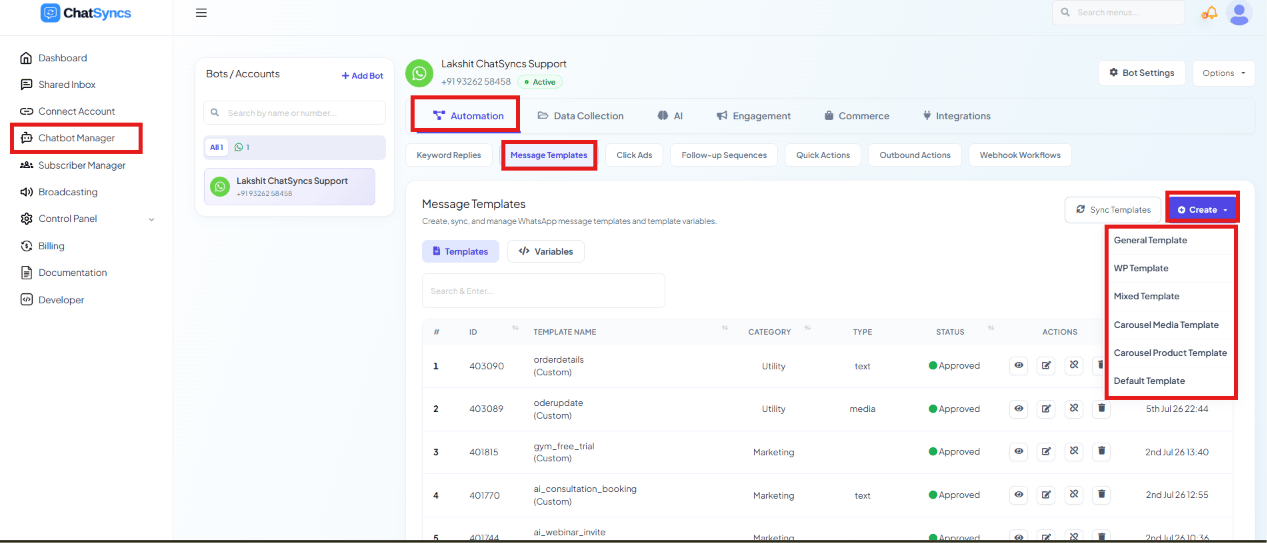
Chatbot Manager → Automation → Message Templates, with the Create dropdown open showing all six template types.
Open Chatbot Manager
Open the Automation tab
Click Message Templates
Click Create
- General Template — the standard single-message template builder.
- WP Template — another single-message builder, mainly used for Marketing templates.
- Mixed Template — supports all three WhatsApp template categories (Marketing, Utility, Authentication/OTP) from one builder.
- Carousel Media Template — a message with swipeable cards, each with its own image or video.
- Carousel Product Template — a carousel purpose-built for showcasing products.
- Default Template — system-created templates you don’t build yourself.
General Template
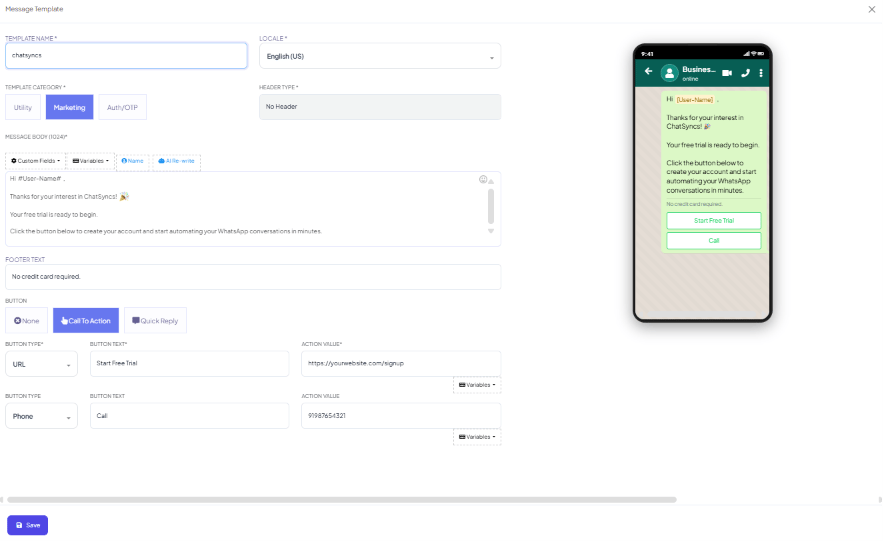
The General Template builder — Template Name, Locale, Template Category, Header Type, Message Body with Custom Fields/Variables/Name/AI Re-write, Footer Text, Buttons, and a live WhatsApp preview.
Mixed Template
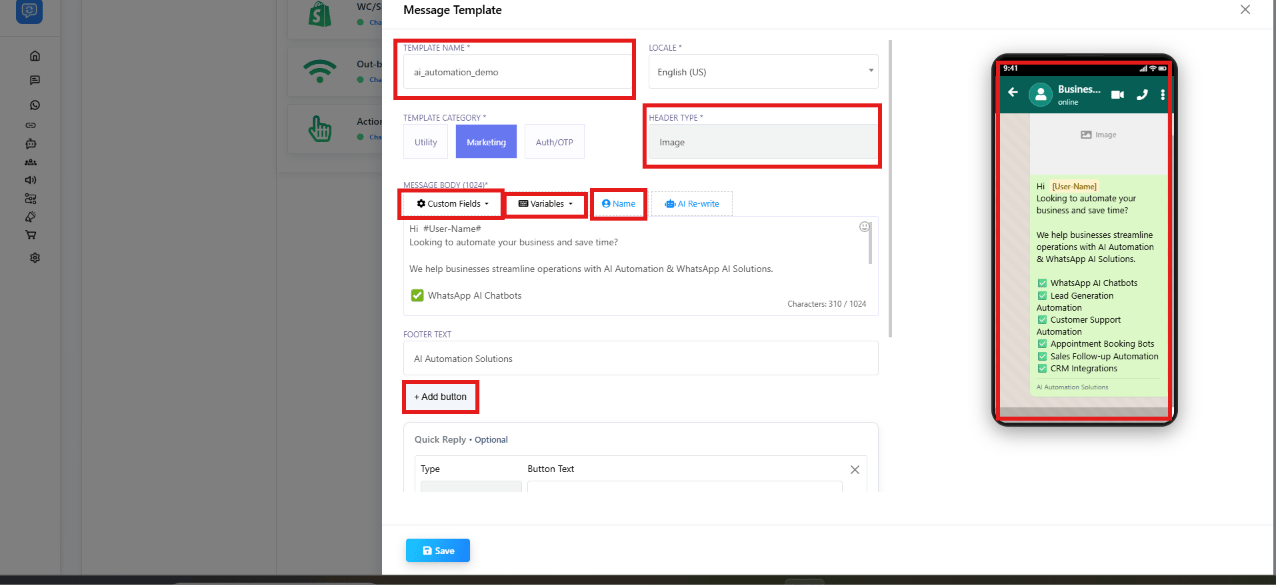
The Mixed Template builder — Template Name, Locale, Template Category, Header Type, Message Body with Custom Fields/Variables/AI Re-write, Footer Text, and a live WhatsApp preview.
Custom Fields and Variables
Inside the Message Body you can insert:- Custom Fields — subscriber fields like
#customer_city#,#customer_email#,#project_name#. - Variables — dynamic placeholders like
#name#,#orderid#,#bookingid#,#amount#, which get replaced with the real value for each customer. These work like WhatsApp’s{{1}}-style template variables, just written with field names instead of numbers.
- AI Rewrite — generates or improves the template’s wording automatically.
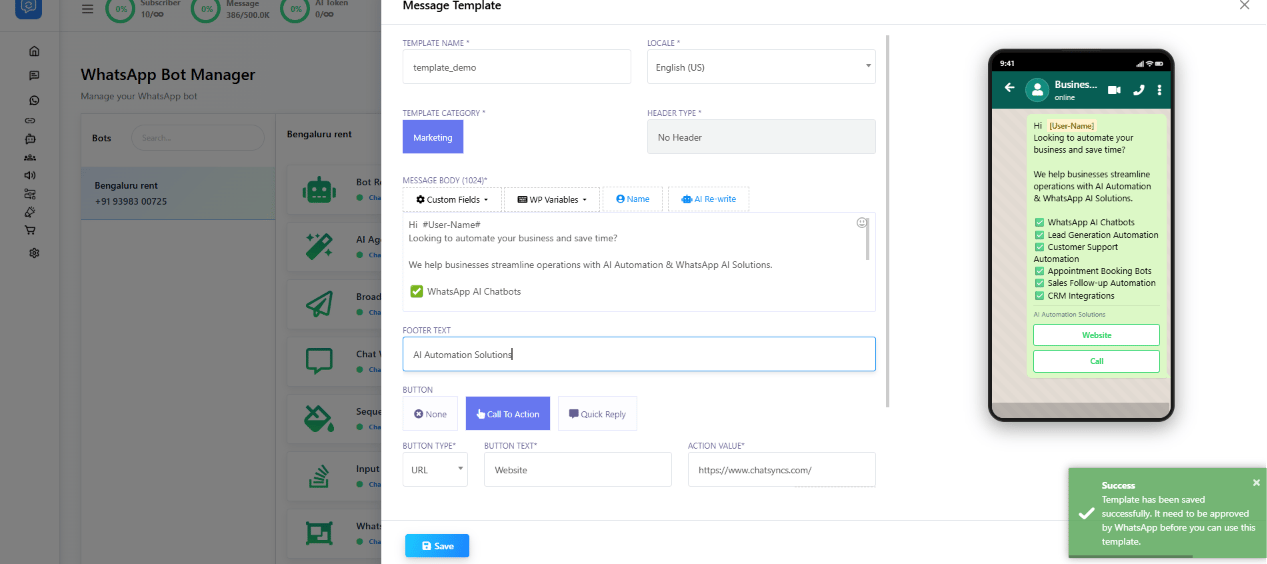
A saved template with Marketing category, no header, a Call To Action button, and the 'Template has been saved successfully' confirmation.
WP Template
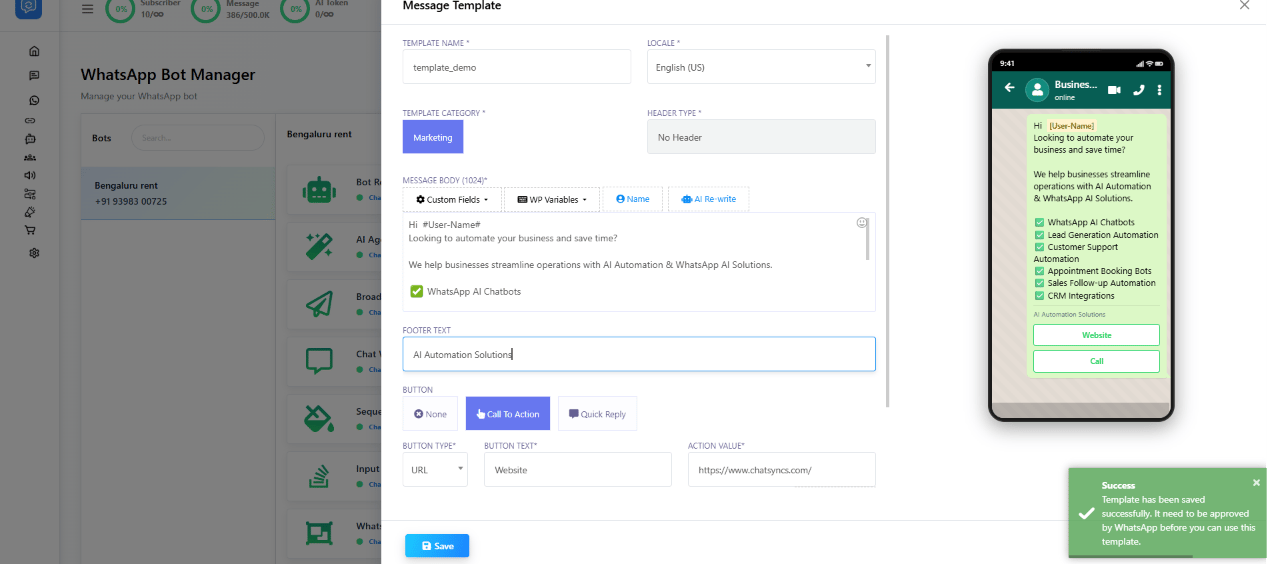
The WP Template builder — Template Name, Locale, Template Category, Header Type, Message Body with Custom Fields/WP Variables/Name/AI Re-write, Footer Text, and buttons.
- Unique Template Name
- Locale selection
- Header options
- Custom Fields
- WP Variables (WP Template’s own variable picker, alongside Custom Fields)
- AI Rewrite
- Footer Text
- Call To Action buttons
- Quick Reply buttons
- Live preview
#name#, #phone#, #email#, #orderid#, #bookingid#.
Common use cases: promotional offers, product launches, property marketing, service
promotions, lead follow-ups.
Carousel Media Template
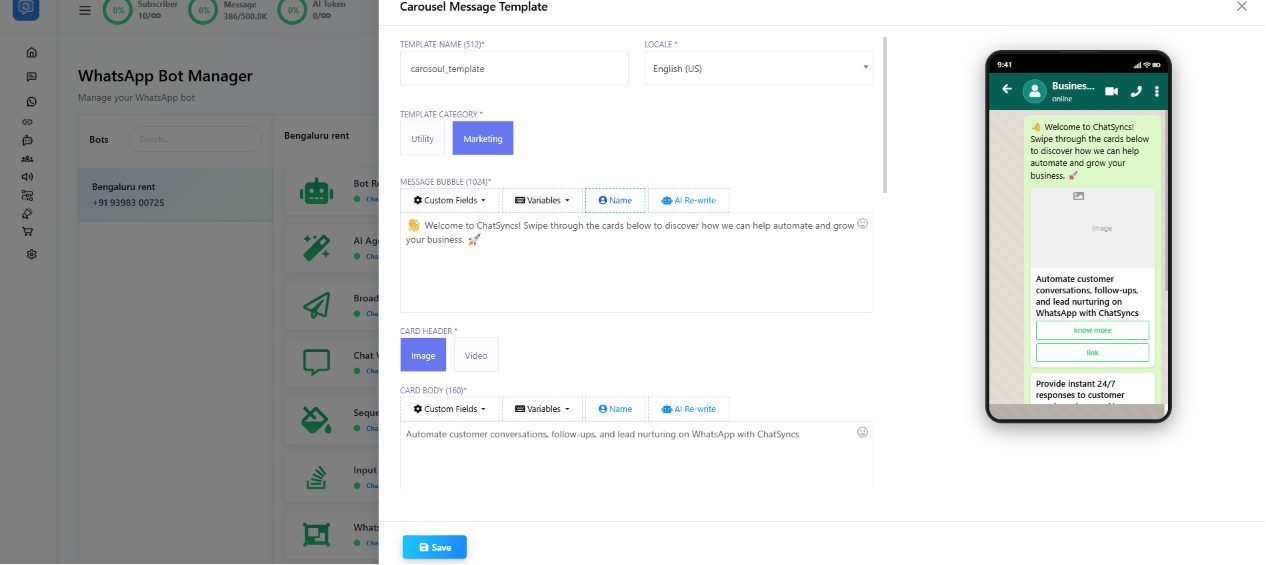
The Carousel Media Template builder — Message Bubble above the cards, plus Card Header (Image/Video) and Card Body for each card.
- Template Category — Marketing or Utility.
- Message Bubble — the main message shown above the cards; supports Custom Fields, Variables, and AI Rewrite.
- Card Header — each card’s Image or Video.
- Card Body — each card’s description text, with Custom Fields, Variables, and personalized content.
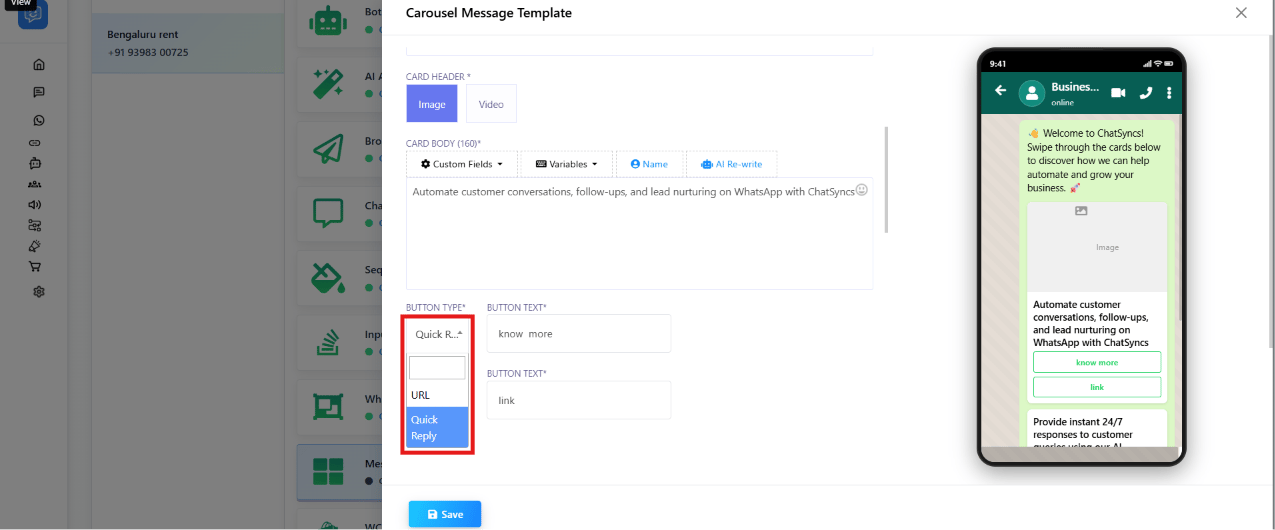
Card button configuration — the Button Type dropdown offering URL and Quick Reply.
- Buttons — each card can have a URL or Quick Reply button.
Carousel Product Template
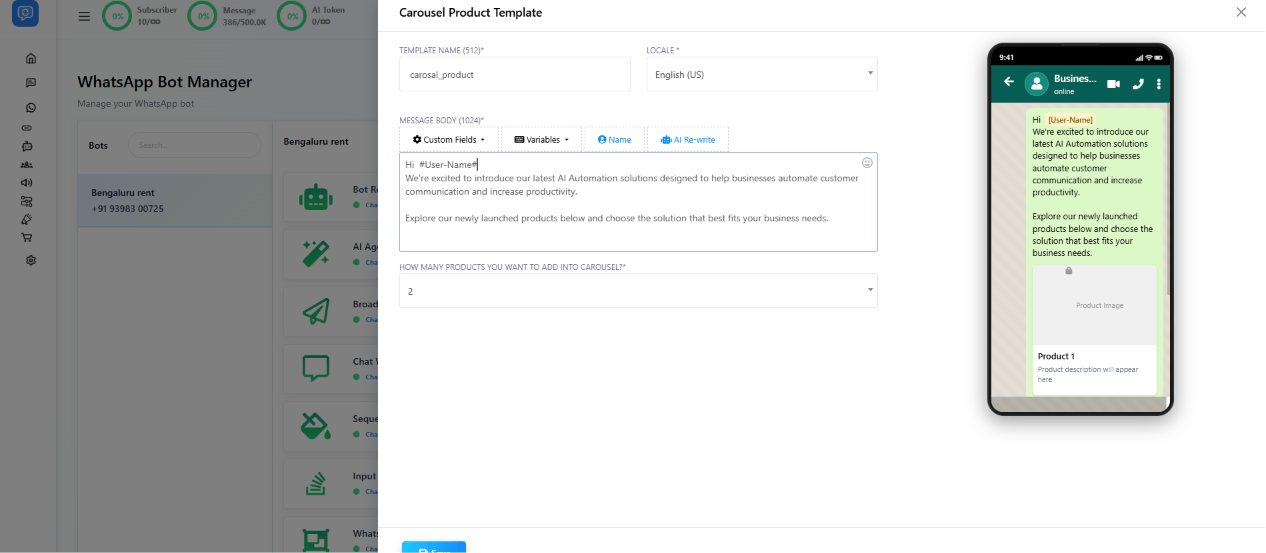
The Carousel Product Template builder — Message Body and 'How many products you want to add into carousel?' set to 2.
- Template Name and Locale as usual.
- Message Body — the introduction message (Custom Fields, Variables, AI Rewrite).
- Number Of Products — how many product cards to show, e.g.
2,5,10. - Product Cards — each card has a Product Image, Product Name, Product Description, and
Product Button (e.g.
Buy Now,View Details,Order Now).
Approval status & Sync Template
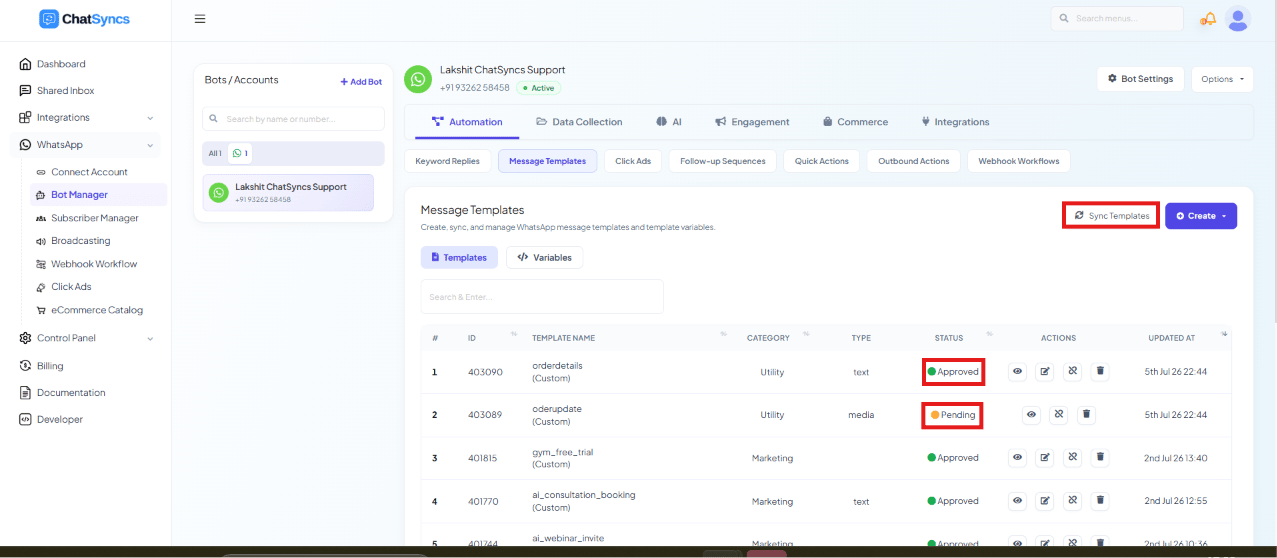
The Message Templates list after a successful sync, showing Approved and Pending statuses and the Sync Templates button.
- Pending — the status right after saving, before it’s been sent to Meta for review.
- Submitted — sent to Meta and awaiting review; a template moves from Pending to Submitted once you click Sync Templates.
- Approved — ready to use in Keyword Replies, Broadcasting, Sequences, WhatsApp Flows, and AI Agent automations.
- Rejected — see why templates get rejected, fix the content, and resubmit.
Template Variables
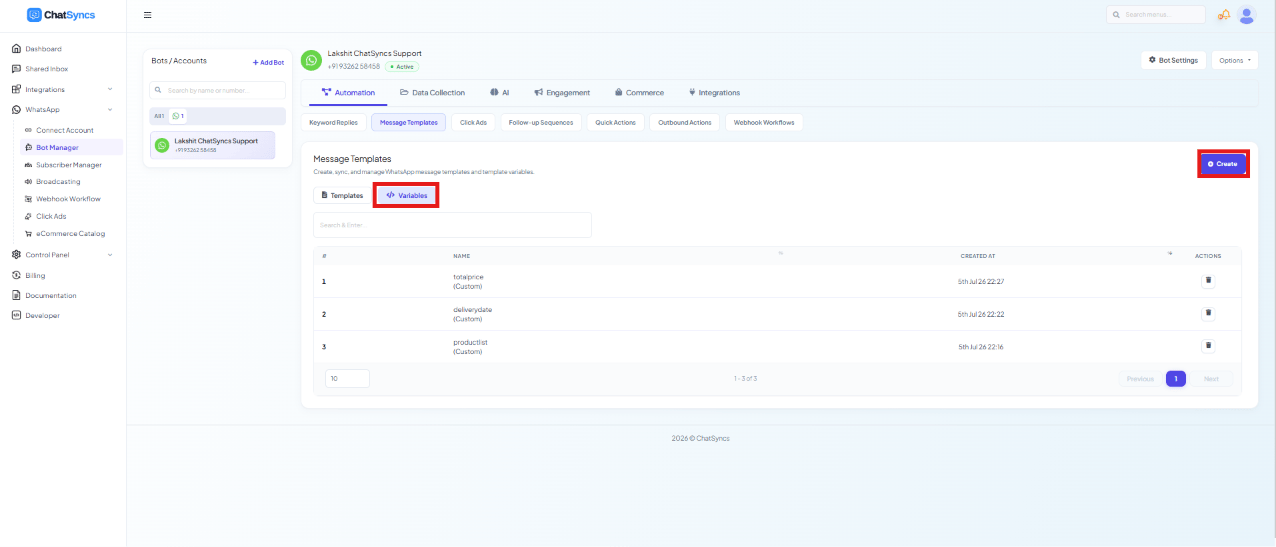
The Message Templates page's Variables tab, listing custom variables (totalprice, deliverydate, productlist) alongside the Templates tab and Create button.
Click Create
Name the variable
name, email, phone, orderid, bookingid, company_name.Save
Broadcasting with Template Buttons
If a WhatsApp template contains buttons, it can be integrated with a Keyword Replies flow during broadcasting — tapping a template button hands the customer straight into that flow. Prerequisites:- A WhatsApp template with buttons, submitted and Approved by WhatsApp.
- The Keyword Replies flow you want the button to trigger, already built.
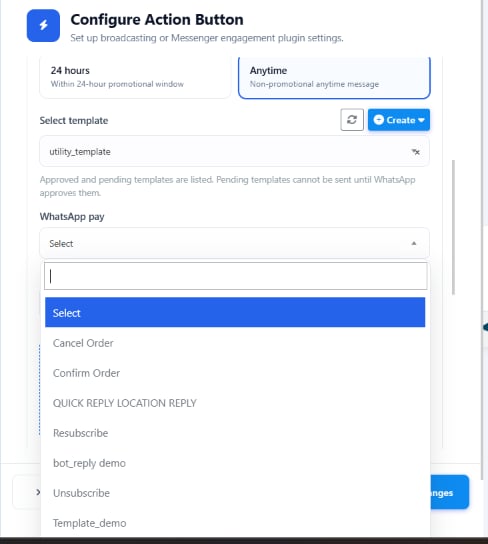
Configure Action Button — choose the messaging window, the approved template, and which Keyword Replies flow a template button should trigger.
Open the Broadcast module
Select the approved template
Open Configure Action Button
Choose the messaging window
Select the Keyword Replies flow
Save and start the broadcast
Frequently asked
How do I create a WhatsApp template in ChatSyncs?
How do I create a WhatsApp template in ChatSyncs?
Why is my template stuck on Submitted?
Why is my template stuck on Submitted?
How do I personalize a template with a customer's name or order number?
How do I personalize a template with a customer's name or order number?
#name# or #orderid# inside the message body. Assign each variable a real value before
sending, and it’s automatically replaced per customer.What's the difference between a Carousel Media and Carousel Product template?
What's the difference between a Carousel Media and Carousel Product template?
Can I use AI to write my template content for me?
Can I use AI to write my template content for me?
What's the difference between General Template, WP Template, and Mixed Template?
What's the difference between General Template, WP Template, and Mixed Template?