

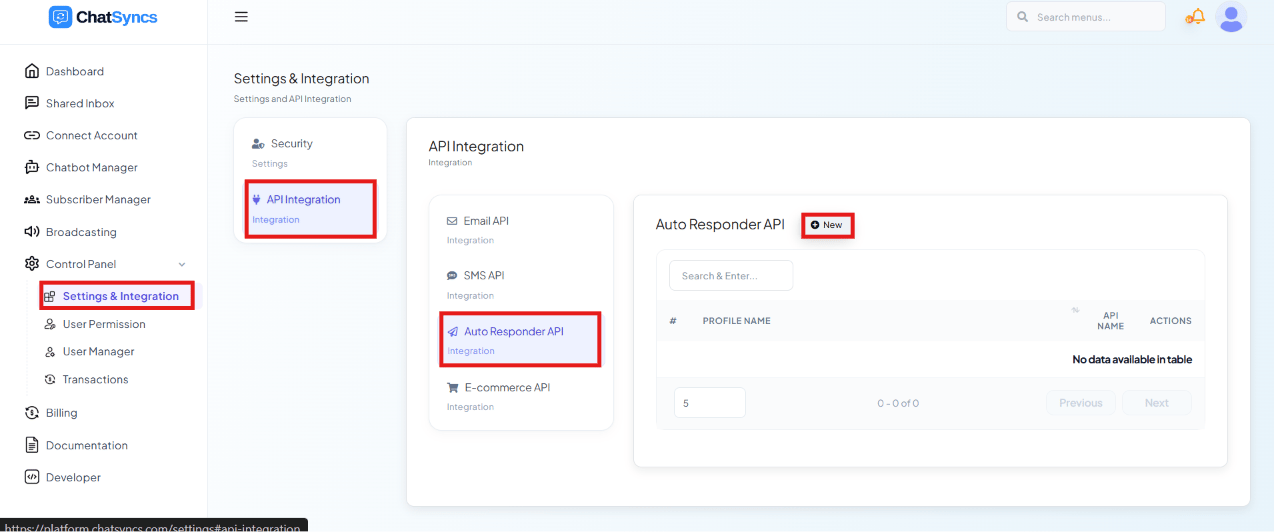
Control Panel → Settings & Integration → API Integration → Auto Responder API, with the New button highlighted.
How it works
1
A customer chats with your bot
e.g. they say “Hi” and the bot offers something.
2
The bot asks for their email
“Please enter your email.”
3
The customer enters it
e.g.
rahul@gmail.com4
ChatSyncs sends it to your connected platform
Mailchimp, Brevo, or whichever you’ve connected.
5
The customer is added to an email list
From here on, the marketing platform — not ChatSyncs — owns the follow-up.
6
The platform sends the marketing emails
Welcome emails, newsletters, promotional offers, discount coupons, product updates — on
whatever schedule you set up in that platform.
Set up a provider
Click New to add a profile: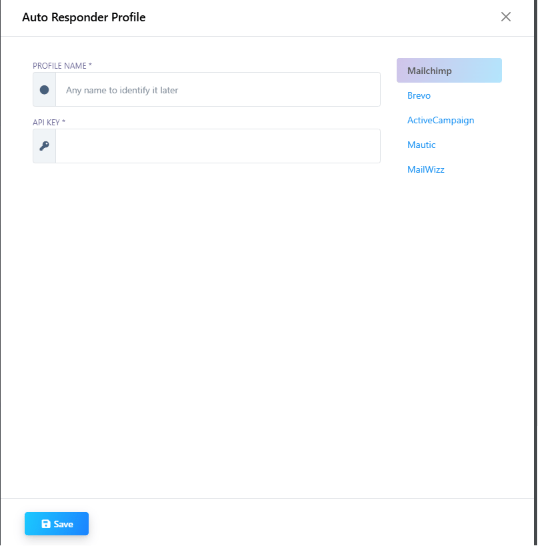
Real examples
Clothing store — growing a customer list for weekend sale alerts:Customer: Hi Bot: Would you like to receive our latest offers? Customer: Yes Bot: Please enter your email. Customer: rahul@gmail.comChatSyncs sends the email to Mailchimp, which adds the customer to the Customers list. The following week, Mailchimp automatically sends:
Bot: Want our free AI Ebook? Customer: Yes Bot: Please enter your email. Customer: rahul@gmail.comChatSyncs adds the email to Brevo, which then sends the ebook, weekly tips, and future course promotions. Real estate — segmenting by interest:
Customer: I’m interested in apartments. Bot: Please enter your email. Customer: rahul@gmail.comChatSyncs adds the customer to an Apartment Buyers list in ActiveCampaign, which sends new listing launches, price updates, and site-visit invitations.
Auto Responder Integration vs Email Integration
It’s easy to mix these two up because both end up sending email — the difference is when and who sends it:
If you want an email sent right now — an OTP, an order confirmation — use
Email Integration instead.
Frequently asked
Can a WhatsApp bot flow add someone to my Mailchimp list?
Can a WhatsApp bot flow add someone to my Mailchimp list?
Yes — connect Mailchimp under Auto Responder Integration with its API key, then use that
profile in a flow step to add the contact whenever the flow collects their email.
Which email marketing platforms can I connect?
Which email marketing platforms can I connect?
Mailchimp, Brevo, ActiveCampaign, Mautic, and MailWizz.
What's the difference between Auto Responder Integration and Email Integration?
What's the difference between Auto Responder Integration and Email Integration?
Auto Responder Integration collects an email and hands it to a marketing platform, which
sends newsletters and offers on its own schedule. Email Integration sends a single email
immediately (an OTP, a confirmation) directly from ChatSyncs — see the comparison table
above.