

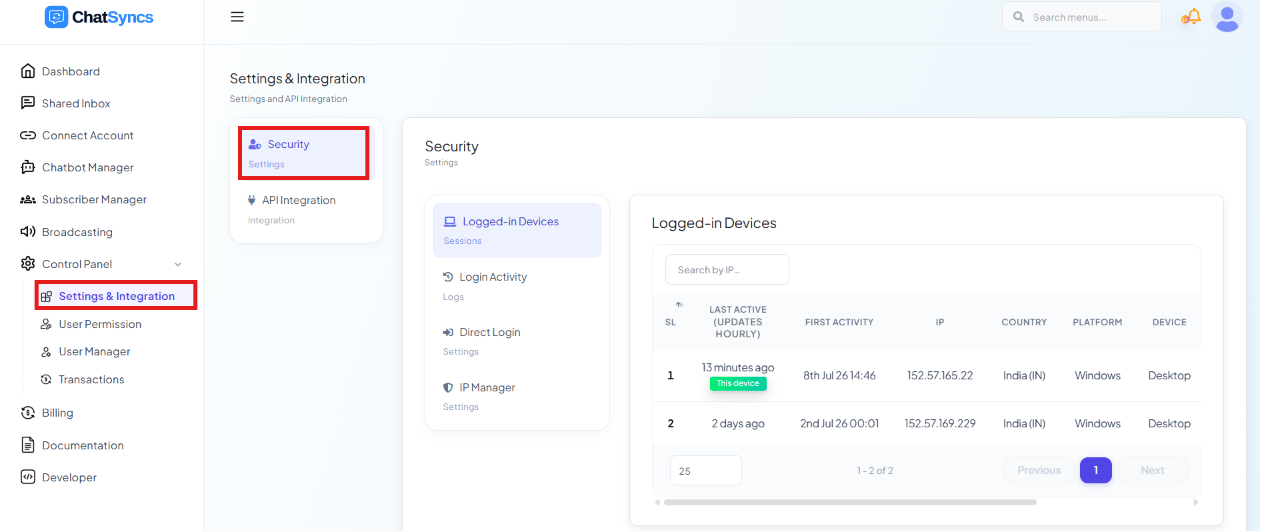
Control Panel → Settings & Integration → Security → Logged-in Devices, with the Security category highlighted.
Logged-in Devices
Every device currently signed in, with:- Last Active — when the session was last used
- First Login — when that session began
- IP Address and Country
- Platform (Windows, Android, etc.) and Device Type (Desktop/Mobile)
- Browser
- Timezone
Login Activity
The history of every login attempt, not just active sessions — time, IP address, browser, device, and whether it succeeded or failed. Use it to spot a pattern of failed attempts (a sign someone is trying to guess the password) or to confirm exactly when a specific login happened.Direct Login
An Allow Admin to Login with Direct Link toggle that lets ChatSyncs support sign directly into the account — no password needed — to troubleshoot an issue.- Enabled: support can access the account (with permission) for faster issue resolution.
- Disabled (default): support cannot log in directly; they can only guide the customer through the UI themselves.
IP Manager
Restricts account access to an allow-list of IP addresses — anything not on the list is blocked. Example: an agency wants only their office network to be able to log into the account, even if someone has the correct password. They add the office’s IP address in IP Manager; a login attempt from a hotel Wi-Fi elsewhere gets blocked.Frequently asked
How do I check if someone else is logged into my account?
How do I check if someone else is logged into my account?
Go to Security → Logged-in Devices — it lists every active session with its IP, country,
device, and browser, so you can spot and log out anything you don’t recognize.
Can ChatSyncs support access my account directly?
Can ChatSyncs support access my account directly?
Only if you enable Direct Login → Allow Admin to Login with Direct Link. Leave it off
unless you trust support with direct access for troubleshooting, and turn it back off once
the issue is resolved.
Someone keeps trying to log into our account — how do I check?
Someone keeps trying to log into our account — how do I check?
Login Activity shows every login attempt with its status (success/failed). A cluster of
failed attempts from an unfamiliar IP is a sign of a guessing attack — consider restricting
access with IP Manager.
Can I restrict our account to only log in from the office?
Can I restrict our account to only log in from the office?
Yes — add your office’s IP address (or address range) to IP Manager. Logins from any
other IP will be blocked, even with the correct password.