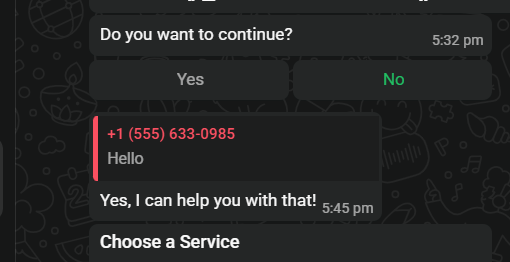
An interactive button message presents the recipient with up to 3 tappable buttons below a body text. When the customer taps a button, WhatsApp sends that button’s id back to your webhook automatically — no typing required. This is the simplest way to build menu-style or yes/no interactions.

Sending reply buttons

{
  "messaging_product": "whatsapp",
  "to": "919959623255",
  "type": "interactive",
  "interactive": {
    "type": "button",
    "body": { "text": "Do you want to continue?" },
    "action": {
      "buttons": [
        { "type": "reply", "reply": { "id": "yes_button", "title": "Yes" } },
        { "type": "reply", "reply": { "id": "no_button", "title": "No" } }
      ]
    }
  }
}
{
  "type": "interactive",
  "interactive": {
    "type": "button",
    "header": { "type": "text", "text": "Order #1023" },
    "body": { "text": "Do you want to confirm this order?" },
    "footer": { "text": "You can cancel within 1 hour" },
    "action": { "buttons": [] }
  }
}

Rules

RuleDetail
Max buttons3
Button title max20 characters
Button ID max256 characters
Works inside 24h windowYes
Header type optionstext, image, video, document

Reference image

Reply button response

Frequently asked

Use type: "interactive" with interactive.type: "button". Add up to 3 button objects in action.buttons, each with a type: "reply", an id, and a title.
WhatsApp sends the button’s id back to your webhook as an inbound interactive message. Your server reads the id to know which button was tapped.
Maximum 3. For more options, use a list message instead.
Yes. Add a header object with "type": "image" and an image.link or image.id. Supports text, image, video, or document headers.

Gotchas & common mistakes

  • Button title over 20 characters — truncated silently or rejected. Keep titles short.
  • Duplicate button IDs — each button’s id must be unique within the message.
  • More than 3 buttons — the API rejects the request. Use a list message for more options.
  • Inside the 24h window only — interactive messages with type: button are free-form and require the 24-hour window to be open. See The 24-hour window.