

The messaging limit tiers
These limits apply only to business-initiated conversations (when you send a template to
start the conversation). Replies to incoming messages are not capped.
How to move from 250 → 2,000
Verify your business in Meta Business Manager and submit the required business documents. Once verified, you become eligible for Tier 1. See Business Verification & the Green Tick for the full application process, common rejection reasons, and how to fix them.How to move from 2,000 upward (automatic scaling)
Meta scales you up automatically when all of the following are true over a rolling 7-day period:- You have started at least 250 unique conversations.
- Your quality rating is High or Medium (green or yellow).
- You have maintained your current tier for at least 48 hours.
Quality rating
Meta grades your phone number’s message quality based on customer feedback (blocks, reports, opt-outs):Checking via API
Reference image
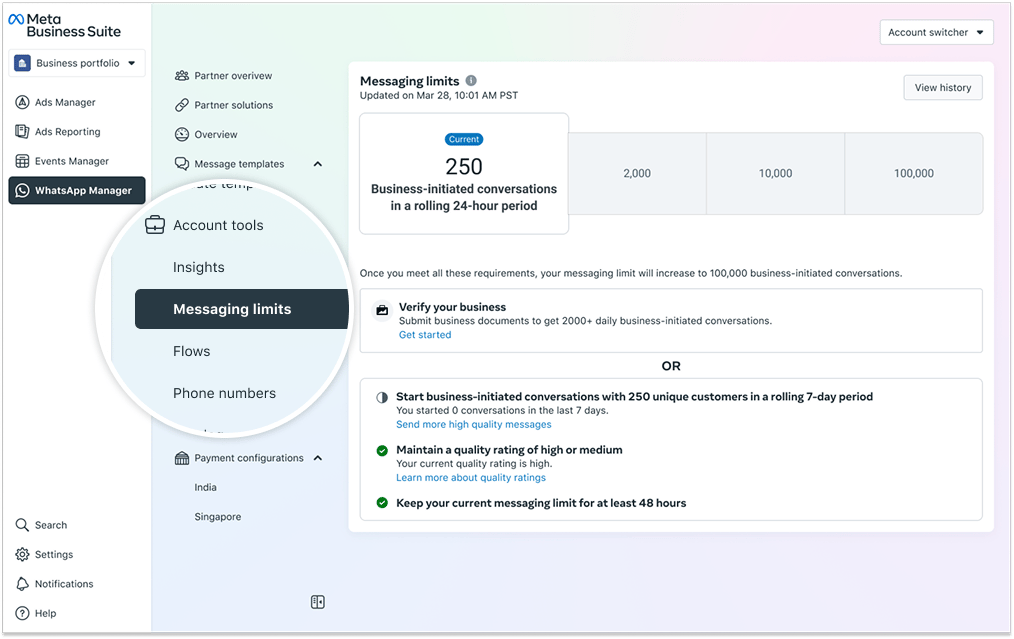
The Messaging Limits panel showing the current tier and the upgrade path to 2,000 / 10,000 / 100,000.
Frequently asked
Why can I only send 250 messages per day?
Why can I only send 250 messages per day?
New WhatsApp Business accounts start at the 250 business-initiated conversations per day
tier. Verify your business in Meta Business Manager to move to the 2,000 tier, then
automatic scaling takes over from there.
How do I increase my messaging limit?
How do I increase my messaging limit?
First, verify your business (250 → 2,000). After that, scaling is automatic — maintain a
high or medium quality rating, send 250+ conversations in 7 days, and hold the tier for 48
hours.
What is quality rating and why does it matter?
What is quality rating and why does it matter?
It’s Meta’s measure of how well your messages are received. If customers are blocking or
reporting your number, your rating drops (yellow → red) and your messaging limit can be
reduced. Keeping it green ensures eligibility for higher tiers.
How do I check my current messaging limit and quality rating?
How do I check my current messaging limit and quality rating?
Use the Graph API with the
whatsapp_business_manager_messaging_limit field for the limit
and quality_score for the rating. See the API calls above.