
The terms
WABA — WhatsApp Business Account The top-level container for a business on WhatsApp. It holds the business profile, message templates, and phone numbers. It lives inside the business’s Meta Business Portfolio. Every business that uses the WhatsApp API has one (or more) WABAs. Phone Number ID A unique numerical identifier Meta assigns to each phone number registered on the WhatsApp API — including test numbers. You use this ID in every API call to specify which number should send or receive a message. Find it in the Meta developer dashboard under API Setup. WABA ID (WhatsApp Business Account ID) The unique ID for the entire WhatsApp Business Account. Used to manage global settings, webhooks, and templates across all phone numbers in that account. Different from the Phone Number ID — the WABA ID identifies the account, the Phone Number ID identifies one specific number inside it. BSP — Business Solution Provider An official Meta partner (e.g. Twilio, Infobip, Sinch, Wati, AiSensy) that resells access to the WhatsApp Business API. BSPs used to be required, but as covered in What Is the WhatsApp Cloud API?, you can connect directly to Meta without going through a BSP. BSPs are optional today — they add value through extra tooling, not because Meta requires them.Where to find your IDs
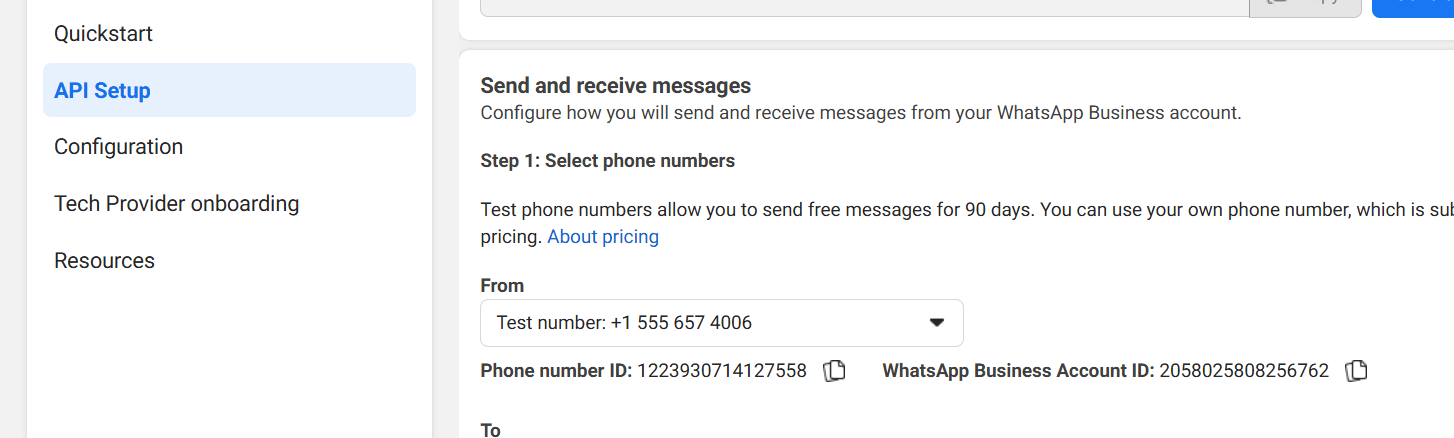
The Meta API Setup screen showing the Phone Number ID and WhatsApp Business Account ID side by side.
Frequently asked
What is a WABA?
What is a WABA?
WABA stands for WhatsApp Business Account. It is the account that holds your business
profile, phone numbers, and message templates on Meta’s platform.
What is a Phone Number ID?
What is a Phone Number ID?
A unique number Meta gives to each phone number registered on the WhatsApp API. You put
it in your API calls so Meta knows which number to send from. Find it in the Meta
developer dashboard → API Setup.
What is a WABA ID?
What is a WABA ID?
The ID of the entire WhatsApp Business Account — used to manage templates and webhooks
globally. Not the same as a Phone Number ID.
Do I need a BSP to use the WhatsApp API?
Do I need a BSP to use the WhatsApp API?
No. With the Cloud API you connect directly to Meta. BSPs are optional — some businesses
use them for extra features, but they are not required.
What is the difference between Phone Number ID and WABA ID?
What is the difference between Phone Number ID and WABA ID?
Phone Number ID identifies one specific number inside your account. WABA ID identifies
the whole account. You use Phone Number ID in message sends; you use WABA ID for
account-level settings and templates.