

Supported platforms
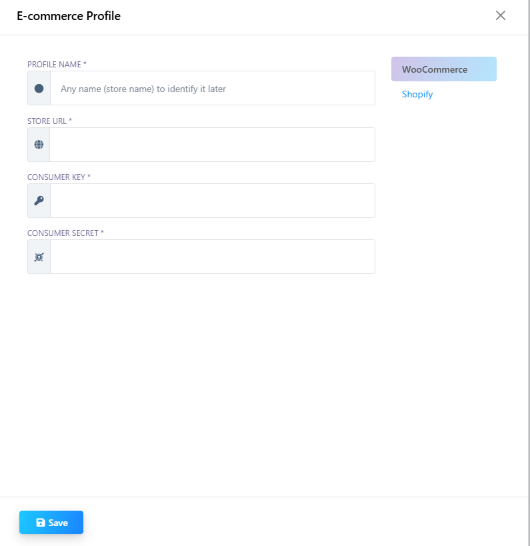
- WooCommerce — needs Store URL, Consumer Key, and Consumer Secret (from WooCommerce → Settings → Advanced → REST API).
- Shopify
WooCommerce abandoned-cart plugin
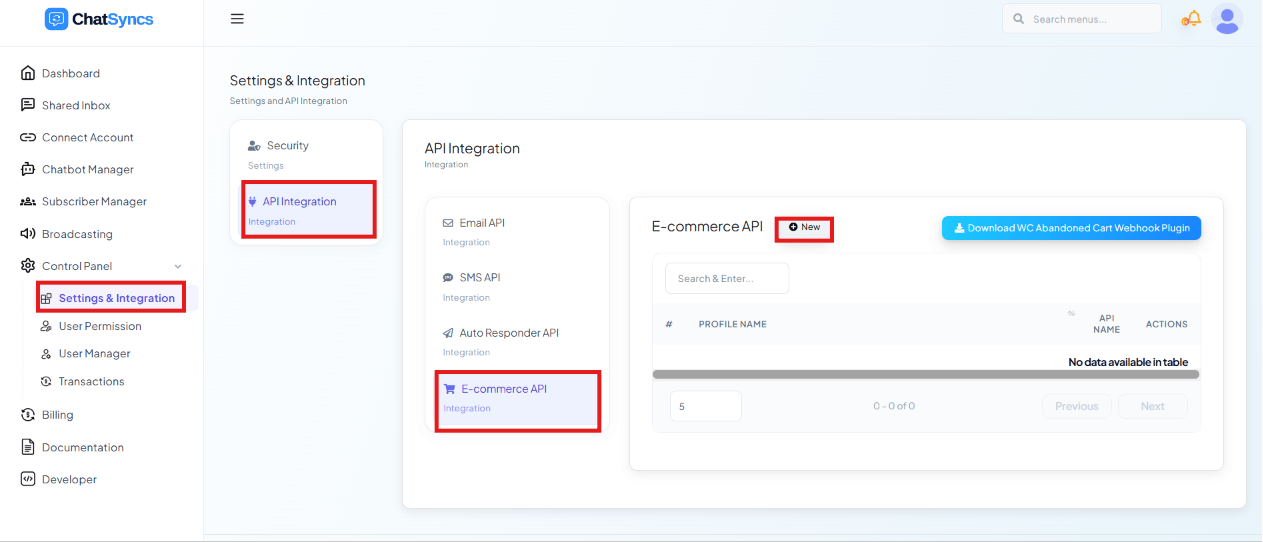
WooCommerce stores can also download the WC Abandoned Cart Webhook Plugin from the profile list page. Install it on the WordPress site so cart-abandonment events are forwarded to ChatSyncs in real time, instead of only syncing on a schedule.Use cases
- Order updates — “Your order #1042 has shipped” sent automatically over WhatsApp.
- Cart reminders — a customer adds items and leaves without checking out; a WhatsApp message nudges them back with a link to finish the purchase.
- Customer support — a support flow looks up the customer’s recent orders by phone number.
- Marketing automation — post-purchase upsell or review-request messages.
Frequently asked
How do I connect my WooCommerce store to ChatSyncs?
How do I connect my WooCommerce store to ChatSyncs?
Go to E-commerce Integration → New, choose WooCommerce, and enter the Store URL
plus the Consumer Key/Consumer Secret generated under WooCommerce’s own
Settings → Advanced → REST API page.
Can I send a WhatsApp reminder when someone abandons their cart?
Can I send a WhatsApp reminder when someone abandons their cart?
Yes — for WooCommerce, install the WC Abandoned Cart Webhook Plugin (downloadable from
the E-commerce Integration list) so cart events reach ChatSyncs in real time; for Shopify,
the abandoned-cart data comes through the standard Shopify connection.
Which store platforms does ChatSyncs support?
Which store platforms does ChatSyncs support?
WooCommerce and Shopify.