

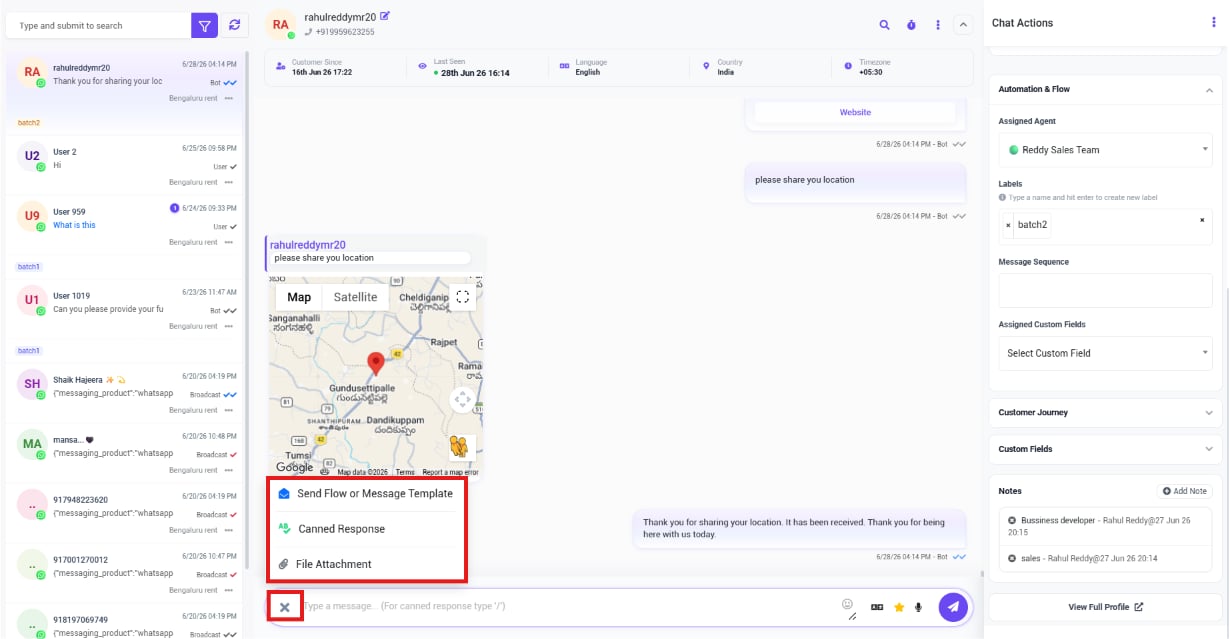
- Send Flow or Message Template — trigger a bot flow, or send an approved Message Template when the conversation is outside the 24-hour window.
- Canned Response — insert a saved reply instead of typing it out again.
- File Attachment — attach a file to the message.
- Emojis, AI Assistance, and Voice Message — additional icons in the composer’s reply bar. See AI Translation & Message Rewrite for the AI option.
Frequently asked
How do I reply with the same message I send to every customer who asks the same question?
How do I reply with the same message I send to every customer who asks the same question?
Use Canned Response in the composer instead of typing it fresh each time.
Why can't I just type a plain reply to some customers?
Why can't I just type a plain reply to some customers?
If the conversation is outside WhatsApp’s 24-hour service window, a plain reply won’t
deliver — use Send Flow or Message Template to send an approved template instead. See
Managing Customer Data with Custom Fields for how to
check a conversation’s messaging window status.