

When to use SMS instead of (or alongside) WhatsApp
- OTP messages — a login code, when the customer can’t receive WhatsApp right now.
- Marketing SMS — for customers who opted into SMS but not WhatsApp.
- Transactional SMS — order or appointment confirmations, as a backup to WhatsApp.
- Notifications — internal alerts sent as SMS to a staff phone.
Step 1: Connect an SMS gateway
Before sending anything, connect a gateway under Chatbot Manager → [your bot] → Integrations → SMS — a one-time technical setup: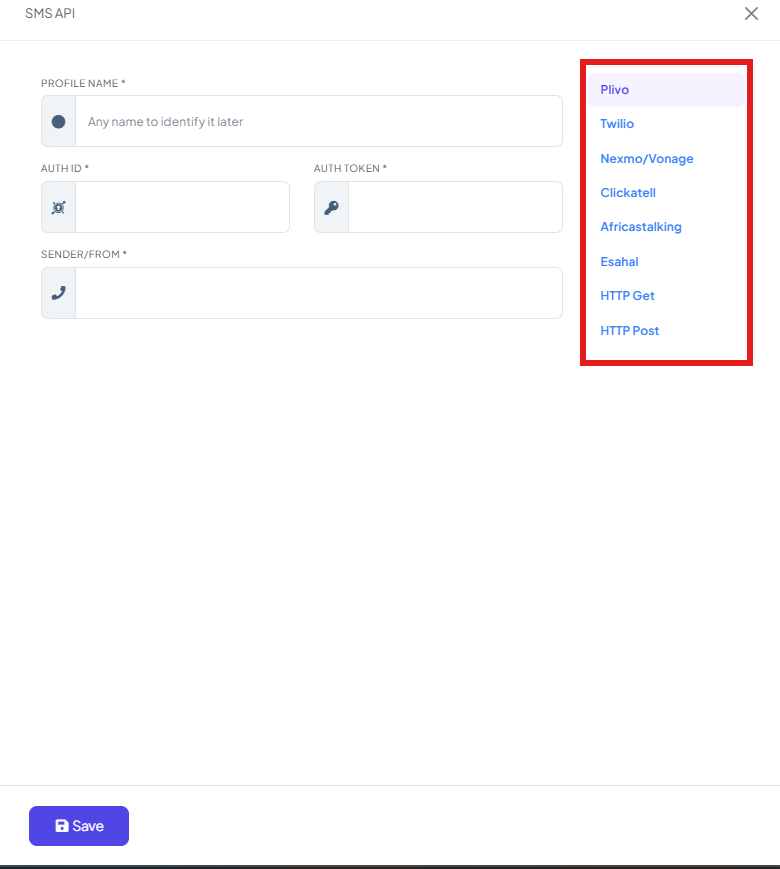
Step 2: Get customer consent first
SMS marketing only works if people actually want to receive it:- Only message customers who opted in to SMS — never message a number just because you have it.
- Make it easy to opt out, and honor opt-outs immediately.
- Keep your list clean — remove numbers that bounce or unsubscribe.
Step 3: Write a message that fits SMS
SMS has real limits that WhatsApp doesn’t:- Keep it short — long messages get split into multiple SMS segments, which usually costs more per send.
- Lead with the offer or reason for the message — SMS doesn’t have a preview image or template formatting to soften a wall of text.
- Include your business name, since SMS doesn’t show a verified display name the way WhatsApp does.
ChatSyncs Store: Flat 30% OFF today only. Reply STOP to opt out. Shop: mystore.com/sale
Step 4: Send and monitor
Once your gateway is connected, send SMS the same way you’d trigger any other automation — through a bot flow, broadcast, or webhook action configured to use your SMS profile instead of WhatsApp. Watch delivery rates and opt-outs after your first send before scaling up to your full list.Frequently asked
Do I need WhatsApp set up before I can use SMS marketing?
Do I need WhatsApp set up before I can use SMS marketing?
No — SMS Integration is independent. It’s commonly used alongside WhatsApp, for customers
who aren’t reachable there, or as a backup channel.
What's the very first thing I need to do to send SMS?
What's the very first thing I need to do to send SMS?
Connect an SMS gateway (Step 1 above) — nothing can send until a profile is configured with
your provider’s credentials.
Can I message anyone whose phone number I have?
Can I message anyone whose phone number I have?
You shouldn’t — only message people who opted in to receive SMS from you. Unsolicited SMS
marketing risks complaints and can violate your SMS provider’s own policies.
Why does my SMS cost more than expected?
Why does my SMS cost more than expected?
Long messages split into multiple segments, and most providers charge per segment. Keep
messages short to avoid this.