

Add the Mautic profile
From Auto Responder Integration, click New, select Mautic from the provider list, and enter: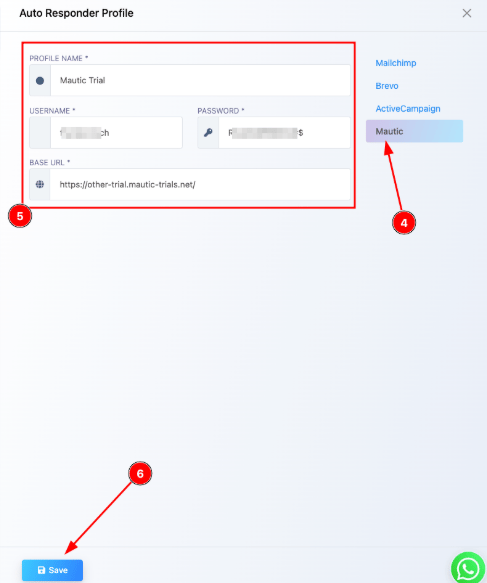
Frequently asked
How do I connect a self-hosted Mautic instance to ChatSyncs?
How do I connect a self-hosted Mautic instance to ChatSyncs?
Add a new Mautic profile under Auto Responder
Integration with your Mautic username, password, and base
URL — Mautic must be reachable over HTTPS with API access enabled.
Does ChatSyncs send the emails, or does Mautic?
Does ChatSyncs send the emails, or does Mautic?
Mautic does — ChatSyncs only sends the subscriber data across; Mautic handles the actual
email sending and campaign logic.
My Mautic connection fails during setup — what should I check?
My Mautic connection fails during setup — what should I check?
Double-check the username, password, and base URL, and confirm your Mautic server’s API is
enabled and not blocked by a firewall.
What Mautic versions are supported?
What Mautic versions are supported?
Mautic 4.x and higher, as long as API access is active on that instance.
Related Documentation
- Auto Responder Integration — connecting any email marketing platform and what it’s used for.