

- Day 1 — “Thanks for downloading! Here’s a quick tip.”
- Day 3 — “Any questions so far?”
- Day 5 — “Ready to get started? Here’s 10% off.”
Create a sequence
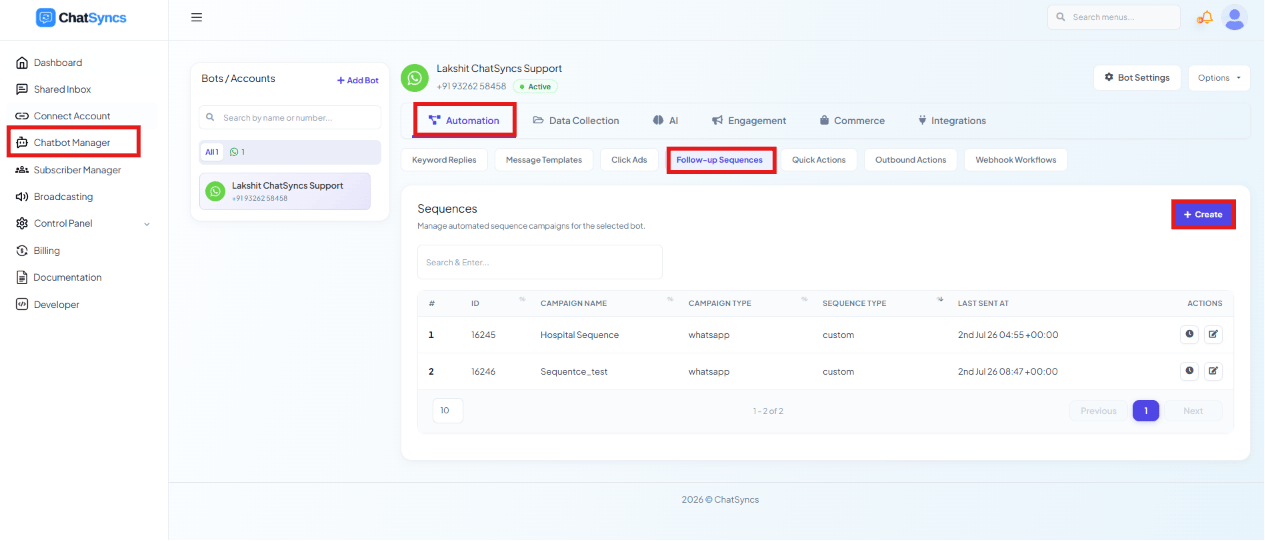
1
Open Chatbot Manager
Go to Chatbot Manager.
2
Open the Automation tab
Select Automation.
3
Click Follow-up Sequences
Select Follow-up Sequences from the sub-tabs.
4
Click Create
Click Create to start a new sequence.
5
Name the sequence
Enter a Sequence Campaign Name to identify it, e.g.
Product Launch Follow-up.Delivery schedule & re-entry rules
The Configure New Sequence panel sets two things beyond the name: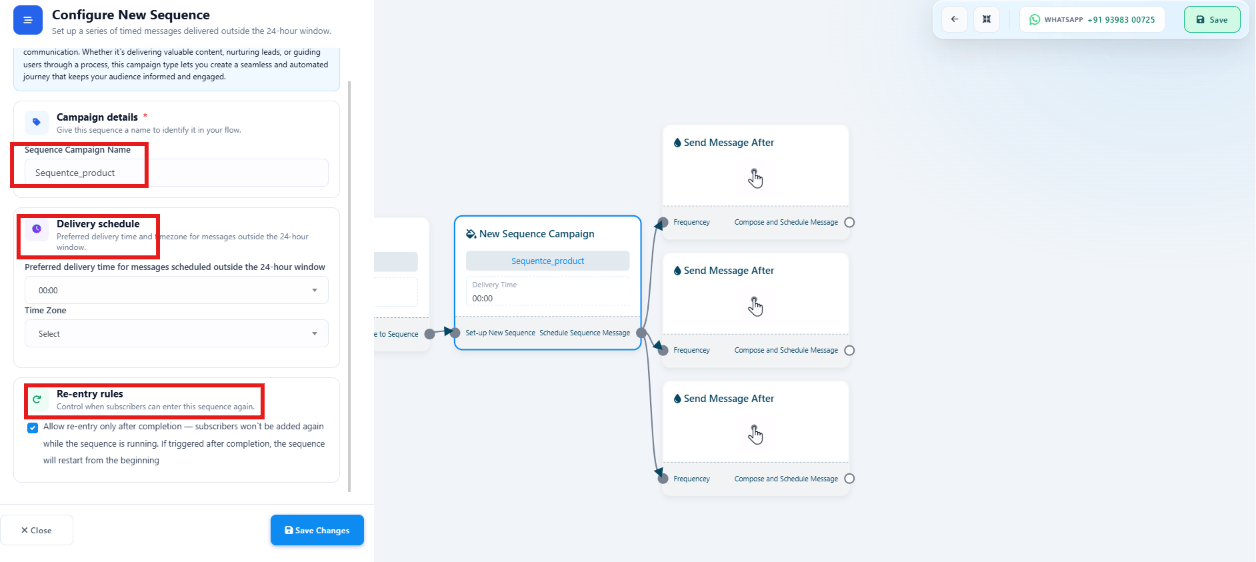
- Delivery Schedule — the Preferred Delivery Time (e.g.
10:00 AM) and Time Zone (e.g.Asia/Kolkata) used for messages sent to subscribers who are outside the WhatsApp 24-hour window, so they land at a consistent, appropriate local time. - Re-entry Rules — Allow Re-entry Only After Completion, which blocks a subscriber from being added to the sequence again while it’s already running for them. Once they finish, they can be re-enrolled if triggered again. For example, a subscriber in a 7-day onboarding sequence can’t be re-added during those 7 days, but can re-enter after it finishes.
Example: why re-entry rules matter
Say a bot triggers a sequence on the keywordHi, sending Message 1 immediately and
Message 2 one minute later.
Without re-entry protection, sending Hi again before Message 2 arrives restarts the whole
sequence from Message 1 — the subscriber ends up with duplicate messages:
Hi is ignored while the
sequence is already running — the subscriber just continues to Message 2 normally, and can
only restart the sequence after it’s fully finished:
Configure each message step
Each step in the sequence (a Send Message After block) is configured with: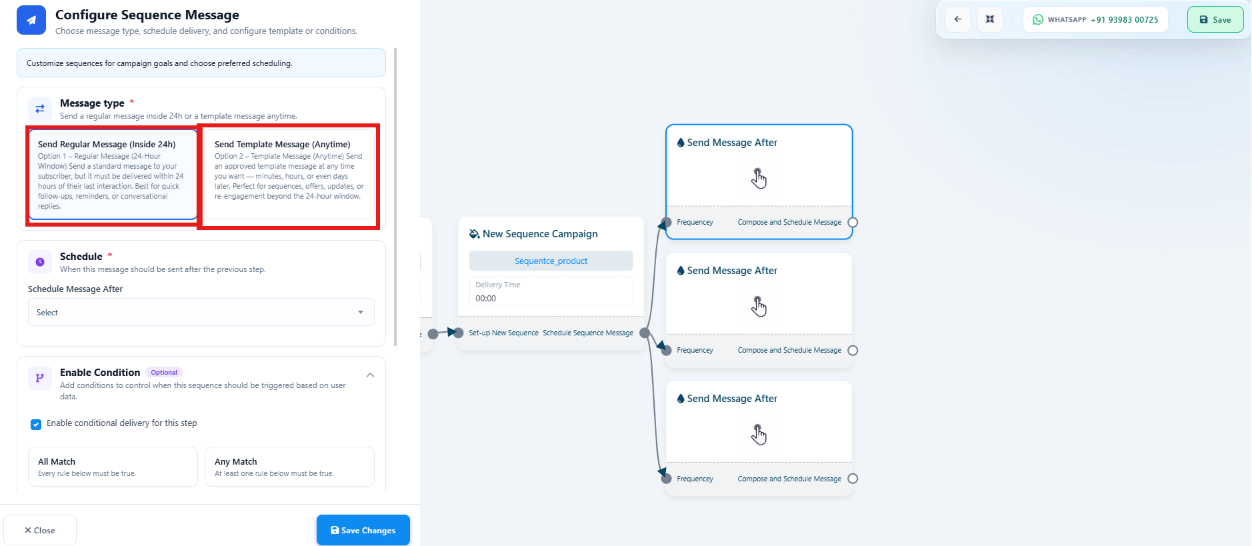
1
Message Type
Send Regular Message (Inside 24h) — for subscribers inside the WhatsApp 24-hour window;
no template approval needed, and supports text, images, videos, documents, and buttons.
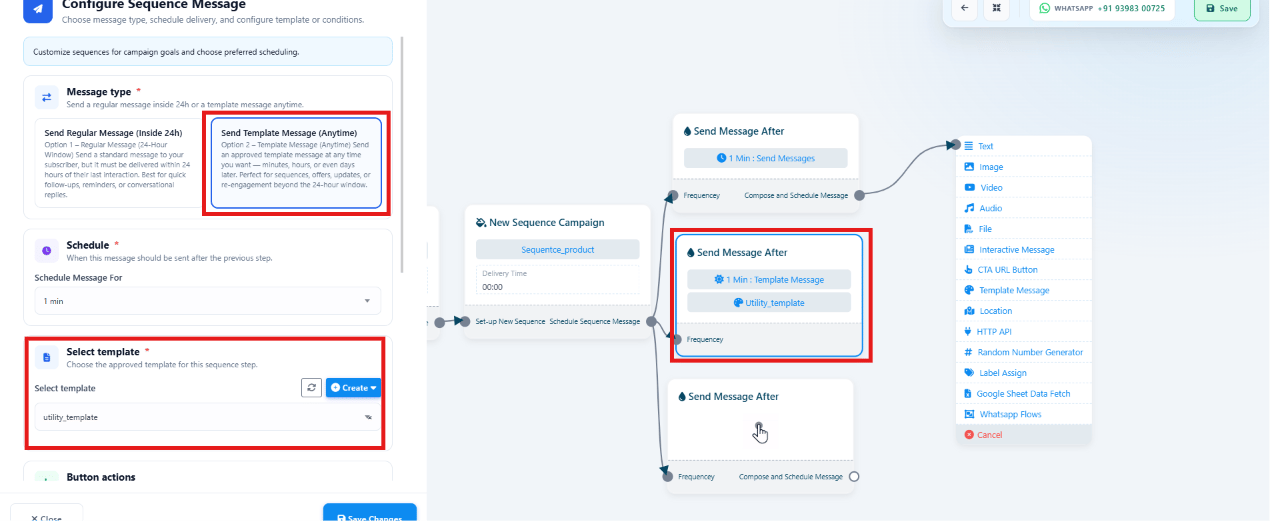
Send Template Message (Anytime) — for subscribers outside the window; requires an
approved WhatsApp template but can be sent at any
time. See the 24-hour customer service window.
2
Schedule
Set how long after the previous step this message sends, e.g. immediately, after 2 hours,
or after 1 day.
3
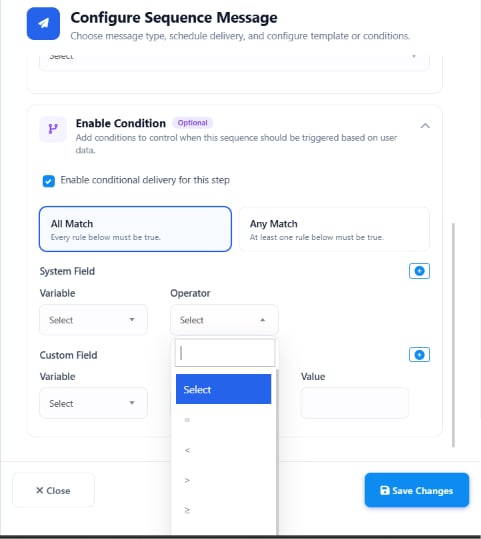
Enable Condition (optional)
Restrict the step to subscribers matching specific criteria, with All Match or Any
Match logic — see Condition logic for a step below.
Condition logic for a step
Enable Condition sends a step’s message only when a subscriber meets criteria you set — if the condition is true, the message sends; if false, it’s skipped for that subscriber.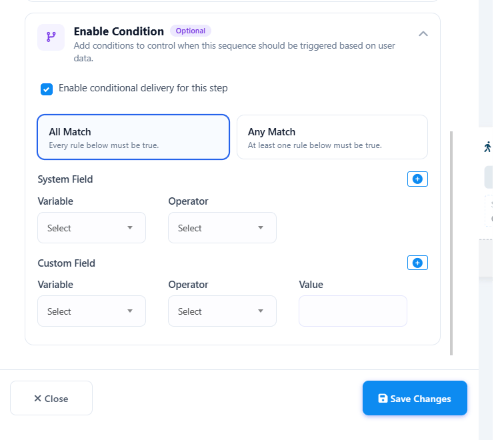
Match types
- All Match (AND) — every condition must be true. E.g.
Country = IndiaandMembership = Goldonly sends to Indian Gold members; an Indian Silver member or a US Gold member is skipped. - Any Match (OR) — at least one condition must be true. E.g.
Membership = GoldorMembership = Platinumsends to either, skipping only Silver.
Variable types
- System Field — built-in subscriber details ChatSyncs already tracks: First Name, Last Name, Phone Number, Country, Gender.
- Custom Field — fields you created yourself, e.g. Membership, City, Product, Plan, Order Value.
Operators
Practical examples
- Gold members only: Custom Field
Membership=Gold→ only Gold members receive the step. - High-value customers: Custom Field
Order Value>=10000→ only customers who’ve ordered ₹10,000+ receive the step. - India only: System Field
Country=India→ only Indian subscribers receive the step.
Add a step’s content
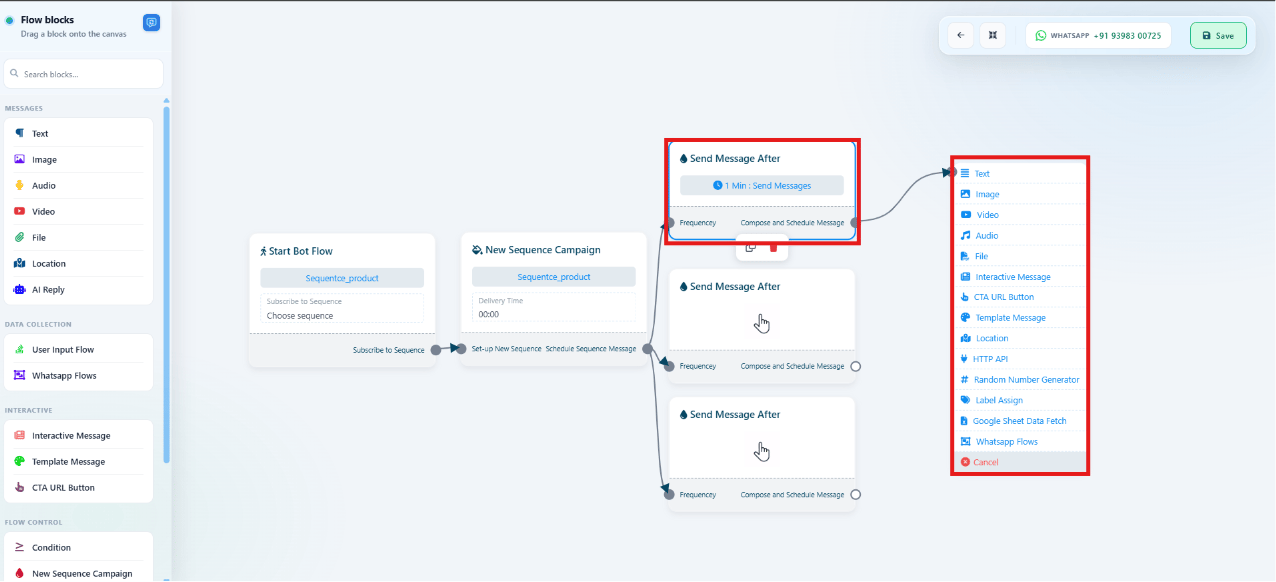
Send a Template Message step
Use a sequence in Keyword Replies
Once saved, a sequence becomes available across the platform — most commonly, you subscribe users to it from a Keyword Replies action block. See How to Create a Keyword-Based WhatsApp Chatbot for building the flow that subscribes them:Follow-up Sequences actions
The Sequences list shows every sequence with two actions: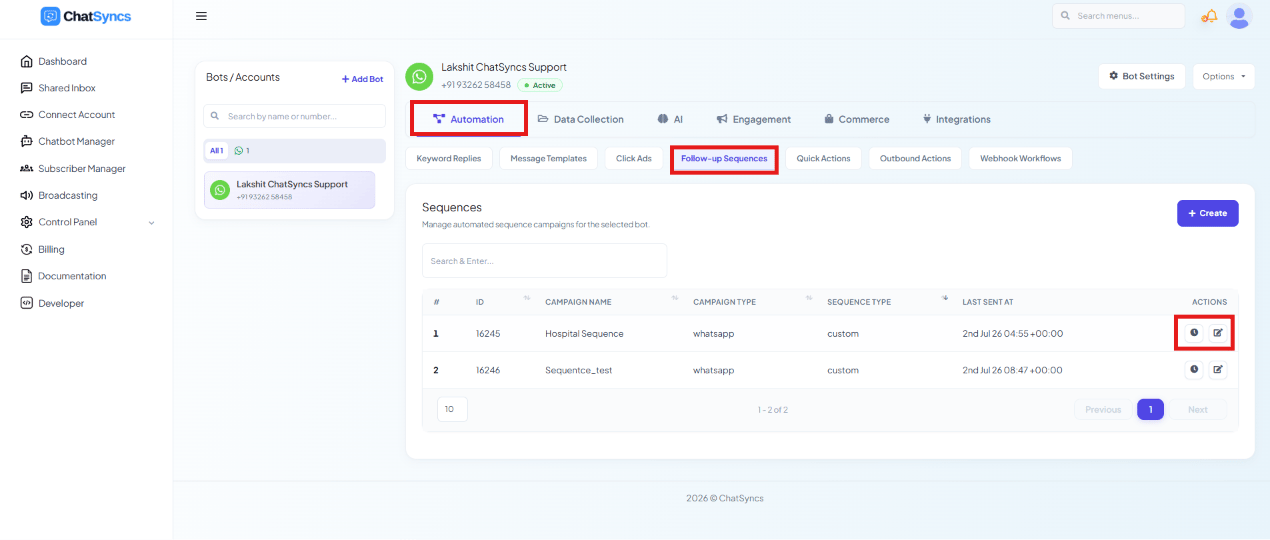
- View Report — subscribers enrolled, messages sent, delivery status, and progress.
- Edit — update message content, delivery schedule, conditions, or templates. Edits apply only to subscribers who enter the sequence after the change; subscribers already running it finish on the version they started with.
Frequently asked
Do I need to send follow-up messages myself?
Do I need to send follow-up messages myself?
No — once a Follow-up Sequence is built and a subscriber is enrolled, ChatSyncs sends every
message in it automatically, on schedule.
Can a follow-up chatbot ask questions, not just send messages?
Can a follow-up chatbot ask questions, not just send messages?
Yes — combine a sequence with a User Input Flow step to collect
an answer partway through the follow-up, not just send one-way messages.
What's the difference between a regular message step and a template message step?
What's the difference between a regular message step and a template message step?
Send Regular Message (Inside 24h) only reaches subscribers currently inside the
24-hour window and needs no template approval. Send Template Message (Anytime) reaches
subscribers regardless of window but requires an approved WhatsApp template.
Can the same subscriber go through a sequence twice?
Can the same subscriber go through a sequence twice?
Yes, once they complete it — if Allow Re-entry Only After Completion is enabled, they
can’t be re-added while the sequence is still running for them, but can be re-enrolled after
it finishes.
If I edit a sequence, does it change messages already sent?
If I edit a sequence, does it change messages already sent?
No — edits only apply to future executions. Subscribers currently running the sequence
continue on the version they started with; only newly enrolled subscribers get the update.
How do I subscribe a user to a sequence?
How do I subscribe a user to a sequence?
From a Keyword Replies flow, use an action block to subscribe the user to the sequence — e.g.
triggered when they click a button or send a keyword. They then receive the sequence’s
messages automatically over time.
Can I send a sequence step only to certain subscribers?
Can I send a sequence step only to certain subscribers?
Yes — turn on Enable Condition on that step and add one or more rules (System Field or
Custom Field, an operator, and a value). Use All Match if every rule must be true, or
Any Match if just one needs to be — e.g. only Gold members, or only orders over a
certain value.