

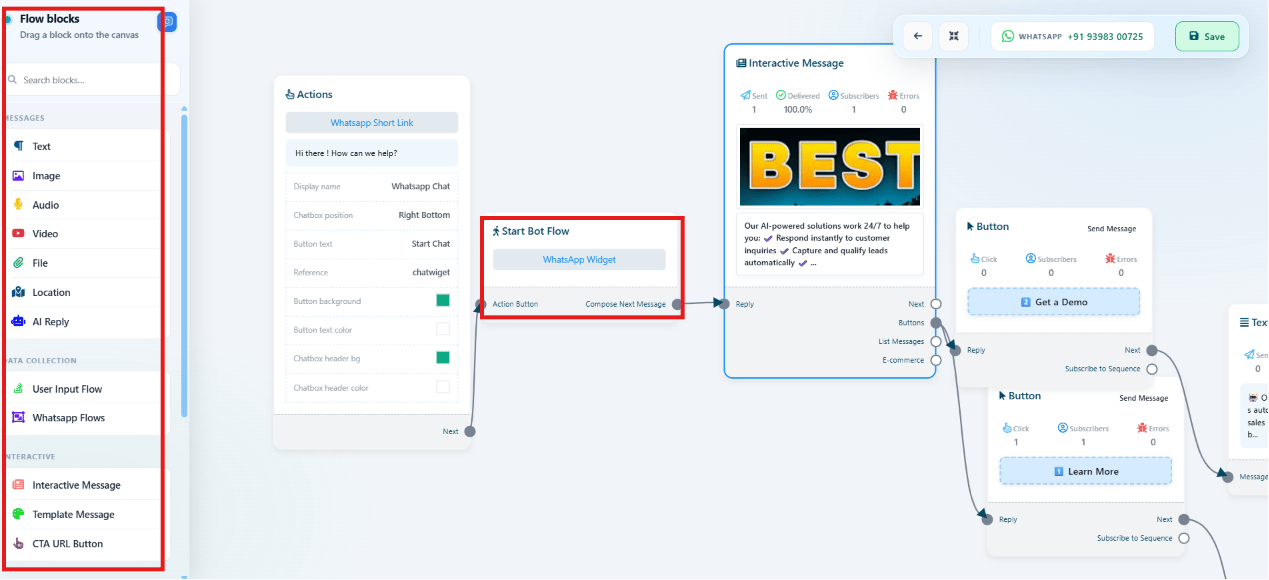
1
Build the widget's flow
Follow Chat Widget to create the widget and open its
conversation canvas.
2
Add a User Input Flow block
Drag on a User Input Flow component the same way as in User Input
Flow, chaining questions together.
3
Save and publish the widget
Save the flow, then confirm the embed code is live on your site.
Frequently asked
Does User Input Flow work the same way on the website widget as on WhatsApp?
Does User Input Flow work the same way on the website widget as on WhatsApp?
Yes — it’s the same canvas and the same User Input Flow
component, just running inside the Chat Widget instead of a
WhatsApp conversation.
Where do the answers collected in the website chat end up?
Where do the answers collected in the website chat end up?
Saved as Custom Fields on the subscriber’s profile, the same as any other Input Flow
submission — see How Do I Manage Custom Fields and Labels?.