

- Every WhatsApp template you build in ChatSyncs needs a Template Category, chosen when you create it.
- The category decides pricing, delivery rules, and what content is allowed.
- Picking the wrong one is one of the most common reasons a template gets rejected or reclassified.
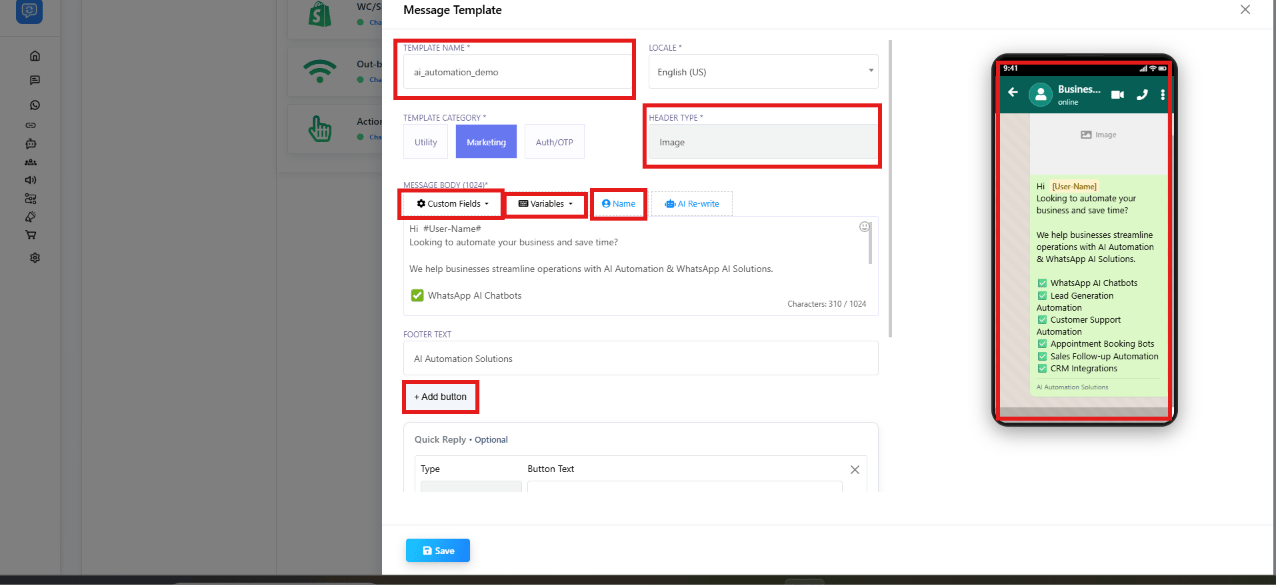
The one-line test
Ask: “Does this message benefit the customer, or my business?”- Benefits the customer (confirms something, updates them, reminds them) → Utility
- Benefits your business (drives a sale, promotes something, re-engages a cold lead) → Marketing
- Contains a one-time password or verification code → Authentication
Marketing
Purpose: promote products, services, or offers — drive engagement and sales. Examples:- “Exclusive deal! Get 20% off your next purchase. Use code SAVE20 at checkout.”
- “We miss you! Enjoy free shipping on your next order. Tap below to shop now.”
- “Join us for our upcoming webinar on WhatsApp automation. Register now!”
- Used for promotional content: discounts, offers, product launches, upselling.
- WhatsApp limits how many marketing templates a single user receives — if they don’t engage, Meta may stop delivering more (a per-user marketing limit).
- Error 131049 means a marketing template was blocked because the recipient hit that limit. Wait at least 24 hours before retrying.
- Marketing templates are not delivered to US phone numbers.
- If a customer replies to a marketing template, that opens the 24-hour customer service window.
Utility
Purpose: transactional notifications sent in response to something the customer already did or is expecting — a confirmation, a change, or a status update. Examples:- “Your order #12345 has been confirmed. You will receive a tracking update soon.”
- “Your payment of ₹2,500 has been successfully processed. Thank you for your purchase!”
- “Reminder: Your appointment with Dr. Sharma is scheduled for March 15 at 10 AM. Reply to confirm.”
- Must be non-promotional — no discounts, offers, upselling, or marketing language.
- Must be specific to the customer’s own action, or essential/critical information.
- If Meta detects promotional intent in a Utility template, it automatically reclassifies it as Marketing, and the higher Marketing pricing applies going forward.
- Supports up to 10 buttons: Call request, Copy code, Phone number, Quick Reply, URL.
These are illustrative examples — Meta may classify a similar-looking message differently
depending on its exact wording, so treat borderline cases with caution and lean Marketing if in
doubt.
Authentication
Purpose: one-time passwords (OTPs) and verification codes only. Examples:- “123456 is your verification code.”
- “Use 789012 to verify your login.”
- Only for OTP-based flows: login verification, account recovery, identity verification, security checks, sign-up verification.
- Only Authentication templates can send OTPs — never put a verification code in a Marketing or Utility template.
- Delivered only to the customer’s primary device, not a linked/secondary device.
- No header, footer, or URL buttons allowed — body only, containing the code.
Category comparison
Why picking wrong matters
Choosing the wrong category is one of the fastest ways to get a template rejected, and it also changes what the message costs you every time it’s sent — see Understanding Conversations and Their Types for how category ties directly to conversation pricing.Frequently asked
Is an appointment reminder Utility or Marketing?
Is an appointment reminder Utility or Marketing?
Utility — it confirms and reminds the customer about something they already scheduled, with
no promotional content.
I want to send a shipping update AND a discount code in the same template. What category is that?
I want to send a shipping update AND a discount code in the same template. What category is that?
Marketing. Adding any promotional content — a discount, an offer, an upsell — to an
otherwise transactional message pushes the whole template into Marketing. Send the discount
as a separate template if you want the shipping update to stay Utility.
What about OTPs — is that Utility?
What about OTPs — is that Utility?
No. One-time passwords and verification codes always need the Authentication category —
never Utility or Marketing.
What happens if I pick Utility but the content is actually promotional?
What happens if I pick Utility but the content is actually promotional?
Meta either rejects it or automatically reclassifies it as Marketing, and the higher
Marketing conversation cost applies going forward.
Why aren't my marketing templates being delivered to some customers?
Why aren't my marketing templates being delivered to some customers?
Two likely reasons: the recipient is a US phone number (Marketing templates aren’t delivered
there), or they’ve hit their per-user marketing limit (Error 131049) — wait at least 24
hours before retrying.