

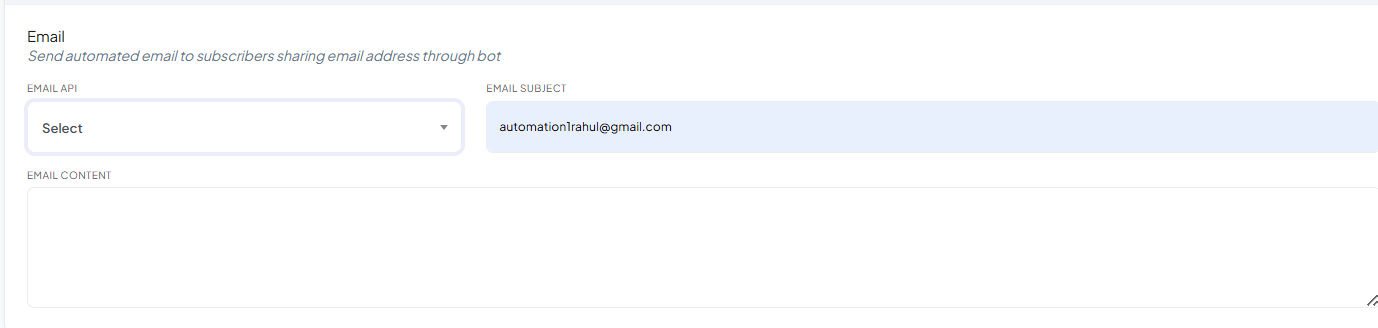
Email API is a dropdown listing the email profiles you’ve connected under Email
Integration — connect one there first, then select it here and write
the Subject and Content this bot should send.
Save your changes

Frequently asked
Do I need to connect an email provider before I can use this tab?
Do I need to connect an email provider before I can use this tab?
Yes — connect one (SMTP, Mailgun, Postmark, SES, or Mandrill) once under Email
Integration, then write the Subject and Content here.
What's the difference between this tab and Auto Responder?
What's the difference between this tab and Auto Responder?
This Email tab sends one specific email immediately, personalized with that
subscriber’s details. How Do I Automatically Add Subscribers to My Email Marketing
List? instead adds the
subscriber to an ongoing marketing-platform list (Mailchimp, Brevo, etc.) for future
campaigns.
Can I personalize the email content per subscriber?
Can I personalize the email content per subscriber?
Yes — use the First name / Last name variables in the Content field, and they’re
filled in automatically for each recipient.
Related Documentation
- Bot Settings — all eight tabs at a glance.
- Email Integration — connecting the email provider itself.
- How Do I Automatically Add Subscribers to My Email Marketing List? — for ongoing campaigns instead of a one-off email.