

This replaces what earlier ChatSyncs docs called Intent Detection — same idea (route a
message to the right handler based on what it’s about), current UI and terminology.
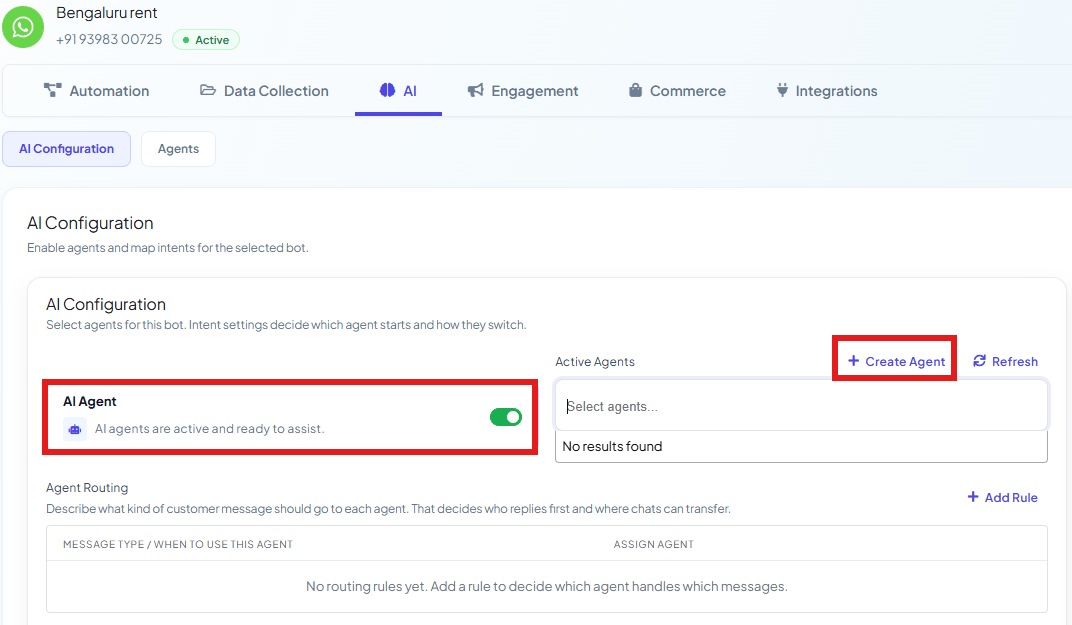
Add a routing rule
1
Open AI Configuration
Go to Chatbot Manager → AI → AI Configuration.
2
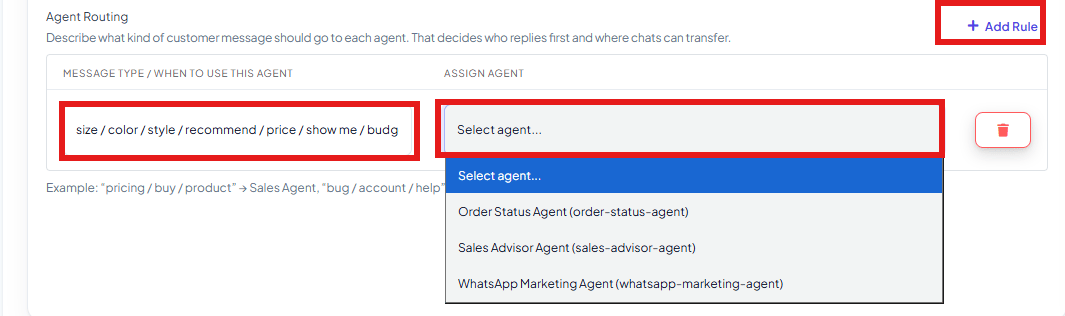
Click Add Rule
Under Agent Routing, click Add Rule to add a new row.
3
Describe the message type
In Message Type / When to Use This Agent, list the words or phrases that signal this
kind of message — e.g.
size / color / style / recommend / price / show me / budget for a
sales-shaped question, or order / tracking / delivery / shipped / arrived / exchange for an
order-status question.4
Assign the agent
In Assign Agent, pick which active agent should handle messages matching that
description — e.g. the
size / color / style... rule points to the Sales Advisor Agent,
and the order / tracking / delivery... rule points to the Order Status Agent.5
Add more rules as needed
Click Add Rule again for each additional message type. Rules also decide where chats
can transfer — an agent can hand a conversation to another agent whose rule better matches
what the customer is now asking.
size / color / style / recommend / price rule → routed to the Sales Advisor Agent. Later
in the same conversation, “Where’s my order, it hasn’t shipped yet” matches the
order / tracking / delivery / shipped rule → the conversation transfers to the
Order Status Agent instead.
Frequently asked
What happens if a message doesn't match any routing rule?
What happens if a message doesn't match any routing rule?
It goes to whichever agent is set to handle general queries for the bot — keep at least one
active agent capable of answering broadly if you want every message covered.
Can a conversation move from one agent to another mid-chat?
Can a conversation move from one agent to another mid-chat?
Yes — routing rules also govern where chats can transfer. If a later message matches a
different rule, the conversation can hand off to that rule’s agent. See also the
transfer_agent action in AI Agent Actions for an agent-initiated
handoff.Do I need Agent Routing if I only have one agent?
Do I need Agent Routing if I only have one agent?
No — with a single active agent, every message just goes to it. Routing only matters once you
have more than one agent to choose between.
Is this the same as the old Intent Detection feature?
Is this the same as the old Intent Detection feature?
It’s the current version of the same idea — routing a message to the right handler based on
what it’s about. The screens and exact fields have changed to this Agent Routing table.