

Send Template Message
Send an approved WhatsApp message template to a phone number via the ChatSyncs API — generated end-to-end from the API Developer Console, no hand-written fields. Use when a developer asks how to message someone outside the 24-hour window, or how to send a specific template programmatically.
What a send contains
system-cart-product-list at position 2, giving the field templateVariable-system-cart-product-list-2. A template that
uses custom tokens such as #!productlist!# takes the token without the #!: templateVariable-productlist-1.
A URL button with a variable
A URL button can end its link in a variable, such ashttps://www.chatsyncs.com/{{1}} for a Pay Now button. Its value is sent
like any other variable, but it is numbered after the body variables. With four body variables, the button’s variable is
number 5:
https://www.chatsyncs.com/pay/INV-1001), so it cannot contain spaces. Leave it
out and ChatSyncs refuses the send with buttons: URL parameter generates an invalid URL. In
Bot Template Get this variable is listed apart from the body ones, under
variable_map.button, so count the body variables first and continue from there.
Quick-reply buttons
A quick-reply button runs a bot reply when the customer taps it, and the send can say which:template_quick_reply_button_values is a
JSON array with one postback id per quick-reply button, in the order the buttons appear. The ids come from
Get Postback List: YES_START_CHAT_WITH_BOT (Chat with robot), UNSUBSCRIBE_QUICK_BOXER
(Unsubscribe), and the id of any keyword-reply flow you have built.
The field is optional. A template with a quick-reply button is delivered without it, but tapping the button then starts none of your
bot replies, so send it whenever the buttons should do something. The API Developer Console always asks you to pick a reply for every
quick-reply button before it generates a request.
A successful send returns the wa_message_id:
What cannot be sent this way
ChatSyncs refuses these, because this request carries nothing for them:Generate the request
You never need to guesstemplate_id, variable names, or field formats — the console builds the whole request for you, already filled in. The only thing you type at the end is the recipient’s phone number.
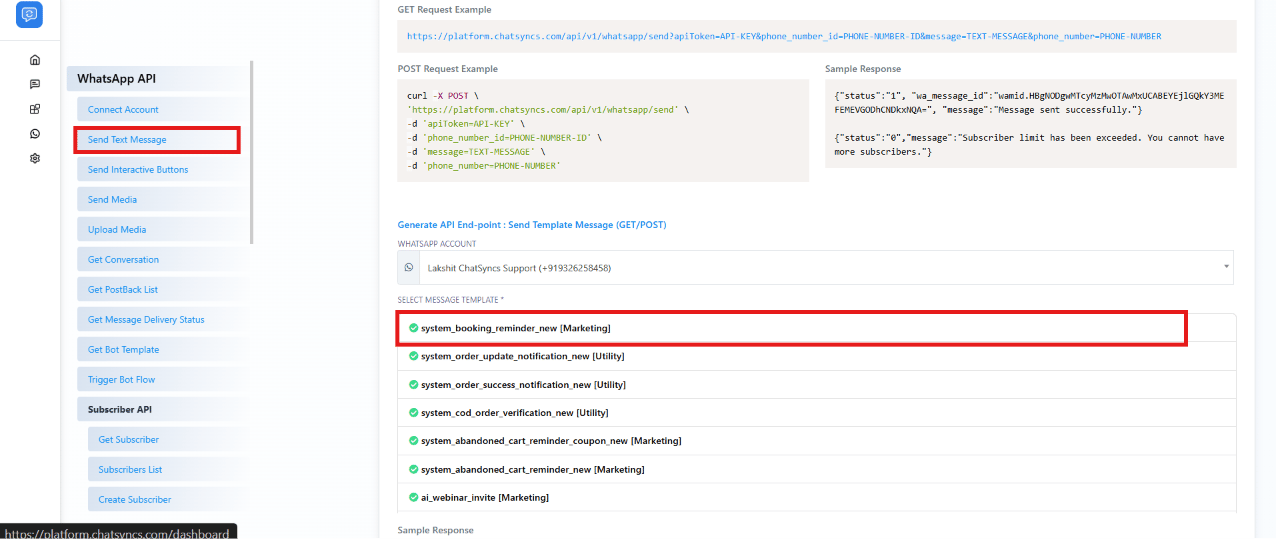
Open Send Text Message in the API Developer Console
Pick your WhatsApp account and template
Fill in that template's variables
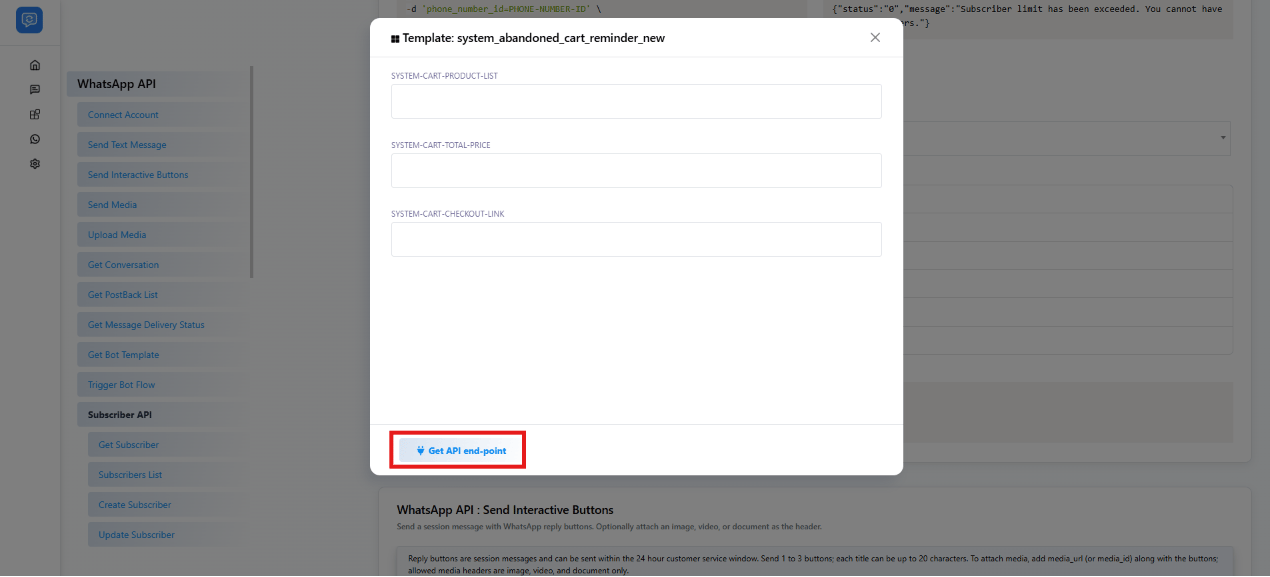
Click Get API end-point
apiToken, phone_number_id, template_id, and every variable you just typed are already filled in. The only placeholder left in either request is phone_number.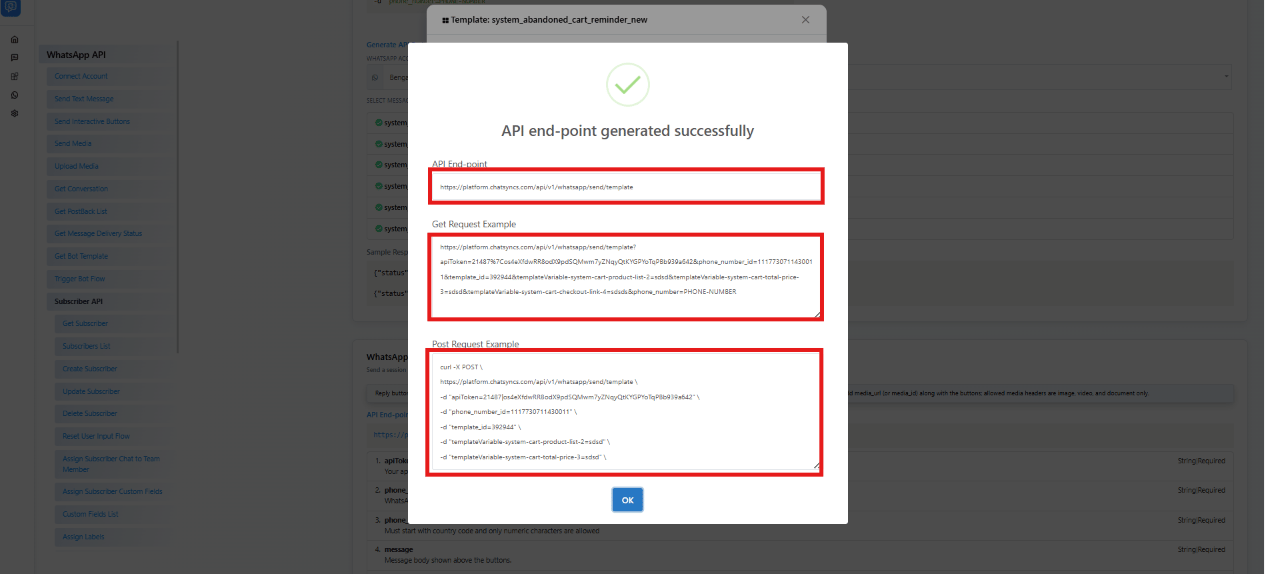
Set the phone number and run it
apiToken, phone_number_id, template_id, and every variable are already inside it, so there’s nothing left to look up. Replace phone_number with the recipient’s number (country code first, digits only, no +, e.g. 91XXXXXXXXXX for an Indian number), then run it from a terminal or a tool like Postman or Insomnia.Body
Your ChatSyncs API key (not a WhatsApp/Meta access token). Where to find it.
"API-KEY"
The WhatsApp account's phone number ID. Where to find it.
"PHONE-NUMBER-ID"
The template to send: its id from Bot Template Get (the short ChatSyncs number). Not Meta's long template_id. Where to find it.
"428445"
The recipient phone number, with country code, digits only.
"PHONE-NUMBER"
Optional. For a template with quick-reply buttons: a JSON array with the bot reply each quick-reply button runs when the contact taps it — one entry per quick-reply button, in button order. Each entry is a postback id from Get Postback List, e.g. ["YES_START_CHAT_WITH_BOT"]. Leave it out and the message is still delivered, but tapping its quick-reply buttons starts none of your bot replies. The API Developer Console always asks you to pick one for every quick-reply button.
"[\"YES_START_CHAT_WITH_BOT\"]"
A value for one variable, repeated once per variable. {position} is the placeholder number (2 for {{2}}) and {name} is the variable's name, e.g. system-cart-total-price or productlist. The variable at the end of a URL button's link comes after the body variables and continues the count: with four body variables it is templateVariable-payment_link-5. Its value is added to the end of the button's link, so it cannot contain spaces. Not needed for the contact's first name. Single line, no tabs, up to 1024 characters.
"999"