

API Token (apiToken)
Every request needs this. Go to API Developer Console.
Business Account ID (whatsapp_business_account_id)
Identifies which connected WhatsApp Business Account a request acts on. For a number already
connected to ChatSyncs, it’s shown directly in the dashboard — no need to go through Meta
Business Suite. Go to
Connect Account and scroll down to the
Business Accounts panel. Click the dropdown (chevron) icon at the top-right of that panel to
expand it, then scroll down — the Business Account ID is shown right under the account’s name.
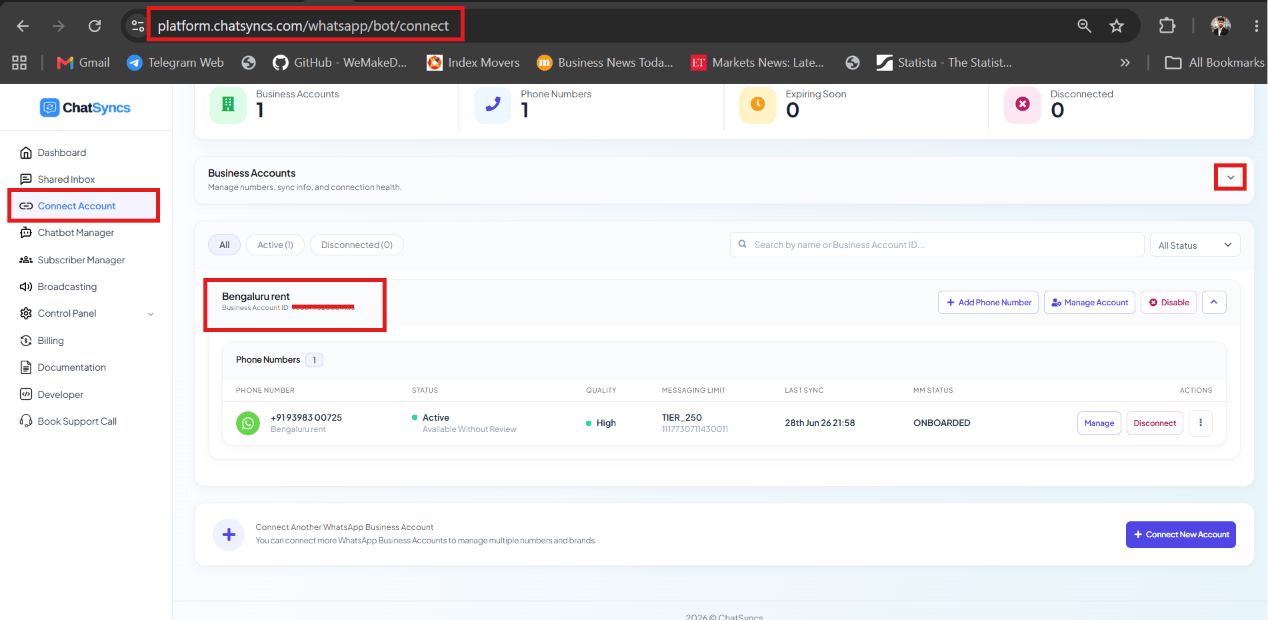
Connect Account — the Business Account ID is shown under the connected account's name.
Phone Number ID (phone_number_id)
Identifies which connected WhatsApp number a request acts on — required by almost every
endpoint. Go to
Connect Account and scroll down to the
Business Accounts panel. Click the dropdown (chevron) icon at the top-right of that panel to
expand it, then scroll down to the account’s Phone Numbers table — the phone_number_id is
shown beneath the number’s messaging tier in the Messaging Limit column.
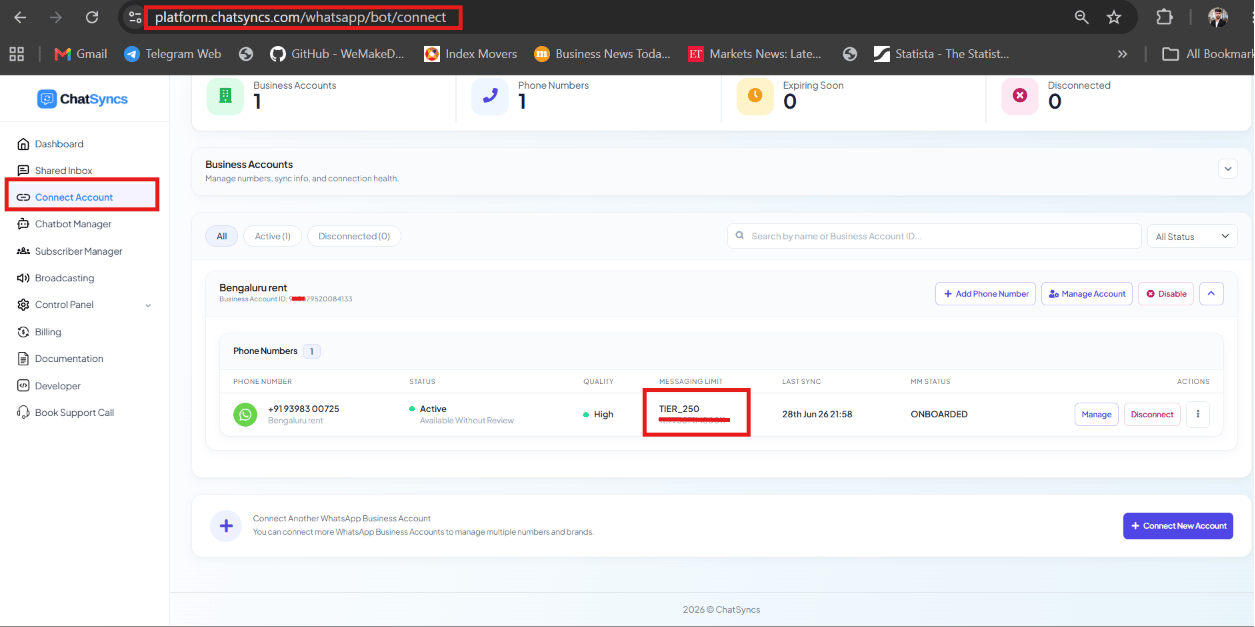
Connect Account — Phone Numbers table, with the phone_number_id shown beneath the Messaging Limit tier.
Template ID (template_id)
Identifies a specific approved WhatsApp template, needed by
Send Template Message. Go to
Chatbot Manager → Automation → Message Templates
— the ID column lists every template’s ID. That is the value to send as template_id; in
Bot Template Get it is the field called id.
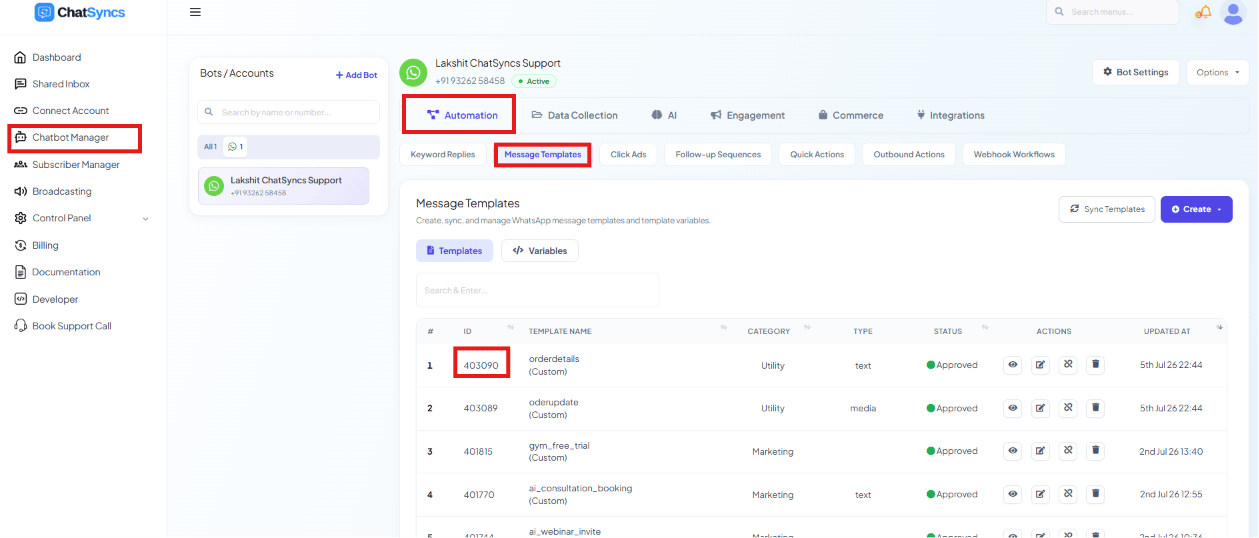
Chatbot Manager → Automation → Message Templates — the ID column lists each template's template_id.
Bot Flow and WhatsApp Bot ID (bot_flow_unique_id)
Identifies a specific Keyword Replies flow, needed by
Trigger Bot Flow. Go to
Chatbot Manager → Automation → Keyword Replies
— the Unique ID column lists each flow’s ID.
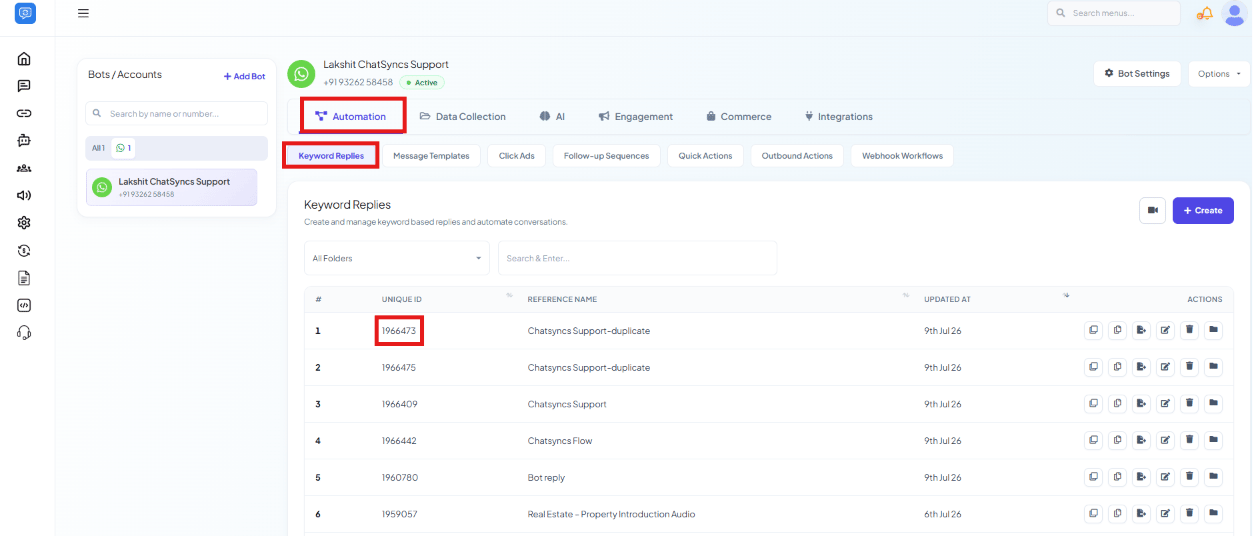
Chatbot Manager → Automation → Keyword Replies — the Unique ID column lists each flow's bot_flow_unique_id.
Label ID (label_id)
Identifies a label for Assign Labels and
Remove Labels. Go to
Subscriber Manager → Labels
— the ID column lists each label’s ID.
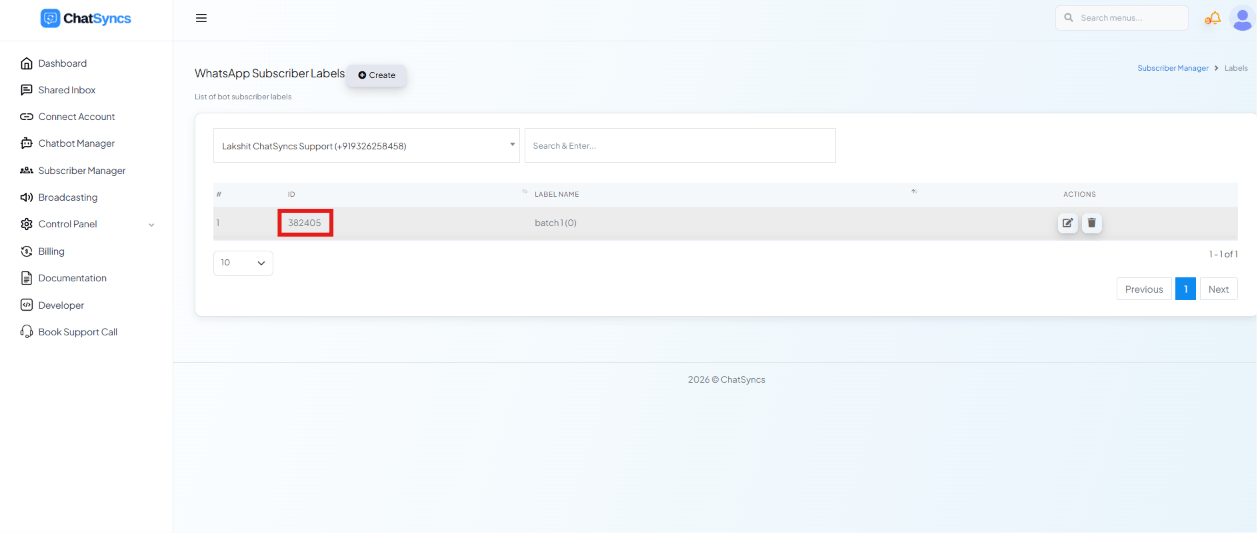
Subscriber Manager → Labels — the ID column lists each label's label_id.
Team Member ID (team_member_id)
Identifies a team member for
Assign Chat to Team Member. Go to
Control Panel → User Manager — the User ID
column lists each member’s ID.
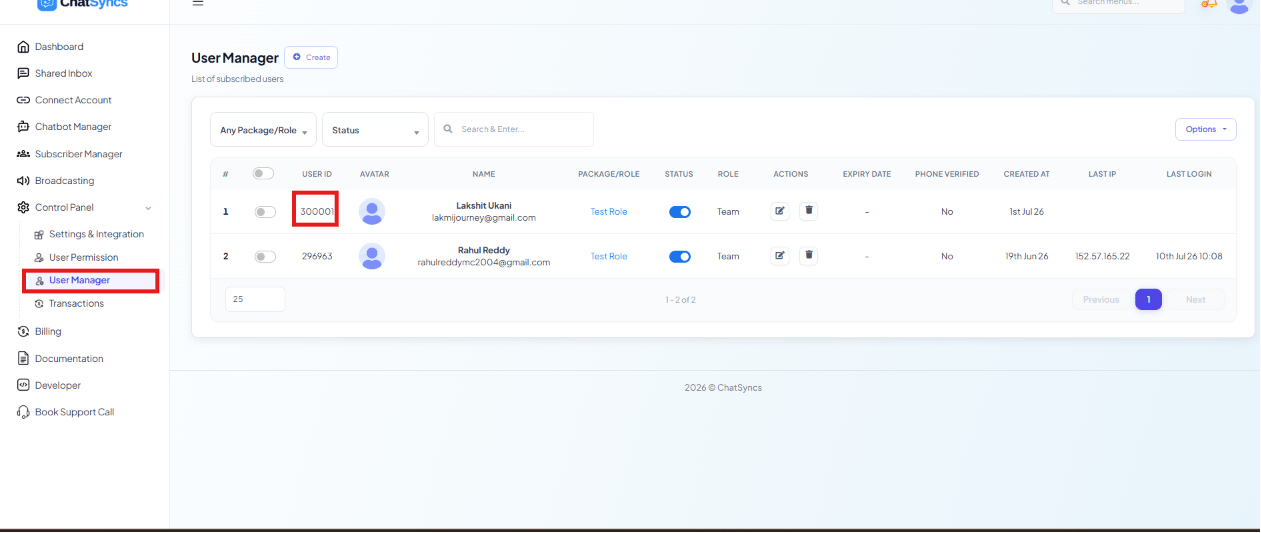
Control Panel → User Manager — the User ID column lists each team member's team_member_id.
Sequence ID (sequence_id)
Identifies a sequence for Assign Sequence and
Remove Sequence. Go to
Chatbot Manager → Automation → Follow-up Sequences
— the ID column lists each sequence’s ID.
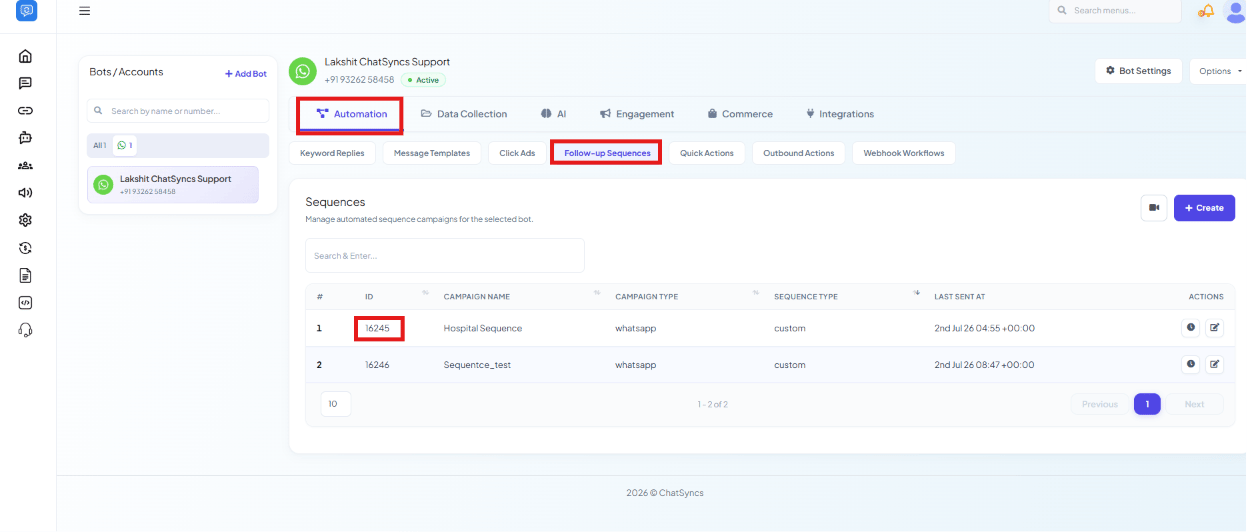
Chatbot Manager → Automation → Follow-up Sequences — the ID column lists each sequence's sequence_id.
Catalog ID and Order Unique ID (whatsapp_catalog_id, order_unique_id)
whatsapp_catalog_id identifies a connected product catalog;
order_unique_id identifies one order inside it — both used by the
Catalog API. Go to
Chatbot Manager → Commerce → Product Catalog
— Catalog Orders lists the Order Unique ID column, and the catalog filter at the top
lists your connected catalogs.
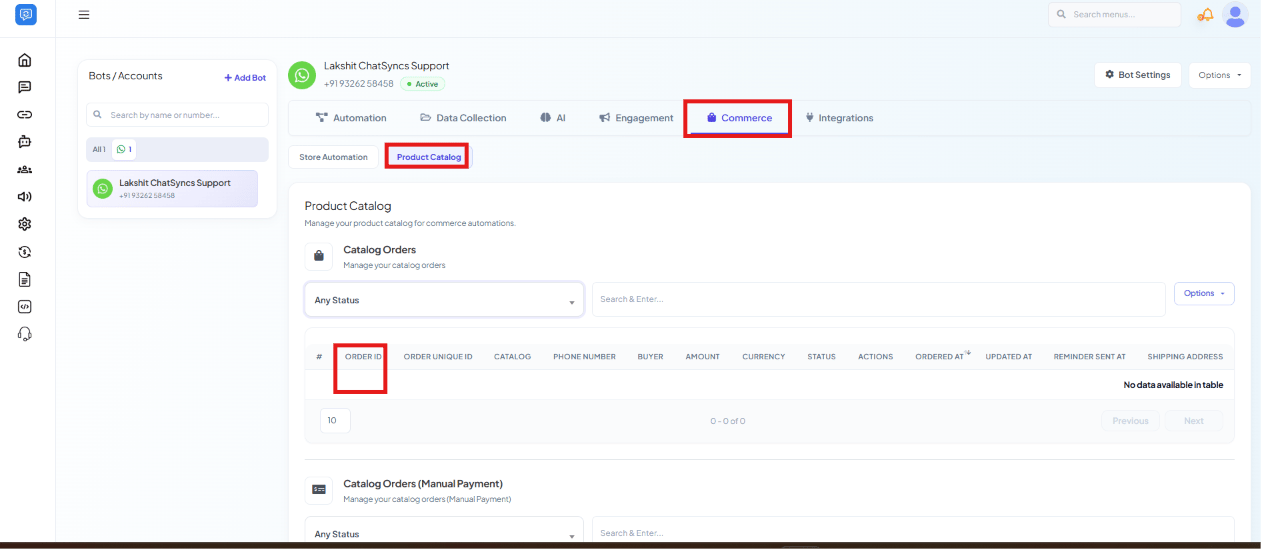
Chatbot Manager → Commerce → Product Catalog — Catalog Orders, with the Order ID / Order Unique ID columns (empty here since no orders exist yet on this account).
Cart Status (cart_status)
Not an ID you look up — it’s a status you set on
Catalog Order Status Change. Use one of:
Package ID (package_id)
Identifies a subscription package — needed when creating a new user via
Get Direct Login URL. Go to
Control Panel → User Permission — the
Package ID column lists each package’s ID.
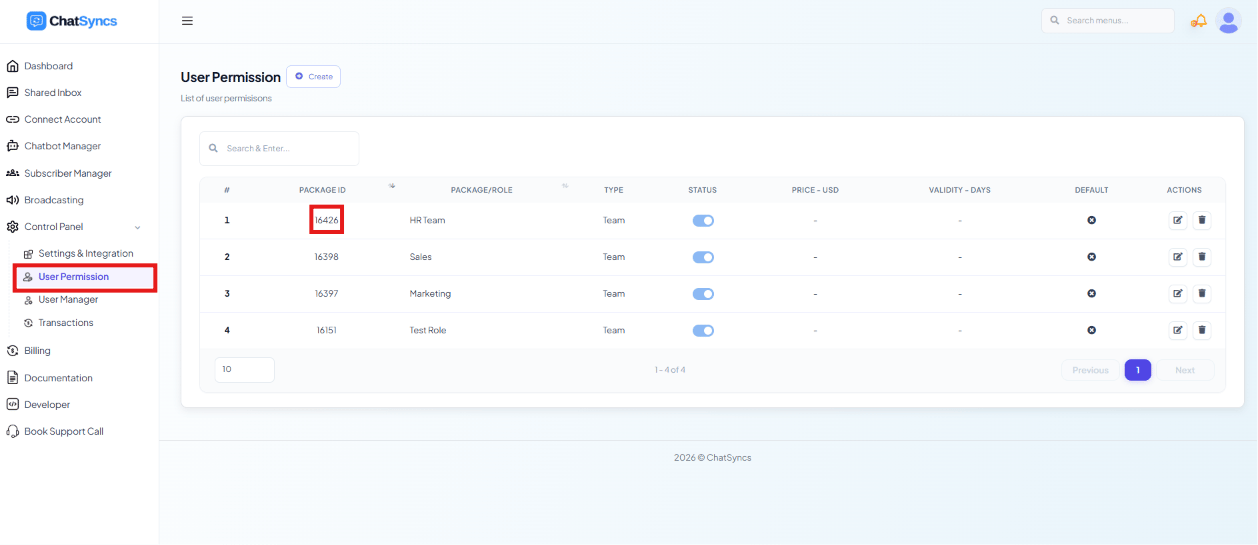
Control Panel → User Permission — the Package ID column lists each package's package_id.
Frequently asked
Where do I get my apiToken?
Where do I get my apiToken?
I have template_id and id from Bot Template Get — which one do I use?
I have template_id and id from Bot Template Get — which one do I use?
id — the short number — as template_id. The long template_id is Meta’s own
number and the send endpoint does not recognise it. See the note on
Bot Template Get.Do I need a whatsapp_bot_id?
Do I need a whatsapp_bot_id?
bot_flow_unique_id, which
Bot Flow List returns.cart_status isn't showing up anywhere in the dashboard — where do I find it?
cart_status isn't showing up anywhere in the dashboard — where do I find it?
Approved, Completed, Shipped,
Delivered, or Refunded, picked by you when calling Catalog Order Status Change.