

Prerequisites
- Read AI Agent first to understand how the whole feature works — this guide only covers how the pieces combine for a real business, not the feature itself.
- A defined business profile to train on — company info, services, destinations, pricing, and policies (see the TravelEase Holidays profile used throughout this guide, below).
- A decision on tone and boundaries for the Prompt Message — how long responses should be, what the AI should never say, and when it should hand off to a human.
- Whichever training source you’ll use ready to go — a written FAQ list, a website URL, a brochure/PDF, a Google Sheet, or an API endpoint. Only one source is active per campaign at a time (see AI Knowledge Base for the mutual-exclusion rules).
- A list of intents worth detecting (e.g. “Talk to Human”, “Sales Enquiry”) and which flow or team each one should route to.
Implementation Guide
Step 1 — Enable the AI Agent and attach a Training Campaign
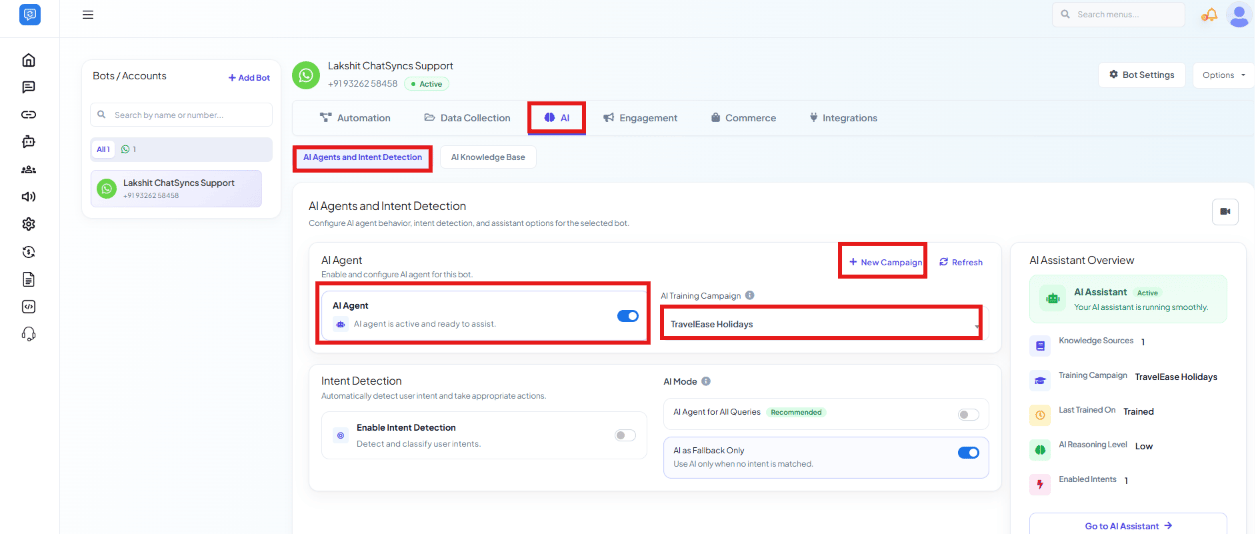
Objective: Turn on the component that actually talks to the customer. Explanation: The AI Agent receives the message, searches the configured training data, understands the intent behind it, and generates a natural response — it does nothing until a Training Campaign is attached. Actions to perform:- Open Chatbot Manager → AI Agent and select (or create) the TravelEase Holidays AI Training Campaign.
Step 2 — Write the Prompt Message
Objective: Define how the AI behaves — role, personality, tone, response length, restrictions, and conversation style. Explanation: The Prompt Message is what stops an AI Agent from confidently inventing prices, dates, or policies it was never told. Actions to perform:- For a fast-moving WhatsApp conversation, a short numbered rule set works well:
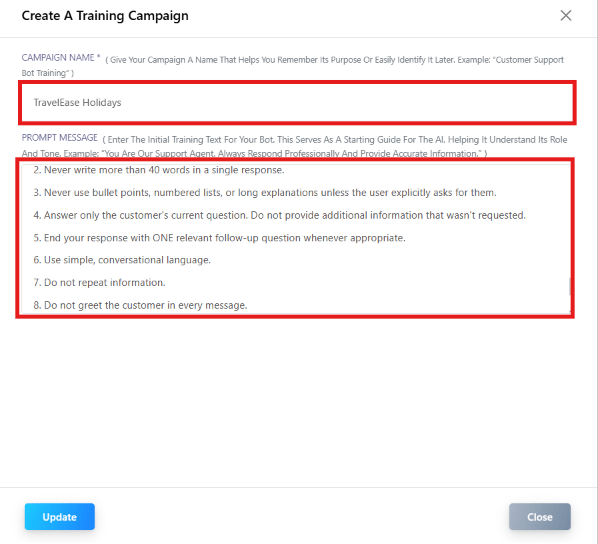
- For a business that needs a strict role, tone, and full set of boundaries defined at once, a much longer template covers every dimension — role, personality, communication style, tone, response format, knowledge usage, conversation behavior, restrictions, escalation rules, and safety, ending with the AI’s overall goal.
Step 3 — Build the AI Training Campaign
Objective: Give the AI a knowledge base to answer from — without one, it has nothing business-specific to say. Explanation: TravelEase Holidays’ campaign contains company information, services, destinations, FAQs, budget recommendations, and conversation rules — fed from exactly one of four sources (only one can be active at a time). Actions to perform:- Add direct question/answer pairs under Content or FAQ — e.g. “Do you provide visa assistance?”, “Can I customize my trip?”, “Which destinations are best for honeymoon?”.
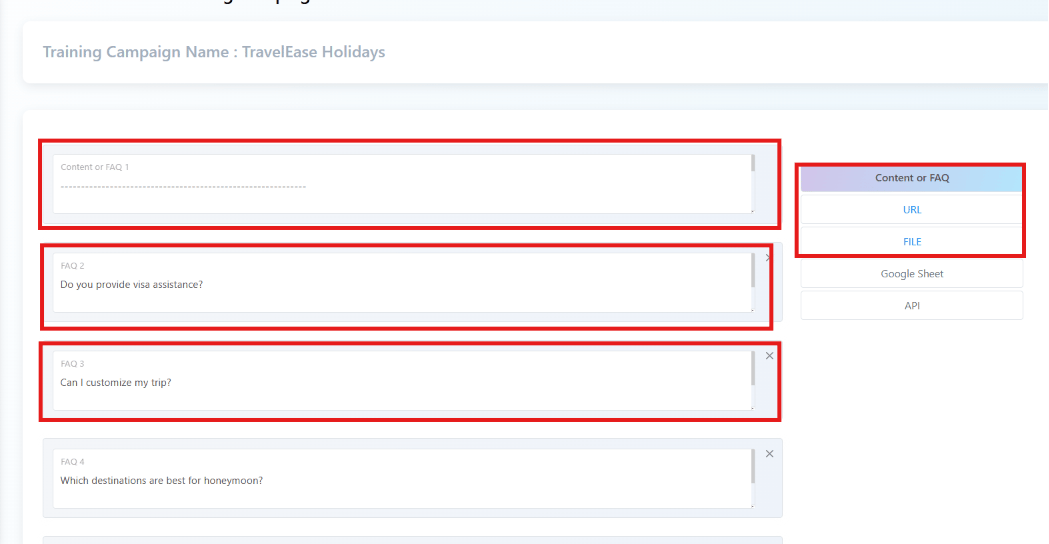
- Instead of FAQs, choose one other source depending on how the data changes:
- URL Training — the AI learns directly from the company website; refresh training whenever the website content changes.
- File Training — upload a PDF, DOCX, catalog, or brochure (e.g. TravelEase’s package brochure) and the AI reads it directly.
-
Google Sheet Training — structured, frequently-updated data without editing the AI
manually, e.g.:
- API Training — retrieves live information instead of static text: flight status, hotel availability, package availability, currency rates.
Step 4 — Route “Talk to Human” requests with Bot Flow Trigger
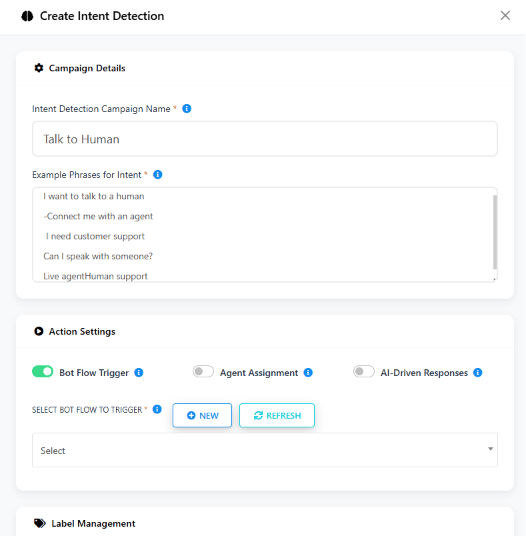
Objective: Hand off to a fixed, structured flow instead of letting the AI attempt an answer. Explanation: Intent Detection reads the customer’s message, matches it to a named intent, and performs one of three actions — routing the conversation instead of sending every message through the same knowledge base. Actions to perform:- Create an intent named Talk to Human matching phrases like “I want to talk to a human”, “Connect me with an agent”, “I need customer support”, “Can I speak with someone?”.
- Enable Bot Flow Trigger, pointed at a Human Support Keyword Replies flow that asks the customer to pick Sales, Technical Support, Billing, or General Enquiry, then collects Name, Phone Number, Email, and Query before handing off.
Step 5 — Route sales/complaint messages with Agent Assignment
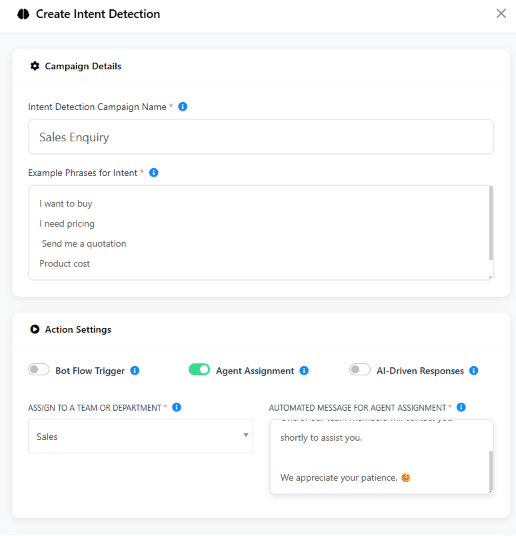
Objective: Skip the AI entirely for messages that should go straight to a team. Explanation: Agent Assignment sends the conversation straight to a team, with an automated acknowledgement, instead of the AI attempting to answer a sales or complaint message itself. Actions to perform:- Create an intent named Sales Enquiry matching “I want to buy”, “I need pricing”, “Send me a quotation”, “Product cost”, with Agent Assignment enabled, assigned to the Sales team.
-
Repeat the same pattern for other intents and teams:
Step 6 — Point specific topics at a dedicated campaign with AI-Driven Responses
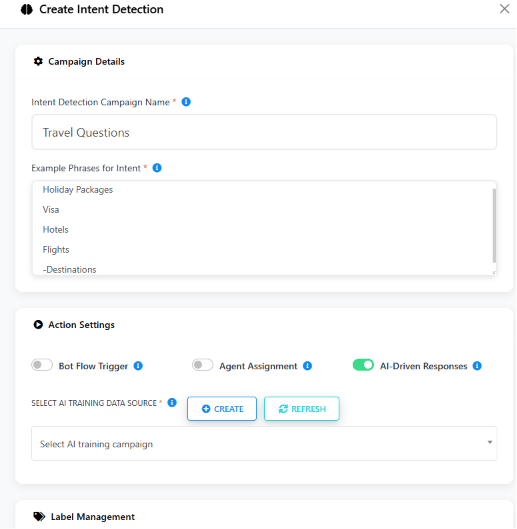
Objective: Let the AI keep answering, but from a more focused knowledge base than the account’s default. Explanation: AI-Driven Responses is how one account runs several AI “experts” side by side — each intent pointed at its own training campaign. Actions to perform:- Create an intent named Travel Questions matching “Holiday Packages”, “Visa”, “Hotels”, “Flights”, “Destinations”, with AI-Driven Responses enabled and pointed at the Travel Assistant campaign.
-
The same pattern lets other departments run their own dedicated campaign:
Features Used
Expected Result
- Customers get instant, accurate answers about packages, visa, hotels, and flights at any hour.
- Every customer gets the same consistent tone and information, governed by the Prompt Message.
- “Talk to Human” requests are collected and handed off with no manual intervention.
- Sales enquiries and complaints skip the AI entirely and go straight to the right team.
- Multiple knowledge bases (Travel, Healthcare, Real Estate, Education, E-Commerce) can run side by side in the same account, each answering only its own topic.
FAQs
How do multiple AI Training Campaigns work in one account?
How do multiple AI Training Campaigns work in one account?
Create one training campaign per topic or department (e.g. Travel Assistant, Hospital
Assistant), then have each Intent Detection intent point its AI-Driven Responses action
at the matching campaign — see Step 6 above.
When should a message trigger a Bot Flow instead of an AI answer?
When should a message trigger a Bot Flow instead of an AI answer?
When the business wants structured data collection or a fixed path — e.g. escalating to a
human, or booking an appointment — use Bot Flow Trigger instead of letting the AI free-
answer. See Step 4 above.
How do I stop the AI from answering sales or complaint messages itself?
How do I stop the AI from answering sales or complaint messages itself?
Create an intent for it (e.g.
Sales Enquiry, Complaint) with Agent Assignment
enabled, pointed at the right team. The message skips the AI and goes straight to that team
— see Step 5 above.In what order does the AI Agent check its knowledge sources?
In what order does the AI Agent check its knowledge sources?
It searches the AI Training Campaign, reads the Prompt Message, then checks FAQs, Files,
URL content, Google Sheet, and finally calls the API if one is configured — see the
Expected Result in Step 3 above.
Can this same setup work for a business that isn't a travel agency?
Can this same setup work for a business that isn't a travel agency?
Yes — the structure (AI Agent + Training Campaign + Prompt Message + Intent Detection) stays
identical. Only the training content and the intents you define change — swap the business
profile in Prerequisites for a hospital’s, school’s, or store’s own details.
What stops the AI from inventing a price or policy it was never told?
What stops the AI from inventing a price or policy it was never told?
The Prompt Message — an explicit restriction telling the AI what to refuse and when to
hand off to a human instead of guessing. See the Warning in Step 2 above.
Which training source should I use for pricing that changes often?
Which training source should I use for pricing that changes often?
Google Sheet Training for data someone updates regularly (e.g. destination prices), or
API Training for anything that needs to be live right now, like flight status or hotel
availability. See Step 3 above.
Does a 'Talk to Human' request lose any customer details in the handoff?
Does a 'Talk to Human' request lose any customer details in the handoff?
No — the Bot Flow Trigger’s Human Support flow collects Name, Phone Number, Email, and Query
before handing off, so the receiving team doesn’t have to ask again. See Step 4 above.
Related Documentation
- AI Agent — the full feature guide this use case builds on.
- AI Knowledge Base — the four training sources and their mutual-exclusion rules.
- Keyword Replies — the bot flow builder used for the Human Support handoff.
Back to Business Problem
Start over from the beginning of this use case.