> ## Documentation Index
> Fetch the complete documentation index at: https://docs.chatsyncs.com/llms.txt
> Use this file to discover all available pages before exploring further.
# Template Structure & Sending
> How a WhatsApp template message is structured (header, body, footer, buttons) and how to send one via the API using the components array. Use when a customer asks how to send a template message, what the components field is, how to include a header image or footer text, or what the full API payload looks like when sending an approved template.
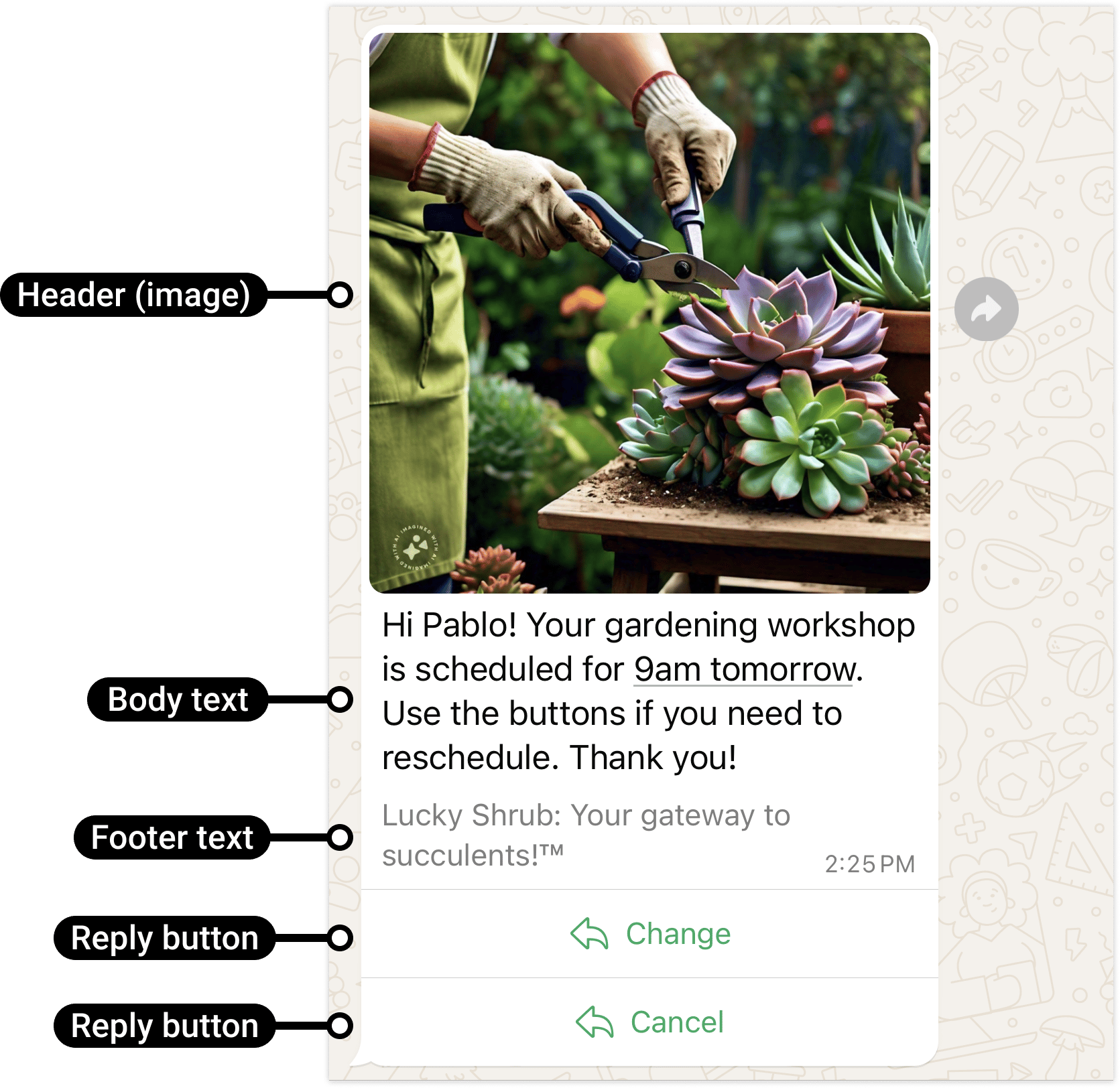
A template message is sent by filling in an approved template with real content. The API call
uses a `components` array to supply the values for each part of the template: header
(optional), body (required), footer (optional), and buttons (optional). The template itself was
pre-approved by Meta; the components just supply the variable values at send time.
## Sending a template
```json theme={null}
POST https://graph.facebook.com/v25.0/{phone-number-id}/messages
{
"messaging_product": "whatsapp",
"to": "919959623255",
"type": "template",
"template": {
"name": "marketing_template_test",
"language": { "code": "en" },
"components": [
{
"type": "header",
"parameters": [
{ "type": "image", "image": { "link": "https://yourstore.com/banner.jpg" } }
]
},
{
"type": "body",
"parameters": [
{ "type": "text", "text": "Rahul" },
{ "type": "text", "text": "FEST20" }
]
},
{ "type": "button", "sub_type": "url", "index": "0", "parameters": [] },
{
"type": "button",
"sub_type": "copy_code",
"index": "1",
"parameters": [{ "type": "coupon_code", "coupon_code": "FEST20" }]
},
{
"type": "button",
"sub_type": "quick_reply",
"index": "2",
"parameters": [{ "type": "payload", "payload": "INTERESTED" }]
}
]
}
}
```
## Component types
| Component | Required | What it does |
| --------- | -------- | ---------------------------------------------------------------- |
| `header` | No | Top section — can be text, image, document, or video |
| `body` | Yes | Main message text; contains `{{1}}`, `{{2}}` variables |
| `footer` | No | Small grey text at the bottom (no variables) |
| `buttons` | No | Up to 3 buttons: URL, quick\_reply, copy\_code, or phone\_number |
Only include a component in the `components` array if that component exists in the template and
has variables or dynamic values to fill in. A footer with no variables doesn't need to appear
in the array.
## Language codes
Common values: `en` (English), `en_us` (English US), `hi` (Hindi). Use whatever code you set
when creating the template.
## Technical detail
* `template.name` — exact name of the approved template (case-sensitive).
* `template.language.code` — must match the language code set during template creation.
* Button `index` — zero-based position of the button as defined in the template. If your
template has 3 buttons, they are index "0", "1", "2".
* Header parameter types: `image`, `document`, `video` (for media headers) or `text` (for text
headers with variables).
## Reference image
 ## Frequently asked
Use `type: "template"`, give the template `name` and `language.code`, then pass a
`components` array to fill in the dynamic values. See the payload above.
It's how you supply real values at send time — header images, body variables, button URLs,
coupon codes. Each entry targets one part of the template (header, body, or a specific
button by index).
Add a `{ "type": "header", "parameters": [{ "type": "image", "image": { "link": "..." } }] }`
entry in `components`.
Add a button component with `sub_type: "copy_code"` and pass
`{ "type": "coupon_code", "coupon_code": "YOUR_CODE" }` in its parameters.
## Gotchas & common mistakes
* **Wrong `index` on buttons** — button components must use zero-based index matching the order
buttons were defined in the template. Wrong index = API error.
* **Including a component not in the template** — if your template has no header, don't include
a header component in the array; it will cause an error.
* **`language.code` mismatch** — must exactly match the language used at template creation.
`"en"` and `"en_us"` are different codes.
* **Sending outside a template** — you can only send templates outside the 24-hour window. See
[The 24-hour window](/meta-api/messaging/24-hour-customer-service-window).
## Frequently asked
Use `type: "template"`, give the template `name` and `language.code`, then pass a
`components` array to fill in the dynamic values. See the payload above.
It's how you supply real values at send time — header images, body variables, button URLs,
coupon codes. Each entry targets one part of the template (header, body, or a specific
button by index).
Add a `{ "type": "header", "parameters": [{ "type": "image", "image": { "link": "..." } }] }`
entry in `components`.
Add a button component with `sub_type: "copy_code"` and pass
`{ "type": "coupon_code", "coupon_code": "YOUR_CODE" }` in its parameters.
## Gotchas & common mistakes
* **Wrong `index` on buttons** — button components must use zero-based index matching the order
buttons were defined in the template. Wrong index = API error.
* **Including a component not in the template** — if your template has no header, don't include
a header component in the array; it will cause an error.
* **`language.code` mismatch** — must exactly match the language used at template creation.
`"en"` and `"en_us"` are different codes.
* **Sending outside a template** — you can only send templates outside the 24-hour window. See
[The 24-hour window](/meta-api/messaging/24-hour-customer-service-window).