> ## Documentation Index
> Fetch the complete documentation index at: https://docs.chatsyncs.com/llms.txt
> Use this file to discover all available pages before exploring further.
# WhatsApp API Glossary (WABA, Phone Number ID, BSP)
> Definitions of the key WhatsApp Business API terms — WABA, Phone Number ID, WABA ID, and BSP. Use when a customer asks what any of these terms mean, or is confused by the jargon in the Meta developer dashboard.
The core vocabulary of the WhatsApp Business API. These terms appear everywhere in the
Meta dashboard and in API calls — you need to understand them before you can do anything
else.
## The terms
**WABA — WhatsApp Business Account**
The top-level container for a business on WhatsApp. It holds the business profile, message
templates, and phone numbers. It lives inside the business's Meta Business Portfolio. Every
business that uses the WhatsApp API has one (or more) WABAs.
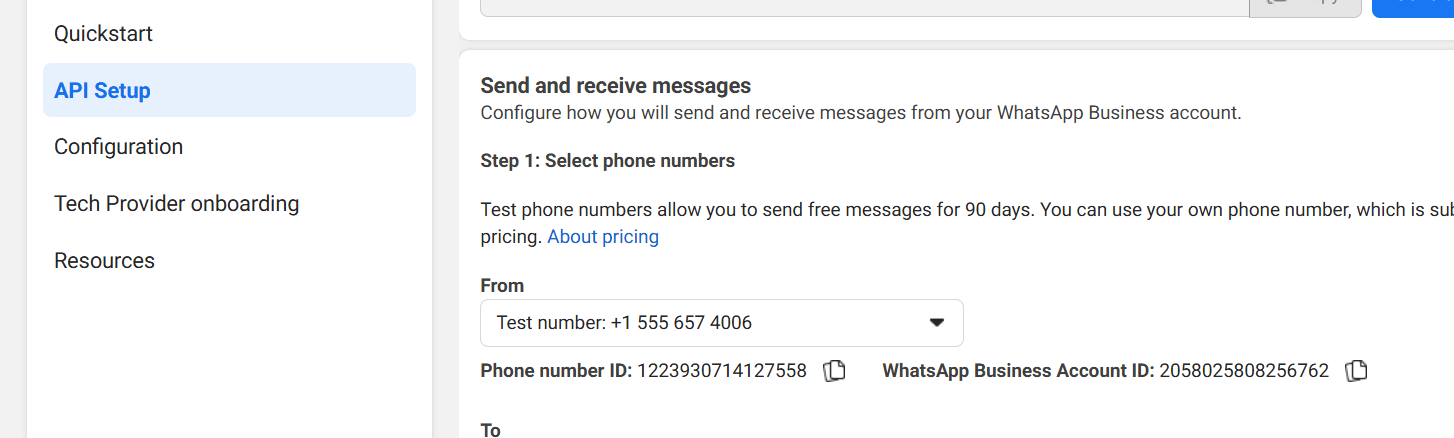
**Phone Number ID**
A unique numerical identifier Meta assigns to each phone number registered on the WhatsApp
API — including test numbers. You use this ID in every API call to specify which number
should send or receive a message. Find it in the Meta developer dashboard under API Setup.
**WABA ID (WhatsApp Business Account ID)**
The unique ID for the entire WhatsApp Business Account. Used to manage global settings,
webhooks, and templates across all phone numbers in that account. Different from the Phone
Number ID — the WABA ID identifies the *account*, the Phone Number ID identifies one
specific *number* inside it.
**BSP — Business Solution Provider**
An official Meta partner (e.g. Twilio, Infobip, Sinch, Wati, AiSensy) that resells access to
the WhatsApp Business API. BSPs used to be required, but with the
[Cloud API](/meta-api/concepts/cloud-vs-on-premise) you can connect directly to Meta without
going through a BSP. BSPs are optional today — they add value through extra tooling, not
because Meta requires them.
## Where to find your IDs
 ## Frequently asked
WABA stands for WhatsApp Business Account. It is the account that holds your business
profile, phone numbers, and message templates on Meta's platform.
A unique number Meta gives to each phone number registered on the WhatsApp API. You put
it in your API calls so Meta knows which number to send from. Find it in the Meta
developer dashboard → API Setup.
The ID of the entire WhatsApp Business Account — used to manage templates and webhooks
globally. Not the same as a Phone Number ID.
No. With the Cloud API you connect directly to Meta. BSPs are optional — some businesses
use them for extra features, but they are not required.
Phone Number ID identifies one specific number inside your account. WABA ID identifies
the whole account. You use Phone Number ID in message sends; you use WABA ID for
account-level settings and templates.
## Frequently asked
WABA stands for WhatsApp Business Account. It is the account that holds your business
profile, phone numbers, and message templates on Meta's platform.
A unique number Meta gives to each phone number registered on the WhatsApp API. You put
it in your API calls so Meta knows which number to send from. Find it in the Meta
developer dashboard → API Setup.
The ID of the entire WhatsApp Business Account — used to manage templates and webhooks
globally. Not the same as a Phone Number ID.
No. With the Cloud API you connect directly to Meta. BSPs are optional — some businesses
use them for extra features, but they are not required.
Phone Number ID identifies one specific number inside your account. WABA ID identifies
the whole account. You use Phone Number ID in message sends; you use WABA ID for
account-level settings and templates.