> ## Documentation Index
> Fetch the complete documentation index at: https://docs.chatsyncs.com/llms.txt
> Use this file to discover all available pages before exploring further.
# Messaging Limits & Quality Rating
> How WhatsApp Cloud API messaging limits work — the daily cap on business-initiated conversations — and how quality rating (green/yellow/red) affects whether your limit scales up or gets reduced. Use when a customer asks why they can only message 250 people per day, how to increase their messaging limit, what quality rating means, or how to get to higher tiers.
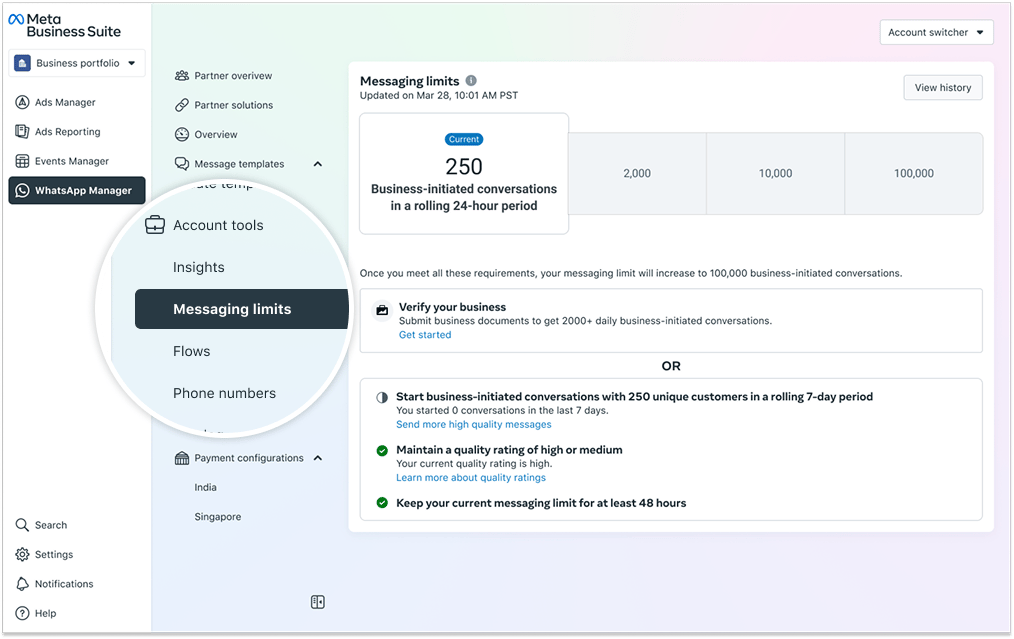
WhatsApp limits how many business-initiated conversations a WABA phone number can open per
rolling 24-hour period. New accounts start at 250. As your account establishes a track record
of high-quality messaging, the limit scales up automatically. Your **quality rating** (based
on customer feedback) determines whether your limit grows or shrinks.
## The messaging limit tiers
| Tier | Daily business-initiated conversations |
| -------- | -------------------------------------- |
| Starting | 250 |
| Tier 1 | 2,000 |
| Tier 2 | 10,000 |
| Tier 3 | 100,000 |
| Tier 4 | Unlimited |
These limits apply only to **business-initiated** conversations (when you send a template to
start the conversation). Replies to incoming messages are not capped.
## How to move from 250 → 2,000
Verify your business in Meta Business Manager and submit the required business documents. Once
verified, you become eligible for Tier 1.
## How to move from 2,000 upward (automatic scaling)
Meta scales you up automatically when all of the following are true over a rolling 7-day
period:
1. You have started at least 250 unique conversations.
2. Your quality rating is High or Medium (green or yellow).
3. You have maintained your current tier for at least 48 hours.
## Quality rating
Meta grades your phone number's message quality based on customer feedback (blocks, reports,
opt-outs):
| Rating | What it means |
| ------------------- | ------------------------------------------------------ |
| **Green (High)** | No or negligible negative feedback |
| **Yellow (Medium)** | Some negative feedback; messages may be lower quality |
| **Red (Low)** | Significant negative feedback; limit may be reduced |
| **Unknown** | Quality score is still being calculated (new accounts) |
## Checking via API
```bash theme={null}
# Current messaging limit
curl 'https://graph.facebook.com/v25.0/{business-manager-id}?fields=whatsapp_business_manager_messaging_limit' \
-H 'Authorization: Bearer YOUR_TOKEN'
# Quality rating
curl 'https://graph.facebook.com/v25.0/{phone-number-id}?fields=quality_score' \
-H 'Authorization: Bearer YOUR_TOKEN'
```
## Reference image
 ## Frequently asked
New WhatsApp Business accounts start at the 250 business-initiated conversations per day
tier. Verify your business in Meta Business Manager to move to the 2,000 tier, then
automatic scaling takes over from there.
First, verify your business (250 → 2,000). After that, scaling is automatic — maintain a
high or medium quality rating, send 250+ conversations in 7 days, and hold the tier for 48
hours.
It's Meta's measure of how well your messages are received. If customers are blocking or
reporting your number, your rating drops (yellow → red) and your messaging limit can be
reduced. Keeping it green ensures eligibility for higher tiers.
Use the Graph API with the `whatsapp_business_manager_messaging_limit` field for the limit
and `quality_score` for the rating. See the API calls above.
## Gotchas & common mistakes
* **Limits apply only to business-initiated conversations** — if a customer messages you
first, you can reply freely inside the CSW; that doesn't count against your daily limit.
* **Quality rating is per phone number, not per WABA** — if you have multiple phone numbers,
each has its own rating and limit.
* **Red rating doesn't immediately drop your tier** — Meta gives a warning period. But
continued red rating will reduce your limit. Fix message quality fast. See
[Conversation categories & pricing](/meta-api/concepts/conversation-categories-and-pricing).
## Frequently asked
New WhatsApp Business accounts start at the 250 business-initiated conversations per day
tier. Verify your business in Meta Business Manager to move to the 2,000 tier, then
automatic scaling takes over from there.
First, verify your business (250 → 2,000). After that, scaling is automatic — maintain a
high or medium quality rating, send 250+ conversations in 7 days, and hold the tier for 48
hours.
It's Meta's measure of how well your messages are received. If customers are blocking or
reporting your number, your rating drops (yellow → red) and your messaging limit can be
reduced. Keeping it green ensures eligibility for higher tiers.
Use the Graph API with the `whatsapp_business_manager_messaging_limit` field for the limit
and `quality_score` for the rating. See the API calls above.
## Gotchas & common mistakes
* **Limits apply only to business-initiated conversations** — if a customer messages you
first, you can reply freely inside the CSW; that doesn't count against your daily limit.
* **Quality rating is per phone number, not per WABA** — if you have multiple phone numbers,
each has its own rating and limit.
* **Red rating doesn't immediately drop your tier** — Meta gives a warning period. But
continued red rating will reduce your limit. Fix message quality fast. See
[Conversation categories & pricing](/meta-api/concepts/conversation-categories-and-pricing).