> ## Documentation Index
> Fetch the complete documentation index at: https://docs.chatsyncs.com/llms.txt
> Use this file to discover all available pages before exploring further.
# Media by URL vs Media ID
> The two ways to attach a file to a WhatsApp Cloud API message — a public URL or uploading it to Meta first to get a media ID — and when to use each method.
Every media message (image, document, video, audio) needs you to tell WhatsApp where to get
the file. There are exactly two ways: give it a public URL and let Meta fetch it, or upload
the file to Meta's servers first and use the ID Meta gives you.
## Method 1 — Media by URL
Give WhatsApp a public link. Meta fetches the file and delivers it.
```json theme={null}
{
"messaging_product": "whatsapp",
"to": "919959623255",
"type": "image",
"image": {
"link": "https://example.com/photo.jpg",
"caption": "Here is your invoice"
}
}
```
**Requirements for the URL:**
* Must be **publicly accessible** — no login, no password, no auth header
* Must be **`https://`** — not `http://`. WhatsApp requires encrypted URLs
* If your file is on `localhost` or a private server, use **ngrok** or **Cloudflare Tunnel**
to expose it temporarily as a public `https://` URL
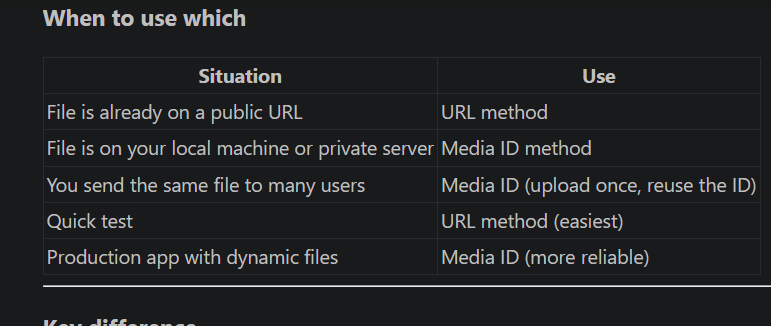
**Use when:** The file is already hosted on a public server, CDN, or cloud storage (S3,
Google Cloud, etc.).
## Method 2 — Media by ID
Upload the file to Meta's servers first, receive a `media_id`, then use that ID in your
message.
**Step 1 — Upload the file:**
```
POST https://graph.facebook.com/v21.0/{phone-number-id}/media
Authorization: Bearer YOUR_TOKEN
Content-Type: multipart/form-data
messaging_product = whatsapp
file = [the actual file bytes]
type = image/jpeg
```
Meta returns:
```json theme={null}
{ "id": "1234567890" }
```
**Step 2 — Send the message using the ID:**
```json theme={null}
{
"messaging_product": "whatsapp",
"to": "919959623255",
"type": "image",
"image": {
"id": "1234567890",
"caption": "Here is your invoice"
}
}
```
**Use when:** The file is on your local machine, a private server, or you send the same file
to many users (upload once, reuse the ID).
## Side-by-side comparison
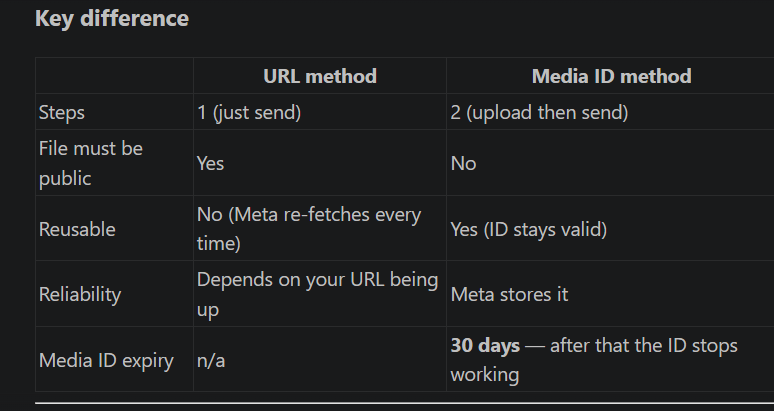
| | URL method | Media ID method |
| -------------------- | --------------------------- | --------------------------------------------- |
| Steps to send | 1 | 2 (upload then send) |
| File must be public | Yes | No |
| Works with localhost | No (use ngrok) | Yes |
| Reuse same file | No (re-fetched each time) | Yes (same ID for all sends) |
| ID expiry | n/a | **30 days** — after that the ID stops working |
| Best for | Files already hosted online | Local files, private files, repeated sends |
**Local testing:** to test the URL method with a file on your computer, run `ngrok http 3000`
for a temporary public `https://` URL, or use Cloudflare Tunnel (free, more stable for longer
sessions). Both create a public tunnel to your local machine so Meta can fetch the file.
## Reference images
 ## Frequently asked
Two ways — provide a public `https://` URL to the image in the `link` field, or upload the
image to Meta first and use the returned ID in the `id` field. Both go in the `image`
object of your request body.
The URL must be publicly accessible (no login required) and must use `https://` not
`http://`. If your file is on a local or private server, use ngrok or Cloudflare Tunnel to
create a public URL.
Send a `multipart/form-data` POST to
`https://graph.facebook.com/v21.0/{phone-number-id}/media` with your token,
`messaging_product=whatsapp`, the file bytes, and the MIME type. Meta returns a `media_id`
you then use in your message.
Yes. Upload once and use the ID in as many messages as you want. Media IDs are valid for
**30 days** — after that you must re-upload.
URL is simpler if the file is already public online. Media ID is better for files on your
own server, large files you send repeatedly, or any file that is not publicly accessible.
## Gotchas & common mistakes
* **`http://` instead of `https://`** — WhatsApp rejects non-HTTPS URLs. Always use `https://`.
* **Private or authenticated URLs** — if the URL requires a login or token, Meta cannot fetch
it and the send will fail.
* **Localhost URLs** — `http://localhost/file.jpg` is not reachable by Meta's servers. Use
ngrok or Cloudflare Tunnel for local testing.
* **Expired media ID** — media IDs expire after 30 days. Re-upload before the ID expires if
you plan to reuse it.
* **Wrong MIME type on upload** — the `type` field must match the actual file format (e.g.
`image/jpeg`, `application/pdf`). A mismatch causes the upload or send to fail.
## Frequently asked
Two ways — provide a public `https://` URL to the image in the `link` field, or upload the
image to Meta first and use the returned ID in the `id` field. Both go in the `image`
object of your request body.
The URL must be publicly accessible (no login required) and must use `https://` not
`http://`. If your file is on a local or private server, use ngrok or Cloudflare Tunnel to
create a public URL.
Send a `multipart/form-data` POST to
`https://graph.facebook.com/v21.0/{phone-number-id}/media` with your token,
`messaging_product=whatsapp`, the file bytes, and the MIME type. Meta returns a `media_id`
you then use in your message.
Yes. Upload once and use the ID in as many messages as you want. Media IDs are valid for
**30 days** — after that you must re-upload.
URL is simpler if the file is already public online. Media ID is better for files on your
own server, large files you send repeatedly, or any file that is not publicly accessible.
## Gotchas & common mistakes
* **`http://` instead of `https://`** — WhatsApp rejects non-HTTPS URLs. Always use `https://`.
* **Private or authenticated URLs** — if the URL requires a login or token, Meta cannot fetch
it and the send will fail.
* **Localhost URLs** — `http://localhost/file.jpg` is not reachable by Meta's servers. Use
ngrok or Cloudflare Tunnel for local testing.
* **Expired media ID** — media IDs expire after 30 days. Re-upload before the ID expires if
you plan to reuse it.
* **Wrong MIME type on upload** — the `type` field must match the actual file format (e.g.
`image/jpeg`, `application/pdf`). A mismatch causes the upload or send to fail.