> ## Documentation Index
> Fetch the complete documentation index at: https://docs.chatsyncs.com/llms.txt
> Use this file to discover all available pages before exploring further.
# WhatsApp Rules: How to Never Get Banned
> Why WhatsApp Business accounts get permanently banned, the 7 rules that keep a number safe, and what to do if a number is already banned — with real quality-rating, messaging-tier, and cost numbers. Read this before sending anything through WhatsApp automation.
This video walks through the same three things this lesson covers below — why WhatsApp accounts
actually get banned, the habits that keep a number safe, and what recovery looks like if a
number is already restricted. Watch it first, then use the sections below as the reference to
come back to.
## Why this matters
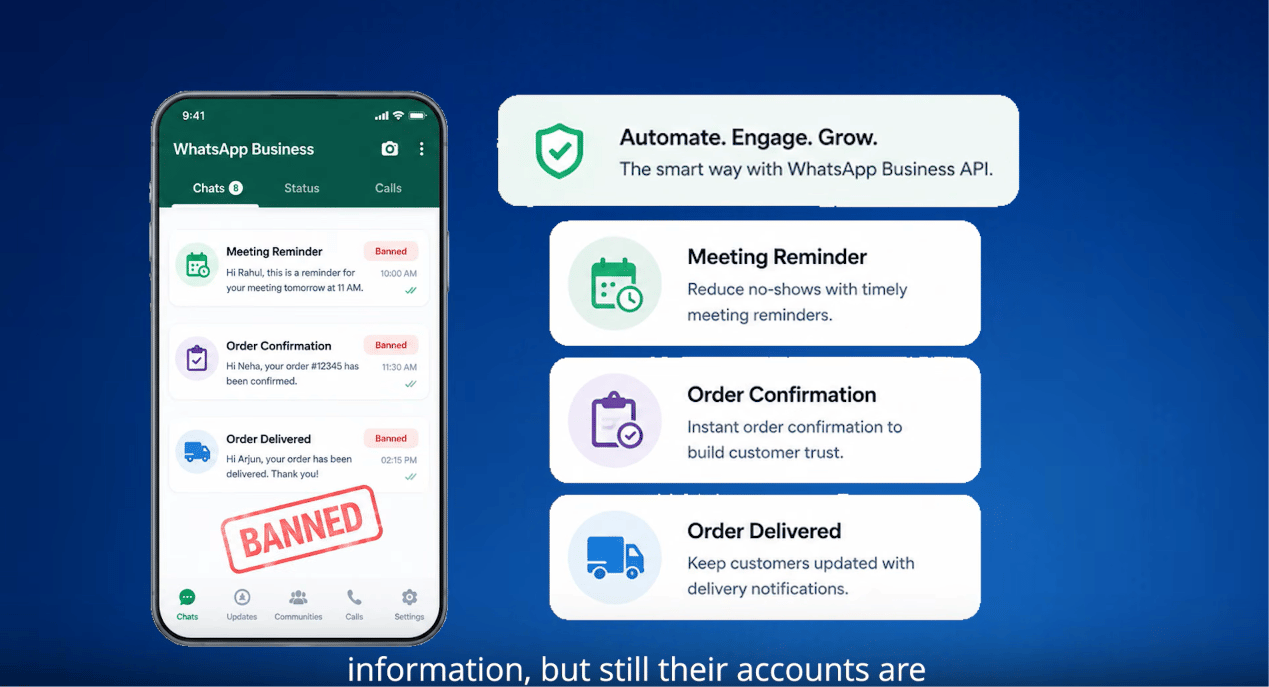
**8 million WhatsApp accounts get permanently banned every month, worldwide.** In India alone,
**92 million accounts were banned in 2024** — over three times more than in 2022. Most of them
weren't spammers. They were real businesses sending appointment reminders, order updates, and
follow-ups, who simply didn't know the rules.
And here's the part that makes it worse: **most bans come with no warning at all.** No email,
no notification — a business opens WhatsApp one morning and the number is just gone, along with
its entire chat history and customer list.
This lesson covers three things: **why accounts actually get banned, the rules that keep a
number safe, and what to do if a number is already banned.**
That scale is worth keeping in mind: WhatsApp has **2 billion monthly active users** globally,
handling **100 billion messages a day** — and in India, a marketing message costs as little as
**₹0.85**, the lowest rate anywhere in the world. A **healthy campaign typically gets a 30–50%
reply rate**; that benchmark is what the rest of this lesson is built around.
## The one idea that matters
WhatsApp doesn't ban you for sending **too many** messages. It bans you for sending messages
people **didn't want**. A high reply rate is your protection; a high block rate is what kills
you.
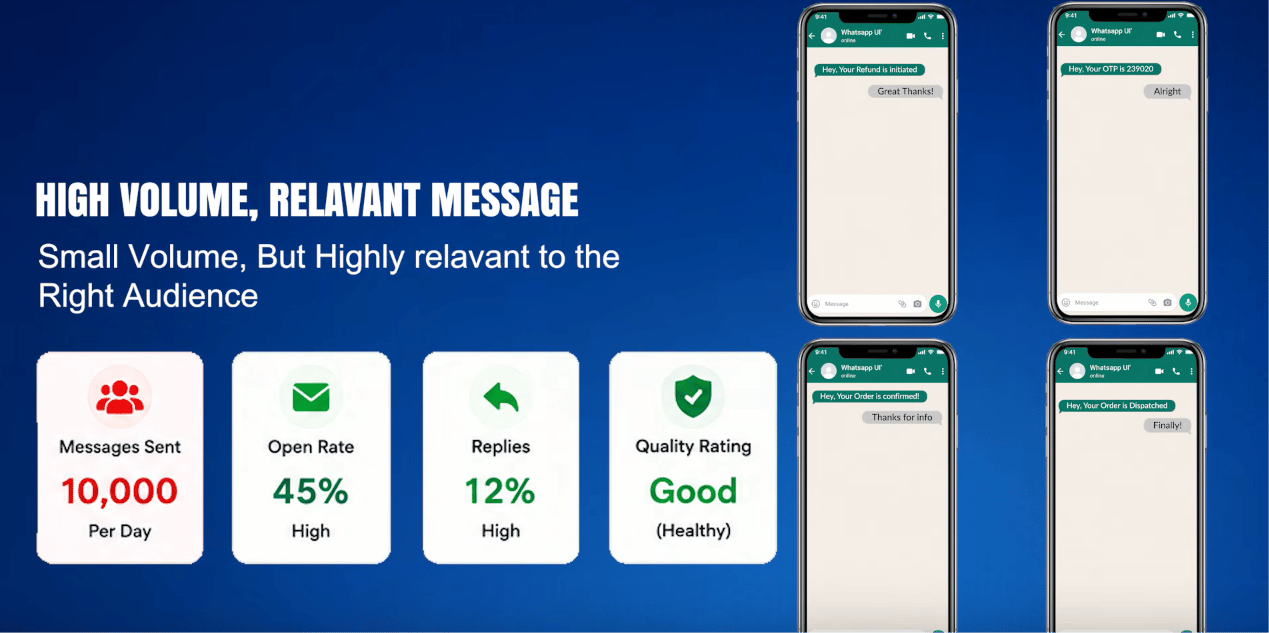
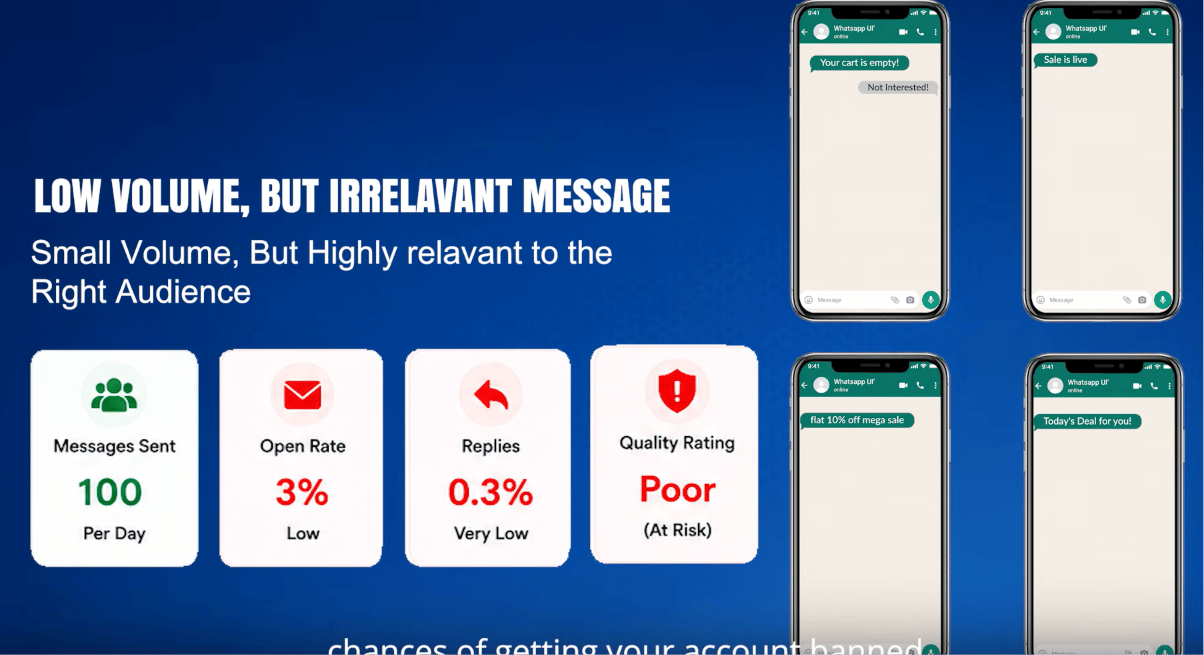
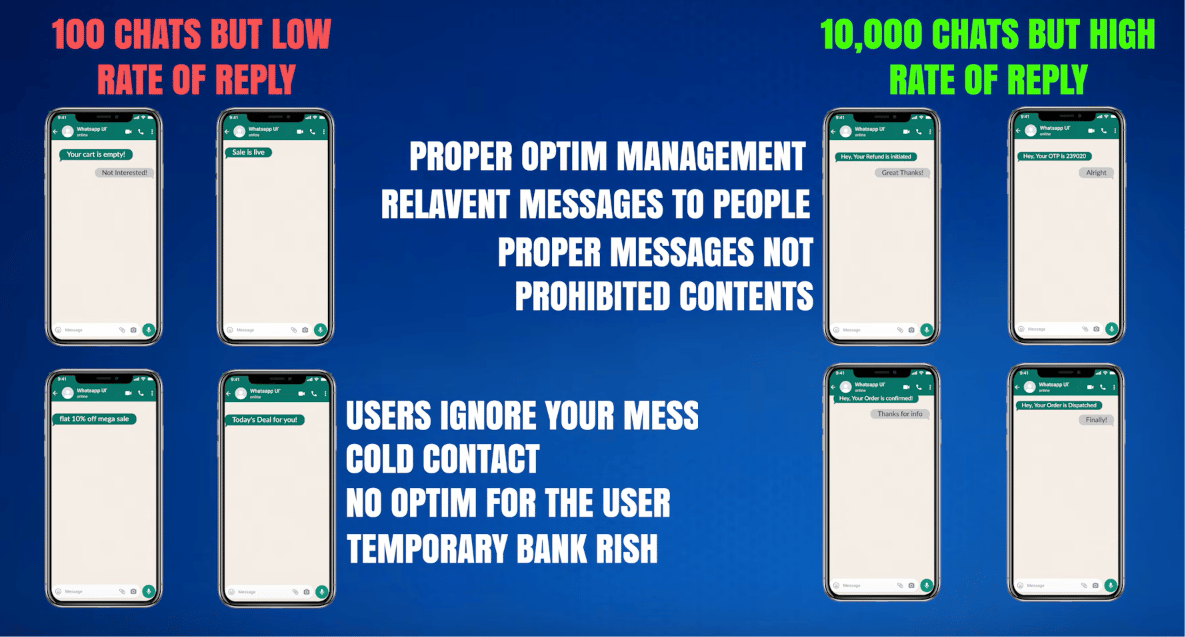
> 10,000 messages a day with a 45% reply rate is *safer* than 100 messages a day at a 3% reply
> rate. Volume is not the enemy. Irrelevance is.
## Why accounts actually get banned
There are three official reasons, plus a behavioral layer WhatsApp's systems track underneath
all three.
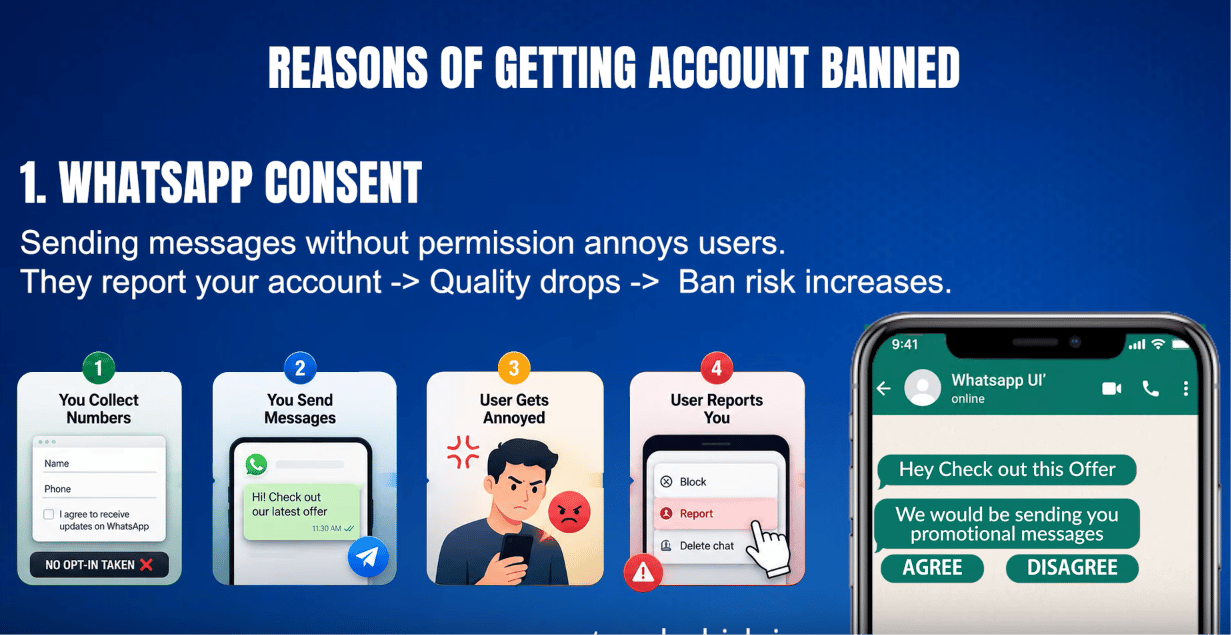
### 1. Messaging people without consent
This is the single most important rule in WhatsApp's Business Messaging Policy:
> *"You may only contact people on WhatsApp if: (a) they have given you their mobile phone
> number; and (b) you have received opt-in permission from the recipient confirming that they
> wish to receive subsequent messages or calls from you."*
Most bans trace back to exactly this — a business buys a contact list, scrapes numbers, or
messages people who never asked to hear from them. When someone didn't opt in, they block the
number or report it as spam. Those blocks and reports are what actually trigger enforcement.
### 2. Blocks and reports damaging the quality rating
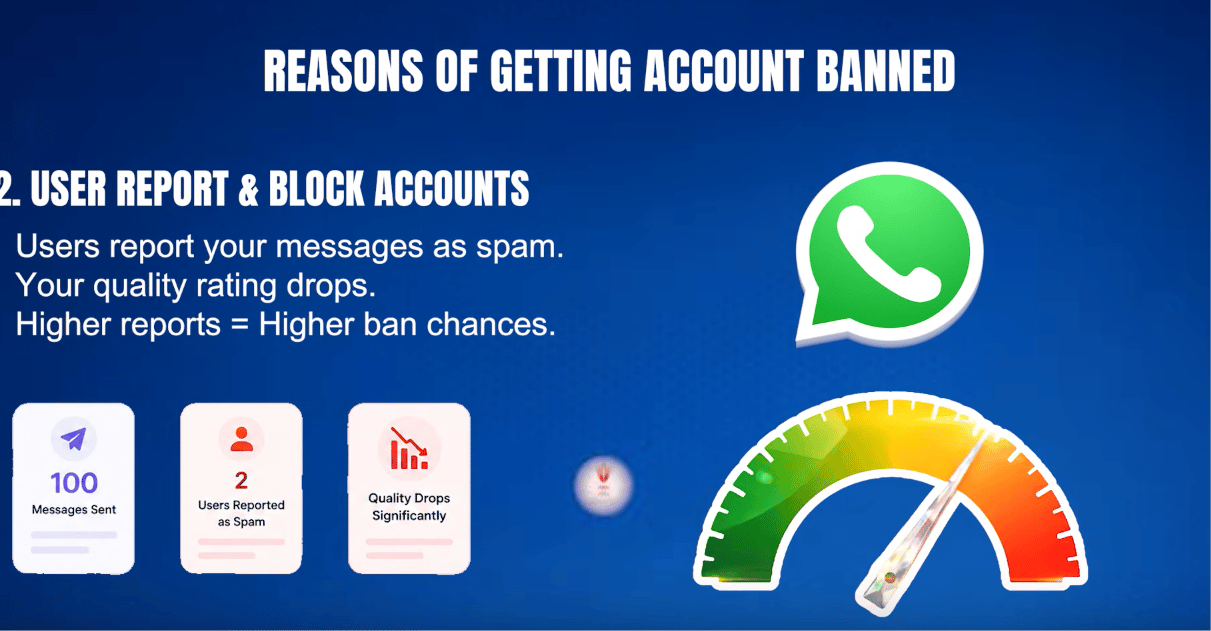
Every block or spam report is a negative signal that feeds into a number's **Quality Rating**
(Green / Yellow / Red). WhatsApp's own policy states plainly that *"systems will limit the
amount of messages a business can send if the business' quality tier is low for a sustained
period of time."*
As a rough, real-world (not officially published) guideline: crossing a **block rate around
2%** of everyone messaged is typically where a rating starts slipping toward Red. Once a number
is Red, there's usually about a **7-day window** to fix things before messaging gets restricted.
### 3. Prohibited business categories
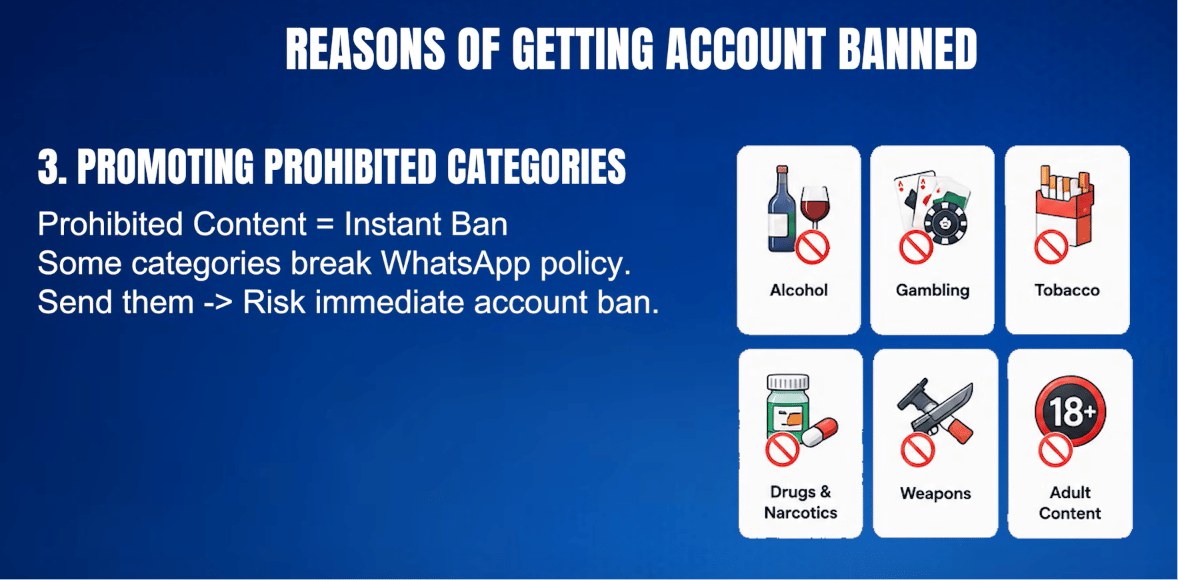
Some categories are never allowed on WhatsApp Business, regardless of opt-in or quality rating:
* **Cryptocurrency and ICOs** — high fraud risk and largely unregulated, so Meta blocks the
category outright rather than trying to police individual scams.
* **Real-money gambling** — betting, lotteries, and casino-style apps are restricted regardless
of local legality.
* **Adult content and dating services** — restricted regardless of how the business frames it.
* **Multi-level marketing** — recruitment-based "join and earn" business models are blocked, not
just outright pyramid schemes.
* **Payday loans and debt collection** — predatory or high-pressure lending/collection practices.
* **Drugs — prescription or recreational** — Meta generally prohibits the promotion, sale, or
facilitation of prescription drugs and recreational drugs through WhatsApp Business and other
Meta commerce products. This includes ordinary prescription medicines, not just illegal drugs.
Businesses must comply with Meta's Commerce Policies and applicable laws.
* **Firearms** — weapons, ammunition, and related accessories.
Meta also reserves a broad right to restrict *"business models, goods, items, or services that
we determine may be fraudulent, misleading, offensive, or deceptive."*
### The behavioral signals underneath all three
WhatsApp uses machine-learning systems to flag abusive behavior at scale, without publishing
exact thresholds. Based on real-world usage patterns (not an official Meta number), the signals
that most consistently get accounts flagged are:
* **High send volume with a low reply rate** — a lot of messages that almost nobody responds to
reads as spam to the system.
* **The same message sent to many contacts at once**, especially contacts who never messaged
first.
* **Sudden volume spikes** — jumping from 50 messages a day to 5,000 overnight is a red flag.
* **Messages to contacts who then block or report** — the clearest negative signal there is.
A healthy marketing campaign typically sees a **30–50% reply rate**; anything consistently below
**15%** starts hurting the quality rating — regardless of how few messages were sent.
Two real-shaped examples of the same idea:
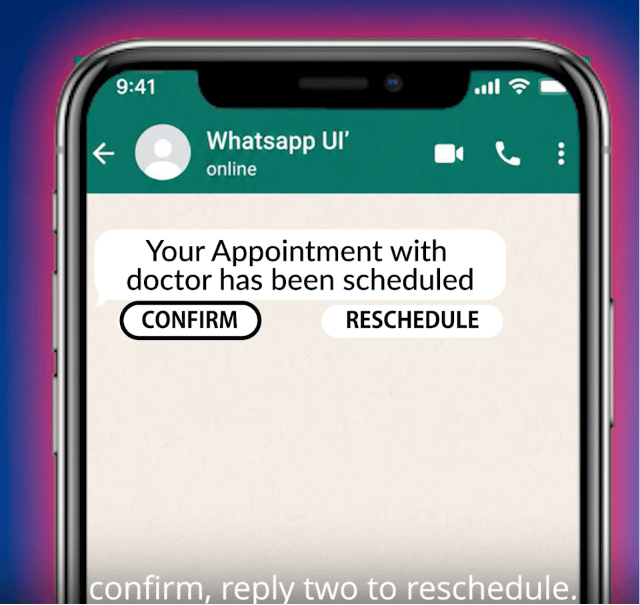
**New in 2026 — the unanswered-message counter.** WhatsApp now also tracks messages that get
**no reply within 48 hours**, added up across every conversation on a rolling 30-day window.
This can catch a fully compliant business by surprise — e.g. a clinic sending approved
appointment reminders where patients just show up instead of replying, with nothing telling
WhatsApp the message actually landed. The fix: design every message to invite a reply, e.g.
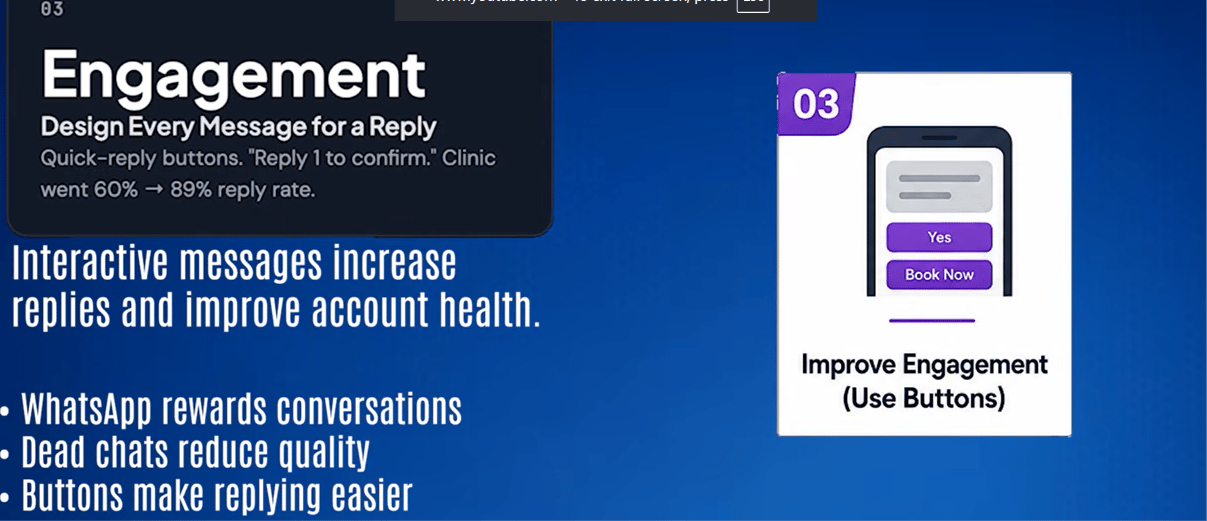
*"Reply 1 to confirm, 2 to reschedule."* A quick-reply button like this gives the customer an
easy one-tap way to respond instead of having to type something back — and once they can reply
that easily, more of them actually do. That's exactly what happened in one real case: adding
that single line took the reply rate from 60% to 89%, and the quality rating recovered within
two weeks, simply because WhatsApp could now see the messages were wanted and being acted on.
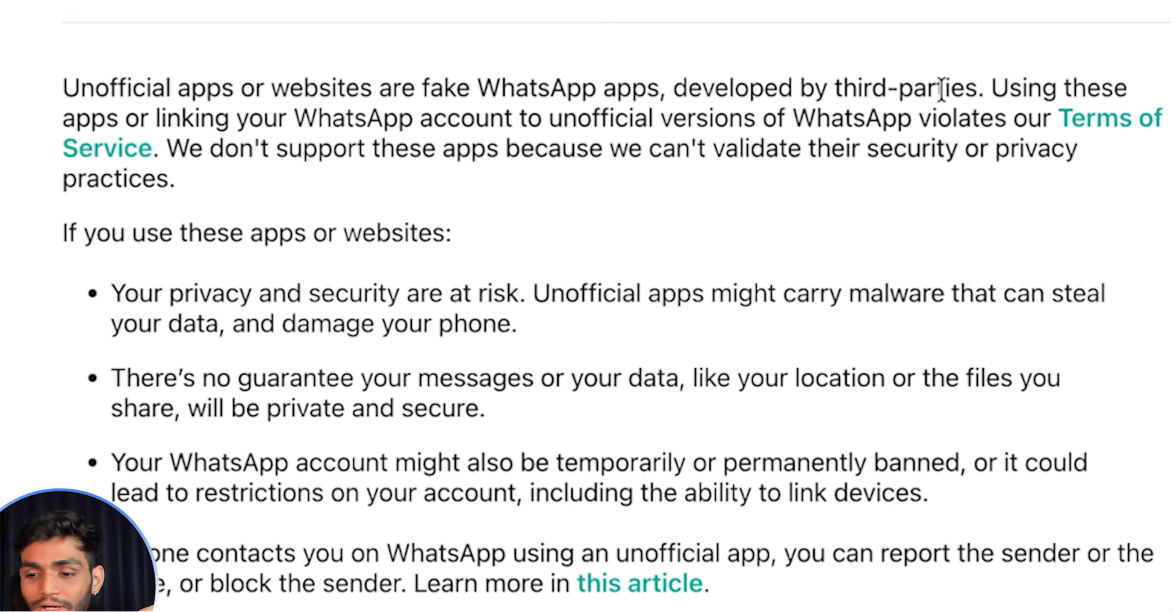
## The unofficial API risk (Baileys, WPPConnect, and similar)
Tools that reverse-engineer WhatsApp Web to send messages without Meta's official API are cheap
and quick to set up — but they explicitly warn against the exact use case most businesses want
them for. Baileys' own README says: *"We discourage any stalkerware, bulk or automated messaging
usage."* WhatsApp's own help documentation is just as direct about the risk of using them at all:
Mass ban waves have already happened — in October 2025, bots that had run cleanly on unofficial
APIs for **three years** were banned overnight, with no warning and no appeal path. Real-world
tracking across many deployments suggests:
* An unofficial-API bot that only **replies to incoming messages**: under 2% annual ban risk.
* An unofficial-API bot that **proactively messages people**: roughly **15–30% annual ban risk**.
That means if a number is running proactive messaging on an unofficial API, there's a real
chance — call it 1 in 5 to 1 in 3 — it's gone within a year. And when an unofficial-API number
is banned, **it is permanently blacklisted.** There is no appeal process and no support ticket to
file, because Meta never recognized the connection as legitimate in the first place.
Never run a real business number through an unofficial / QR-code WhatsApp tool. ChatSyncs
connects through the **official Meta Cloud API** for exactly this reason — official-API accounts
can recover from a bad quality rating; unofficial-API accounts generally cannot recover at all.
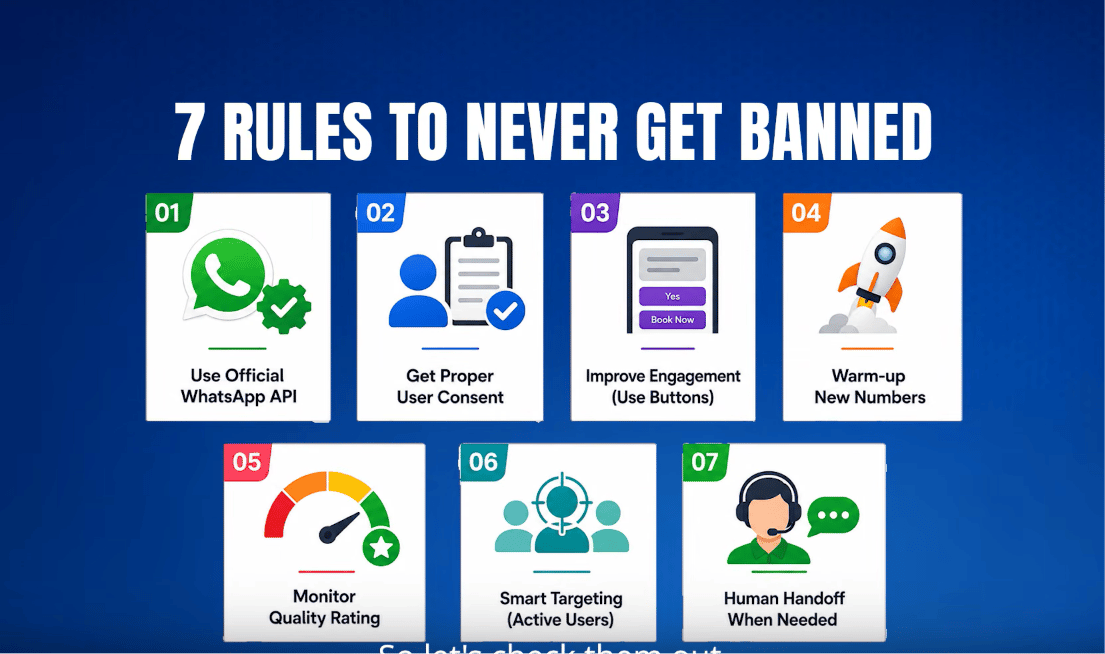
## The 7 rules to stay safe
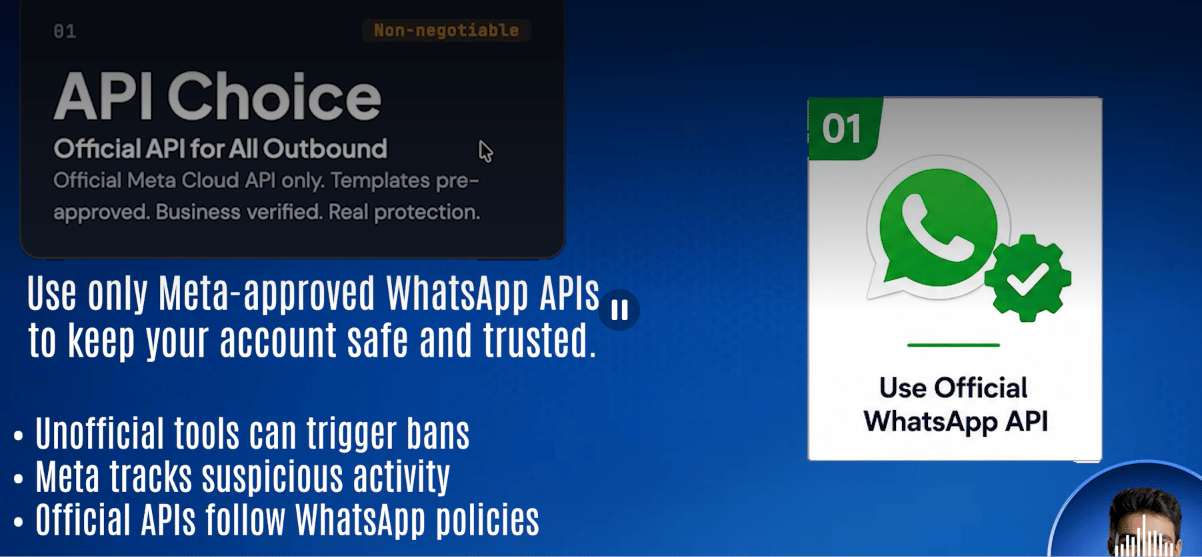
1. **Official API only** — never an unofficial QR-based connection. Template pre-approval and
business verification exist specifically to prevent the kind of content bans that unofficial
tools can't protect against.
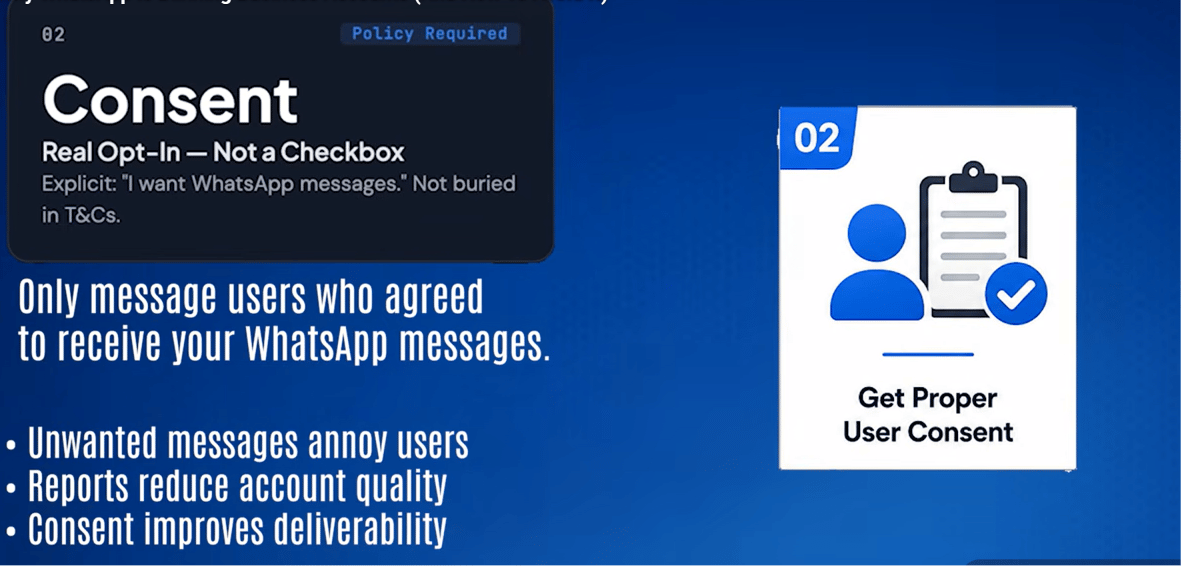
2. **Real opt-in, not a checkbox** — *"I want to receive order updates and promotions via
WhatsApp"* is real consent; *"I agree to the terms and conditions"* buried in fine print is
not. This one rule prevents the largest share of reports and blocks.
3. **Design every message to get a reply** — quick-reply buttons, simple yes/no questions,
*"Reply 1 to confirm."* Reply rate is a trust signal WhatsApp actively tracks.
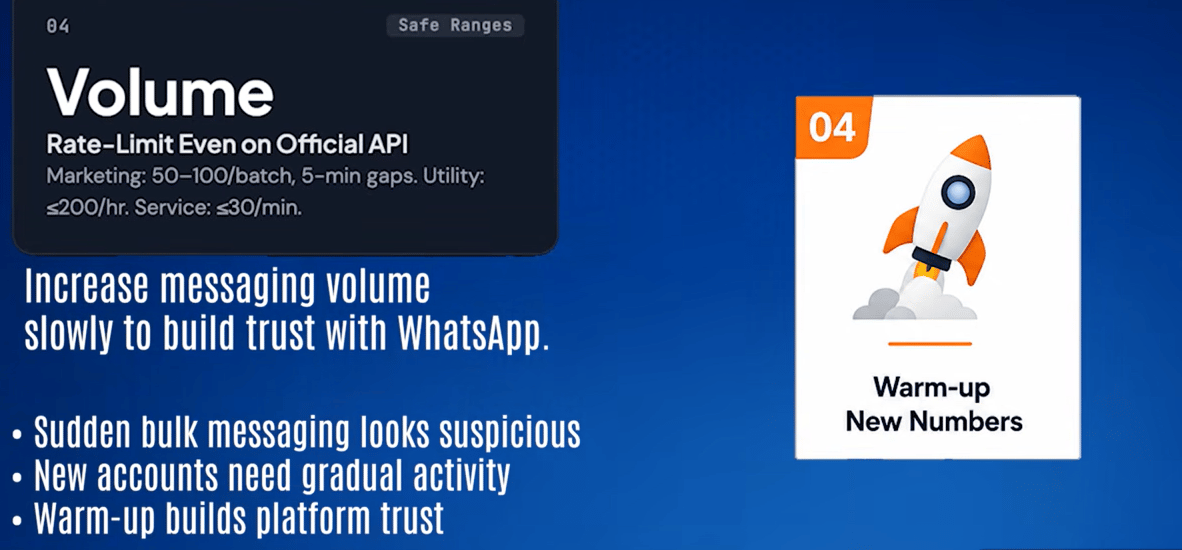
4. **Rate-limit sends, even on the official API.** Reasonable, real-world operating ranges:
marketing messages in batches of 50–100 with a few minutes between batches; utility messages
(order updates, reminders) under roughly 200/hour; service replies to inbound messages under
about 30/minute.
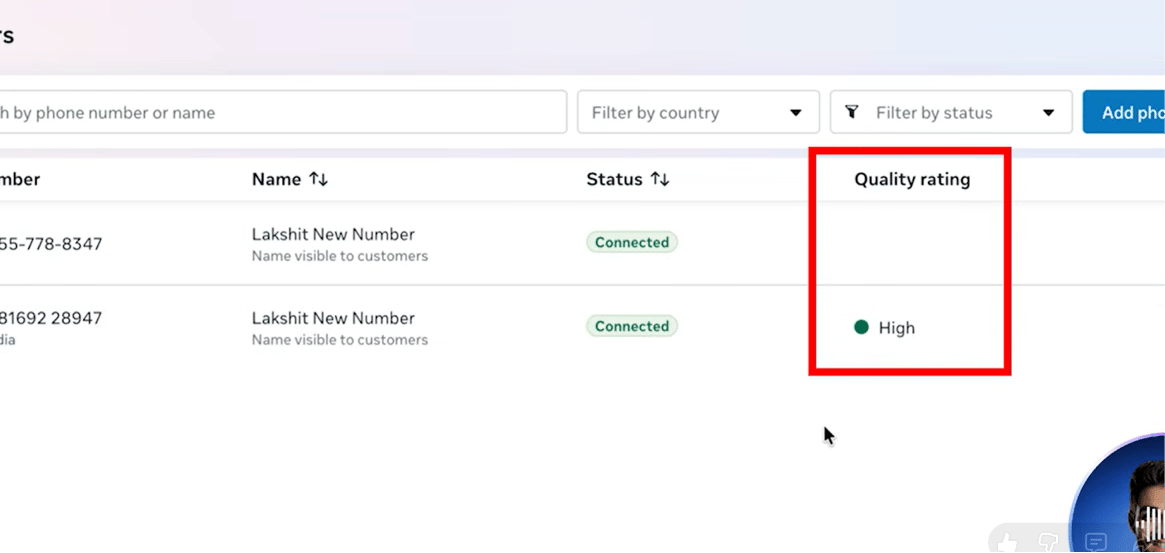
5. **Check the quality rating every week** in Meta Business Suite → Phone Numbers → Quality
Rating — it takes 30 seconds and catches problems before they become a ban:
| Rating | Colour | What to do |
| ------ | --------- | --------------------------------------------------------- |
| High | 🟢 Green | Keep going — the account is safe. |
| Medium | 🟡 Yellow | Review templates — something is generating reports. |
| Low | 🔴 Red | Stop all marketing templates immediately and investigate. |
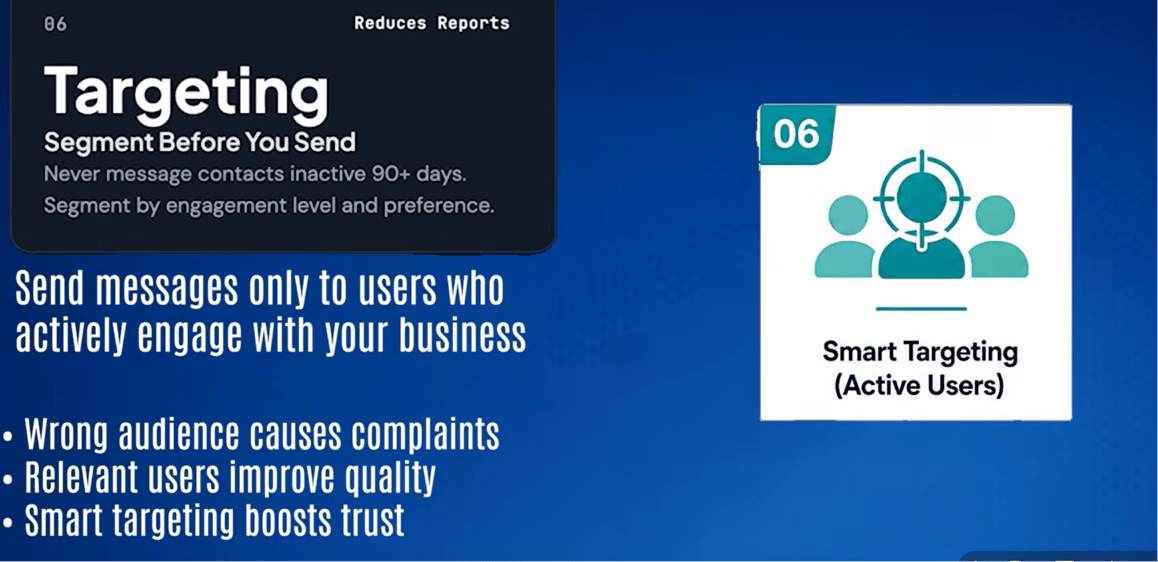
6. **Segment before sending** — don't send every campaign to every contact. At minimum, segment
by last interaction date (skip anyone inactive 90+ days), engagement level, and message-type
preference (some customers want reminders but not promotions).
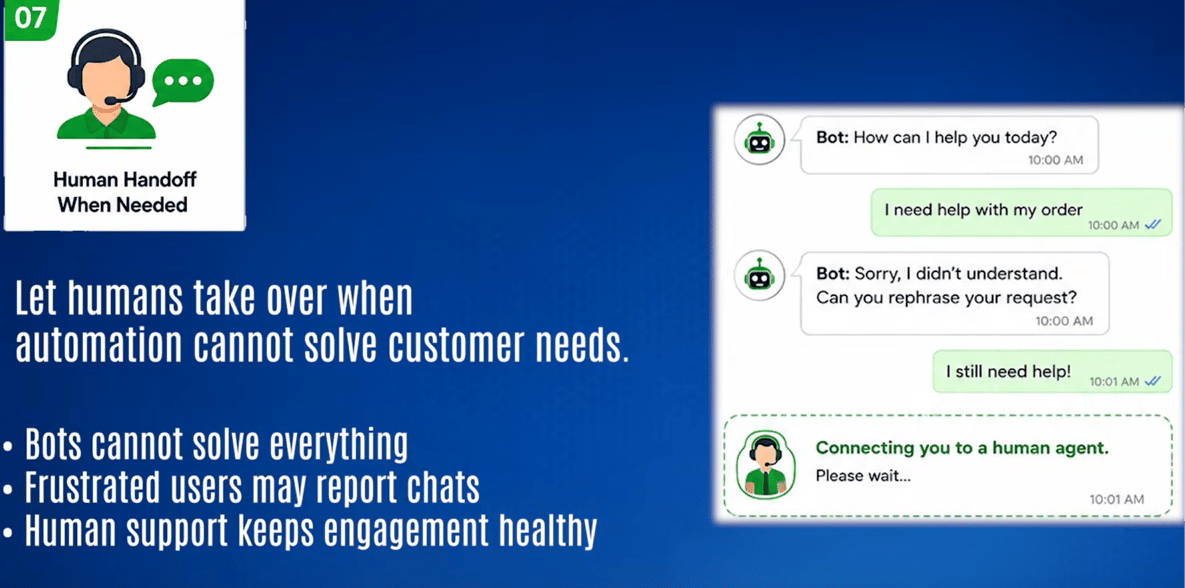
7. **Escalate to a human after two failed bot responses.** A customer who can't reach a real
person will block the number — and that block is permanent.
Do not try to unlock higher messaging tiers by pushing volume quickly. WhatsApp's tier system
upgrades a number automatically once quality is sustained:
| Tier | Unique customers per 24 hours | How it unlocks |
| ---------- | ----------------------------- | ------------------------------------------------------------------ |
| Unverified | 250 | Default starting state |
| Tier 1 | 1,000 | Connected status + approved display name |
| Tier 2 | 10,000 | High/Medium quality sustained for 7 days at \~50% of Tier 1 volume |
| Tier 3 | 100,000 | Same pattern, one level up |
| Tier 4 | Unlimited | — |
Warm up slowly — quality earns the next tier automatically.
## Real cost: official vs unofficial API
An unofficial API looks cheaper on the surface — just server hosting, no per-message fee — but
that comparison leaves out the cost of losing the number entirely, which unofficial APIs carry a
real (15–30% annual) risk of. The official API's per-message rate in India (₹0.85 for marketing
messages) is passed straight through with no markup, so the extra monthly cost buys template
pre-approval, business verification, and a number that can actually recover if its quality
rating drops.
## How ChatSyncs helps you follow these rules automatically
ChatSyncs can't read a customer's mind, but it can automate the parts of compliance that are
mechanical rather than judgment calls:
* **Send messages only to opted-in users.** Make sure users have explicitly agreed to receive
WhatsApp messages, and avoid sending templates to purchased or scraped contact lists.
* **Stop messaging users who don't engage.** If a user doesn't open, reply, or click after a few
campaigns, automatically add a label such as `Inactive` or `No Engagement`, then exclude that
label from future broadcasts.
* **Respect opt-outs immediately.** If a user replies *"STOP"*, *"UNSUBSCRIBE"*, *"NO,"* or
similar, automatically add a `Do Not Contact` label and exclude it from every future campaign.
* **Use labels and segmentation.** Send a campaign only to the contacts actually interested in
that topic, instead of blasting every campaign to every contact.
* **Limit broadcast frequency.** Don't send marketing templates every day — space campaigns out
so they don't wear out their welcome.
* **Monitor quality.** If the WhatsApp quality rating drops, reduce marketing broadcasts until it
recovers.
Concretely, this can look like:
* A user replies **STOP** → ChatSyncs automatically adds a `Do Not Contact` label.
* A user blocks or opts out (wherever WhatsApp exposes that as an event) → ChatSyncs adds an
exclusion label.
* Broadcasts are configured to target only users **without** the `Do Not Contact` or `Inactive`
labels.
* After several campaigns with no engagement, a contact moves into an `Inactive` segment and
stops receiving marketing templates.
**An important limitation to understand.** If someone simply ignores a message — doesn't reply,
doesn't click — WhatsApp's API does not send an event saying *"this person disliked the
message."* Likewise, if someone reports a message as spam, Meta does not identify which specific
user did it — only overall quality metrics are visible, never individual reporters.
So the realistic strategy is: **track engagement yourself** (ChatSyncs's labels do this),
**automatically exclude inactive or opted-out contacts**, and **only send relevant,
permission-based campaigns.** That combination is the safest practical approach to keeping a
WhatsApp Business account healthy and out of restriction/ban territory — there's no way to get
perfect visibility into why any single message underperformed.
## If a number is already banned
### On the official API — this is recoverable
1. Check the current status in Meta Business Suite → Phone Numbers → Quality Rating.
2. Pause all marketing templates immediately — keep only utility and service messages running.
3. Look at template analytics to see which specific templates have low quality ratings — those
are the ones generating reports.
4. Improve those templates: add interactive buttons, personalize the content, reduce send
frequency.
5. Wait roughly 7 days — quality ratings are re-evaluated on a weekly cycle.
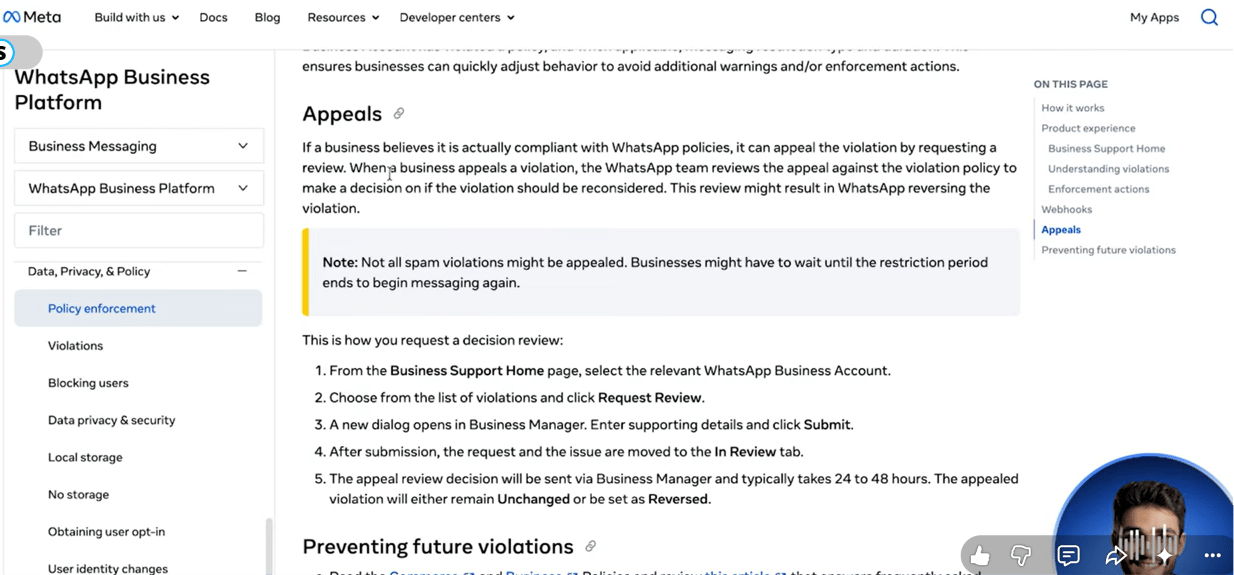
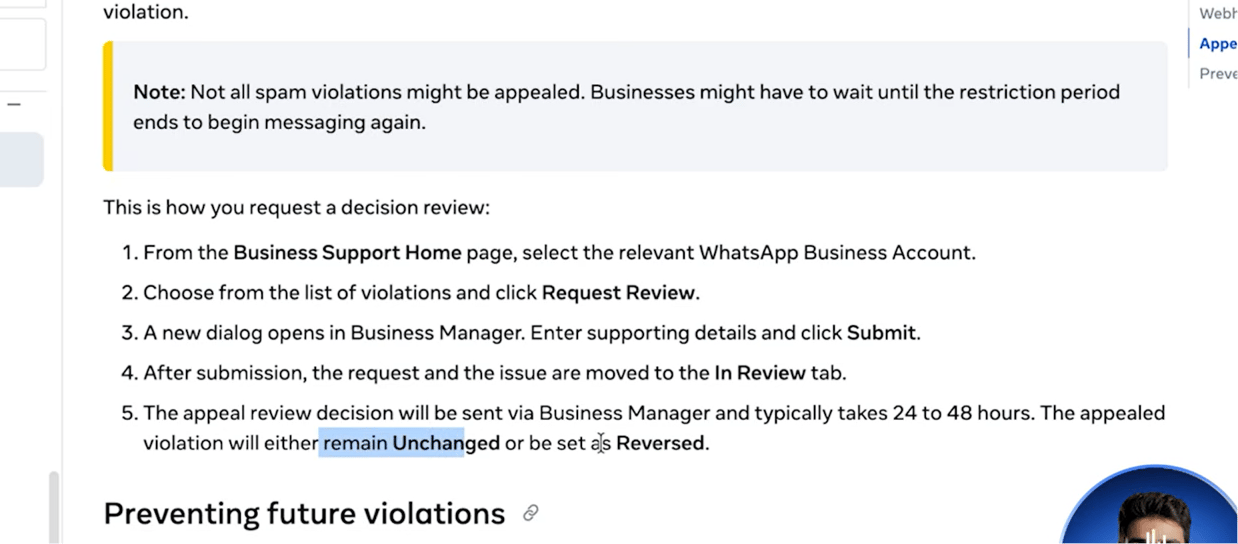
6. If the account is still restricted beyond a quality downgrade, file an appeal through Meta
Business Support with business verification details and a clear explanation of the opt-in
process used.
### On an unofficial API — the number is gone
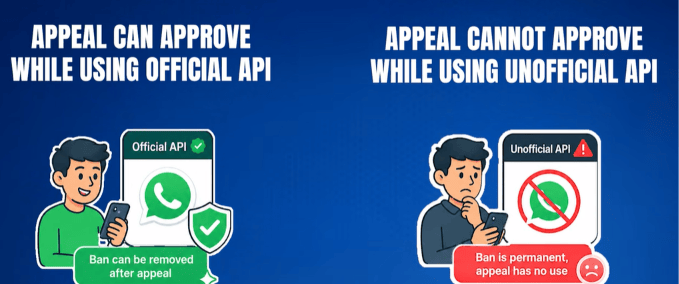
If a number was banned while running an unofficial tool (Baileys, WPPConnect, or similar), it is
**permanently lost** — there's no appeal process and no Meta support ticket that applies, because
the connection was never an officially recognized one.
The realistic path forward:
1. Stop all proactive messaging on any remaining accounts immediately.
2. Switch any still-active accounts to reactive-only (replying to inbound messages) while
migrating.
3. Get a new phone number.
4. Register it properly through the official Meta Cloud API this time.
5. Warm it up slowly — start with 10–20 messages a day to contacts likely to reply, and scale up
by roughly 20% every few days rather than jumping straight to full volume.
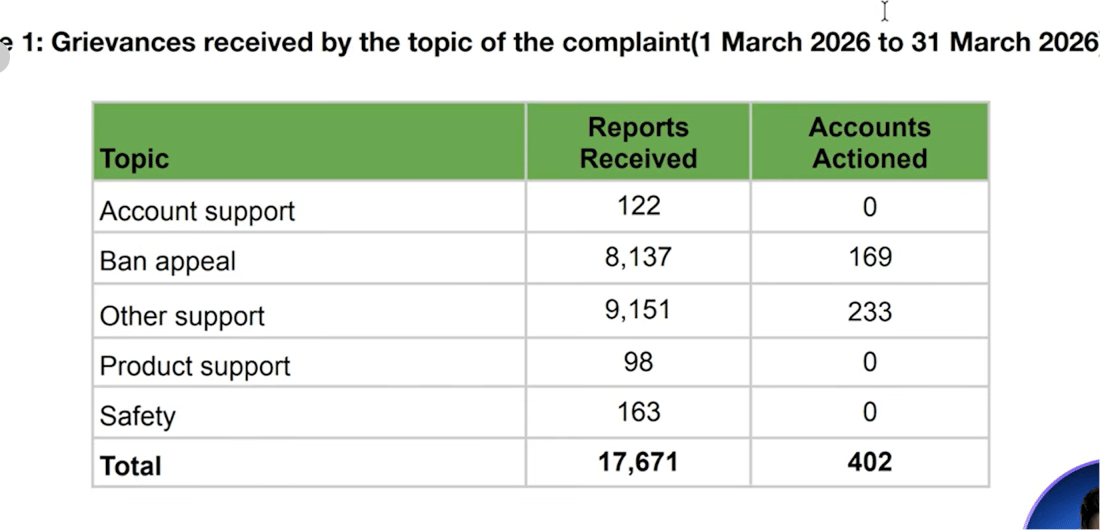
Don't count on winning an appeal even on the official API. WhatsApp India's monthly transparency
report for March 2026 shows **8,137 ban appeals received, with only 169 actioned** — a roughly
**2% success rate**. It's still worth trying, but prevention is far more reliable than recovery.
## Frequently asked
Not by itself. WhatsApp bans accounts for sending messages people didn't want, not for
volume — a high-volume, high-reply-rate account is safer than a low-volume account nobody
responds to.
No. WhatsApp only exposes overall quality metrics, never which specific contact reported a
message or which one simply ignored it. Track engagement yourself instead (see how ChatSyncs
does this above).
No — unofficial-API bans have no appeal path, because Meta never recognized that connection
as legitimate. The number is permanently blacklisted; the only path forward is a new number
connected through the official API.
Check Meta Business Suite → Phone Numbers → Quality Rating weekly. Yellow means something is
generating reports and needs review; Red means stop all marketing templates immediately.
Treat anyone inactive for 90+ days as a risk — they've likely forgotten opting in and are
more likely to block or report. Segment them out or move them to an inactive/no-engagement
label instead of including them in broadcasts.
## What's next
Now that the rules are clear, see what WhatsApp automation actually costs in the
[pricing lesson](/learn/whatsapp-api-pricing) — then move on to setting up your Meta account.
 **8 million WhatsApp accounts get permanently banned every month, worldwide.** In India alone,
**92 million accounts were banned in 2024** — over three times more than in 2022. Most of them
weren't spammers. They were real businesses sending appointment reminders, order updates, and
follow-ups, who simply didn't know the rules.
And here's the part that makes it worse: **most bans come with no warning at all.** No email,
no notification — a business opens WhatsApp one morning and the number is just gone, along with
its entire chat history and customer list.
This lesson covers three things: **why accounts actually get banned, the rules that keep a
number safe, and what to do if a number is already banned.**
That scale is worth keeping in mind: WhatsApp has **2 billion monthly active users** globally,
handling **100 billion messages a day** — and in India, a marketing message costs as little as
**₹0.85**, the lowest rate anywhere in the world. A **healthy campaign typically gets a 30–50%
reply rate**; that benchmark is what the rest of this lesson is built around.
## The one idea that matters
WhatsApp doesn't ban you for sending **too many** messages. It bans you for sending messages
people **didn't want**. A high reply rate is your protection; a high block rate is what kills
you.
> 10,000 messages a day with a 45% reply rate is *safer* than 100 messages a day at a 3% reply
> rate. Volume is not the enemy. Irrelevance is.
## Why accounts actually get banned
There are three official reasons, plus a behavioral layer WhatsApp's systems track underneath
all three.
### 1. Messaging people without consent
This is the single most important rule in WhatsApp's Business Messaging Policy:
> *"You may only contact people on WhatsApp if: (a) they have given you their mobile phone
> number; and (b) you have received opt-in permission from the recipient confirming that they
> wish to receive subsequent messages or calls from you."*
Most bans trace back to exactly this — a business buys a contact list, scrapes numbers, or
messages people who never asked to hear from them. When someone didn't opt in, they block the
number or report it as spam. Those blocks and reports are what actually trigger enforcement.
**8 million WhatsApp accounts get permanently banned every month, worldwide.** In India alone,
**92 million accounts were banned in 2024** — over three times more than in 2022. Most of them
weren't spammers. They were real businesses sending appointment reminders, order updates, and
follow-ups, who simply didn't know the rules.
And here's the part that makes it worse: **most bans come with no warning at all.** No email,
no notification — a business opens WhatsApp one morning and the number is just gone, along with
its entire chat history and customer list.
This lesson covers three things: **why accounts actually get banned, the rules that keep a
number safe, and what to do if a number is already banned.**
That scale is worth keeping in mind: WhatsApp has **2 billion monthly active users** globally,
handling **100 billion messages a day** — and in India, a marketing message costs as little as
**₹0.85**, the lowest rate anywhere in the world. A **healthy campaign typically gets a 30–50%
reply rate**; that benchmark is what the rest of this lesson is built around.
## The one idea that matters
WhatsApp doesn't ban you for sending **too many** messages. It bans you for sending messages
people **didn't want**. A high reply rate is your protection; a high block rate is what kills
you.
> 10,000 messages a day with a 45% reply rate is *safer* than 100 messages a day at a 3% reply
> rate. Volume is not the enemy. Irrelevance is.
## Why accounts actually get banned
There are three official reasons, plus a behavioral layer WhatsApp's systems track underneath
all three.
### 1. Messaging people without consent
This is the single most important rule in WhatsApp's Business Messaging Policy:
> *"You may only contact people on WhatsApp if: (a) they have given you their mobile phone
> number; and (b) you have received opt-in permission from the recipient confirming that they
> wish to receive subsequent messages or calls from you."*
Most bans trace back to exactly this — a business buys a contact list, scrapes numbers, or
messages people who never asked to hear from them. When someone didn't opt in, they block the
number or report it as spam. Those blocks and reports are what actually trigger enforcement.
 ### 2. Blocks and reports damaging the quality rating
Every block or spam report is a negative signal that feeds into a number's **Quality Rating**
(Green / Yellow / Red). WhatsApp's own policy states plainly that *"systems will limit the
amount of messages a business can send if the business' quality tier is low for a sustained
period of time."*
As a rough, real-world (not officially published) guideline: crossing a **block rate around
2%** of everyone messaged is typically where a rating starts slipping toward Red. Once a number
is Red, there's usually about a **7-day window** to fix things before messaging gets restricted.
### 2. Blocks and reports damaging the quality rating
Every block or spam report is a negative signal that feeds into a number's **Quality Rating**
(Green / Yellow / Red). WhatsApp's own policy states plainly that *"systems will limit the
amount of messages a business can send if the business' quality tier is low for a sustained
period of time."*
As a rough, real-world (not officially published) guideline: crossing a **block rate around
2%** of everyone messaged is typically where a rating starts slipping toward Red. Once a number
is Red, there's usually about a **7-day window** to fix things before messaging gets restricted.
 ### 3. Prohibited business categories
Some categories are never allowed on WhatsApp Business, regardless of opt-in or quality rating:
* **Cryptocurrency and ICOs** — high fraud risk and largely unregulated, so Meta blocks the
category outright rather than trying to police individual scams.
* **Real-money gambling** — betting, lotteries, and casino-style apps are restricted regardless
of local legality.
* **Adult content and dating services** — restricted regardless of how the business frames it.
* **Multi-level marketing** — recruitment-based "join and earn" business models are blocked, not
just outright pyramid schemes.
* **Payday loans and debt collection** — predatory or high-pressure lending/collection practices.
* **Drugs — prescription or recreational** — Meta generally prohibits the promotion, sale, or
facilitation of prescription drugs and recreational drugs through WhatsApp Business and other
Meta commerce products. This includes ordinary prescription medicines, not just illegal drugs.
Businesses must comply with Meta's Commerce Policies and applicable laws.
* **Firearms** — weapons, ammunition, and related accessories.
Meta also reserves a broad right to restrict *"business models, goods, items, or services that
we determine may be fraudulent, misleading, offensive, or deceptive."*
### 3. Prohibited business categories
Some categories are never allowed on WhatsApp Business, regardless of opt-in or quality rating:
* **Cryptocurrency and ICOs** — high fraud risk and largely unregulated, so Meta blocks the
category outright rather than trying to police individual scams.
* **Real-money gambling** — betting, lotteries, and casino-style apps are restricted regardless
of local legality.
* **Adult content and dating services** — restricted regardless of how the business frames it.
* **Multi-level marketing** — recruitment-based "join and earn" business models are blocked, not
just outright pyramid schemes.
* **Payday loans and debt collection** — predatory or high-pressure lending/collection practices.
* **Drugs — prescription or recreational** — Meta generally prohibits the promotion, sale, or
facilitation of prescription drugs and recreational drugs through WhatsApp Business and other
Meta commerce products. This includes ordinary prescription medicines, not just illegal drugs.
Businesses must comply with Meta's Commerce Policies and applicable laws.
* **Firearms** — weapons, ammunition, and related accessories.
Meta also reserves a broad right to restrict *"business models, goods, items, or services that
we determine may be fraudulent, misleading, offensive, or deceptive."*
 ### The behavioral signals underneath all three
WhatsApp uses machine-learning systems to flag abusive behavior at scale, without publishing
exact thresholds. Based on real-world usage patterns (not an official Meta number), the signals
that most consistently get accounts flagged are:
* **High send volume with a low reply rate** — a lot of messages that almost nobody responds to
reads as spam to the system.
* **The same message sent to many contacts at once**, especially contacts who never messaged
first.
* **Sudden volume spikes** — jumping from 50 messages a day to 5,000 overnight is a red flag.
* **Messages to contacts who then block or report** — the clearest negative signal there is.
A healthy marketing campaign typically sees a **30–50% reply rate**; anything consistently below
**15%** starts hurting the quality rating — regardless of how few messages were sent.
Two real-shaped examples of the same idea:
### The behavioral signals underneath all three
WhatsApp uses machine-learning systems to flag abusive behavior at scale, without publishing
exact thresholds. Based on real-world usage patterns (not an official Meta number), the signals
that most consistently get accounts flagged are:
* **High send volume with a low reply rate** — a lot of messages that almost nobody responds to
reads as spam to the system.
* **The same message sent to many contacts at once**, especially contacts who never messaged
first.
* **Sudden volume spikes** — jumping from 50 messages a day to 5,000 overnight is a red flag.
* **Messages to contacts who then block or report** — the clearest negative signal there is.
A healthy marketing campaign typically sees a **30–50% reply rate**; anything consistently below
**15%** starts hurting the quality rating — regardless of how few messages were sent.
Two real-shaped examples of the same idea:
 Mass ban waves have already happened — in October 2025, bots that had run cleanly on unofficial
APIs for **three years** were banned overnight, with no warning and no appeal path. Real-world
tracking across many deployments suggests:
* An unofficial-API bot that only **replies to incoming messages**: under 2% annual ban risk.
* An unofficial-API bot that **proactively messages people**: roughly **15–30% annual ban risk**.
That means if a number is running proactive messaging on an unofficial API, there's a real
chance — call it 1 in 5 to 1 in 3 — it's gone within a year. And when an unofficial-API number
is banned, **it is permanently blacklisted.** There is no appeal process and no support ticket to
file, because Meta never recognized the connection as legitimate in the first place.
Mass ban waves have already happened — in October 2025, bots that had run cleanly on unofficial
APIs for **three years** were banned overnight, with no warning and no appeal path. Real-world
tracking across many deployments suggests:
* An unofficial-API bot that only **replies to incoming messages**: under 2% annual ban risk.
* An unofficial-API bot that **proactively messages people**: roughly **15–30% annual ban risk**.
That means if a number is running proactive messaging on an unofficial API, there's a real
chance — call it 1 in 5 to 1 in 3 — it's gone within a year. And when an unofficial-API number
is banned, **it is permanently blacklisted.** There is no appeal process and no support ticket to
file, because Meta never recognized the connection as legitimate in the first place.
 1. **Official API only** — never an unofficial QR-based connection. Template pre-approval and
business verification exist specifically to prevent the kind of content bans that unofficial
tools can't protect against.
1. **Official API only** — never an unofficial QR-based connection. Template pre-approval and
business verification exist specifically to prevent the kind of content bans that unofficial
tools can't protect against.
 2. **Real opt-in, not a checkbox** — *"I want to receive order updates and promotions via
WhatsApp"* is real consent; *"I agree to the terms and conditions"* buried in fine print is
not. This one rule prevents the largest share of reports and blocks.
2. **Real opt-in, not a checkbox** — *"I want to receive order updates and promotions via
WhatsApp"* is real consent; *"I agree to the terms and conditions"* buried in fine print is
not. This one rule prevents the largest share of reports and blocks.
 3. **Design every message to get a reply** — quick-reply buttons, simple yes/no questions,
*"Reply 1 to confirm."* Reply rate is a trust signal WhatsApp actively tracks.
3. **Design every message to get a reply** — quick-reply buttons, simple yes/no questions,
*"Reply 1 to confirm."* Reply rate is a trust signal WhatsApp actively tracks.
 4. **Rate-limit sends, even on the official API.** Reasonable, real-world operating ranges:
marketing messages in batches of 50–100 with a few minutes between batches; utility messages
(order updates, reminders) under roughly 200/hour; service replies to inbound messages under
about 30/minute.
4. **Rate-limit sends, even on the official API.** Reasonable, real-world operating ranges:
marketing messages in batches of 50–100 with a few minutes between batches; utility messages
(order updates, reminders) under roughly 200/hour; service replies to inbound messages under
about 30/minute.
 5. **Check the quality rating every week** in Meta Business Suite → Phone Numbers → Quality
Rating — it takes 30 seconds and catches problems before they become a ban:
5. **Check the quality rating every week** in Meta Business Suite → Phone Numbers → Quality
Rating — it takes 30 seconds and catches problems before they become a ban:
 | Rating | Colour | What to do |
| ------ | --------- | --------------------------------------------------------- |
| High | 🟢 Green | Keep going — the account is safe. |
| Medium | 🟡 Yellow | Review templates — something is generating reports. |
| Low | 🔴 Red | Stop all marketing templates immediately and investigate. |
6. **Segment before sending** — don't send every campaign to every contact. At minimum, segment
by last interaction date (skip anyone inactive 90+ days), engagement level, and message-type
preference (some customers want reminders but not promotions).
| Rating | Colour | What to do |
| ------ | --------- | --------------------------------------------------------- |
| High | 🟢 Green | Keep going — the account is safe. |
| Medium | 🟡 Yellow | Review templates — something is generating reports. |
| Low | 🔴 Red | Stop all marketing templates immediately and investigate. |
6. **Segment before sending** — don't send every campaign to every contact. At minimum, segment
by last interaction date (skip anyone inactive 90+ days), engagement level, and message-type
preference (some customers want reminders but not promotions).
 7. **Escalate to a human after two failed bot responses.** A customer who can't reach a real
person will block the number — and that block is permanent.
7. **Escalate to a human after two failed bot responses.** A customer who can't reach a real
person will block the number — and that block is permanent.
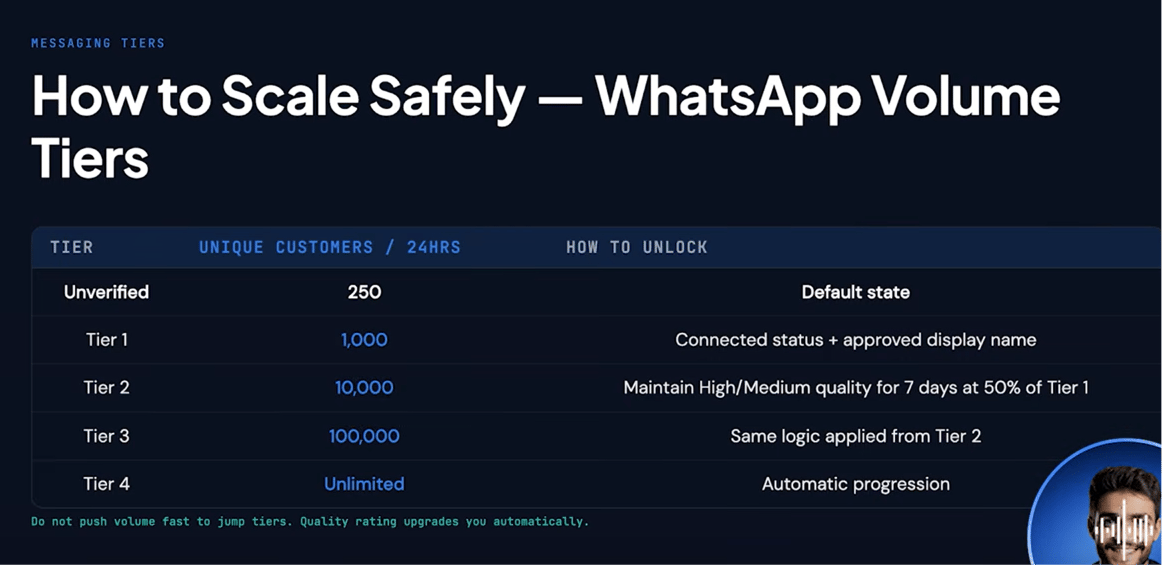 | Tier | Unique customers per 24 hours | How it unlocks |
| ---------- | ----------------------------- | ------------------------------------------------------------------ |
| Unverified | 250 | Default starting state |
| Tier 1 | 1,000 | Connected status + approved display name |
| Tier 2 | 10,000 | High/Medium quality sustained for 7 days at \~50% of Tier 1 volume |
| Tier 3 | 100,000 | Same pattern, one level up |
| Tier 4 | Unlimited | — |
Warm up slowly — quality earns the next tier automatically.
| Tier | Unique customers per 24 hours | How it unlocks |
| ---------- | ----------------------------- | ------------------------------------------------------------------ |
| Unverified | 250 | Default starting state |
| Tier 1 | 1,000 | Connected status + approved display name |
| Tier 2 | 10,000 | High/Medium quality sustained for 7 days at \~50% of Tier 1 volume |
| Tier 3 | 100,000 | Same pattern, one level up |
| Tier 4 | Unlimited | — |
Warm up slowly — quality earns the next tier automatically.
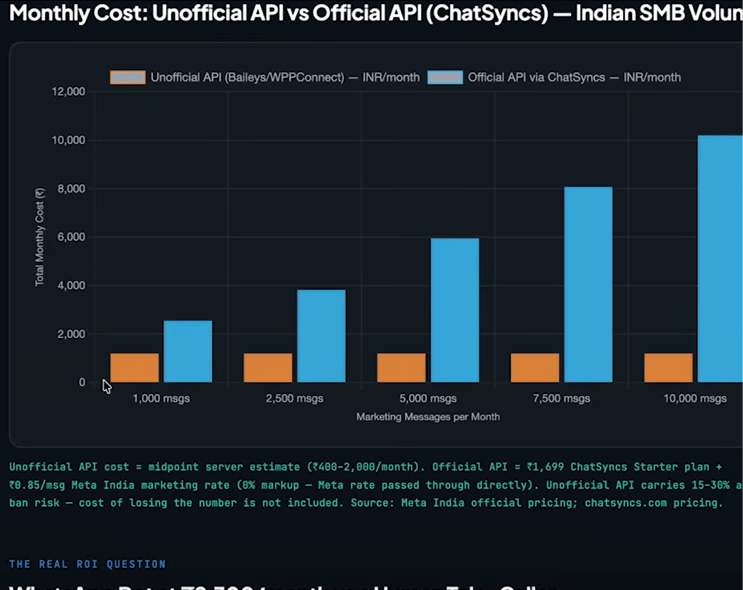 An unofficial API looks cheaper on the surface — just server hosting, no per-message fee — but
that comparison leaves out the cost of losing the number entirely, which unofficial APIs carry a
real (15–30% annual) risk of. The official API's per-message rate in India (₹0.85 for marketing
messages) is passed straight through with no markup, so the extra monthly cost buys template
pre-approval, business verification, and a number that can actually recover if its quality
rating drops.
## How ChatSyncs helps you follow these rules automatically
ChatSyncs can't read a customer's mind, but it can automate the parts of compliance that are
mechanical rather than judgment calls:
* **Send messages only to opted-in users.** Make sure users have explicitly agreed to receive
WhatsApp messages, and avoid sending templates to purchased or scraped contact lists.
* **Stop messaging users who don't engage.** If a user doesn't open, reply, or click after a few
campaigns, automatically add a label such as `Inactive` or `No Engagement`, then exclude that
label from future broadcasts.
* **Respect opt-outs immediately.** If a user replies *"STOP"*, *"UNSUBSCRIBE"*, *"NO,"* or
similar, automatically add a `Do Not Contact` label and exclude it from every future campaign.
* **Use labels and segmentation.** Send a campaign only to the contacts actually interested in
that topic, instead of blasting every campaign to every contact.
* **Limit broadcast frequency.** Don't send marketing templates every day — space campaigns out
so they don't wear out their welcome.
* **Monitor quality.** If the WhatsApp quality rating drops, reduce marketing broadcasts until it
recovers.
Concretely, this can look like:
* A user replies **STOP** → ChatSyncs automatically adds a `Do Not Contact` label.
* A user blocks or opts out (wherever WhatsApp exposes that as an event) → ChatSyncs adds an
exclusion label.
* Broadcasts are configured to target only users **without** the `Do Not Contact` or `Inactive`
labels.
* After several campaigns with no engagement, a contact moves into an `Inactive` segment and
stops receiving marketing templates.
An unofficial API looks cheaper on the surface — just server hosting, no per-message fee — but
that comparison leaves out the cost of losing the number entirely, which unofficial APIs carry a
real (15–30% annual) risk of. The official API's per-message rate in India (₹0.85 for marketing
messages) is passed straight through with no markup, so the extra monthly cost buys template
pre-approval, business verification, and a number that can actually recover if its quality
rating drops.
## How ChatSyncs helps you follow these rules automatically
ChatSyncs can't read a customer's mind, but it can automate the parts of compliance that are
mechanical rather than judgment calls:
* **Send messages only to opted-in users.** Make sure users have explicitly agreed to receive
WhatsApp messages, and avoid sending templates to purchased or scraped contact lists.
* **Stop messaging users who don't engage.** If a user doesn't open, reply, or click after a few
campaigns, automatically add a label such as `Inactive` or `No Engagement`, then exclude that
label from future broadcasts.
* **Respect opt-outs immediately.** If a user replies *"STOP"*, *"UNSUBSCRIBE"*, *"NO,"* or
similar, automatically add a `Do Not Contact` label and exclude it from every future campaign.
* **Use labels and segmentation.** Send a campaign only to the contacts actually interested in
that topic, instead of blasting every campaign to every contact.
* **Limit broadcast frequency.** Don't send marketing templates every day — space campaigns out
so they don't wear out their welcome.
* **Monitor quality.** If the WhatsApp quality rating drops, reduce marketing broadcasts until it
recovers.
Concretely, this can look like:
* A user replies **STOP** → ChatSyncs automatically adds a `Do Not Contact` label.
* A user blocks or opts out (wherever WhatsApp exposes that as an event) → ChatSyncs adds an
exclusion label.
* Broadcasts are configured to target only users **without** the `Do Not Contact` or `Inactive`
labels.
* After several campaigns with no engagement, a contact moves into an `Inactive` segment and
stops receiving marketing templates.
 ### On an unofficial API — the number is gone
If a number was banned while running an unofficial tool (Baileys, WPPConnect, or similar), it is
**permanently lost** — there's no appeal process and no Meta support ticket that applies, because
the connection was never an officially recognized one.
### On an unofficial API — the number is gone
If a number was banned while running an unofficial tool (Baileys, WPPConnect, or similar), it is
**permanently lost** — there's no appeal process and no Meta support ticket that applies, because
the connection was never an officially recognized one.
 The realistic path forward:
1. Stop all proactive messaging on any remaining accounts immediately.
2. Switch any still-active accounts to reactive-only (replying to inbound messages) while
migrating.
3. Get a new phone number.
4. Register it properly through the official Meta Cloud API this time.
5. Warm it up slowly — start with 10–20 messages a day to contacts likely to reply, and scale up
by roughly 20% every few days rather than jumping straight to full volume.
The realistic path forward:
1. Stop all proactive messaging on any remaining accounts immediately.
2. Switch any still-active accounts to reactive-only (replying to inbound messages) while
migrating.
3. Get a new phone number.
4. Register it properly through the official Meta Cloud API this time.
5. Warm it up slowly — start with 10–20 messages a day to contacts likely to reply, and scale up
by roughly 20% every few days rather than jumping straight to full volume.