> ## Documentation Index
> Fetch the complete documentation index at: https://docs.chatsyncs.com/llms.txt
> Use this file to discover all available pages before exploring further.
# Audio Message
> Audio Message sends a voice recording to a customer inside a Keyword Replies flow — a friendlier, more personal alternative to a wall of text. Use this when a customer wants to know where an audio clip can go in a flow, what real-world use cases it fits, or how long/what tone to record it in.
An **Audio Message** plays a voice recording to the customer inside a Keyword Replies flow — see
[Keyword Replies](/learn/whatsapp-keyword-replies#add-flow-components) for how to drag it onto the canvas
alongside the other flow components. Unlike a text message, audio lets a business explain
something in its own voice, which reads as more personal for greetings, walkthroughs, and
instructions.
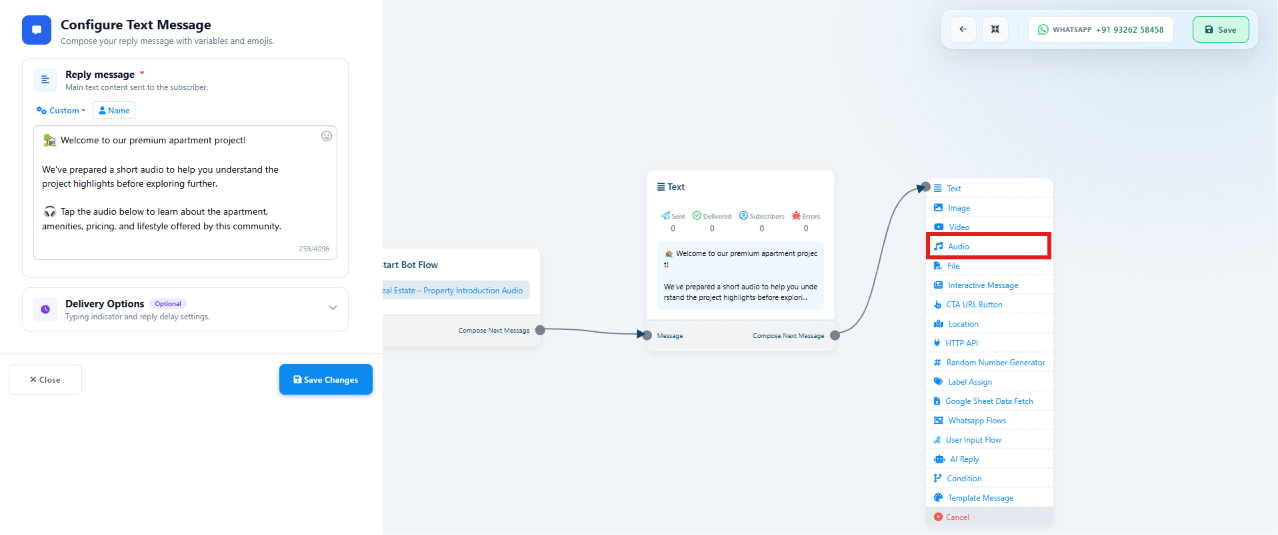 **Example:** a "Property Introduction Audio" flow sends a welcome text — *"We've prepared a
short audio to help you understand the project highlights before exploring further"* — then
plays a voice recording covering the apartment, amenities, pricing, and lifestyle.
## Where it can go in a flow
An Audio Message can connect after almost any other block, so it fits wherever a spoken
explanation adds value:
| Comes after | Typical reason to add audio |
| ------------------- | -------------------------------------------------------------- |
| Text Message | Reinforce a written welcome or instruction in a natural voice |
| Image Message | Describe what's in the photo — a property, product, or vehicle |
| Video Message | Add commentary the video itself doesn't cover |
| Document Message | Explain how to read or use a brochure, invoice, or catalog |
| Interactive Message | Narrate the options before the customer taps a button |
| CTA URL Button | Explain what the link leads to before the customer opens it |
| User Input Flow | Guide the customer through what information is being collected |
| AI Reply | Turn a text answer into a spoken summary for a more human feel |
| Condition | Explain the branch the conversation just took |
| WhatsApp Flow | Introduce a form before the customer fills it in |
| HTTP API Response | Read out live data fetched from an external system |
| Template Message | Add a voice follow-up to an approved template send |
## Common use cases
| Situation | Flow |
| ------------------------ | ------------------------------------------------------------------------------------------------------------------------------------ |
| Welcome greeting | `Hi → Welcome Text → Welcome Audio` |
| Property introduction | `Apartment Image → Project Introduction Audio` |
| Video explanation | `Video → Audio Explanation` |
| Document guide | `PDF Brochure → Audio Guide` |
| Product demonstration | `Product Image → Product Demo Audio` |
| AI assistant summary | `AI Reply → Audio Summary` |
| Appointment instructions | `Appointment Confirmed → Instruction Audio` |
| Course introduction | `Course List → Course Introduction Audio` |
| Vehicle showcase | `Car Image → Vehicle Overview Audio` |
| Restaurant special | `Today's Menu → Chef Recommendation Audio` |
| Travel package | `Holiday Package → Travel Guide Audio` |
| Customer support | `Support Menu → Troubleshooting Audio` |
| Announcements | New product launches, festival greetings, store openings, business updates, maintenance notices — sent as a standalone audio message |
The real estate **Property Introduction** example above is one instance of this same pattern —
see [Keyword Replies: Real Estate Property Showcase](/learn/bot-reply-use-case-real-estate) for a full
worked flow it could extend.
## Best practices
* Keep audio between **30–60 seconds** whenever possible — long recordings lose customers.
* Speak clearly, in a friendly tone, with background noise removed.
* Cover **one topic per audio message** rather than combining several ideas.
* End with a clear call to action — explore products, contact support, or book a service.
## Frequently asked
AAC, MP3, AMR, or OGG, up to 16 MB — see the component table in
[Keyword Replies](/learn/whatsapp-keyword-replies#add-flow-components). An OGG file encoded with the
Opus codec renders as a native WhatsApp voice note with a waveform; other formats play as a
regular audio file — see [Audio Messages](/meta-api/messaging/audio-messages).
Almost any of them — Text, Image, Video, Document, Interactive Message, CTA URL Button, User
Input Flow, AI Reply, Condition, WhatsApp Flow, HTTP API, and Template Message — see
[Where it can go in a flow](#where-it-can-go-in-a-flow) above.
30–60 seconds is the sweet spot — long enough to explain one thing clearly, short enough
that customers actually listen to the end.
Yes, but the common pattern pairs it with a short lead-in Text or Image message first (e.g.
`Hi → Welcome Text → Welcome Audio`) so the customer has context before the recording plays.
**Example:** a "Property Introduction Audio" flow sends a welcome text — *"We've prepared a
short audio to help you understand the project highlights before exploring further"* — then
plays a voice recording covering the apartment, amenities, pricing, and lifestyle.
## Where it can go in a flow
An Audio Message can connect after almost any other block, so it fits wherever a spoken
explanation adds value:
| Comes after | Typical reason to add audio |
| ------------------- | -------------------------------------------------------------- |
| Text Message | Reinforce a written welcome or instruction in a natural voice |
| Image Message | Describe what's in the photo — a property, product, or vehicle |
| Video Message | Add commentary the video itself doesn't cover |
| Document Message | Explain how to read or use a brochure, invoice, or catalog |
| Interactive Message | Narrate the options before the customer taps a button |
| CTA URL Button | Explain what the link leads to before the customer opens it |
| User Input Flow | Guide the customer through what information is being collected |
| AI Reply | Turn a text answer into a spoken summary for a more human feel |
| Condition | Explain the branch the conversation just took |
| WhatsApp Flow | Introduce a form before the customer fills it in |
| HTTP API Response | Read out live data fetched from an external system |
| Template Message | Add a voice follow-up to an approved template send |
## Common use cases
| Situation | Flow |
| ------------------------ | ------------------------------------------------------------------------------------------------------------------------------------ |
| Welcome greeting | `Hi → Welcome Text → Welcome Audio` |
| Property introduction | `Apartment Image → Project Introduction Audio` |
| Video explanation | `Video → Audio Explanation` |
| Document guide | `PDF Brochure → Audio Guide` |
| Product demonstration | `Product Image → Product Demo Audio` |
| AI assistant summary | `AI Reply → Audio Summary` |
| Appointment instructions | `Appointment Confirmed → Instruction Audio` |
| Course introduction | `Course List → Course Introduction Audio` |
| Vehicle showcase | `Car Image → Vehicle Overview Audio` |
| Restaurant special | `Today's Menu → Chef Recommendation Audio` |
| Travel package | `Holiday Package → Travel Guide Audio` |
| Customer support | `Support Menu → Troubleshooting Audio` |
| Announcements | New product launches, festival greetings, store openings, business updates, maintenance notices — sent as a standalone audio message |
The real estate **Property Introduction** example above is one instance of this same pattern —
see [Keyword Replies: Real Estate Property Showcase](/learn/bot-reply-use-case-real-estate) for a full
worked flow it could extend.
## Best practices
* Keep audio between **30–60 seconds** whenever possible — long recordings lose customers.
* Speak clearly, in a friendly tone, with background noise removed.
* Cover **one topic per audio message** rather than combining several ideas.
* End with a clear call to action — explore products, contact support, or book a service.
## Frequently asked
AAC, MP3, AMR, or OGG, up to 16 MB — see the component table in
[Keyword Replies](/learn/whatsapp-keyword-replies#add-flow-components). An OGG file encoded with the
Opus codec renders as a native WhatsApp voice note with a waveform; other formats play as a
regular audio file — see [Audio Messages](/meta-api/messaging/audio-messages).
Almost any of them — Text, Image, Video, Document, Interactive Message, CTA URL Button, User
Input Flow, AI Reply, Condition, WhatsApp Flow, HTTP API, and Template Message — see
[Where it can go in a flow](#where-it-can-go-in-a-flow) above.
30–60 seconds is the sweet spot — long enough to explain one thing clearly, short enough
that customers actually listen to the end.
Yes, but the common pattern pairs it with a short lead-in Text or Image message first (e.g.
`Hi → Welcome Text → Welcome Audio`) so the customer has context before the recording plays.