> ## Documentation Index
> Fetch the complete documentation index at: https://docs.chatsyncs.com/llms.txt
> Use this file to discover all available pages before exploring further.
# Install ChatSyncs on Android
> Install ChatSyncs as a Progressive Web App (PWA) on Android via Chrome, for faster, app-like access to the Shared Inbox without a separate app store download.
ChatSyncs can be installed as a **Progressive Web App (PWA)** on Android for faster, app-like
access to the Shared Inbox — no separate app store download needed.
On your Android device, open **Google Chrome** and log in to your ChatSyncs account.
From the dashboard, open **Shared Inbox** from the sidebar.
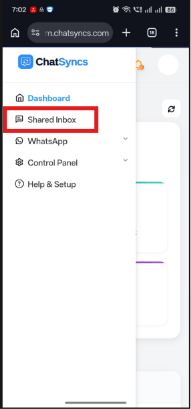 Tap the **⋮** (three-dot) menu in the top-right corner of Chrome.
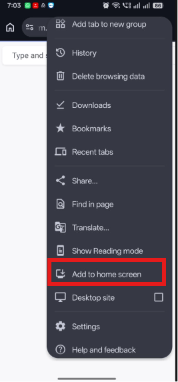 Depending on your Chrome version, this may instead say **Install App** or **Install**.
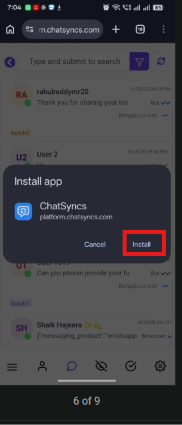 Tap **Install** to confirm. Chrome installs the ChatSyncs PWA on your device.
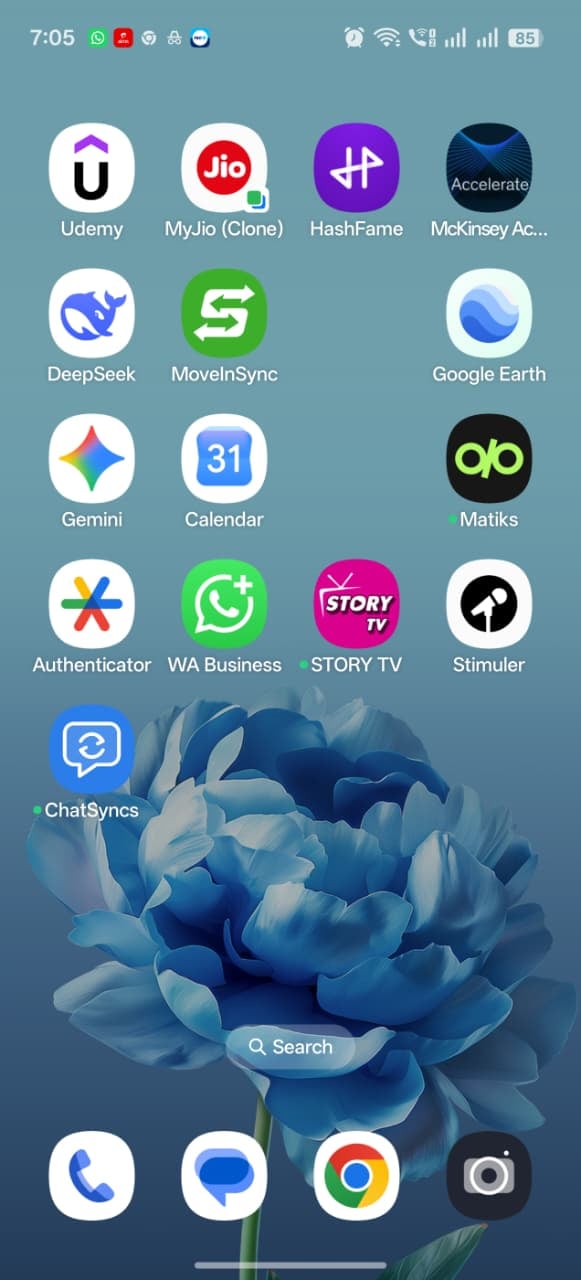 The ChatSyncs icon appears on your **Home Screen** and in your **App Drawer**. Tap it to
launch ChatSyncs like a native app — faster than opening Chrome and navigating there each
time.
If **Install** appears grayed out the first time you open **Add to Home screen**, close the
menu, let the page finish loading fully, and try again.
## Frequently asked
Yes — open the Shared Inbox in Chrome on Android, tap the **⋮** menu, choose **Add to Home
screen**, then **Install**. ChatSyncs is added to your home screen and app drawer like a
native app.
Close the menu, wait for the page to finish loading completely, then try again.
No — this is a Progressive Web App install through Chrome, not a Play Store download.
## What's next
Need this on an iPhone instead? See [Install ChatSyncs on iOS](/learn/install-chatsyncs-ios).
The ChatSyncs icon appears on your **Home Screen** and in your **App Drawer**. Tap it to
launch ChatSyncs like a native app — faster than opening Chrome and navigating there each
time.
If **Install** appears grayed out the first time you open **Add to Home screen**, close the
menu, let the page finish loading fully, and try again.
## Frequently asked
Yes — open the Shared Inbox in Chrome on Android, tap the **⋮** menu, choose **Add to Home
screen**, then **Install**. ChatSyncs is added to your home screen and app drawer like a
native app.
Close the menu, wait for the page to finish loading completely, then try again.
No — this is a Progressive Web App install through Chrome, not a Play Store download.
## What's next
Need this on an iPhone instead? See [Install ChatSyncs on iOS](/learn/install-chatsyncs-ios).