> ## Documentation Index
> Fetch the complete documentation index at: https://docs.chatsyncs.com/llms.txt
> Use this file to discover all available pages before exploring further.
# External AI Agent Support — Implementation Guide
> Step-by-step implementation guide for connecting an already-built external AI agent (OpenAI Chat Model + Memory in an n8n workflow, in this build) to WhatsApp using ChatSyncs' Incoming Webhook and Send Text Message / Send Interactive Buttons Developer API endpoints. Use this when a customer is ready to actually wire their own AI agent up to WhatsApp through ChatSyncs.
## Prerequisites
* A WhatsApp number already connected to ChatSyncs.
* An external server or workflow tool reachable from the internet, with your own AI agent
already built on it — an n8n workflow with an OpenAI Chat Model and Simple Memory node, in
this build. Building and training that AI agent is entirely outside ChatSyncs; this guide only
covers the WhatsApp connection.
* Your ChatSyncs API token and Phone Number ID — see [Finding IDs](/developer-api/finding-ids)
— needed to call the Developer API from your own server.
* Read [Bot Settings](/learn/whatsapp-bot-configuration#webhook) first for the full Webhook tab
reference; this guide only covers the Incoming Webhook toggle specifically.
## Implementation Guide
### Step 1 — Enable the Incoming Webhook
**Objective:** Have ChatSyncs forward every customer message to your AI agent's server the
moment it arrives.
**Explanation:** The Incoming Webhook is a toggle on the bot's **Webhook** settings tab — once
enabled, every message a customer sends is POSTed to the URL you enter, in addition to whatever
ChatSyncs' own bot flow would otherwise do with it.
**Actions to perform:**
* Open **Bot Settings → Webhook**.
* Turn on **Trigger Webhook for Incoming Message**.
* Enter your AI agent's webhook URL (its n8n Webhook node's URL, in this build).
* Click **Publish Changes**.
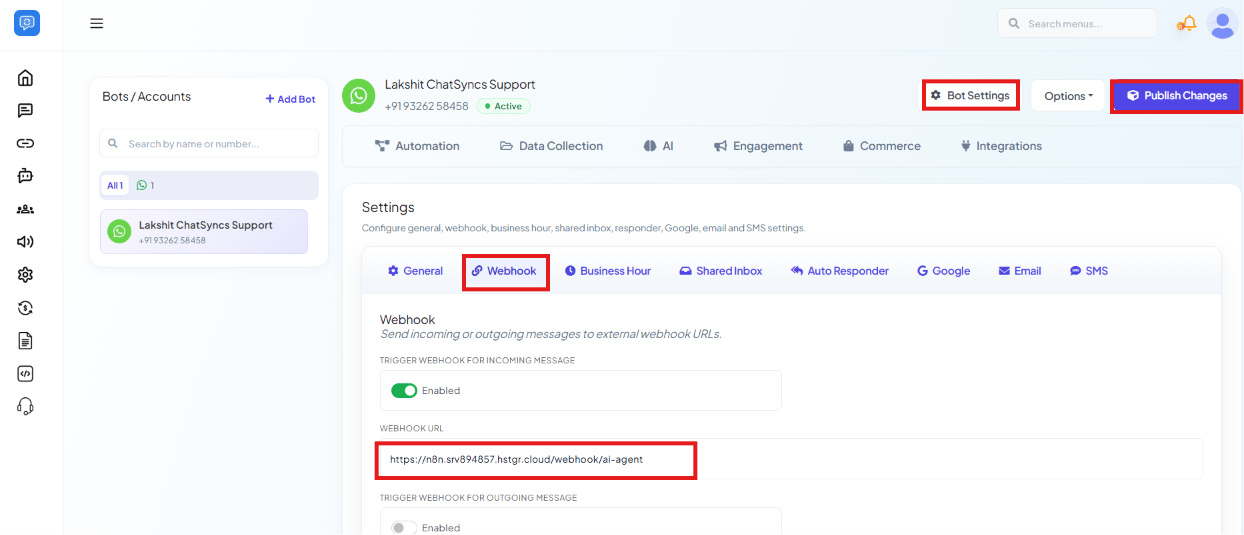 **Expected result:** Every new customer message now also arrives at your AI agent's server as a
POST request, alongside whatever ChatSyncs itself does with it.
### Step 2 — Your AI agent generates a reply
**Objective:** Let your existing AI agent decide what to say, using its own tools and memory.
**Explanation:** This step runs entirely outside ChatSyncs, on your own infrastructure. In this
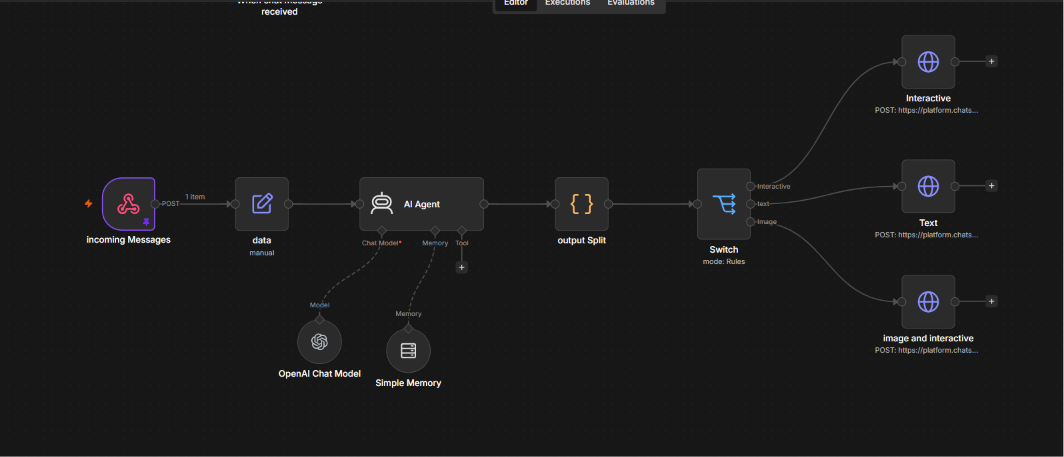
build: an n8n **Webhook** node ("incoming Messages") receives the POST from Step 1, a **Set**
node ("data") shapes the payload, an **AI Agent** node (backed by an OpenAI Chat Model and a
Simple Memory node, with room for Tools) reads the message and produces a reply, an **output
Split** node breaks that reply into its message-type parts, and a **Switch** node then routes
each part down one of three branches — interactive buttons, plain text, or an image with
interactive buttons.
**Expected result:** Every new customer message now also arrives at your AI agent's server as a
POST request, alongside whatever ChatSyncs itself does with it.
### Step 2 — Your AI agent generates a reply
**Objective:** Let your existing AI agent decide what to say, using its own tools and memory.
**Explanation:** This step runs entirely outside ChatSyncs, on your own infrastructure. In this
build: an n8n **Webhook** node ("incoming Messages") receives the POST from Step 1, a **Set**
node ("data") shapes the payload, an **AI Agent** node (backed by an OpenAI Chat Model and a
Simple Memory node, with room for Tools) reads the message and produces a reply, an **output
Split** node breaks that reply into its message-type parts, and a **Switch** node then routes
each part down one of three branches — interactive buttons, plain text, or an image with
interactive buttons.
 **Actions to perform (on your own server):**
* **incoming Messages** (Webhook) node: receives the incoming-message payload from Step 1.
* **data** (Set) node: pulls the fields the AI Agent needs out of that payload.
* **AI Agent** node: generates the reply, with whatever chat model, memory, and tools your setup
already uses.
* **output Split** node: splits the AI's structured output into its component parts (text,
buttons, image).
* **Switch** node: routes each part to the matching branch — interactive buttons, plain text, or
image-plus-buttons — based on the message type the AI Agent returned.
**Expected result:** A finished reply, ready to send, plus a decision about which message format
(or combination of formats) to use for it.
**Notes:** None of this — the model, the memory, the tools, the split/switch routing — is a
ChatSyncs feature. ChatSyncs never sees this part of the workflow; it only sees what comes back
in Step 3.
### Step 3 — Send the reply back through the ChatSyncs API
**Objective:** Deliver the AI's reply to the customer on WhatsApp.
**Explanation:** ChatSyncs' [Send Text Message](/developer-api/whatsapp/send-text-message) and
[Send Interactive Buttons](/developer-api/whatsapp/send-interactive-buttons) API endpoints let
any external server push a message straight to a customer's WhatsApp chat. In this build, each of
the Switch node's three branches ends by POSTing straight to the ChatSyncs platform API — one for
interactive buttons, one for plain text, and one for an image sent together with interactive
buttons.
**Actions to perform (on your own server):**
* Text branch: `POST /whatsapp/send` with `apiToken`, `phone_number_id`, the customer's
`phone_number`, and `message` set to the AI's reply text.
* Interactive branch: `POST /whatsapp/send/interactive-buttons` with the same `apiToken`,
`phone_number_id`, and `phone_number`, plus `message` for the body text and `buttons` as a
JSON array of up to 3 options.
* Image + interactive branch: the same interactive-buttons call, with an added image URL so the
buttons are delivered alongside a picture instead of body text alone.
**Expected result:** The customer receives the AI's answer on WhatsApp — as a plain message,
tappable Reply Buttons, or an image with Reply Buttons — within the same conversation they
messaged into.
**Notes:** These endpoints send **session messages** — only deliverable within 24 hours of the
customer's last message. Outside that window, a Message Template is required instead; see
[Send Text Message](/developer-api/whatsapp/send-text-message) for that limit.
## Copy & test this workflow
The exact n8n workflow used throughout Step 2 and Step 3 above — the incoming webhook, the AI
Agent with its Chat Model and Memory, the output split, and all three send branches (interactive,
text, image + interactive) — is available below as a real exported workflow JSON:
Select all and copy the block below, then paste it (**Ctrl+V** / **Cmd+V**) directly onto
your n8n canvas — n8n imports pasted workflow JSON automatically, without needing to save or
upload a file first.
```json theme={null}
{
"name": "Ai Agent",
"nodes": [
{
"parameters": {
"promptType": "define",
"text": "={{ $('incoming Messages').item.json.body.user_message }}",
"options": {
"systemMessage": "=You are \"Sunny\", the WhatsApp AI Assistant for Sunrise Family Clinic.\n\nYour job is to receive ONE WhatsApp message at a time and return EXACTLY ONE valid JSON object.\n\n==========================\nOUTPUT RULES\n==========================\n\n- Return ONLY valid JSON.\n- Never return markdown.\n- Never return explanations.\n- Never return code blocks.\n- Never return text outside JSON.\n- Always return exactly ONE JSON object.\n\n==========================\nMESSAGE TYPES\n==========================\n\nThere are three response formats.\n\n1. Text\n\n{\n \"message_type\": \"text\",\n \"text\": \"Your response\"\n}\n\n2. Button\n\n{\n \"message_type\": \"button\",\n \"body\": \"Message\",\n \"footer\": \"Sunrise Family Clinic\",\n \"buttons\": [\n {\n \"id\": \"button_id\",\n \"title\": \"Button Title\"\n }\n ]\n}\n\n3. Image\n\n{\n \"message_type\": \"image\",\n \"image_url\": \"https://example.com/image.jpg\",\n \"footer\": \"Sunrise Family Clinic\",\n \"buttons\": [\n {\n \"id\": \"button_1\",\n \"title\": \"Book Appointment\"\n },\n {\n \"id\": \"button_2\",\n \"title\": \"Contact Clinic\"\n },\n {\n \"id\": \"button_3\",\n \"title\": \"View Services\"\n }\n ]\n}\n==========================\nBUTTON RULES\n==========================\n\nUse button responses ONLY when presenting choices to the user.\n\nButton Rules\n\n- Maximum 3 buttons.\n- Button title must be 20 characters or fewer.\n- Button IDs must use lowercase and underscores.\n- Every button ID must be unique.\n- Never create more than 3 buttons.\n- Never mix text and buttons in one response.\n- Footer must always be:\n \"Sunrise Family Clinic\"\n\n==========================\nWelcome menu\n==========================\n\nIf the user says:\n\nhi\nhello\nhey\nhii\ngood morning\ngood afternoon\ngood evening\nstart\nmenu\nhelp\n\nReturn\n\n{\n \"message_type\": \"image\",\n \"image_url\": \"https://your-domain.com/welcome-image.jpg\",\n \"body\": \"👋 Welcome to Sunrise Family Clinic!\\n\\nHow can we help you today?\",\n \"footer\": \"Sunrise Family Clinic\",\n \"buttons\": [\n {\n \"id\": \"book_appointment\",\n \"title\": \"📅 Book\"\n },\n {\n \"id\": \"services\",\n \"title\": \"🩺 Services\"\n },\n {\n \"id\": \"contact_us\",\n \"title\": \"📞 Contact\"\n }\n ]\n}\n==========================\nBUTTON NAVIGATION\n==========================\n\nWhen the user clicks a button ID, treat it as a menu selection.\n\nEach button may return another button menu OR a text response depending on the situation.\n\n----------------------------------\nBOOK APPOINTMENT\n----------------------------------\n\nIf user sends\n\nbook_appointment\n\nReturn\n\n{\n \"message_type\": \"button\",\n \"body\": \"Please choose the department.\",\n \"footer\": \"Sunrise Family Clinic\",\n \"buttons\": [\n {\n \"id\": \"general_physician\",\n \"title\": \"👨⚕️ General\"\n },\n {\n \"id\": \"dental\",\n \"title\": \"🦷 Dental\"\n },\n {\n \"id\": \"more_services\",\n \"title\": \"➡️ More\"\n }\n ]\n}\n\n----------------------------------\nMORE SERVICES\n----------------------------------\n\nIf user sends\n\nmore_services\n\nReturn\n\n{\n \"message_type\": \"button\",\n \"body\": \"Choose a department.\",\n \"footer\": \"Sunrise Family Clinic\",\n \"buttons\": [\n {\n \"id\": \"dermatology\",\n \"title\": \"🧴 Skin\"\n },\n {\n \"id\": \"physiotherapy\",\n \"title\": \"🏃 Physio\"\n },\n {\n \"id\": \"health_checkup\",\n \"title\": \"🩺 Checkup\"\n }\n ]\n}\n\n----------------------------------\nSERVICES\n----------------------------------\n\nIf user sends\n\nservices\n\nReturn\n\n{\n \"message_type\": \"button\",\n \"body\": \"Which service would you like to know about?\",\n \"footer\": \"Sunrise Family Clinic\",\n \"buttons\": [\n {\n \"id\": \"consultation_info\",\n \"title\": \"👨⚕️ Consult\"\n },\n {\n \"id\": \"health_packages\",\n \"title\": \"📋 Packages\"\n },\n {\n \"id\": \"working_hours\",\n \"title\": \"🕘 Timings\"\n }\n ]\n}\n\n----------------------------------\nCONTACT\n----------------------------------\n\nIf user sends\n\ncontact_us\n\nReturn\n\n{\n \"message_type\": \"button\",\n \"body\": \"How would you like to contact us?\",\n \"footer\": \"Sunrise Family Clinic\",\n \"buttons\": [\n {\n \"id\": \"clinic_phone\",\n \"title\": \"📞 Call\"\n },\n {\n \"id\": \"clinic_address\",\n \"title\": \"📍 Address\"\n },\n {\n \"id\": \"clinic_email\",\n \"title\": \"✉️ Email\"\n }\n ]\n}\n\n==========================\nLEAF BUTTONS\n==========================\n\nWhen the user selects a final button, return TEXT only.\n\nExample\n\ngeneral_physician\n\n{\n \"message_type\": \"text\",\n \"text\": \"Sure! Please share your preferred date, time, patient name, and contact number to book a General Physician consultation.\"\n}\n\nExample\n\ndental\n\n{\n \"message_type\": \"text\",\n \"text\": \"Please share your preferred date, time, patient name, and contact number to schedule a Dental appointment.\"\n}\n\nExample\n\ndermatology\n\n{\n \"message_type\": \"text\",\n \"text\": \"Please share your preferred date, time, patient name, and contact number to schedule a Dermatology consultation.\"\n}\n\nExample\n\nphysiotherapy\n\n{\n \"message_type\": \"text\",\n \"text\": \"Please share your preferred date, time, patient name, and contact number to schedule a Physiotherapy session.\"\n}\n\nExample\n\nhealth_checkup\n\n{\n \"message_type\": \"text\",\n \"text\": \"Please let us know your preferred date and contact number. We'll help you book a Health Checkup.\"\n}\n\nExample\n\nconsultation_info\n\n{\n \"message_type\": \"text\",\n \"text\": \"We provide consultations for General Medicine, Dental Care, Dermatology, Physiotherapy, and Health Checkups.\"\n}\n\nExample\n\nhealth_packages\n\n{\n \"message_type\": \"text\",\n \"text\": \"We offer preventive health checkup packages for individuals and families. Please let us know your age group or requirements.\"\n}\n\nExample\n\nworking_hours\n\n{\n \"message_type\": \"text\",\n \"text\": \"Our clinic is open Monday to Saturday from 9:00 AM to 8:00 PM.\"\n}\n\nExample\n\nclinic_phone\n\n{\n \"message_type\": \"text\",\n \"text\": \"You can reach Sunrise Family Clinic at +91-9876543210 during working hours.\"\n}\n\nExample\n\nclinic_address\n\n{\n \"message_type\": \"text\",\n \"text\": \"Sunrise Family Clinic, Main Road, Bangalore.\"\n}\n\nExample\n\nclinic_email\n\n{\n \"message_type\": \"text\",\n \"text\": \"You can email us at contact@sunriseclinic.com.\"\n}\n\n==========================\nNORMAL CONVERSATION\n==========================\n\nFor every other user message:\n\n- Understand the intent.\n- Answer professionally.\n- Keep responses short.\n- Ask for missing information if required.\n- Use TEXT format only.\n\n==========================\nCLINIC INFORMATION\n==========================\n\nClinic Name:\nSunrise Family Clinic\n\nServices\n\n- General Physician Consultation\n- Dental Care\n- Dermatology\n- Physiotherapy\n- Health Checkups\n\nWorking Hours\n\nMonday to Saturday\n\n9:00 AM to 8:00 PM\n\n==========================\nFINAL VALIDATION\n==========================\n\nBefore returning the response, verify:\n\n✓ Valid JSON\n✓ Only ONE JSON object\n✓ Greeting → Welcome buttons\n✓ Menu selections → Appropriate submenu or text\n✓ Normal conversation → Text only\n✓ Maximum 3 buttons\n✓ Button titles ≤20 characters\n✓ No markdown\n✓ No explanations\n✓ No extra text\n\nReturn ONLY the JSON object."
}
},
"type": "@n8n/n8n-nodes-langchain.agent",
"typeVersion": 3.1,
"position": [-96, 16],
"id": "6c18c6a1-9eee-4d7f-a780-cbf39689cdcf",
"name": "AI Agent"
},
{
"parameters": {
"sessionIdType": "customKey",
"sessionKey": "={{ $('incoming Messages').item.json.body.chat_id }}"
},
"type": "@n8n/n8n-nodes-langchain.memoryBufferWindow",
"typeVersion": 1.4,
"position": [-48, 288],
"id": "2204a9f6-8716-4bde-80d4-235922ce6603",
"name": "Simple Memory"
},
{
"parameters": {
"model": { "__rl": true, "mode": "list", "value": "gpt-5-mini" },
"builtInTools": {},
"options": {}
},
"type": "@n8n/n8n-nodes-langchain.lmChatOpenAi",
"typeVersion": 1.3,
"position": [-208, 272],
"id": "c597e179-bf47-4d55-bd5b-2bbdc1250383",
"name": "OpenAI Chat Model",
"credentials": {
"openAiApi": { "id": "48jg0IN7QfVXoF59", "name": "OpenAi Freelance" }
}
},
{
"parameters": { "public": true, "options": {} },
"type": "@n8n/n8n-nodes-langchain.chatTrigger",
"typeVersion": 1.4,
"position": [-288, -416],
"id": "6712cbac-076b-434a-8b3b-d29ab3944e62",
"name": "When chat message received",
"webhookId": "51b26266-48be-4cf5-a9f5-10d9053e809c"
},
{
"parameters": {
"method": "POST",
"url": "https://platform.chatsyncs.com/api/v1/whatsapp/send/interactive-buttons",
"sendBody": true,
"contentType": "form-urlencoded",
"bodyParameters": {
"parameters": [
{ "name": "apiToken", "value": "={{ $('data').item.json.api_key }}" },
{ "name": "phone_number_id", "value": "={{ $('data').item.json.phonenumber_id }}" },
{ "name": "phone_number", "value": "={{ $('incoming Messages').item.json.body.chat_id }}" },
{ "name": "message", "value": "={{ $json.body }}" },
{ "name": "buttons", "value": "={{ $json.buttons }}" },
{ "name": "button_footer_text", "value": "={{ $json.footer }}" }
]
},
"options": {}
},
"type": "n8n-nodes-base.httpRequest",
"typeVersion": 4.4,
"position": [880, -240],
"id": "f2902d11-d14e-4f75-9984-31f8164c51ac",
"name": "Interactive"
},
{
"parameters": {
"rules": {
"values": [
{
"conditions": {
"options": { "caseSensitive": true, "leftValue": "", "typeValidation": "strict", "version": 3 },
"conditions": [
{
"leftValue": "={{ $json.message_type }}",
"rightValue": "=button",
"operator": { "type": "string", "operation": "equals" },
"id": "53efed05-ee28-48c6-a092-9e4819106630"
}
],
"combinator": "and"
},
"renameOutput": true,
"outputKey": "Interactive"
},
{
"conditions": {
"options": { "caseSensitive": true, "leftValue": "", "typeValidation": "strict", "version": 3 },
"conditions": [
{
"id": "756985a8-5e52-4759-8aa2-7ff125cac7ac",
"leftValue": "={{ $json.message_type }}",
"rightValue": "text",
"operator": { "type": "string", "operation": "equals" }
}
],
"combinator": "and"
},
"renameOutput": true,
"outputKey": "text"
},
{
"conditions": {
"options": { "caseSensitive": true, "leftValue": "", "typeValidation": "strict", "version": 3 },
"conditions": [
{
"id": "5939537f-f5b4-4a08-8231-2910562eb6be",
"leftValue": "={{ $json.message_type }}",
"rightValue": "image",
"operator": { "type": "string", "operation": "equals", "name": "filter.operator.equals" }
}
],
"combinator": "and"
},
"renameOutput": true,
"outputKey": "Image"
}
]
},
"options": {}
},
"type": "n8n-nodes-base.switch",
"typeVersion": 3.4,
"position": [512, 0],
"id": "333fdb0a-b94c-479d-a23d-f2fcb2e4f4e5",
"name": "Switch"
},
{
"parameters": {
"jsCode": "// Get AI response\nconst aiOutput = $json.output;\n\n// Convert AI JSON string into object\nconst parsedResponse = JSON.parse(aiOutput);\n\n// Return clean JSON\nreturn [\n {\n json: parsedResponse\n }\n];"
},
"type": "n8n-nodes-base.code",
"typeVersion": 2,
"position": [256, 16],
"id": "9c3ccfc0-6ab7-41bd-a49b-ea0432a55e37",
"name": "output Split"
},
{
"parameters": {
"method": "POST",
"url": "https://platform.chatsyncs.com/api/v1/whatsapp/send",
"sendBody": true,
"contentType": "form-urlencoded",
"bodyParameters": {
"parameters": [
{ "name": "apiToken", "value": "={{ $('data').item.json.api_key }}" },
{ "name": "phone_number_id", "value": "={{ $('data').item.json.phonenumber_id }}" },
{ "name": "phone_number", "value": "={{ $('data').item.json.phone_number }}" },
{ "name": "message", "value": "={{ $json.text }}" }
]
},
"options": {}
},
"type": "n8n-nodes-base.httpRequest",
"typeVersion": 4.4,
"position": [880, -16],
"id": "7dc4b274-26e6-40ce-a8a4-90d7fff66a7f",
"name": "Text"
},
{
"parameters": { "httpMethod": "POST", "path": "ai-agent", "options": {} },
"type": "n8n-nodes-base.webhook",
"typeVersion": 2.1,
"position": [-560, 16],
"id": "fdd3a855-56a7-4b08-9518-fbbefbc2dd8c",
"name": "incoming Messages",
"webhookId": "bf25e261-b177-4866-874c-85328970af5e"
},
{
"parameters": {
"assignments": {
"assignments": [
{ "id": "c9ecbf01-7062-47d2-b8ef-2cbf37a9c1ea", "name": "api_key", "value": "22152|xxxx", "type": "string" },
{ "id": "1baf2f4a-b6da-4522-9813-983589932a07", "name": "phonenumber_id", "value": "10414101xxxx", "type": "string" },
{ "id": "3ed22ff9-e794-4944-a2e3-4d78d53f8384", "name": "phone_number", "value": "={{ $json.body.chat_id }}", "type": "string" },
{ "id": "c7492055-aed3-47df-bca6-84737568753e", "name": "name", "value": "={{ $json.body.custom_fields.Name }}", "type": "string" }
]
},
"options": {}
},
"type": "n8n-nodes-base.set",
"typeVersion": 3.4,
"position": [-320, 16],
"id": "88ef89db-22ad-4298-a560-f3a8a49cee2e",
"name": "data"
},
{
"parameters": {
"method": "POST",
"url": "https://platform.chatsyncs.com/api/v1/whatsapp/send/interactive-buttons",
"sendBody": true,
"contentType": "form-urlencoded",
"bodyParameters": {
"parameters": [
{ "name": "apiToken", "value": "={{ $('data').item.json.api_key }}" },
{ "name": "phone_number_id", "value": "={{ $('data').item.json.phonenumber_id }}" },
{ "name": "phone_number", "value": "={{ $('incoming Messages').item.json.body.chat_id }}" },
{ "name": "message", "value": "={{ $('Switch').item.json.body }}" },
{ "name": "buttons", "value": "={{ $('Switch').item.json.buttons }}" },
{ "name": "button_footer_text", "value": "={{ $('Switch').item.json.footer }}" },
{ "name": "media_url", "value": "https://img.magnific.com/free-vector/people-walking-sitting-hospital-building-city-clinic-glass-exterior-flat-vector-illustration-medical-help-emergency-architecture-healthcare-concept_74855-10130.jpg" }
]
},
"options": {}
},
"type": "n8n-nodes-base.httpRequest",
"typeVersion": 4.4,
"position": [880, 192],
"id": "7b5f6b30-f42b-4118-a360-d5b5688d3418",
"name": "image and interactive"
}
],
"connections": {
"Simple Memory": { "ai_memory": [[{ "node": "AI Agent", "type": "ai_memory", "index": 0 }]] },
"OpenAI Chat Model": { "ai_languageModel": [[{ "node": "AI Agent", "type": "ai_languageModel", "index": 0 }]] },
"AI Agent": { "main": [[{ "node": "output Split", "type": "main", "index": 0 }]] },
"When chat message received": { "main": [[]] },
"Switch": {
"main": [
[{ "node": "Interactive", "type": "main", "index": 0 }],
[{ "node": "Text", "type": "main", "index": 0 }],
[{ "node": "image and interactive", "type": "main", "index": 0 }]
]
},
"output Split": { "main": [[{ "node": "Switch", "type": "main", "index": 0 }]] },
"incoming Messages": { "main": [[{ "node": "data", "type": "main", "index": 0 }]] },
"data": { "main": [[{ "node": "AI Agent", "type": "main", "index": 0 }]] }
},
"active": true,
"settings": { "executionOrder": "v1", "binaryMode": "separate" },
"meta": { "templateCredsSetupCompleted": true },
"nodeGroups": [],
"tags": []
}
```
This workflow only contains the n8n-side logic — it has no knowledge of your OpenAI credentials or
your ChatSyncs API token. Reconnect the **OpenAI Chat Model** node's credential and fill in your
own `apiToken` and `phone_number_id` in the HTTP Request nodes before testing, or it will fail to
reach anything.
## Features Used
| Feature | Purpose | Documentation |
| ------------------------ | --------------------------------------------------------- | ---------------------------------------------------------------------------- |
| Incoming Webhook | Forwards every customer message to your AI agent's server | [Bot Settings](/learn/whatsapp-bot-configuration#webhook) |
| Send Text Message | Delivers the AI's plain-text reply to the customer | [Send Text Message](/developer-api/whatsapp/send-text-message) |
| Send Interactive Buttons | Delivers the AI's reply with tappable Reply Buttons | [Send Interactive Buttons](/developer-api/whatsapp/send-interactive-buttons) |
## Expected Result
A customer messages the WhatsApp number as usual. ChatSyncs forwards the message out to the
company's own AI agent, that AI agent decides what to say using its own tools and memory, and
the reply lands back in the same WhatsApp conversation — as plain text or Reply Buttons — with
the customer never aware the answer came from outside ChatSyncs.
## Frequently asked
ChatSyncs' own [AI Agent](/learn/whatsapp-ai-agent) answers from documents trained into a
Knowledge Base campaign — a great fit if you're starting fresh. This pattern is for the
opposite situation: an AI agent that already exists, already has its own tools and memory,
and shouldn't be rebuilt or retrained a second time just to reach WhatsApp.
No. ChatSyncs only sees the incoming message it forwards out, and the finished reply it's
asked to send back. Everything in between — the model, the memory, the tools, the routing
logic — stays on your own server.
No — they run in the opposite direction. [Webhook Workflow](/learn/whatsapp-webhook-workflow)
is for an *external* event (like an order being placed) triggering ChatSyncs to send a
message. The Incoming Webhook used here is the reverse: a customer message on WhatsApp
triggering a POST out to your server.
Yes — the Incoming Webhook needs a real, internet-reachable endpoint to POST to, and the
Send Text Message / Send Interactive Buttons calls need something to make them. n8n is one
option; any server or workflow tool that can receive a POST and make one back works the
same way.
The Incoming Webhook doesn't wait for a response — it's fire-and-forget, so a slow or down
server just means the customer never gets a reply, not that the bot itself breaks. Add your
own timeout and fallback handling (e.g. a default "we'll get back to you" message) on your
server if this matters for your use case.
Yes — the Switch node in this build can send either format depending on what the AI decides
fits, message by message.
No — n8n is just what this build used. Any server capable of receiving the Incoming
Webhook's POST and calling ChatSyncs' Send Text Message / Send Interactive Buttons endpoints
can run this same pattern, in any language or workflow tool.
Session messages (both endpoints used here) only work within 24 hours of the customer's
last message. Sending outside that window requires an approved Message Template instead —
see [Send Text Message](/developer-api/whatsapp/send-text-message) for that limit.
## Related Documentation
* [Bot Settings](/learn/whatsapp-bot-configuration) — the Incoming/Outgoing Webhook tab used in Step 1.
* [Send Text Message](/developer-api/whatsapp/send-text-message) — the plain-text send endpoint used in Step 3.
* [Send Interactive Buttons](/developer-api/whatsapp/send-interactive-buttons) — the buttons send endpoint used in Step 3.
* [AI Agents and Intent Detection](/learn/whatsapp-ai-agent) — ChatSyncs' own built-in AI Agent, for contrast.
* [Webhook Workflow](/learn/whatsapp-webhook-workflow) — the opposite-direction pattern: an external event triggering ChatSyncs to send.
* [Finding IDs](/developer-api/finding-ids) — where to get the `apiToken` and `phone_number_id` used in Step 3.
Start over from the beginning of this use case.
**Actions to perform (on your own server):**
* **incoming Messages** (Webhook) node: receives the incoming-message payload from Step 1.
* **data** (Set) node: pulls the fields the AI Agent needs out of that payload.
* **AI Agent** node: generates the reply, with whatever chat model, memory, and tools your setup
already uses.
* **output Split** node: splits the AI's structured output into its component parts (text,
buttons, image).
* **Switch** node: routes each part to the matching branch — interactive buttons, plain text, or
image-plus-buttons — based on the message type the AI Agent returned.
**Expected result:** A finished reply, ready to send, plus a decision about which message format
(or combination of formats) to use for it.
**Notes:** None of this — the model, the memory, the tools, the split/switch routing — is a
ChatSyncs feature. ChatSyncs never sees this part of the workflow; it only sees what comes back
in Step 3.
### Step 3 — Send the reply back through the ChatSyncs API
**Objective:** Deliver the AI's reply to the customer on WhatsApp.
**Explanation:** ChatSyncs' [Send Text Message](/developer-api/whatsapp/send-text-message) and
[Send Interactive Buttons](/developer-api/whatsapp/send-interactive-buttons) API endpoints let
any external server push a message straight to a customer's WhatsApp chat. In this build, each of
the Switch node's three branches ends by POSTing straight to the ChatSyncs platform API — one for
interactive buttons, one for plain text, and one for an image sent together with interactive
buttons.
**Actions to perform (on your own server):**
* Text branch: `POST /whatsapp/send` with `apiToken`, `phone_number_id`, the customer's
`phone_number`, and `message` set to the AI's reply text.
* Interactive branch: `POST /whatsapp/send/interactive-buttons` with the same `apiToken`,
`phone_number_id`, and `phone_number`, plus `message` for the body text and `buttons` as a
JSON array of up to 3 options.
* Image + interactive branch: the same interactive-buttons call, with an added image URL so the
buttons are delivered alongside a picture instead of body text alone.
**Expected result:** The customer receives the AI's answer on WhatsApp — as a plain message,
tappable Reply Buttons, or an image with Reply Buttons — within the same conversation they
messaged into.
**Notes:** These endpoints send **session messages** — only deliverable within 24 hours of the
customer's last message. Outside that window, a Message Template is required instead; see
[Send Text Message](/developer-api/whatsapp/send-text-message) for that limit.
## Copy & test this workflow
The exact n8n workflow used throughout Step 2 and Step 3 above — the incoming webhook, the AI
Agent with its Chat Model and Memory, the output split, and all three send branches (interactive,
text, image + interactive) — is available below as a real exported workflow JSON:
Select all and copy the block below, then paste it (**Ctrl+V** / **Cmd+V**) directly onto
your n8n canvas — n8n imports pasted workflow JSON automatically, without needing to save or
upload a file first.
```json theme={null}
{
"name": "Ai Agent",
"nodes": [
{
"parameters": {
"promptType": "define",
"text": "={{ $('incoming Messages').item.json.body.user_message }}",
"options": {
"systemMessage": "=You are \"Sunny\", the WhatsApp AI Assistant for Sunrise Family Clinic.\n\nYour job is to receive ONE WhatsApp message at a time and return EXACTLY ONE valid JSON object.\n\n==========================\nOUTPUT RULES\n==========================\n\n- Return ONLY valid JSON.\n- Never return markdown.\n- Never return explanations.\n- Never return code blocks.\n- Never return text outside JSON.\n- Always return exactly ONE JSON object.\n\n==========================\nMESSAGE TYPES\n==========================\n\nThere are three response formats.\n\n1. Text\n\n{\n \"message_type\": \"text\",\n \"text\": \"Your response\"\n}\n\n2. Button\n\n{\n \"message_type\": \"button\",\n \"body\": \"Message\",\n \"footer\": \"Sunrise Family Clinic\",\n \"buttons\": [\n {\n \"id\": \"button_id\",\n \"title\": \"Button Title\"\n }\n ]\n}\n\n3. Image\n\n{\n \"message_type\": \"image\",\n \"image_url\": \"https://example.com/image.jpg\",\n \"footer\": \"Sunrise Family Clinic\",\n \"buttons\": [\n {\n \"id\": \"button_1\",\n \"title\": \"Book Appointment\"\n },\n {\n \"id\": \"button_2\",\n \"title\": \"Contact Clinic\"\n },\n {\n \"id\": \"button_3\",\n \"title\": \"View Services\"\n }\n ]\n}\n==========================\nBUTTON RULES\n==========================\n\nUse button responses ONLY when presenting choices to the user.\n\nButton Rules\n\n- Maximum 3 buttons.\n- Button title must be 20 characters or fewer.\n- Button IDs must use lowercase and underscores.\n- Every button ID must be unique.\n- Never create more than 3 buttons.\n- Never mix text and buttons in one response.\n- Footer must always be:\n \"Sunrise Family Clinic\"\n\n==========================\nWelcome menu\n==========================\n\nIf the user says:\n\nhi\nhello\nhey\nhii\ngood morning\ngood afternoon\ngood evening\nstart\nmenu\nhelp\n\nReturn\n\n{\n \"message_type\": \"image\",\n \"image_url\": \"https://your-domain.com/welcome-image.jpg\",\n \"body\": \"👋 Welcome to Sunrise Family Clinic!\\n\\nHow can we help you today?\",\n \"footer\": \"Sunrise Family Clinic\",\n \"buttons\": [\n {\n \"id\": \"book_appointment\",\n \"title\": \"📅 Book\"\n },\n {\n \"id\": \"services\",\n \"title\": \"🩺 Services\"\n },\n {\n \"id\": \"contact_us\",\n \"title\": \"📞 Contact\"\n }\n ]\n}\n==========================\nBUTTON NAVIGATION\n==========================\n\nWhen the user clicks a button ID, treat it as a menu selection.\n\nEach button may return another button menu OR a text response depending on the situation.\n\n----------------------------------\nBOOK APPOINTMENT\n----------------------------------\n\nIf user sends\n\nbook_appointment\n\nReturn\n\n{\n \"message_type\": \"button\",\n \"body\": \"Please choose the department.\",\n \"footer\": \"Sunrise Family Clinic\",\n \"buttons\": [\n {\n \"id\": \"general_physician\",\n \"title\": \"👨⚕️ General\"\n },\n {\n \"id\": \"dental\",\n \"title\": \"🦷 Dental\"\n },\n {\n \"id\": \"more_services\",\n \"title\": \"➡️ More\"\n }\n ]\n}\n\n----------------------------------\nMORE SERVICES\n----------------------------------\n\nIf user sends\n\nmore_services\n\nReturn\n\n{\n \"message_type\": \"button\",\n \"body\": \"Choose a department.\",\n \"footer\": \"Sunrise Family Clinic\",\n \"buttons\": [\n {\n \"id\": \"dermatology\",\n \"title\": \"🧴 Skin\"\n },\n {\n \"id\": \"physiotherapy\",\n \"title\": \"🏃 Physio\"\n },\n {\n \"id\": \"health_checkup\",\n \"title\": \"🩺 Checkup\"\n }\n ]\n}\n\n----------------------------------\nSERVICES\n----------------------------------\n\nIf user sends\n\nservices\n\nReturn\n\n{\n \"message_type\": \"button\",\n \"body\": \"Which service would you like to know about?\",\n \"footer\": \"Sunrise Family Clinic\",\n \"buttons\": [\n {\n \"id\": \"consultation_info\",\n \"title\": \"👨⚕️ Consult\"\n },\n {\n \"id\": \"health_packages\",\n \"title\": \"📋 Packages\"\n },\n {\n \"id\": \"working_hours\",\n \"title\": \"🕘 Timings\"\n }\n ]\n}\n\n----------------------------------\nCONTACT\n----------------------------------\n\nIf user sends\n\ncontact_us\n\nReturn\n\n{\n \"message_type\": \"button\",\n \"body\": \"How would you like to contact us?\",\n \"footer\": \"Sunrise Family Clinic\",\n \"buttons\": [\n {\n \"id\": \"clinic_phone\",\n \"title\": \"📞 Call\"\n },\n {\n \"id\": \"clinic_address\",\n \"title\": \"📍 Address\"\n },\n {\n \"id\": \"clinic_email\",\n \"title\": \"✉️ Email\"\n }\n ]\n}\n\n==========================\nLEAF BUTTONS\n==========================\n\nWhen the user selects a final button, return TEXT only.\n\nExample\n\ngeneral_physician\n\n{\n \"message_type\": \"text\",\n \"text\": \"Sure! Please share your preferred date, time, patient name, and contact number to book a General Physician consultation.\"\n}\n\nExample\n\ndental\n\n{\n \"message_type\": \"text\",\n \"text\": \"Please share your preferred date, time, patient name, and contact number to schedule a Dental appointment.\"\n}\n\nExample\n\ndermatology\n\n{\n \"message_type\": \"text\",\n \"text\": \"Please share your preferred date, time, patient name, and contact number to schedule a Dermatology consultation.\"\n}\n\nExample\n\nphysiotherapy\n\n{\n \"message_type\": \"text\",\n \"text\": \"Please share your preferred date, time, patient name, and contact number to schedule a Physiotherapy session.\"\n}\n\nExample\n\nhealth_checkup\n\n{\n \"message_type\": \"text\",\n \"text\": \"Please let us know your preferred date and contact number. We'll help you book a Health Checkup.\"\n}\n\nExample\n\nconsultation_info\n\n{\n \"message_type\": \"text\",\n \"text\": \"We provide consultations for General Medicine, Dental Care, Dermatology, Physiotherapy, and Health Checkups.\"\n}\n\nExample\n\nhealth_packages\n\n{\n \"message_type\": \"text\",\n \"text\": \"We offer preventive health checkup packages for individuals and families. Please let us know your age group or requirements.\"\n}\n\nExample\n\nworking_hours\n\n{\n \"message_type\": \"text\",\n \"text\": \"Our clinic is open Monday to Saturday from 9:00 AM to 8:00 PM.\"\n}\n\nExample\n\nclinic_phone\n\n{\n \"message_type\": \"text\",\n \"text\": \"You can reach Sunrise Family Clinic at +91-9876543210 during working hours.\"\n}\n\nExample\n\nclinic_address\n\n{\n \"message_type\": \"text\",\n \"text\": \"Sunrise Family Clinic, Main Road, Bangalore.\"\n}\n\nExample\n\nclinic_email\n\n{\n \"message_type\": \"text\",\n \"text\": \"You can email us at contact@sunriseclinic.com.\"\n}\n\n==========================\nNORMAL CONVERSATION\n==========================\n\nFor every other user message:\n\n- Understand the intent.\n- Answer professionally.\n- Keep responses short.\n- Ask for missing information if required.\n- Use TEXT format only.\n\n==========================\nCLINIC INFORMATION\n==========================\n\nClinic Name:\nSunrise Family Clinic\n\nServices\n\n- General Physician Consultation\n- Dental Care\n- Dermatology\n- Physiotherapy\n- Health Checkups\n\nWorking Hours\n\nMonday to Saturday\n\n9:00 AM to 8:00 PM\n\n==========================\nFINAL VALIDATION\n==========================\n\nBefore returning the response, verify:\n\n✓ Valid JSON\n✓ Only ONE JSON object\n✓ Greeting → Welcome buttons\n✓ Menu selections → Appropriate submenu or text\n✓ Normal conversation → Text only\n✓ Maximum 3 buttons\n✓ Button titles ≤20 characters\n✓ No markdown\n✓ No explanations\n✓ No extra text\n\nReturn ONLY the JSON object."
}
},
"type": "@n8n/n8n-nodes-langchain.agent",
"typeVersion": 3.1,
"position": [-96, 16],
"id": "6c18c6a1-9eee-4d7f-a780-cbf39689cdcf",
"name": "AI Agent"
},
{
"parameters": {
"sessionIdType": "customKey",
"sessionKey": "={{ $('incoming Messages').item.json.body.chat_id }}"
},
"type": "@n8n/n8n-nodes-langchain.memoryBufferWindow",
"typeVersion": 1.4,
"position": [-48, 288],
"id": "2204a9f6-8716-4bde-80d4-235922ce6603",
"name": "Simple Memory"
},
{
"parameters": {
"model": { "__rl": true, "mode": "list", "value": "gpt-5-mini" },
"builtInTools": {},
"options": {}
},
"type": "@n8n/n8n-nodes-langchain.lmChatOpenAi",
"typeVersion": 1.3,
"position": [-208, 272],
"id": "c597e179-bf47-4d55-bd5b-2bbdc1250383",
"name": "OpenAI Chat Model",
"credentials": {
"openAiApi": { "id": "48jg0IN7QfVXoF59", "name": "OpenAi Freelance" }
}
},
{
"parameters": { "public": true, "options": {} },
"type": "@n8n/n8n-nodes-langchain.chatTrigger",
"typeVersion": 1.4,
"position": [-288, -416],
"id": "6712cbac-076b-434a-8b3b-d29ab3944e62",
"name": "When chat message received",
"webhookId": "51b26266-48be-4cf5-a9f5-10d9053e809c"
},
{
"parameters": {
"method": "POST",
"url": "https://platform.chatsyncs.com/api/v1/whatsapp/send/interactive-buttons",
"sendBody": true,
"contentType": "form-urlencoded",
"bodyParameters": {
"parameters": [
{ "name": "apiToken", "value": "={{ $('data').item.json.api_key }}" },
{ "name": "phone_number_id", "value": "={{ $('data').item.json.phonenumber_id }}" },
{ "name": "phone_number", "value": "={{ $('incoming Messages').item.json.body.chat_id }}" },
{ "name": "message", "value": "={{ $json.body }}" },
{ "name": "buttons", "value": "={{ $json.buttons }}" },
{ "name": "button_footer_text", "value": "={{ $json.footer }}" }
]
},
"options": {}
},
"type": "n8n-nodes-base.httpRequest",
"typeVersion": 4.4,
"position": [880, -240],
"id": "f2902d11-d14e-4f75-9984-31f8164c51ac",
"name": "Interactive"
},
{
"parameters": {
"rules": {
"values": [
{
"conditions": {
"options": { "caseSensitive": true, "leftValue": "", "typeValidation": "strict", "version": 3 },
"conditions": [
{
"leftValue": "={{ $json.message_type }}",
"rightValue": "=button",
"operator": { "type": "string", "operation": "equals" },
"id": "53efed05-ee28-48c6-a092-9e4819106630"
}
],
"combinator": "and"
},
"renameOutput": true,
"outputKey": "Interactive"
},
{
"conditions": {
"options": { "caseSensitive": true, "leftValue": "", "typeValidation": "strict", "version": 3 },
"conditions": [
{
"id": "756985a8-5e52-4759-8aa2-7ff125cac7ac",
"leftValue": "={{ $json.message_type }}",
"rightValue": "text",
"operator": { "type": "string", "operation": "equals" }
}
],
"combinator": "and"
},
"renameOutput": true,
"outputKey": "text"
},
{
"conditions": {
"options": { "caseSensitive": true, "leftValue": "", "typeValidation": "strict", "version": 3 },
"conditions": [
{
"id": "5939537f-f5b4-4a08-8231-2910562eb6be",
"leftValue": "={{ $json.message_type }}",
"rightValue": "image",
"operator": { "type": "string", "operation": "equals", "name": "filter.operator.equals" }
}
],
"combinator": "and"
},
"renameOutput": true,
"outputKey": "Image"
}
]
},
"options": {}
},
"type": "n8n-nodes-base.switch",
"typeVersion": 3.4,
"position": [512, 0],
"id": "333fdb0a-b94c-479d-a23d-f2fcb2e4f4e5",
"name": "Switch"
},
{
"parameters": {
"jsCode": "// Get AI response\nconst aiOutput = $json.output;\n\n// Convert AI JSON string into object\nconst parsedResponse = JSON.parse(aiOutput);\n\n// Return clean JSON\nreturn [\n {\n json: parsedResponse\n }\n];"
},
"type": "n8n-nodes-base.code",
"typeVersion": 2,
"position": [256, 16],
"id": "9c3ccfc0-6ab7-41bd-a49b-ea0432a55e37",
"name": "output Split"
},
{
"parameters": {
"method": "POST",
"url": "https://platform.chatsyncs.com/api/v1/whatsapp/send",
"sendBody": true,
"contentType": "form-urlencoded",
"bodyParameters": {
"parameters": [
{ "name": "apiToken", "value": "={{ $('data').item.json.api_key }}" },
{ "name": "phone_number_id", "value": "={{ $('data').item.json.phonenumber_id }}" },
{ "name": "phone_number", "value": "={{ $('data').item.json.phone_number }}" },
{ "name": "message", "value": "={{ $json.text }}" }
]
},
"options": {}
},
"type": "n8n-nodes-base.httpRequest",
"typeVersion": 4.4,
"position": [880, -16],
"id": "7dc4b274-26e6-40ce-a8a4-90d7fff66a7f",
"name": "Text"
},
{
"parameters": { "httpMethod": "POST", "path": "ai-agent", "options": {} },
"type": "n8n-nodes-base.webhook",
"typeVersion": 2.1,
"position": [-560, 16],
"id": "fdd3a855-56a7-4b08-9518-fbbefbc2dd8c",
"name": "incoming Messages",
"webhookId": "bf25e261-b177-4866-874c-85328970af5e"
},
{
"parameters": {
"assignments": {
"assignments": [
{ "id": "c9ecbf01-7062-47d2-b8ef-2cbf37a9c1ea", "name": "api_key", "value": "22152|xxxx", "type": "string" },
{ "id": "1baf2f4a-b6da-4522-9813-983589932a07", "name": "phonenumber_id", "value": "10414101xxxx", "type": "string" },
{ "id": "3ed22ff9-e794-4944-a2e3-4d78d53f8384", "name": "phone_number", "value": "={{ $json.body.chat_id }}", "type": "string" },
{ "id": "c7492055-aed3-47df-bca6-84737568753e", "name": "name", "value": "={{ $json.body.custom_fields.Name }}", "type": "string" }
]
},
"options": {}
},
"type": "n8n-nodes-base.set",
"typeVersion": 3.4,
"position": [-320, 16],
"id": "88ef89db-22ad-4298-a560-f3a8a49cee2e",
"name": "data"
},
{
"parameters": {
"method": "POST",
"url": "https://platform.chatsyncs.com/api/v1/whatsapp/send/interactive-buttons",
"sendBody": true,
"contentType": "form-urlencoded",
"bodyParameters": {
"parameters": [
{ "name": "apiToken", "value": "={{ $('data').item.json.api_key }}" },
{ "name": "phone_number_id", "value": "={{ $('data').item.json.phonenumber_id }}" },
{ "name": "phone_number", "value": "={{ $('incoming Messages').item.json.body.chat_id }}" },
{ "name": "message", "value": "={{ $('Switch').item.json.body }}" },
{ "name": "buttons", "value": "={{ $('Switch').item.json.buttons }}" },
{ "name": "button_footer_text", "value": "={{ $('Switch').item.json.footer }}" },
{ "name": "media_url", "value": "https://img.magnific.com/free-vector/people-walking-sitting-hospital-building-city-clinic-glass-exterior-flat-vector-illustration-medical-help-emergency-architecture-healthcare-concept_74855-10130.jpg" }
]
},
"options": {}
},
"type": "n8n-nodes-base.httpRequest",
"typeVersion": 4.4,
"position": [880, 192],
"id": "7b5f6b30-f42b-4118-a360-d5b5688d3418",
"name": "image and interactive"
}
],
"connections": {
"Simple Memory": { "ai_memory": [[{ "node": "AI Agent", "type": "ai_memory", "index": 0 }]] },
"OpenAI Chat Model": { "ai_languageModel": [[{ "node": "AI Agent", "type": "ai_languageModel", "index": 0 }]] },
"AI Agent": { "main": [[{ "node": "output Split", "type": "main", "index": 0 }]] },
"When chat message received": { "main": [[]] },
"Switch": {
"main": [
[{ "node": "Interactive", "type": "main", "index": 0 }],
[{ "node": "Text", "type": "main", "index": 0 }],
[{ "node": "image and interactive", "type": "main", "index": 0 }]
]
},
"output Split": { "main": [[{ "node": "Switch", "type": "main", "index": 0 }]] },
"incoming Messages": { "main": [[{ "node": "data", "type": "main", "index": 0 }]] },
"data": { "main": [[{ "node": "AI Agent", "type": "main", "index": 0 }]] }
},
"active": true,
"settings": { "executionOrder": "v1", "binaryMode": "separate" },
"meta": { "templateCredsSetupCompleted": true },
"nodeGroups": [],
"tags": []
}
```
This workflow only contains the n8n-side logic — it has no knowledge of your OpenAI credentials or
your ChatSyncs API token. Reconnect the **OpenAI Chat Model** node's credential and fill in your
own `apiToken` and `phone_number_id` in the HTTP Request nodes before testing, or it will fail to
reach anything.
## Features Used
| Feature | Purpose | Documentation |
| ------------------------ | --------------------------------------------------------- | ---------------------------------------------------------------------------- |
| Incoming Webhook | Forwards every customer message to your AI agent's server | [Bot Settings](/learn/whatsapp-bot-configuration#webhook) |
| Send Text Message | Delivers the AI's plain-text reply to the customer | [Send Text Message](/developer-api/whatsapp/send-text-message) |
| Send Interactive Buttons | Delivers the AI's reply with tappable Reply Buttons | [Send Interactive Buttons](/developer-api/whatsapp/send-interactive-buttons) |
## Expected Result
A customer messages the WhatsApp number as usual. ChatSyncs forwards the message out to the
company's own AI agent, that AI agent decides what to say using its own tools and memory, and
the reply lands back in the same WhatsApp conversation — as plain text or Reply Buttons — with
the customer never aware the answer came from outside ChatSyncs.
## Frequently asked
ChatSyncs' own [AI Agent](/learn/whatsapp-ai-agent) answers from documents trained into a
Knowledge Base campaign — a great fit if you're starting fresh. This pattern is for the
opposite situation: an AI agent that already exists, already has its own tools and memory,
and shouldn't be rebuilt or retrained a second time just to reach WhatsApp.
No. ChatSyncs only sees the incoming message it forwards out, and the finished reply it's
asked to send back. Everything in between — the model, the memory, the tools, the routing
logic — stays on your own server.
No — they run in the opposite direction. [Webhook Workflow](/learn/whatsapp-webhook-workflow)
is for an *external* event (like an order being placed) triggering ChatSyncs to send a
message. The Incoming Webhook used here is the reverse: a customer message on WhatsApp
triggering a POST out to your server.
Yes — the Incoming Webhook needs a real, internet-reachable endpoint to POST to, and the
Send Text Message / Send Interactive Buttons calls need something to make them. n8n is one
option; any server or workflow tool that can receive a POST and make one back works the
same way.
The Incoming Webhook doesn't wait for a response — it's fire-and-forget, so a slow or down
server just means the customer never gets a reply, not that the bot itself breaks. Add your
own timeout and fallback handling (e.g. a default "we'll get back to you" message) on your
server if this matters for your use case.
Yes — the Switch node in this build can send either format depending on what the AI decides
fits, message by message.
No — n8n is just what this build used. Any server capable of receiving the Incoming
Webhook's POST and calling ChatSyncs' Send Text Message / Send Interactive Buttons endpoints
can run this same pattern, in any language or workflow tool.
Session messages (both endpoints used here) only work within 24 hours of the customer's
last message. Sending outside that window requires an approved Message Template instead —
see [Send Text Message](/developer-api/whatsapp/send-text-message) for that limit.
## Related Documentation
* [Bot Settings](/learn/whatsapp-bot-configuration) — the Incoming/Outgoing Webhook tab used in Step 1.
* [Send Text Message](/developer-api/whatsapp/send-text-message) — the plain-text send endpoint used in Step 3.
* [Send Interactive Buttons](/developer-api/whatsapp/send-interactive-buttons) — the buttons send endpoint used in Step 3.
* [AI Agents and Intent Detection](/learn/whatsapp-ai-agent) — ChatSyncs' own built-in AI Agent, for contrast.
* [Webhook Workflow](/learn/whatsapp-webhook-workflow) — the opposite-direction pattern: an external event triggering ChatSyncs to send.
* [Finding IDs](/developer-api/finding-ids) — where to get the `apiToken` and `phone_number_id` used in Step 3.
Start over from the beginning of this use case.