> ## Documentation Index
> Fetch the complete documentation index at: https://docs.chatsyncs.com/llms.txt
> Use this file to discover all available pages before exploring further.
# SMS Integration
> Connect an SMS gateway (Plivo, Twilio, Nexmo/Vonage, Clickatell, AfricasTalking, Esahal, or generic HTTP GET/POST) under Control Panel → Settings & Integration to send OTP, marketing, transactional, or notification text messages. Use this when a customer wants their bot to fall back to SMS or send OTPs outside WhatsApp.
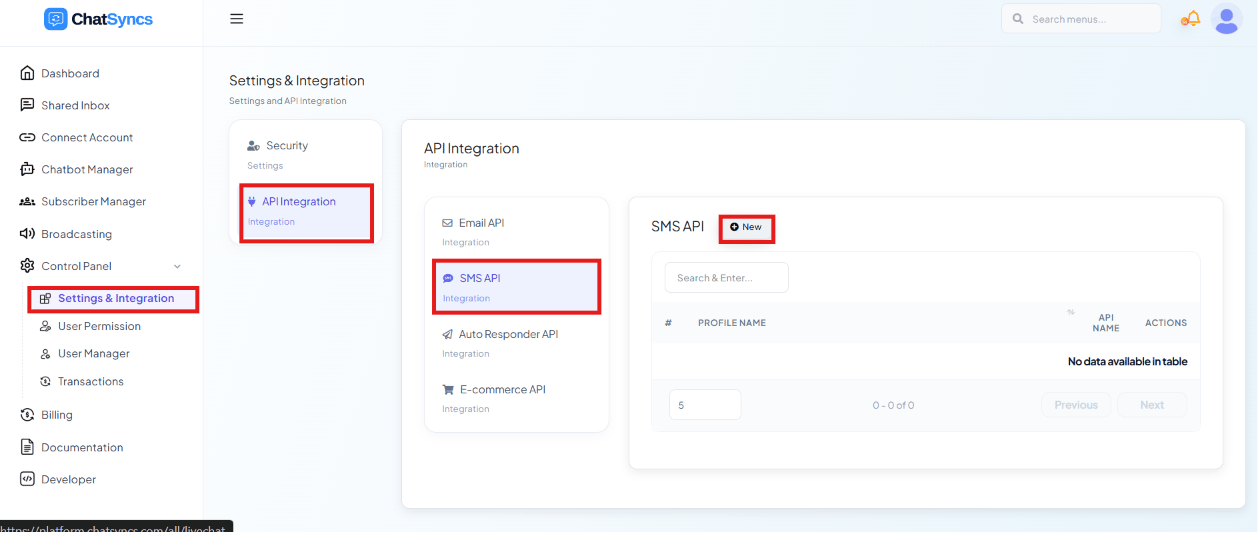 **Control Panel → Settings & Integration → API Integration → SMS API** connects an SMS gateway
so your bot or automations can send plain text messages — useful for OTPs and any customer who
isn't reachable on WhatsApp.
Click **New** to add a profile:
**Control Panel → Settings & Integration → API Integration → SMS API** connects an SMS gateway
so your bot or automations can send plain text messages — useful for OTPs and any customer who
isn't reachable on WhatsApp.
Click **New** to add a profile:
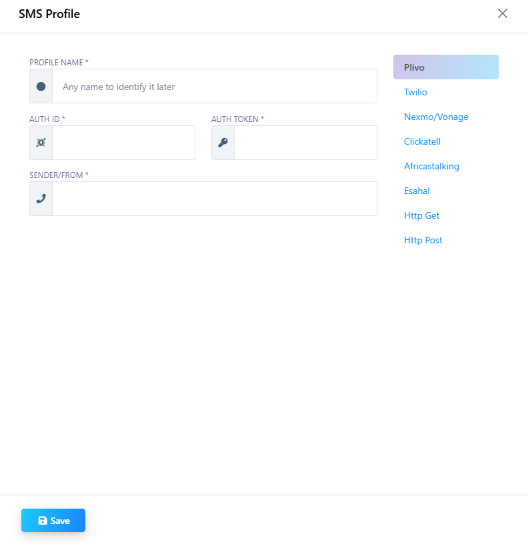 ## Supported providers
* **Plivo**
* **Twilio**
* **Nexmo/Vonage**
* **Clickatell**
* **AfricasTalking**
* **Esahal**
* **HTTP GET** / **HTTP POST** — for any gateway that isn't natively listed but exposes a simple
URL-based API
## Required fields
| Field | Example |
| ---------------------- | ------------------------------ |
| **Profile Name** | `Twilio OTP` |
| **Auth ID** | Your provider's account/API ID |
| **Auth Token** | Your provider's secret token |
| **Sender/From Number** | `+14155550100` |
## Use cases
* **OTP messages** — e.g. a login verification code, when the customer can't receive WhatsApp
right now.
* **Marketing SMS** for customers who opted into SMS but not WhatsApp.
* **Transactional SMS** — order or appointment confirmations.
* **Notifications** — internal alerts sent as SMS to a staff phone.
## Frequently asked
Connect an SMS gateway under **SMS Integration** (e.g. Twilio), then have your flow send the
OTP through that profile instead of a WhatsApp template.
If it exposes a simple **HTTP GET** or **HTTP POST** endpoint for sending messages, choose
that provider type and supply the endpoint details instead of a named integration.
Typically an **Auth ID**, **Auth Token**, and the **Sender/From Number** the messages will
appear to come from — check your provider's dashboard for these.
## Supported providers
* **Plivo**
* **Twilio**
* **Nexmo/Vonage**
* **Clickatell**
* **AfricasTalking**
* **Esahal**
* **HTTP GET** / **HTTP POST** — for any gateway that isn't natively listed but exposes a simple
URL-based API
## Required fields
| Field | Example |
| ---------------------- | ------------------------------ |
| **Profile Name** | `Twilio OTP` |
| **Auth ID** | Your provider's account/API ID |
| **Auth Token** | Your provider's secret token |
| **Sender/From Number** | `+14155550100` |
## Use cases
* **OTP messages** — e.g. a login verification code, when the customer can't receive WhatsApp
right now.
* **Marketing SMS** for customers who opted into SMS but not WhatsApp.
* **Transactional SMS** — order or appointment confirmations.
* **Notifications** — internal alerts sent as SMS to a staff phone.
## Frequently asked
Connect an SMS gateway under **SMS Integration** (e.g. Twilio), then have your flow send the
OTP through that profile instead of a WhatsApp template.
If it exposes a simple **HTTP GET** or **HTTP POST** endpoint for sending messages, choose
that provider type and supply the endpoint details instead of a named integration.
Typically an **Auth ID**, **Auth Token**, and the **Sender/From Number** the messages will
appear to come from — check your provider's dashboard for these.