> ## Documentation Index
> Fetch the complete documentation index at: https://docs.chatsyncs.com/llms.txt
> Use this file to discover all available pages before exploring further.
# Auto Responder Integration
> Connect an email marketing platform (Mailchimp, Brevo, ActiveCampaign, Mautic, MailWizz) under Control Panel → Settings & Integration so ChatSyncs can collect a customer's email during a WhatsApp chat and hand it off for newsletters, offers, and follow-up campaigns. Use this when a customer wants to grow an email list from WhatsApp, not send a one-off email (that's Email Integration).
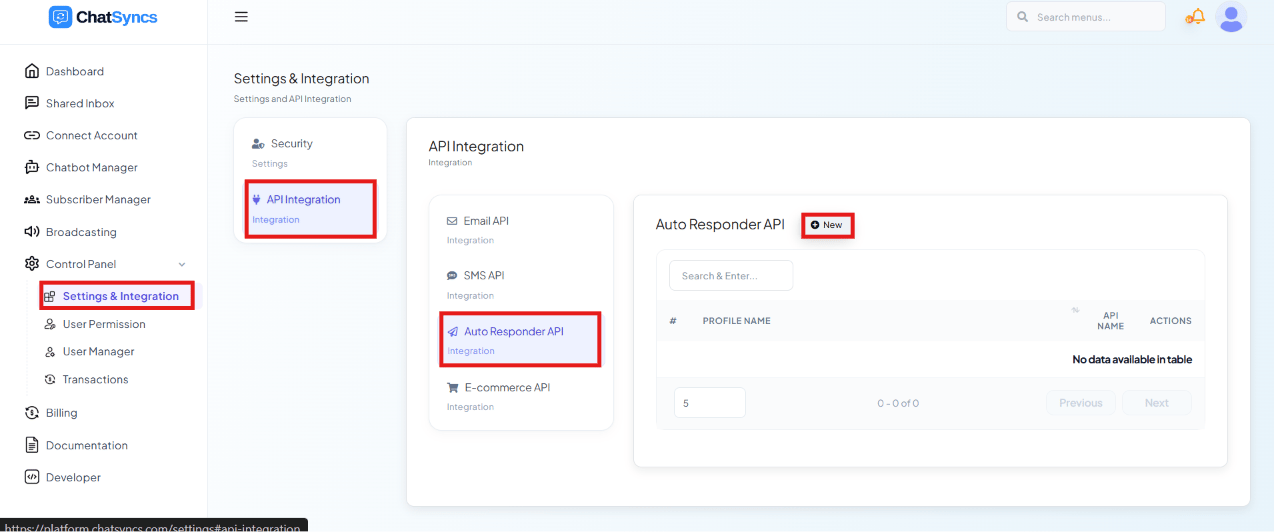 **Auto Responder Integration** connects ChatSyncs to an email marketing platform — Mailchimp,
Brevo, ActiveCampaign, Mautic, or MailWizz. The simple idea: ChatSyncs collects a customer's
email during a WhatsApp conversation, hands it to the marketing platform, and **that platform**
sends the marketing emails later — welcome emails, newsletters, offers, coupons.
## How it works
e.g. they say "Hi" and the bot offers something.
"Please enter your email."
e.g. `rahul@gmail.com`
Mailchimp, Brevo, or whichever you've connected.
From here on, the marketing platform — not ChatSyncs — owns the follow-up.
Welcome emails, newsletters, promotional offers, discount coupons, product updates — on
whatever schedule you set up in that platform.
```
Customer enters email
↓
ChatSyncs
↓
Mailchimp / Brevo
↓
Welcome Email
Newsletter
Offers
Coupons
```
ChatSyncs only collects the email and hands it off — it doesn't send the newsletters itself.
Everything after that (what emails go out, and when) is configured in Mailchimp/Brevo/etc.
## Set up a provider
Click **New** to add a profile:
**Auto Responder Integration** connects ChatSyncs to an email marketing platform — Mailchimp,
Brevo, ActiveCampaign, Mautic, or MailWizz. The simple idea: ChatSyncs collects a customer's
email during a WhatsApp conversation, hands it to the marketing platform, and **that platform**
sends the marketing emails later — welcome emails, newsletters, offers, coupons.
## How it works
e.g. they say "Hi" and the bot offers something.
"Please enter your email."
e.g. `rahul@gmail.com`
Mailchimp, Brevo, or whichever you've connected.
From here on, the marketing platform — not ChatSyncs — owns the follow-up.
Welcome emails, newsletters, promotional offers, discount coupons, product updates — on
whatever schedule you set up in that platform.
```
Customer enters email
↓
ChatSyncs
↓
Mailchimp / Brevo
↓
Welcome Email
Newsletter
Offers
Coupons
```
ChatSyncs only collects the email and hands it off — it doesn't send the newsletters itself.
Everything after that (what emails go out, and when) is configured in Mailchimp/Brevo/etc.
## Set up a provider
Click **New** to add a profile:
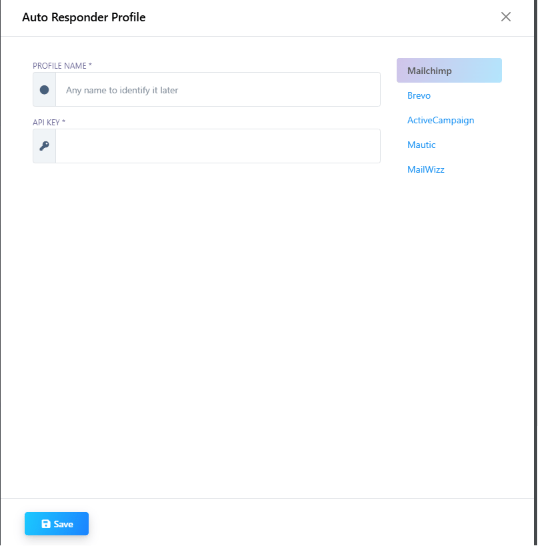 Supported providers: **Mailchimp**, **Brevo**, **ActiveCampaign**, **Mautic**, **MailWizz** — you
just need a **Profile Name** and the provider's **API Key**.
## Real examples
**Clothing store** — growing a customer list for weekend sale alerts:
> **Customer:** Hi
> **Bot:** Would you like to receive our latest offers?
> **Customer:** Yes
> **Bot:** Please enter your email.
> **Customer:** [rahul@gmail.com](mailto:rahul@gmail.com)
ChatSyncs sends the email to Mailchimp, which adds the customer to the **Customers** list. The
following week, Mailchimp automatically sends:
```
🎉 Flat 50% OFF on all shirts this weekend!
```
**Free ebook** — using the email list as a lead magnet:
> **Bot:** Want our free AI Ebook?
> **Customer:** Yes
> **Bot:** Please enter your email.
> **Customer:** [rahul@gmail.com](mailto:rahul@gmail.com)
ChatSyncs adds the email to Brevo, which then sends the ebook, weekly tips, and future course
promotions.
**Real estate** — segmenting by interest:
> **Customer:** I'm interested in apartments.
> **Bot:** Please enter your email.
> **Customer:** [rahul@gmail.com](mailto:rahul@gmail.com)
ChatSyncs adds the customer to an **Apartment Buyers** list in ActiveCampaign, which sends new
listing launches, price updates, and site-visit invitations.
## Auto Responder Integration vs Email Integration
It's easy to mix these two up because both end up sending email — the difference is *when* and
*who* sends it:
| | Auto Responder Integration | [Email Integration](/learn/control-panel-email-integration) |
| ------------------- | -------------------------------------------------- | ----------------------------------------------------------- |
| Sends | Later, through a marketing platform | Immediately, one email at a time |
| Used for | Newsletters, offers, follow-up campaigns | OTPs, confirmations, invoices, notifications |
| Who sends the email | Mailchimp, Brevo, etc. | ChatSyncs, directly |
| Providers | Mailchimp, Brevo, ActiveCampaign, Mautic, MailWizz | SMTP, Mailgun, Postmark, SES, Mandrill |
If you want an email sent **right now** — an OTP, an order confirmation — use
[Email Integration](/learn/control-panel-email-integration) instead.
## Frequently asked
Yes — connect Mailchimp under **Auto Responder Integration** with its API key, then use that
profile in a flow step to add the contact whenever the flow collects their email.
**Mailchimp**, **Brevo**, **ActiveCampaign**, **Mautic**, and **MailWizz**.
Auto Responder Integration collects an email and hands it to a marketing platform, which
sends newsletters and offers on its own schedule. Email Integration sends a single email
immediately (an OTP, a confirmation) directly from ChatSyncs — see the comparison table
above.
No — ChatSyncs only collects the customer's email and adds them to a list. The connected
platform (Mailchimp, Brevo, etc.) sends the actual newsletters, offers, and follow-ups.
Supported providers: **Mailchimp**, **Brevo**, **ActiveCampaign**, **Mautic**, **MailWizz** — you
just need a **Profile Name** and the provider's **API Key**.
## Real examples
**Clothing store** — growing a customer list for weekend sale alerts:
> **Customer:** Hi
> **Bot:** Would you like to receive our latest offers?
> **Customer:** Yes
> **Bot:** Please enter your email.
> **Customer:** [rahul@gmail.com](mailto:rahul@gmail.com)
ChatSyncs sends the email to Mailchimp, which adds the customer to the **Customers** list. The
following week, Mailchimp automatically sends:
```
🎉 Flat 50% OFF on all shirts this weekend!
```
**Free ebook** — using the email list as a lead magnet:
> **Bot:** Want our free AI Ebook?
> **Customer:** Yes
> **Bot:** Please enter your email.
> **Customer:** [rahul@gmail.com](mailto:rahul@gmail.com)
ChatSyncs adds the email to Brevo, which then sends the ebook, weekly tips, and future course
promotions.
**Real estate** — segmenting by interest:
> **Customer:** I'm interested in apartments.
> **Bot:** Please enter your email.
> **Customer:** [rahul@gmail.com](mailto:rahul@gmail.com)
ChatSyncs adds the customer to an **Apartment Buyers** list in ActiveCampaign, which sends new
listing launches, price updates, and site-visit invitations.
## Auto Responder Integration vs Email Integration
It's easy to mix these two up because both end up sending email — the difference is *when* and
*who* sends it:
| | Auto Responder Integration | [Email Integration](/learn/control-panel-email-integration) |
| ------------------- | -------------------------------------------------- | ----------------------------------------------------------- |
| Sends | Later, through a marketing platform | Immediately, one email at a time |
| Used for | Newsletters, offers, follow-up campaigns | OTPs, confirmations, invoices, notifications |
| Who sends the email | Mailchimp, Brevo, etc. | ChatSyncs, directly |
| Providers | Mailchimp, Brevo, ActiveCampaign, Mautic, MailWizz | SMTP, Mailgun, Postmark, SES, Mandrill |
If you want an email sent **right now** — an OTP, an order confirmation — use
[Email Integration](/learn/control-panel-email-integration) instead.
## Frequently asked
Yes — connect Mailchimp under **Auto Responder Integration** with its API key, then use that
profile in a flow step to add the contact whenever the flow collects their email.
**Mailchimp**, **Brevo**, **ActiveCampaign**, **Mautic**, and **MailWizz**.
Auto Responder Integration collects an email and hands it to a marketing platform, which
sends newsletters and offers on its own schedule. Email Integration sends a single email
immediately (an OTP, a confirmation) directly from ChatSyncs — see the comparison table
above.
No — ChatSyncs only collects the customer's email and adds them to a list. The connected
platform (Mailchimp, Brevo, etc.) sends the actual newsletters, offers, and follow-ups.