> ## Documentation Index
> Fetch the complete documentation index at: https://docs.chatsyncs.com/llms.txt
> Use this file to discover all available pages before exploring further.
# Webhook on Button Click in ChatSyncs
> How to fire a webhook when a customer clicks a specific button in a Keyword Replies flow, using the Send data to Webhook URL field on that Button block.
Fire a webhook when a customer clicks a specific button in a flow built following
[How to Create a Keyword-Based WhatsApp Chatbot](/learn/chatsyncs-automation/create-a-keyword-based-whatsapp-chatbot-in-chatsyncs) — track button interactions, trigger an
external action, or sync data the moment a customer makes a choice.
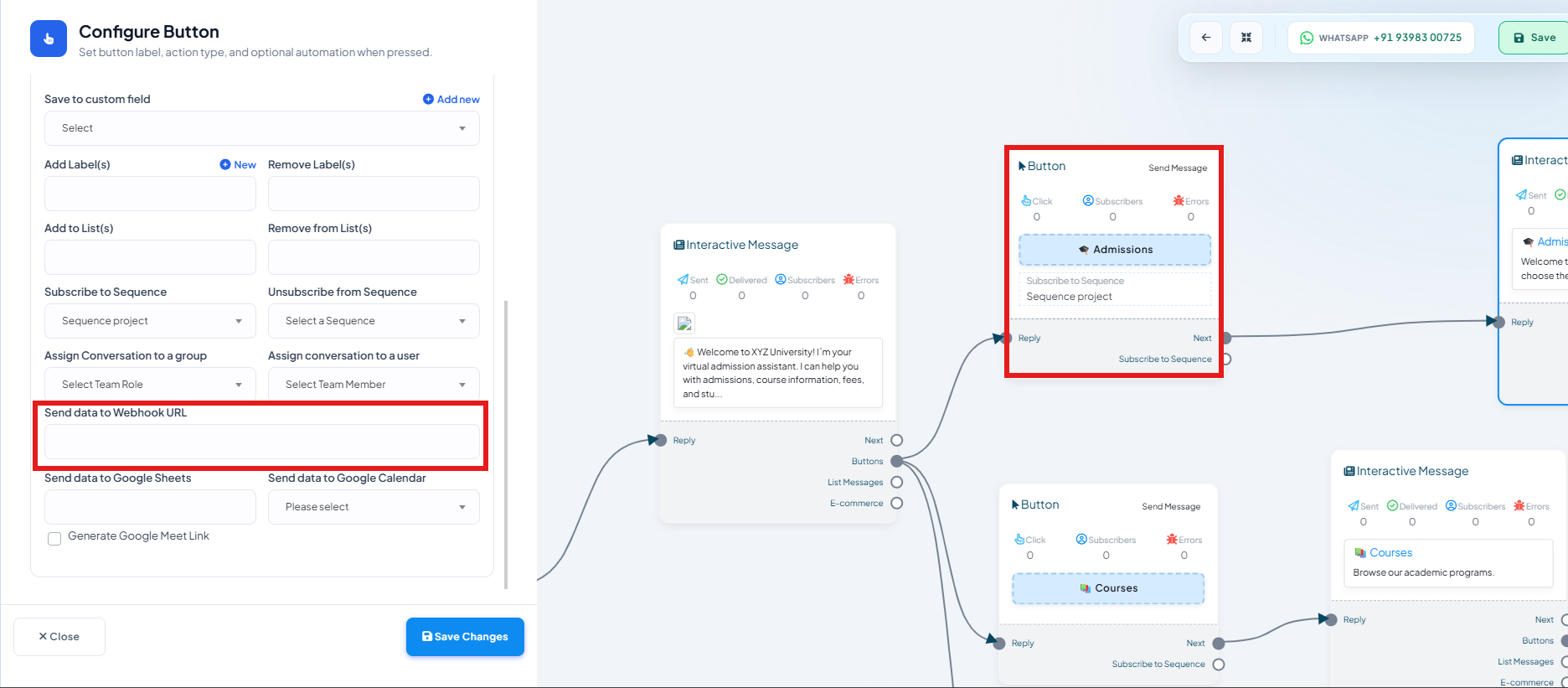 In your bot flow, click a **Button** component (inside an Interactive Message) to open
**Configure Button**.
Scroll down past **Assign Conversation to a group/user**.
Paste your webhook endpoint URL. Every time a customer taps this specific button, ChatSyncs
POSTs the subscriber's data to that URL.
Click **Save Changes**.
Each button in a flow has its own **Send data to Webhook URL** field, so different buttons can
trigger different external systems:
**Example:** In a university admissions bot, the **Admissions** button sends data to an
admissions CRM webhook, while a separate **Courses** button sends data to a course-catalog
webhook — each fires independently based on which button the customer actually taps.
The same panel also has **Send data to Google Sheets** and **Send data to Google Calendar** —
you're not limited to a webhook alone.
## Frequently asked
Yes — **Send data to Webhook URL** is set per button, so each one can point at a different
endpoint.
The subscriber's data at the moment of the click, the same way a [Keyword Trigger
webhook](/learn/chatsyncs-webhooks/webhook-on-keyword-trigger-in-chatsyncs) sends subscriber data on a keyword match.
Yes — [Webhook on Keyword Trigger](/learn/chatsyncs-webhooks/webhook-on-keyword-trigger-in-chatsyncs) fires when the flow's
trigger keyword matches. This one fires later, only when a specific button inside that flow
is actually clicked.
In your bot flow, click a **Button** component (inside an Interactive Message) to open
**Configure Button**.
Scroll down past **Assign Conversation to a group/user**.
Paste your webhook endpoint URL. Every time a customer taps this specific button, ChatSyncs
POSTs the subscriber's data to that URL.
Click **Save Changes**.
Each button in a flow has its own **Send data to Webhook URL** field, so different buttons can
trigger different external systems:
**Example:** In a university admissions bot, the **Admissions** button sends data to an
admissions CRM webhook, while a separate **Courses** button sends data to a course-catalog
webhook — each fires independently based on which button the customer actually taps.
The same panel also has **Send data to Google Sheets** and **Send data to Google Calendar** —
you're not limited to a webhook alone.
## Frequently asked
Yes — **Send data to Webhook URL** is set per button, so each one can point at a different
endpoint.
The subscriber's data at the moment of the click, the same way a [Keyword Trigger
webhook](/learn/chatsyncs-webhooks/webhook-on-keyword-trigger-in-chatsyncs) sends subscriber data on a keyword match.
Yes — [Webhook on Keyword Trigger](/learn/chatsyncs-webhooks/webhook-on-keyword-trigger-in-chatsyncs) fires when the flow's
trigger keyword matches. This one fires later, only when a specific button inside that flow
is actually clicked.