> ## Documentation Index
> Fetch the complete documentation index at: https://docs.chatsyncs.com/llms.txt
> Use this file to discover all available pages before exploring further.
# Webhook for Messages & Status Changes in ChatSyncs
> The four independent webhook triggers on a bot's Webhook tab — Incoming/Outgoing Message, Message Status, and Conversation Status Change — and how to use each.
Send every message a bot receives (and every reply it sends) to your own server, in real time —
plus two more triggers for status changes, all on the same **Webhook** tab in Bot Settings.
 ## Four independent triggers
 | Trigger | Fires when | Typical use |
| ------------------------------ | ------------------------------------------------------------------------- | ------------------------------------------------------------ |
| **Incoming Message** | A customer sends the bot a message. | CRM logging, support tickets, ERP integration. |
| **Outgoing Message** | The bot sends a reply. | Store conversation history, reporting, performance tracking. |
| **Message Status Change** | A sent message's delivery status changes (sent, delivered, read, failed). | Track delivery failures, confirm read receipts. |
| **Conversation Status Change** | The conversation's status changes (resolved, archived, blocked, etc.). | Sync conversation state into an external helpdesk or CRM. |
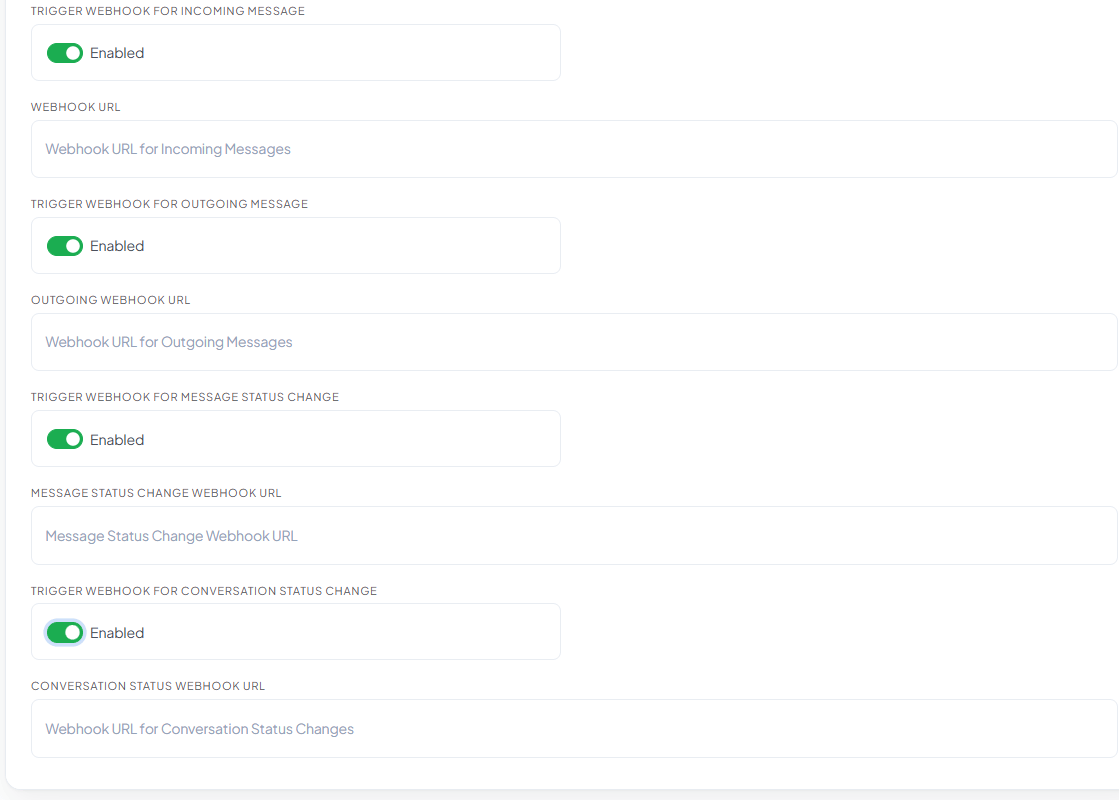
Each trigger is independent — enable any combination, and each has its own **Webhook URL** field
so they can point at the same endpoint or four different ones.
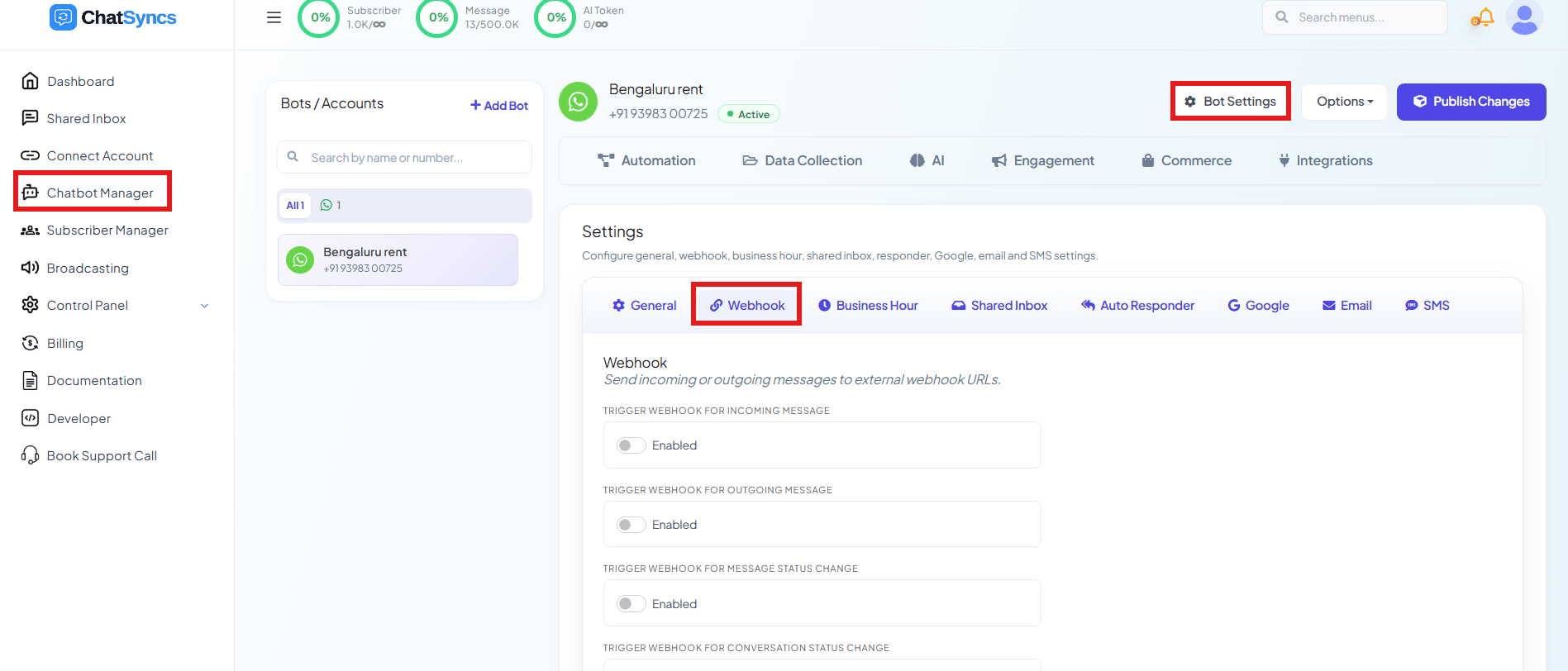
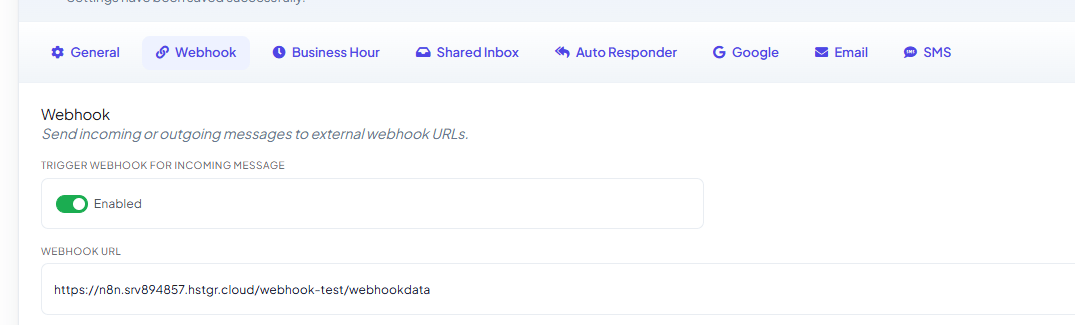
Go to **Chatbot Manager**, select your bot, click **Bot Settings**, then the **Webhook** tab.
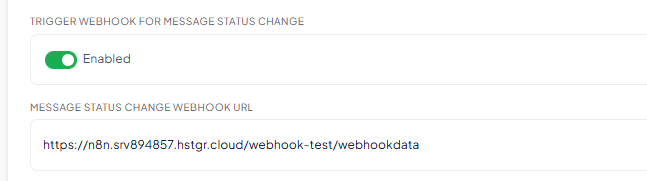
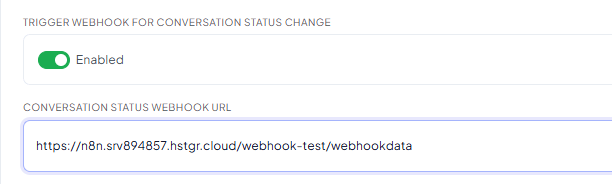
Turn on any of the four toggles.
Fill in the URL field that appears under each enabled toggle.
| Trigger | Fires when | Typical use |
| ------------------------------ | ------------------------------------------------------------------------- | ------------------------------------------------------------ |
| **Incoming Message** | A customer sends the bot a message. | CRM logging, support tickets, ERP integration. |
| **Outgoing Message** | The bot sends a reply. | Store conversation history, reporting, performance tracking. |
| **Message Status Change** | A sent message's delivery status changes (sent, delivered, read, failed). | Track delivery failures, confirm read receipts. |
| **Conversation Status Change** | The conversation's status changes (resolved, archived, blocked, etc.). | Sync conversation state into an external helpdesk or CRM. |
Each trigger is independent — enable any combination, and each has its own **Webhook URL** field
so they can point at the same endpoint or four different ones.
Go to **Chatbot Manager**, select your bot, click **Bot Settings**, then the **Webhook** tab.
Turn on any of the four toggles.
Fill in the URL field that appears under each enabled toggle.
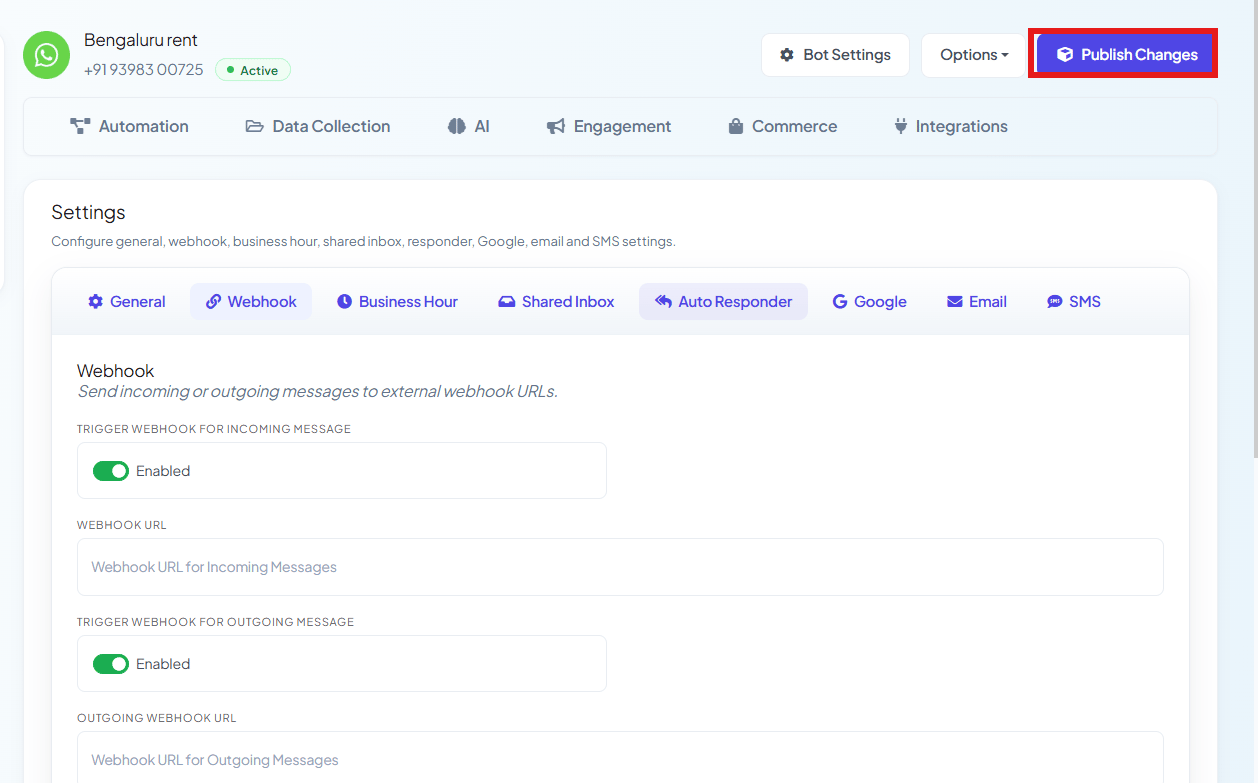 After pasting in your webhook URL(s), click **Publish Changes** — nothing goes live until you
do.
## Examples
Every trigger POSTs a JSON body. These are real captured payloads (subscriber phone number,
name, and endpoint replaced with placeholders) — every receiving tool (n8n, Make, your own
server) wraps the single event in a one-item array like this.
After pasting in your webhook URL(s), click **Publish Changes** — nothing goes live until you
do.
## Examples
Every trigger POSTs a JSON body. These are real captured payloads (subscriber phone number,
name, and endpoint replaced with placeholders) — every receiving tool (n8n, Make, your own
server) wraps the single event in a one-item array like this.
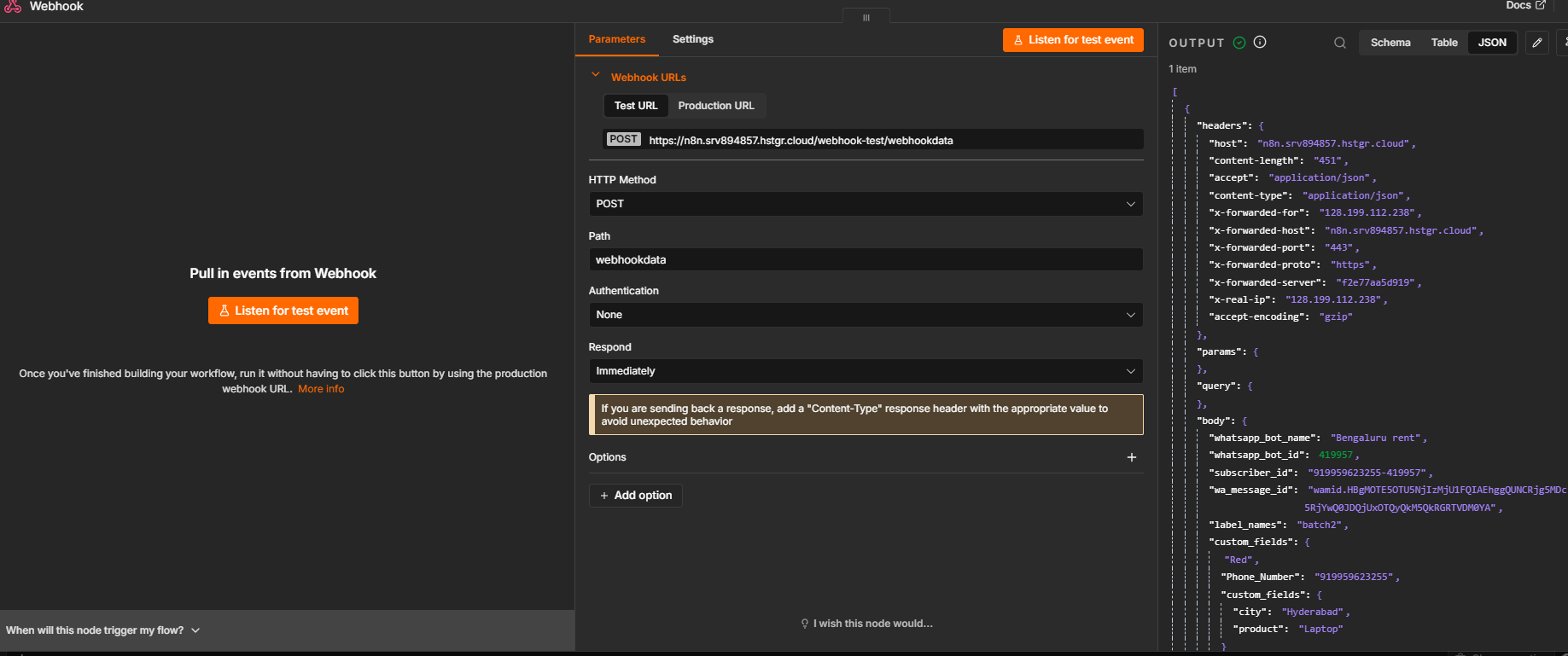 Point a trigger's Webhook URL at a tool like n8n, Make, or webhook.site first and click **Listen
for test event** (or equivalent) — send yourself a real message, and you'll see the exact payload
shape for your account before you build anything downstream.
**Incoming Message** — a customer sends *"Hi"*.
Point a trigger's Webhook URL at a tool like n8n, Make, or webhook.site first and click **Listen
for test event** (or equivalent) — send yourself a real message, and you'll see the exact payload
shape for your account before you build anything downstream.
**Incoming Message** — a customer sends *"Hi"*.
 Your server receives:
```json theme={null}
{
"whatsapp_bot_name": "Bengaluru rent",
"whatsapp_bot_id": 419957,
"subscriber_id": "919876543210-419957",
"wa_message_id": "wamid.HBgMOTE5ODc2NTQzMjEw...",
"label_names": "batch2",
"custom_fields": {
"Phone_Number": "919876543210",
"custom_fields": {
"city": "Hyderabad",
"product": "Laptop"
}
},
"first_name": "Rahul",
"chat_id": "919876543210",
"user_message": "Hi",
"whatsapp_bot_username": "+91 98765 43210"
}
```
`custom_fields` carries every Custom Field currently saved on that subscriber — here `city` and
`product` — alongside the message itself in `user_message`.
**Outgoing Message** — the bot sends a reply.
Your server receives:
```json theme={null}
{
"whatsapp_bot_name": "Bengaluru rent",
"whatsapp_bot_id": 419957,
"subscriber_id": "919876543210-419957",
"wa_message_id": "wamid.HBgMOTE5ODc2NTQzMjEw...",
"label_names": "batch2",
"custom_fields": {
"Phone_Number": "919876543210",
"custom_fields": {
"city": "Hyderabad",
"product": "Laptop"
}
},
"first_name": "Rahul",
"chat_id": "919876543210",
"user_message": "Hi",
"whatsapp_bot_username": "+91 98765 43210"
}
```
`custom_fields` carries every Custom Field currently saved on that subscriber — here `city` and
`product` — alongside the message itself in `user_message`.
**Outgoing Message** — the bot sends a reply.
 Your server receives:
```json theme={null}
{
"whatsapp_bot_name": "Bengaluru rent",
"whatsapp_bot_id": 419957,
"subscriber_id": "919876543210-419957",
"wa_message_id": "wamid.HBgTSU4uMTUyNjg5MzA1NTQ3NDg3OA...",
"label_names": "batch2",
"first_name": "Rahul",
"chat_id": "919876543210",
"whatsapp_bot_username": "+91 98765 43210"
}
```
In this captured payload, the outgoing message's own text isn't included — only subscriber and
message-ID metadata. If your integration needs the actual reply content, verify this against
your own capture (see the Tip above) rather than assuming it's present.
**Message Status Change** — a sent message moves from `sent` → `delivered` → `read`, or fails.
Your server receives:
```json theme={null}
{
"whatsapp_bot_name": "Bengaluru rent",
"whatsapp_bot_id": 419957,
"subscriber_id": "919876543210-419957",
"wa_message_id": "wamid.HBgTSU4uMTUyNjg5MzA1NTQ3NDg3OA...",
"label_names": "batch2",
"first_name": "Rahul",
"chat_id": "919876543210",
"whatsapp_bot_username": "+91 98765 43210"
}
```
In this captured payload, the outgoing message's own text isn't included — only subscriber and
message-ID metadata. If your integration needs the actual reply content, verify this against
your own capture (see the Tip above) rather than assuming it's present.
**Message Status Change** — a sent message moves from `sent` → `delivered` → `read`, or fails.
 Your server receives, on each transition:
```json theme={null}
{
"whatsapp_bot_name": "Bengaluru rent",
"whatsapp_bot_id": 419957,
"subscriber_id": "919876543210-419957",
"wa_message_id": "wamid.HBgTSU4uMTUyNjg5MzA1NTQ3NDg3OA...",
"label_names": "batch2",
"webhook_type": "message_status_change",
"message_status": "delivered",
"status_time": "2026-08-20 02:15:05",
"failed_reason": null,
"first_name": "Rahul",
"chat_id": "919876543210",
"whatsapp_bot_username": "+91 98765 43210"
}
```
`message_status` is one of `sent`, `delivered`, `read`, or `failed` — when it's `failed`,
`failed_reason` carries the reason instead of `null`.
**Conversation Status Change** — an agent marks a conversation **Resolved** in the Shared Inbox
(or via the [Mark Conversation Status API](/developer-api/subscriber/mark-conversation-status)).
Your server receives, on each transition:
```json theme={null}
{
"whatsapp_bot_name": "Bengaluru rent",
"whatsapp_bot_id": 419957,
"subscriber_id": "919876543210-419957",
"wa_message_id": "wamid.HBgTSU4uMTUyNjg5MzA1NTQ3NDg3OA...",
"label_names": "batch2",
"webhook_type": "message_status_change",
"message_status": "delivered",
"status_time": "2026-08-20 02:15:05",
"failed_reason": null,
"first_name": "Rahul",
"chat_id": "919876543210",
"whatsapp_bot_username": "+91 98765 43210"
}
```
`message_status` is one of `sent`, `delivered`, `read`, or `failed` — when it's `failed`,
`failed_reason` carries the reason instead of `null`.
**Conversation Status Change** — an agent marks a conversation **Resolved** in the Shared Inbox
(or via the [Mark Conversation Status API](/developer-api/subscriber/mark-conversation-status)).
 Your server receives:
```json theme={null}
{
"whatsapp_bot_name": "Bengaluru rent",
"whatsapp_bot_id": 419957,
"subscriber_id": "919876543210-419957",
"wa_message_id": "",
"label_names": "",
"event": "conversation.resolved",
"action": "resolved",
"action_status": "1",
"agent_name": "Priya",
"changed_at": "2026-08-29 02:38:21",
"first_name": "Rahul",
"chat_id": "919876543210",
"whatsapp_bot_username": "+91 98765 43210"
}
```
* **`event`** — a namespaced identifier for what happened, e.g. `conversation.resolved`.
* **`action`** — the plain status name: one of `resolved`, `reopen`, `archived`, `unarchived`,
`blocked`, or `unblocked` — the same states as the [Mark Conversation Status
API](/developer-api/subscriber/mark-conversation-status).
* **`action_status`** — `"1"` confirms the change actually succeeded.
* **`agent_name`** — which team member (or system) made the change.
* **`changed_at`** — when it happened, in your account's local time.
* **`wa_message_id`** and **`label_names`** arrive empty here — a conversation status change
isn't tied to one specific message or label, unlike the other three triggers.
## Frequently asked
No — each toggle and its URL field is independent. Enable only the ones you actually need.
Yes — every trigger has its own Webhook URL field, so you can route incoming messages to one
system and status changes to another.
**Message Status Change** tracks one message's delivery lifecycle (sent/delivered/read/failed).
**Conversation Status Change** tracks the whole conversation's state (resolved, archived,
blocked, etc.) — see [Mark Conversation Status](/developer-api/subscriber/mark-conversation-status)
for the same states via the API.
**Chatbot Manager → \[your bot] → Bot Settings → Webhook** tab — see [How Do I Turn On
Webhook Triggers for My Bot?](/learn/chatsyncs-bot-settings/turn-on-webhook-triggers-for-my-bot-with-chatsyncs) for the full Bot Settings
reference.
Your server receives:
```json theme={null}
{
"whatsapp_bot_name": "Bengaluru rent",
"whatsapp_bot_id": 419957,
"subscriber_id": "919876543210-419957",
"wa_message_id": "",
"label_names": "",
"event": "conversation.resolved",
"action": "resolved",
"action_status": "1",
"agent_name": "Priya",
"changed_at": "2026-08-29 02:38:21",
"first_name": "Rahul",
"chat_id": "919876543210",
"whatsapp_bot_username": "+91 98765 43210"
}
```
* **`event`** — a namespaced identifier for what happened, e.g. `conversation.resolved`.
* **`action`** — the plain status name: one of `resolved`, `reopen`, `archived`, `unarchived`,
`blocked`, or `unblocked` — the same states as the [Mark Conversation Status
API](/developer-api/subscriber/mark-conversation-status).
* **`action_status`** — `"1"` confirms the change actually succeeded.
* **`agent_name`** — which team member (or system) made the change.
* **`changed_at`** — when it happened, in your account's local time.
* **`wa_message_id`** and **`label_names`** arrive empty here — a conversation status change
isn't tied to one specific message or label, unlike the other three triggers.
## Frequently asked
No — each toggle and its URL field is independent. Enable only the ones you actually need.
Yes — every trigger has its own Webhook URL field, so you can route incoming messages to one
system and status changes to another.
**Message Status Change** tracks one message's delivery lifecycle (sent/delivered/read/failed).
**Conversation Status Change** tracks the whole conversation's state (resolved, archived,
blocked, etc.) — see [Mark Conversation Status](/developer-api/subscriber/mark-conversation-status)
for the same states via the API.
**Chatbot Manager → \[your bot] → Bot Settings → Webhook** tab — see [How Do I Turn On
Webhook Triggers for My Bot?](/learn/chatsyncs-bot-settings/turn-on-webhook-triggers-for-my-bot-with-chatsyncs) for the full Bot Settings
reference.