> ## Documentation Index
> Fetch the complete documentation index at: https://docs.chatsyncs.com/llms.txt
> Use this file to discover all available pages before exploring further.
# Webhook for Input Flow in ChatSyncs
> How to send a completed User Input Flow's collected answers to a webhook URL automatically, using the Forward Data to Webhook field under Integrations.
Send every answer a customer submits through a [User Input Flow](/learn/chatsyncs-automation/user-input-flow-in-chatsyncs) to
a webhook URL automatically, once they complete it.
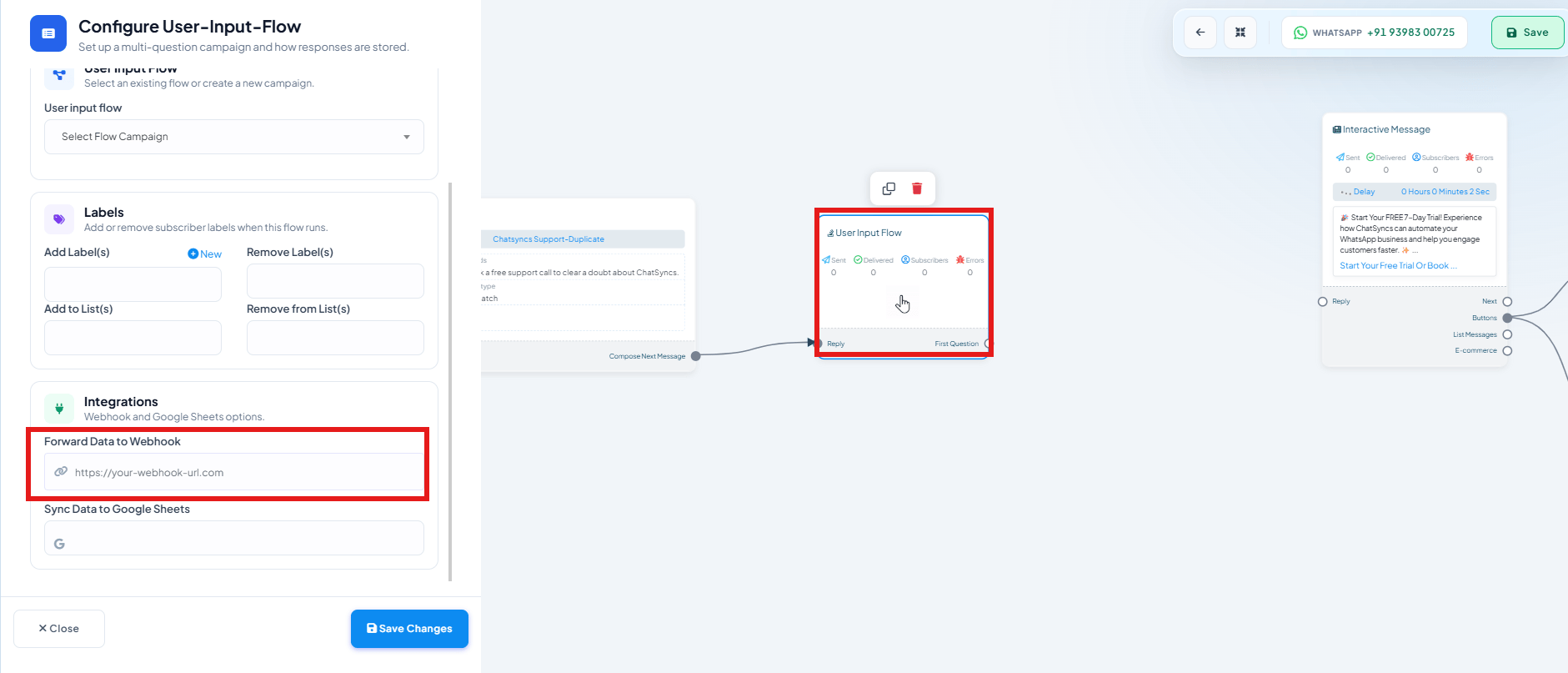 In [Chatbot Manager → Data Collection → User Input Flows](/learn/chatsyncs-automation/user-input-flow-in-chatsyncs), open
the flow you want to configure.
Find the **Integrations** section — it covers **Webhook** and **Google Sheets**.
Paste your webhook endpoint URL. When a customer completes every question in the flow,
ChatSyncs POSTs all the collected answers to that URL as JSON.
Click **Save Changes**.
This is useful for:
* Collecting lead information (name, email, requirements) and pushing it straight to a CRM.
* Gathering survey responses into an analytics platform.
* Creating a support ticket from collected details in a helpdesk.
**Sync Data to Google Sheets** sits right below the webhook field in the same section — you can
send the same completed answers to both a webhook and a spreadsheet.
## Frequently asked
Once the customer has answered every question in the Input Flow — not after each individual
answer.
All of the flow's collected answers as JSON, keyed by each question's saved custom field.
Related but separate — [Webhook on Keyword Trigger](/learn/chatsyncs-webhooks/webhook-on-keyword-trigger-in-chatsyncs) fires on
a keyword match at the start of a flow. This one fires specifically when a User Input Flow
embedded inside a flow is fully completed.
In [Chatbot Manager → Data Collection → User Input Flows](/learn/chatsyncs-automation/user-input-flow-in-chatsyncs), open
the flow you want to configure.
Find the **Integrations** section — it covers **Webhook** and **Google Sheets**.
Paste your webhook endpoint URL. When a customer completes every question in the flow,
ChatSyncs POSTs all the collected answers to that URL as JSON.
Click **Save Changes**.
This is useful for:
* Collecting lead information (name, email, requirements) and pushing it straight to a CRM.
* Gathering survey responses into an analytics platform.
* Creating a support ticket from collected details in a helpdesk.
**Sync Data to Google Sheets** sits right below the webhook field in the same section — you can
send the same completed answers to both a webhook and a spreadsheet.
## Frequently asked
Once the customer has answered every question in the Input Flow — not after each individual
answer.
All of the flow's collected answers as JSON, keyed by each question's saved custom field.
Related but separate — [Webhook on Keyword Trigger](/learn/chatsyncs-webhooks/webhook-on-keyword-trigger-in-chatsyncs) fires on
a keyword match at the start of a flow. This one fires specifically when a User Input Flow
embedded inside a flow is fully completed.