> ## Documentation Index
> Fetch the complete documentation index at: https://docs.chatsyncs.com/llms.txt
> Use this file to discover all available pages before exploring further.
# Messaging Tools: Canned Responses, Templates & Attachments in ChatSyncs
> The message composer's tools for replying faster — saved responses, message templates, and file attachments.
Beyond plain text, the ChatSyncs Shared Inbox message composer has tools built for replying
quickly and consistently.
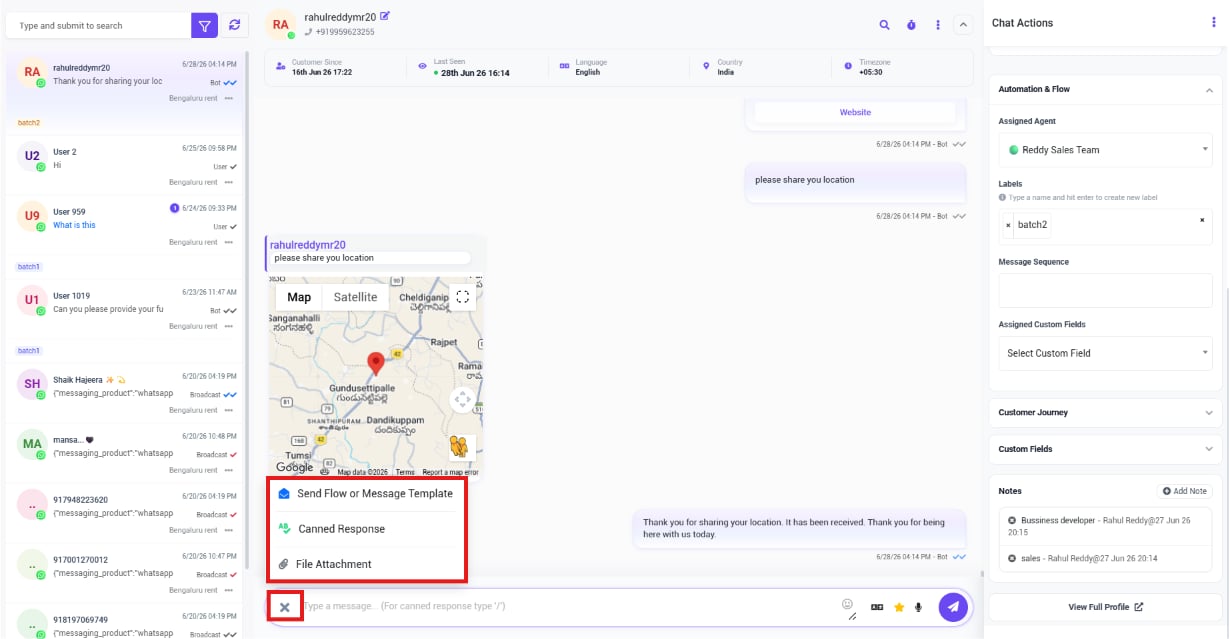 * **Send Flow or Message Template** — trigger a bot flow, or send an approved [Message
Template](/learn/chatsyncs-message-templates/creating-a-whatsapp-message-template-in-chatsyncs) when the conversation is outside the 24-hour window.
* **Canned Response** — insert a saved reply instead of typing it out again.
* **File Attachment** — attach a file to the message.
* **Emojis**, **AI Assistance**, and **Voice Message** — additional icons in the composer's
reply bar. See [AI Translation & Message Rewrite](/learn/chatsyncs-shared-inbox/ai-translation-message-rewrite-in-chatsyncs)
for the AI option.
**Example:** A customer asks *"Can you send your price list?"*. Instead of typing it out, the
agent picks the saved **Canned Response** for pricing and sends it instantly.
## Frequently asked
Use **Canned Response** in the composer instead of typing it fresh each time.
Yes — use **File Attachment** in the composer's extra options menu.
If the conversation is outside WhatsApp's 24-hour service window, a plain reply won't
deliver — use **Send Flow or Message Template** to send an approved template instead. See
[Managing Customer Data with Custom Fields](/learn/chatsyncs-shared-inbox/managing-customer-data-with-custom-fields-in-chatsyncs) for how to
check a conversation's messaging window status.
* **Send Flow or Message Template** — trigger a bot flow, or send an approved [Message
Template](/learn/chatsyncs-message-templates/creating-a-whatsapp-message-template-in-chatsyncs) when the conversation is outside the 24-hour window.
* **Canned Response** — insert a saved reply instead of typing it out again.
* **File Attachment** — attach a file to the message.
* **Emojis**, **AI Assistance**, and **Voice Message** — additional icons in the composer's
reply bar. See [AI Translation & Message Rewrite](/learn/chatsyncs-shared-inbox/ai-translation-message-rewrite-in-chatsyncs)
for the AI option.
**Example:** A customer asks *"Can you send your price list?"*. Instead of typing it out, the
agent picks the saved **Canned Response** for pricing and sends it instantly.
## Frequently asked
Use **Canned Response** in the composer instead of typing it fresh each time.
Yes — use **File Attachment** in the composer's extra options menu.
If the conversation is outside WhatsApp's 24-hour service window, a plain reply won't
deliver — use **Send Flow or Message Template** to send an approved template instead. See
[Managing Customer Data with Custom Fields](/learn/chatsyncs-shared-inbox/managing-customer-data-with-custom-fields-in-chatsyncs) for how to
check a conversation's messaging window status.