> ## Documentation Index
> Fetch the complete documentation index at: https://docs.chatsyncs.com/llms.txt
> Use this file to discover all available pages before exploring further.
# Follow-up Reminders & Message Sequences in ChatSyncs
> How to set a reminder to come back to a conversation later, and how to assign an automated follow-up sequence.
Two ways to make sure a customer doesn't fall through the cracks: a manual **reminder** for you
to come back later, or an automated **Message Sequence** that follows up on its own.
## Follow-up reminders
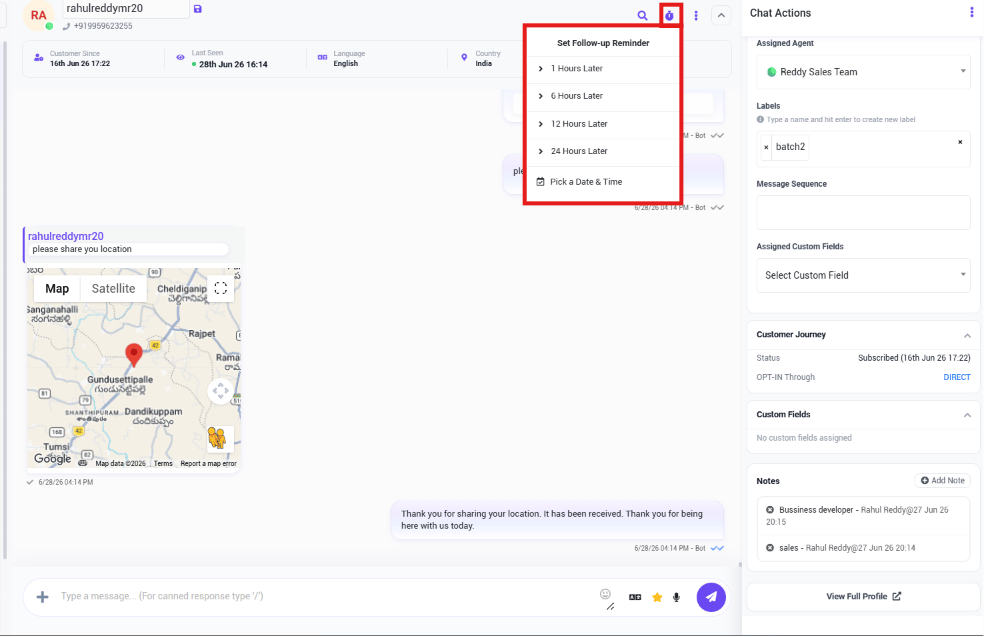 Set a reminder to come back to a conversation later:
* **1 Hour Later**
* **6 Hours Later**
* **12 Hours Later**
* **24 Hours Later**
* **Pick a Date & Time**
**Example:** A customer says *"I'll decide tomorrow."* The agent sets a **24 Hours Later**
reminder, so the system prompts them to follow up instead of relying on memory.
All scheduled reminders are visible together from **Settings → Follow-up List**.
## Message Sequences
Set a reminder to come back to a conversation later:
* **1 Hour Later**
* **6 Hours Later**
* **12 Hours Later**
* **24 Hours Later**
* **Pick a Date & Time**
**Example:** A customer says *"I'll decide tomorrow."* The agent sets a **24 Hours Later**
reminder, so the system prompts them to follow up instead of relying on memory.
All scheduled reminders are visible together from **Settings → Follow-up List**.
## Message Sequences
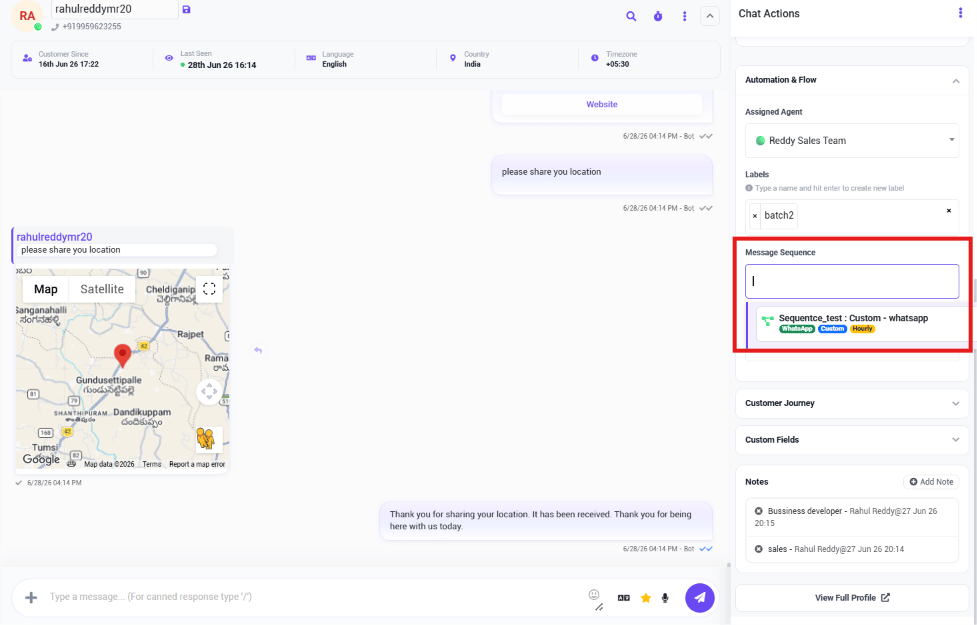 Using [How to Build Automatic Follow-Up Chatbots on WhatsApp](/learn/chatsyncs-automation/build-automatic-follow-up-chatbots-on-whatsapp-in-chatsyncs), assign an automated sequence
to the customer directly from the conversation, instead of setting a manual reminder.
**Example:** A customer downloads a product brochure. The agent assigns a 5-day follow-up
sequence, and ChatSyncs sends the scheduled messages automatically without anyone having to
remember.
## Frequently asked
Use the follow-up reminder option on the conversation and pick **1/6/12/24 Hours Later** or
a custom date and time.
**Settings → Follow-up List** shows every scheduled reminder in one place.
A reminder just nudges *you* to come back to the conversation manually. A **Message
Sequence** sends the follow-up messages automatically, without you doing anything once it's
assigned.
Using [How to Build Automatic Follow-Up Chatbots on WhatsApp](/learn/chatsyncs-automation/build-automatic-follow-up-chatbots-on-whatsapp-in-chatsyncs), assign an automated sequence
to the customer directly from the conversation, instead of setting a manual reminder.
**Example:** A customer downloads a product brochure. The agent assigns a 5-day follow-up
sequence, and ChatSyncs sends the scheduled messages automatically without anyone having to
remember.
## Frequently asked
Use the follow-up reminder option on the conversation and pick **1/6/12/24 Hours Later** or
a custom date and time.
**Settings → Follow-up List** shows every scheduled reminder in one place.
A reminder just nudges *you* to come back to the conversation manually. A **Message
Sequence** sends the follow-up messages automatically, without you doing anything once it's
assigned.