> ## Documentation Index
> Fetch the complete documentation index at: https://docs.chatsyncs.com/llms.txt
> Use this file to discover all available pages before exploring further.
# AI Translation & Message Rewrite in ChatSyncs
> The two AI icons in the Shared Inbox message composer — a translate icon and the star-shaped AI Rewrite icon — plus the separate AI Assistant panel in Chat Actions.
The ChatSyncs Shared Inbox message composer has two separate AI icons next to the emoji icon,
and the Chat Actions panel has a related but separate **AI Assistant** tab.
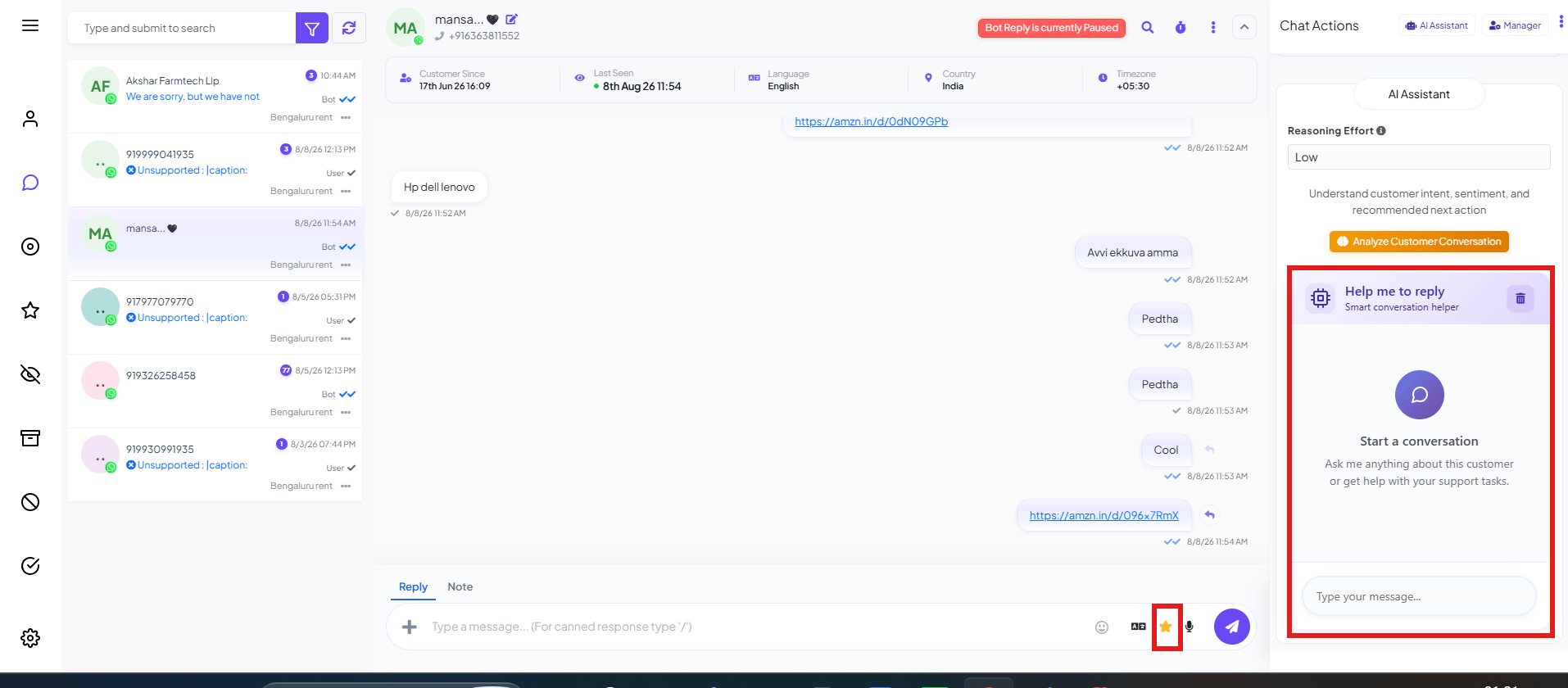 ## The two composer icons
* **Translate icon** (the "Aあ"-style icon) — AI translation for the composer.
* **Star icon** — **AI Rewrite**, highlighted above. Click it to have AI rewrite your draft
reply before you send it.
Exactly what the translate icon translates (your outgoing draft, or the customer's incoming
message) and what tone/style the rewrite applies aren't confirmed yet — try each icon in the
composer to see it in action, and this page will be filled in with the full before/after
behavior once that's confirmed.
## AI Assistant (Chat Actions panel)
The **AI Assistant** tab in the Chat Actions panel is a separate capability from the composer
icons above — a chat-based helper for the agent, not the customer:
* **Analyze Customer Conversation** — a button that reads the conversation and summarizes intent,
sentiment, and a recommended next action.
* **Help me to reply** — a **"Start a conversation"** chat box where the agent can ask the AI
anything about this customer or get help with support tasks, with a **Reasoning Effort**
setting (e.g. Low).
This panel is new and not yet fully documented — this page currently only confirms it exists and
roughly what its two parts do. A full walkthrough will follow once its exact behavior is
confirmed.
## Frequently asked
Two places: the composer's icon row (translate and star/AI Rewrite icons, next to the emoji
icon), and the **AI Assistant** tab in the Chat Actions panel on the right.
It's **AI Rewrite** — rewrites your draft message with AI before you send it.
The composer icons (translate, AI Rewrite) act on the message you're about to send. The **AI
Assistant** panel is a separate chat-based helper — it analyzes the conversation or answers
questions about the customer, rather than editing your draft.
## The two composer icons
* **Translate icon** (the "Aあ"-style icon) — AI translation for the composer.
* **Star icon** — **AI Rewrite**, highlighted above. Click it to have AI rewrite your draft
reply before you send it.
Exactly what the translate icon translates (your outgoing draft, or the customer's incoming
message) and what tone/style the rewrite applies aren't confirmed yet — try each icon in the
composer to see it in action, and this page will be filled in with the full before/after
behavior once that's confirmed.
## AI Assistant (Chat Actions panel)
The **AI Assistant** tab in the Chat Actions panel is a separate capability from the composer
icons above — a chat-based helper for the agent, not the customer:
* **Analyze Customer Conversation** — a button that reads the conversation and summarizes intent,
sentiment, and a recommended next action.
* **Help me to reply** — a **"Start a conversation"** chat box where the agent can ask the AI
anything about this customer or get help with support tasks, with a **Reasoning Effort**
setting (e.g. Low).
This panel is new and not yet fully documented — this page currently only confirms it exists and
roughly what its two parts do. A full walkthrough will follow once its exact behavior is
confirmed.
## Frequently asked
Two places: the composer's icon row (translate and star/AI Rewrite icons, next to the emoji
icon), and the **AI Assistant** tab in the Chat Actions panel on the right.
It's **AI Rewrite** — rewrites your draft message with AI before you send it.
The composer icons (translate, AI Rewrite) act on the message you're about to send. The **AI
Assistant** panel is a separate chat-based helper — it analyzes the conversation or answers
questions about the customer, rather than editing your draft.