> ## Documentation Index
> Fetch the complete documentation index at: https://docs.chatsyncs.com/llms.txt
> Use this file to discover all available pages before exploring further.
# How to Create a Facebook Business Manager Account for ChatSyncs
> How to create a Meta Business Manager account (the account that owns your WhatsApp setup) so you can unlock full WhatsApp Business API access in ChatSyncs.
A **Meta Business Manager** account (also called a **Business Portfolio**) is like the master folder your whole WhatsApp setup lives inside — your WhatsApp number, and everything else you connect to ChatSyncs, hangs off this one account.
If a customer doesn't have one yet, this is the very first thing to set up — before connecting a phone number at all.
Embedded signup can also create a Business Portfolio for you inline, asking only for a portfolio name, your first/last name, and a website — see [How to Connect Your Number to ChatSyncs](/learn/chatsyncs-setup-and-configuration/connect-your-number-to-chatsyncs). Use this guide instead if you'd rather set the account up ahead of time, or need the fuller sign-up flow with email verification.
## Why you need one
* Access to unlimited messaging tiers, once verified (see [Messaging Limits & Quality Rating](/meta-api/concepts/messaging-limits-and-quality-rating)) — an unverified account is capped at 250 unique customers per day.
* One account that everything else attaches to: your WhatsApp number, ad accounts, and any future Meta app all live inside this same portfolio.
* A single place to manage team access, billing, and business documents.
## Before you start
* An active personal Facebook account.
* A business email address you check regularly.
* Basic business information — legal name, address, and category.
## Create the account
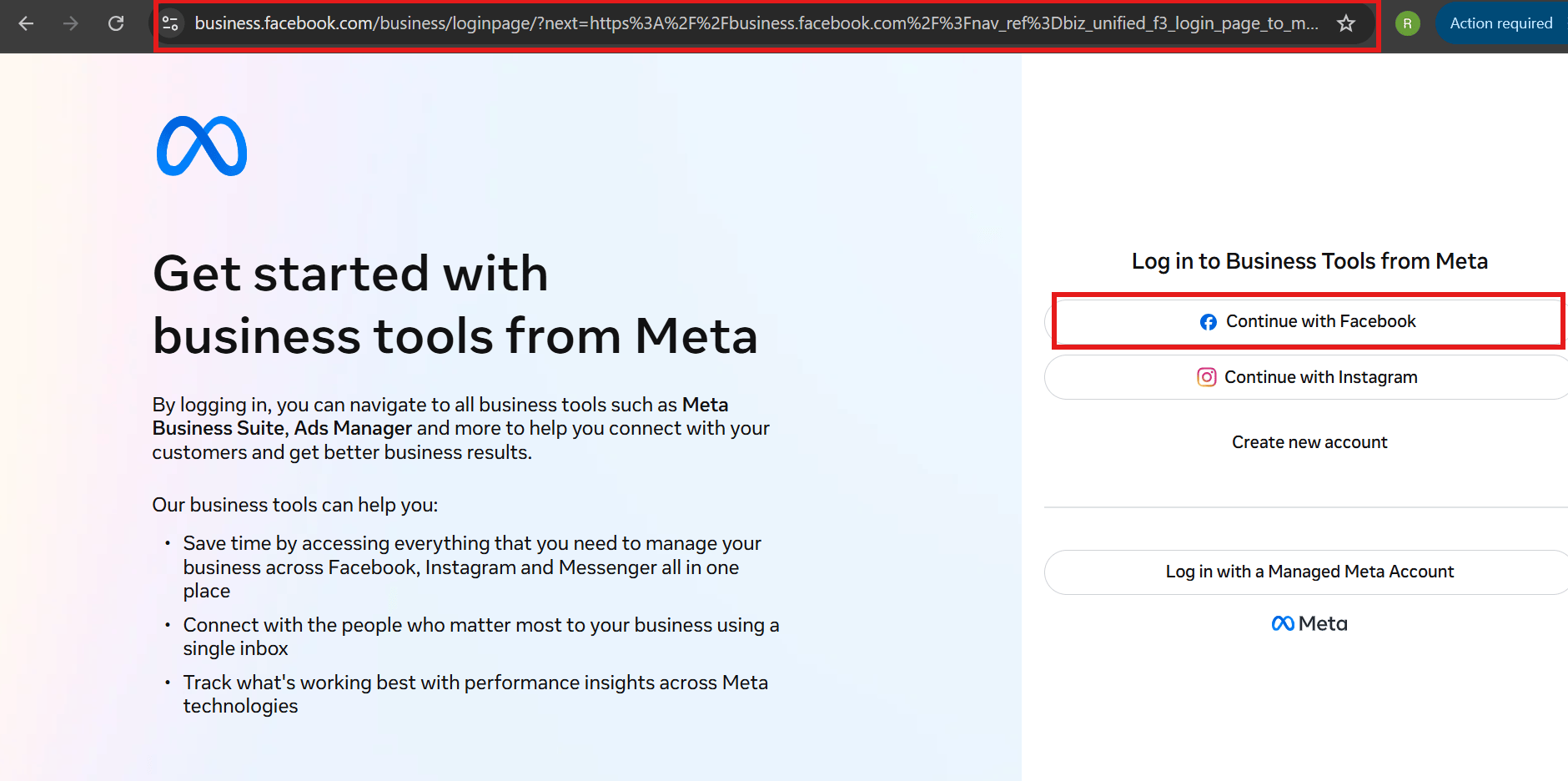
Visit [business.facebook.com](https://business.facebook.com/) and click **Continue with Facebook**.
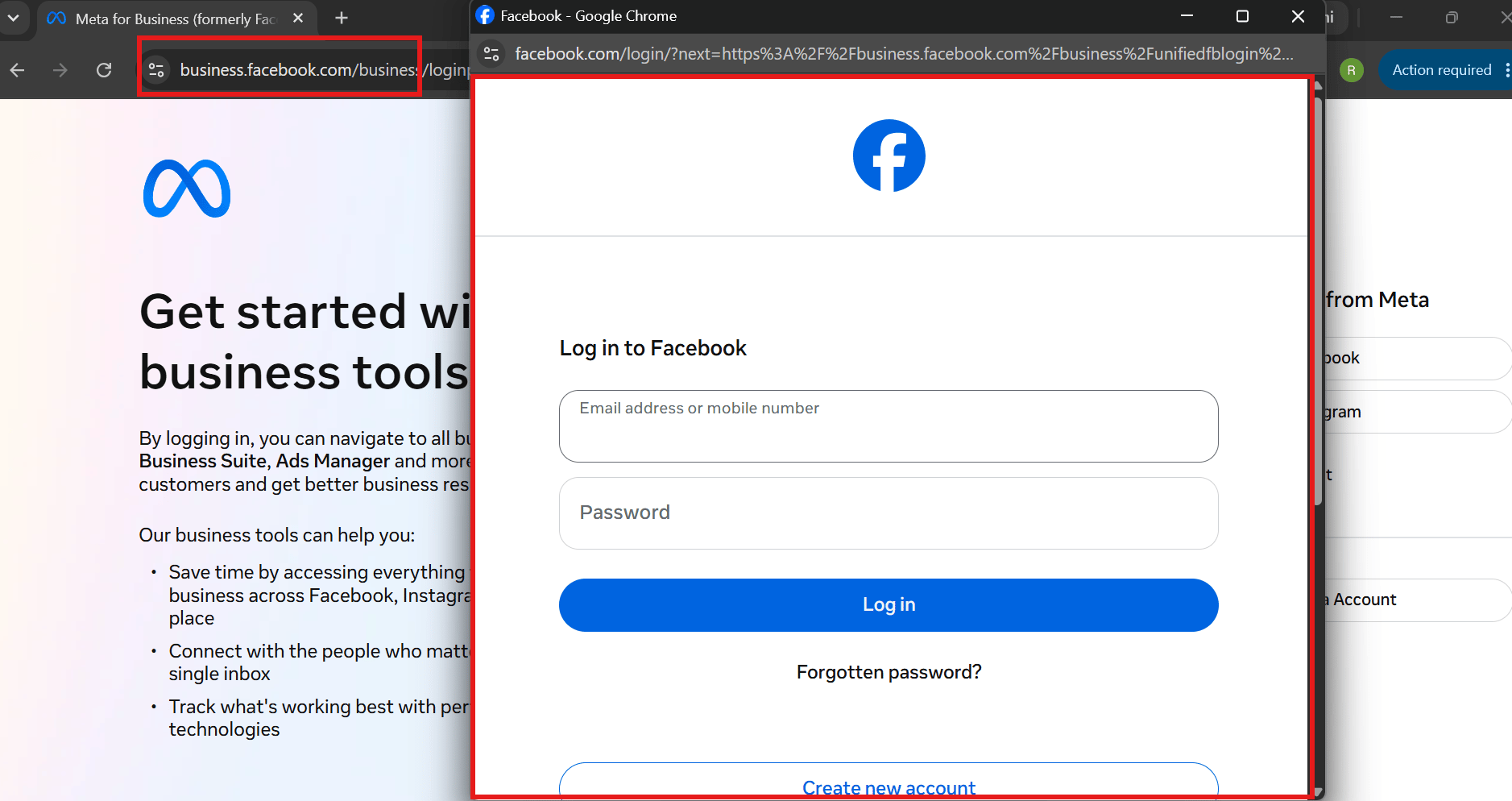
 Use the personal Facebook account you want to manage the business with — this becomes the account's first admin.
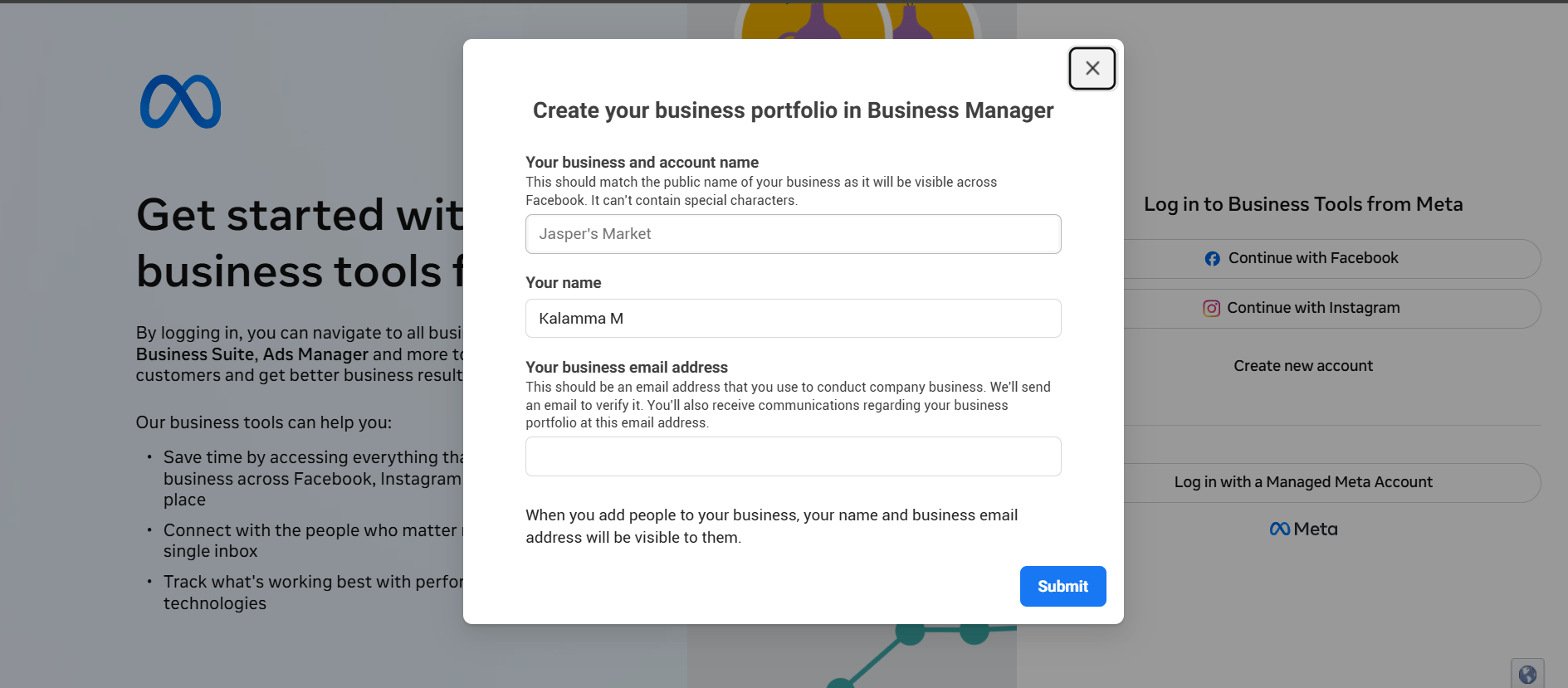
 In the **Create your business portfolio in Business Manager** dialog, fill in **Your business and account name**, **Your name**, and **Your business email address**, then click **Submit**. Use the business's actual legal name here if possible — it's the detail most likely to cause a mismatch later during [Business Verification](/meta-api/concepts/business-verification-and-green-tick).
 Check the inbox for the email address just entered and click **Confirm Now** in the verification email Meta sends.
Once confirmed, the portfolio is created — **Business Settings** is where you'll come back to add team members, connect a WhatsApp number, and eventually apply for verification.
## Common mistakes to avoid
* **Using a personal email instead of a business one** — a business email is recommended so account and billing notices don't get lost in a personal inbox.
* **Entering incomplete or inconsistent business information** — double-check the business name and address before submitting; small mismatches (like "Pvt Ltd" vs "Private Limited") are the most common cause of a rejected verification later.
* **Creating a second Business Portfolio for the same company** — this just splits assets and verification history across two places. Reuse the existing one if your business already has one from running ads or another integration.
## What's next
With the account created, either connect a number through [How to Connect Your Number to ChatSyncs](/learn/chatsyncs-setup-and-configuration/connect-your-number-to-chatsyncs) or [How to Add Payment Method for WhatsApp API Billing](/learn/chatsyncs-setup-and-configuration/add-payment-method-for-whatsapp-api-billing-in-chatsyncs) and [apply for Business Verification](/meta-api/concepts/business-verification-and-green-tick) to raise your messaging limits ahead of time.
## Frequently asked
You can, but a business email is recommended — Meta sends verification and account notices there, and it's easy to miss them in a personal inbox.
Yes, most information can be edited later in **Business Settings**. Fix it there before applying for Business Verification, since mismatches against your uploaded documents are the most common rejection reason.
No — you can connect a WhatsApp number and start sending messages at the starter tier (250 unique customers/day) before verifying. Verify later to raise that limit.
No — reuse the existing one. Creating a second portfolio for the same company just splits your assets and verification history across two places.
Check the inbox for the email address just entered and click **Confirm Now** in the verification email Meta sends.
Once confirmed, the portfolio is created — **Business Settings** is where you'll come back to add team members, connect a WhatsApp number, and eventually apply for verification.
## Common mistakes to avoid
* **Using a personal email instead of a business one** — a business email is recommended so account and billing notices don't get lost in a personal inbox.
* **Entering incomplete or inconsistent business information** — double-check the business name and address before submitting; small mismatches (like "Pvt Ltd" vs "Private Limited") are the most common cause of a rejected verification later.
* **Creating a second Business Portfolio for the same company** — this just splits assets and verification history across two places. Reuse the existing one if your business already has one from running ads or another integration.
## What's next
With the account created, either connect a number through [How to Connect Your Number to ChatSyncs](/learn/chatsyncs-setup-and-configuration/connect-your-number-to-chatsyncs) or [How to Add Payment Method for WhatsApp API Billing](/learn/chatsyncs-setup-and-configuration/add-payment-method-for-whatsapp-api-billing-in-chatsyncs) and [apply for Business Verification](/meta-api/concepts/business-verification-and-green-tick) to raise your messaging limits ahead of time.
## Frequently asked
You can, but a business email is recommended — Meta sends verification and account notices there, and it's easy to miss them in a personal inbox.
Yes, most information can be edited later in **Business Settings**. Fix it there before applying for Business Verification, since mismatches against your uploaded documents are the most common rejection reason.
No — you can connect a WhatsApp number and start sending messages at the starter tier (250 unique customers/day) before verifying. Verify later to raise that limit.
No — reuse the existing one. Creating a second portfolio for the same company just splits your assets and verification history across two places.