> ## Documentation Index
> Fetch the complete documentation index at: https://docs.chatsyncs.com/llms.txt
> Use this file to discover all available pages before exploring further.
# What Is a WABA (WhatsApp Business Account)?
> What a WABA (WhatsApp Business Account) is, and how it relates to the phone number and templates ChatSyncs uses.
A **WABA (WhatsApp Business Account)** holds, on Meta's side:
* The business's phone number(s)
* Message templates
* Messaging history
It lives inside the business's Meta Business Portfolio, and it's what ChatSyncs connects to
when linking a WhatsApp number — whether through
[How to Connect Your Number to ChatSyncs](/learn/chatsyncs-setup-and-configuration/how-to-connect-your-number-to-chatsyncs) or [How to Connect Your WhatsApp Account Manually (Alternative Method)](/learn/chatsyncs-setup-and-configuration/how-to-connect-your-whatsapp-account-manually-alternative-method-in-chatsyncs).
**Two different IDs, easy to mix up:**
* **WABA ID** — identifies the whole account (used for account-level settings, templates,
webhooks).
* **Phone Number ID** — identifies one specific number inside that account.
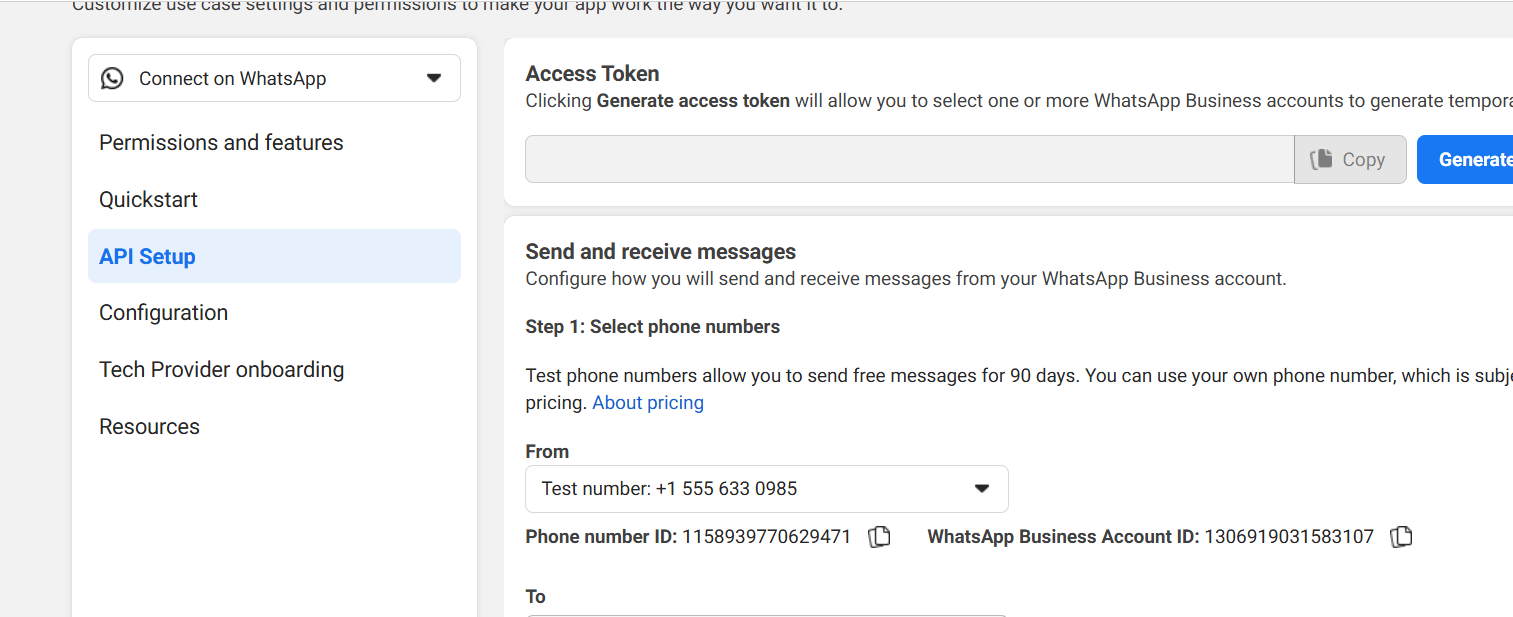 Both IDs live on the same Meta API Setup screen, right next to each other — that's exactly why
they're easy to mix up.
Both IDs live on the same Meta API Setup screen, right next to each other — that's exactly why
they're easy to mix up.
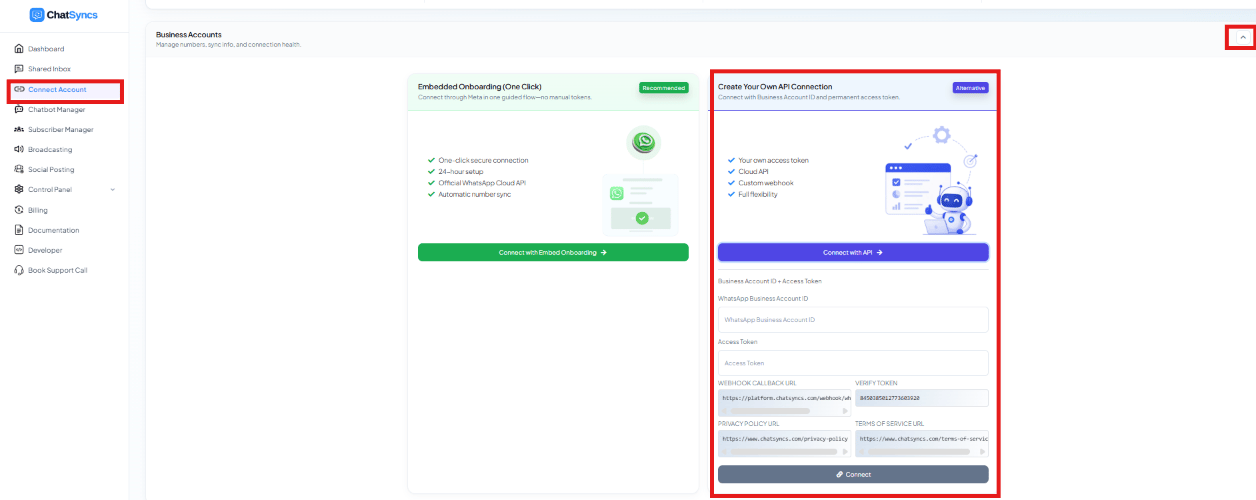 That's where the WABA ID goes in ChatSyncs — the WhatsApp Business Account ID field on the
manual connection panel.
## Frequently asked
In the Meta developer dashboard, under API Setup — or in the credentials shown during
ChatSyncs' manual connection flow.
No. WABA ID identifies the whole account; Phone Number ID identifies one number inside it.
ChatSyncs needs both during manual setup.
For the full glossary — including Phone Number ID and BSP — see
[What Is a WABA (WhatsApp Business Account)?](/meta-api/concepts/whatsapp-api-glossary) in the Meta WhatsApp API reference.
This documentation is built and hosted on [Mintlify](https://mintlify.com), a developer documentation platform.
That's where the WABA ID goes in ChatSyncs — the WhatsApp Business Account ID field on the
manual connection panel.
## Frequently asked
In the Meta developer dashboard, under API Setup — or in the credentials shown during
ChatSyncs' manual connection flow.
No. WABA ID identifies the whole account; Phone Number ID identifies one number inside it.
ChatSyncs needs both during manual setup.
For the full glossary — including Phone Number ID and BSP — see
[What Is a WABA (WhatsApp Business Account)?](/meta-api/concepts/whatsapp-api-glossary) in the Meta WhatsApp API reference.
This documentation is built and hosted on [Mintlify](https://mintlify.com), a developer documentation platform.