> ## Documentation Index
> Fetch the complete documentation index at: https://docs.chatsyncs.com/llms.txt
> Use this file to discover all available pages before exploring further.
# Template Variables vs Custom Variables — What's the Difference with ChatSyncs?
> The difference between a Template Variable and a Custom Field in WhatsApp message templates, when to use each, and how each behaves in the API.
Inside a [Message Template](/learn/chatsyncs-message-templates/creating-a-whatsapp-message-template-in-chatsyncs) body, a **Template Variable** and a
**Custom Field** look exactly the same — both are written as `#fieldname#`. That's exactly why
they confuse people: `#price#` and `#name#` look like the same kind of thing, but where each one
gets its value from is completely different.
## One example, both types
Imagine an order confirmation template with this body:
```text theme={null}
Hi #name#, thanks for shopping with us!
Your #product_name# (#price#) has been confirmed.
Order ID: #orderid#
Arriving: #delivery_date#
We'll deliver to your address in #city#.
```
| Placeholder | Type | Where the value comes from |
| ----------------- | ----------------- | ------------------------------------------------------------- |
| `#name#` | Custom Field | Stored on the subscriber's profile — set once, reused forever |
| `#city#` | Custom Field | Stored on the subscriber's profile — set once, reused forever |
| `#product_name#` | Template Variable | Typed in fresh, every time you send this template |
| `#price#` | Template Variable | Typed in fresh, every time you send this template |
| `#orderid#` | Template Variable | Typed in fresh, every time you send this template |
| `#delivery_date#` | Template Variable | Typed in fresh, every time you send this template |
`#name#` and `#city#` almost never change for a given subscriber, so they're stored once and
reused automatically. `#product_name#`, `#price#`, `#orderid#`, and `#delivery_date#` are
different on *every single order* — nobody would want to permanently store "₹499" on a
subscriber's profile, so those get typed in fresh each time you send.
## Quick comparison
| | Template Variable | Custom Field |
| ----------------- | ------------------------------------------------------------------------- | ---------------------------------------------------------------------------------------------------------------------------------------------------- |
| **Looks like** | `#price#`, `#orderid#`, `#delivery_date#` | `#name#`, `#city#`, `#company_name#` |
| **Where created** | Message Templates → Template Variables section | Subscriber Manager → [How Do I Manage Custom Fields and Labels?](/learn/chatsyncs-subscriber-manager/manage-custom-fields-and-labels-with-chatsyncs) |
| **Data storage** | Temporary — you supply it every time you send | Permanent — stored on the subscriber's profile |
| **Attached to** | The message | The subscriber |
| **Best for** | Data that changes every send: prices, order numbers, delivery dates, OTPs | Data that rarely changes: name, company, email, city |
| **API behavior** | You must pass the value on every send | ChatSyncs pulls it automatically — no need to pass it |
## Template Variables
A Template Variable is a placeholder that changes with every message — it isn't stored
anywhere, so you type the real value in fresh each time you send. Use it for anything unique to
that one message: a price, an order number, a delivery date, an OTP code.
Create one from **Chatbot Manager → Automation → Message Templates → Template Variables**:
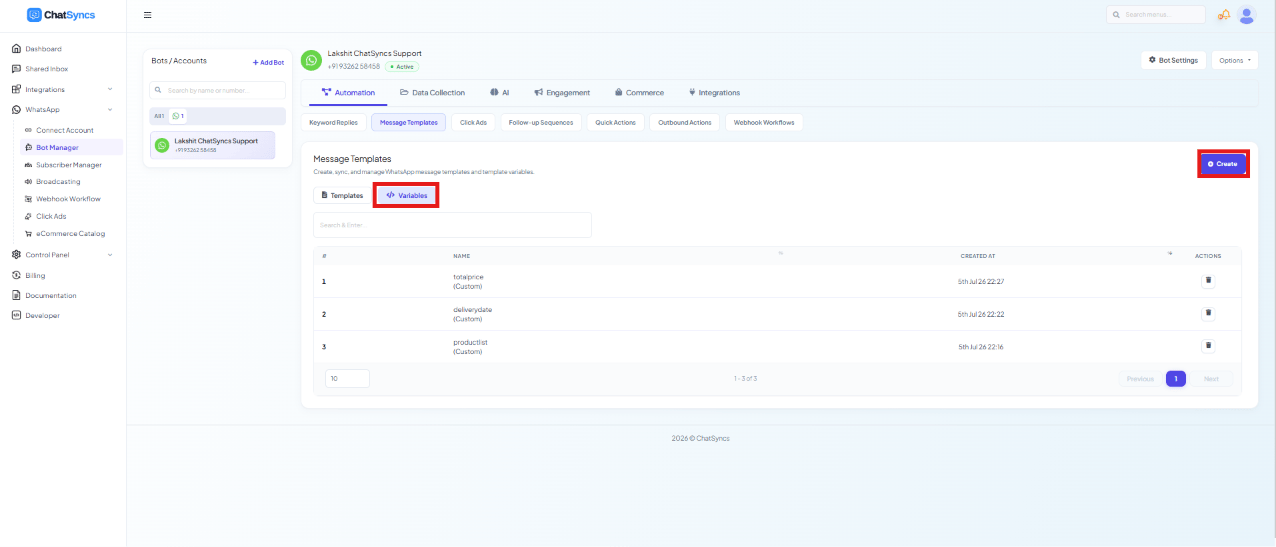 Open the Template Variables list and click **Create**.
Give it a plain name with no spaces or special characters, e.g. `price`, `orderid`, `delivery_date`, `product_name`.
It now appears in the list and can be inserted into any template's Message Body from the **Variables** picker.
```text theme={null}
Your #product_name# (#price#) will arrive on #delivery_date#.
```
For one customer this might render as:
```text theme={null}
Your Bluetooth Speaker (₹1,499) will arrive on Feb 18.
```
For the next customer, same template, completely different values:
```text theme={null}
Your Running Shoes (₹2,999) will arrive on Feb 20.
```
When sending via the [ChatSyncs API](/developer-api/whatsapp/send-template-message), a Template
Variable needs its value filled in for that specific send — the
[API Developer Console](https://platform.chatsyncs.com/api/developer/console#api-whatsapp-send-block)
prompts you for a value for every Template Variable the chosen template has, since there's no
stored value to fall back on.
## Custom Fields
A Custom Field (see [How Do I Manage Custom Fields and Labels?](/learn/chatsyncs-subscriber-manager/manage-custom-fields-and-labels-with-chatsyncs)) stores one persistent piece
of data per subscriber — their name, city, email, or company — that stays on their profile until
it's changed.
Open the Template Variables list and click **Create**.
Give it a plain name with no spaces or special characters, e.g. `price`, `orderid`, `delivery_date`, `product_name`.
It now appears in the list and can be inserted into any template's Message Body from the **Variables** picker.
```text theme={null}
Your #product_name# (#price#) will arrive on #delivery_date#.
```
For one customer this might render as:
```text theme={null}
Your Bluetooth Speaker (₹1,499) will arrive on Feb 18.
```
For the next customer, same template, completely different values:
```text theme={null}
Your Running Shoes (₹2,999) will arrive on Feb 20.
```
When sending via the [ChatSyncs API](/developer-api/whatsapp/send-template-message), a Template
Variable needs its value filled in for that specific send — the
[API Developer Console](https://platform.chatsyncs.com/api/developer/console#api-whatsapp-send-block)
prompts you for a value for every Template Variable the chosen template has, since there's no
stored value to fall back on.
## Custom Fields
A Custom Field (see [How Do I Manage Custom Fields and Labels?](/learn/chatsyncs-subscriber-manager/manage-custom-fields-and-labels-with-chatsyncs)) stores one persistent piece
of data per subscriber — their name, city, email, or company — that stays on their profile until
it's changed.
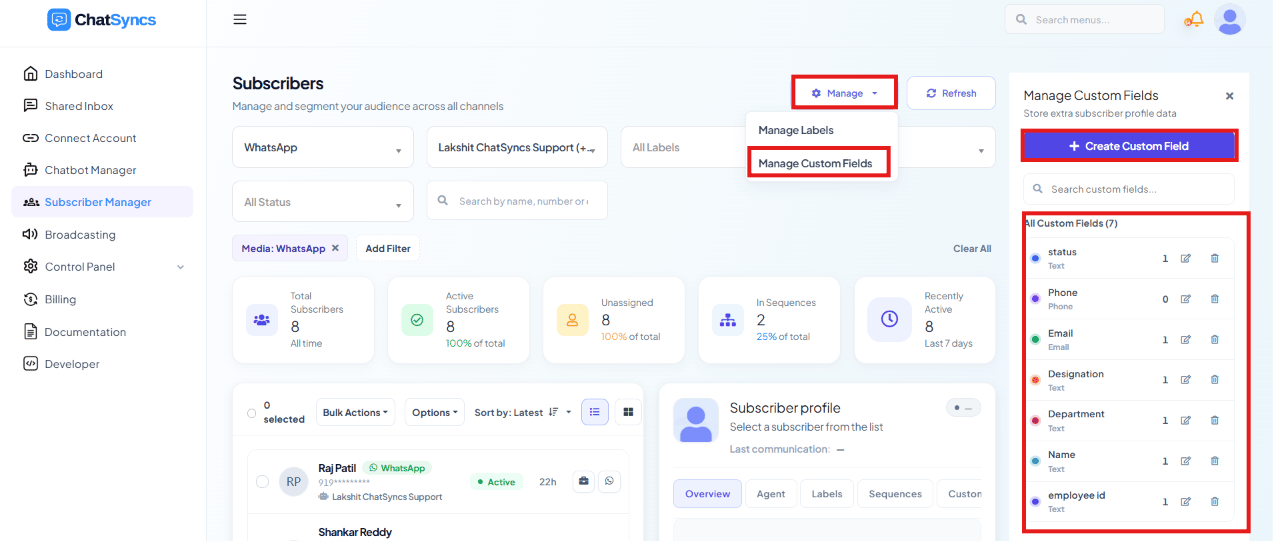 Insert it from the **Custom Fields** picker in the Message Body — it's written the exact same
way as a Template Variable:
```text theme={null}
Hi #name#, welcome back to #company_name#!
```
Before this can send a real value, the Custom Field must already have data on that subscriber —
set manually, via CSV/Google Sheet import, or through the
[Subscriber Update API](/developer-api/subscriber/update-subscriber). If the field is empty for a
given subscriber, that part of the message sends blank.
Because ChatSyncs pulls a Custom Field's value straight from the subscriber's stored profile,
you don't fill it into the API Developer Console the way you do a Template Variable — it's
already there, waiting to be used.
## Which should you use?
Ask: **"Will this value change every time I message this person?"**
* **Yes** → Template Variable — `#price#`, `#orderid#`, `#delivery_date#`, an OTP code
* **No** → Custom Field — `#name#`, `#company_name#`, `#city#`, an email address
If you're not sure, picture sending the *same* template to two different customers on the *same*
day. If the value would be identical for both of them (their own name, their own city), it's a
Custom Field. If it depends entirely on which order or message this happens to be (a price, an
order number), it's a Template Variable.
## Frequently asked
If you used a Custom Field, check that the subscriber actually has a value stored for it —
an empty Custom Field sends blank. If you used a Template Variable, make sure you supplied a
value for it in that specific send; Template Variables aren't stored anywhere and need a
fresh value every time.
No — ChatSyncs pulls Custom Field values automatically from the subscriber's stored profile.
Only Template Variables need to be supplied on every send.
Template Variable — a price or order number changes on every send, so it shouldn't be stored
permanently on the subscriber.
Yes — see the order confirmation example above. `#name#` and `#city#` are Custom Fields;
`#product_name#`, `#price#`, `#orderid#`, and `#delivery_date#` are Template Variables, all
in the same template body.
Both are written as `#fieldname#` — the difference isn't in how they look, it's in which
picker you inserted them from (**Variables** vs **Custom Fields**) and where ChatSyncs pulls
the value from when it actually sends.
## Gotchas & common mistakes
* **Passing a Custom Field's value as if it were a Template Variable** — it isn't needed and
won't be used; ChatSyncs already pulls Custom Field data from the subscriber automatically.
* **Forgetting to set the Custom Field before sending** — the message will send with that part
blank if the subscriber has no value stored for it yet.
* **Using a Template Variable for something that's actually permanent about the customer** — if
the value should be the same across every future message to that person (their name, their
city), store it as a Custom Field instead so you don't have to re-type it every send.
* **Assuming the `#...#` syntax alone tells you which type it is** — it doesn't. `#price#` and
`#name#` are written identically; only the picker you used to insert them (and where the value
comes from) tells them apart.
Insert it from the **Custom Fields** picker in the Message Body — it's written the exact same
way as a Template Variable:
```text theme={null}
Hi #name#, welcome back to #company_name#!
```
Before this can send a real value, the Custom Field must already have data on that subscriber —
set manually, via CSV/Google Sheet import, or through the
[Subscriber Update API](/developer-api/subscriber/update-subscriber). If the field is empty for a
given subscriber, that part of the message sends blank.
Because ChatSyncs pulls a Custom Field's value straight from the subscriber's stored profile,
you don't fill it into the API Developer Console the way you do a Template Variable — it's
already there, waiting to be used.
## Which should you use?
Ask: **"Will this value change every time I message this person?"**
* **Yes** → Template Variable — `#price#`, `#orderid#`, `#delivery_date#`, an OTP code
* **No** → Custom Field — `#name#`, `#company_name#`, `#city#`, an email address
If you're not sure, picture sending the *same* template to two different customers on the *same*
day. If the value would be identical for both of them (their own name, their own city), it's a
Custom Field. If it depends entirely on which order or message this happens to be (a price, an
order number), it's a Template Variable.
## Frequently asked
If you used a Custom Field, check that the subscriber actually has a value stored for it —
an empty Custom Field sends blank. If you used a Template Variable, make sure you supplied a
value for it in that specific send; Template Variables aren't stored anywhere and need a
fresh value every time.
No — ChatSyncs pulls Custom Field values automatically from the subscriber's stored profile.
Only Template Variables need to be supplied on every send.
Template Variable — a price or order number changes on every send, so it shouldn't be stored
permanently on the subscriber.
Yes — see the order confirmation example above. `#name#` and `#city#` are Custom Fields;
`#product_name#`, `#price#`, `#orderid#`, and `#delivery_date#` are Template Variables, all
in the same template body.
Both are written as `#fieldname#` — the difference isn't in how they look, it's in which
picker you inserted them from (**Variables** vs **Custom Fields**) and where ChatSyncs pulls
the value from when it actually sends.
## Gotchas & common mistakes
* **Passing a Custom Field's value as if it were a Template Variable** — it isn't needed and
won't be used; ChatSyncs already pulls Custom Field data from the subscriber automatically.
* **Forgetting to set the Custom Field before sending** — the message will send with that part
blank if the subscriber has no value stored for it yet.
* **Using a Template Variable for something that's actually permanent about the customer** — if
the value should be the same across every future message to that person (their name, their
city), store it as a Custom Field instead so you don't have to re-type it every send.
* **Assuming the `#...#` syntax alone tells you which type it is** — it doesn't. `#price#` and
`#name#` are written identically; only the picker you used to insert them (and where the value
comes from) tells them apart.