> ## Documentation Index
> Fetch the complete documentation index at: https://docs.chatsyncs.com/llms.txt
> Use this file to discover all available pages before exploring further.
# Guidelines for Utility and Marketing Templates in ChatSyncs
> The difference between Marketing, Utility, and Authentication WhatsApp templates — the one-line test for picking the right category, and what happens if you pick wrong.
* Every WhatsApp template you build in ChatSyncs needs a **Template Category**, chosen when you
create it.
* The category decides [pricing](/learn/chatsyncs-overview/what-whatsapp-api-pricing-really-means-in-chatsyncs), delivery rules, and what content
is allowed.
* Picking the wrong one is one of the most common reasons a template gets rejected or
reclassified.
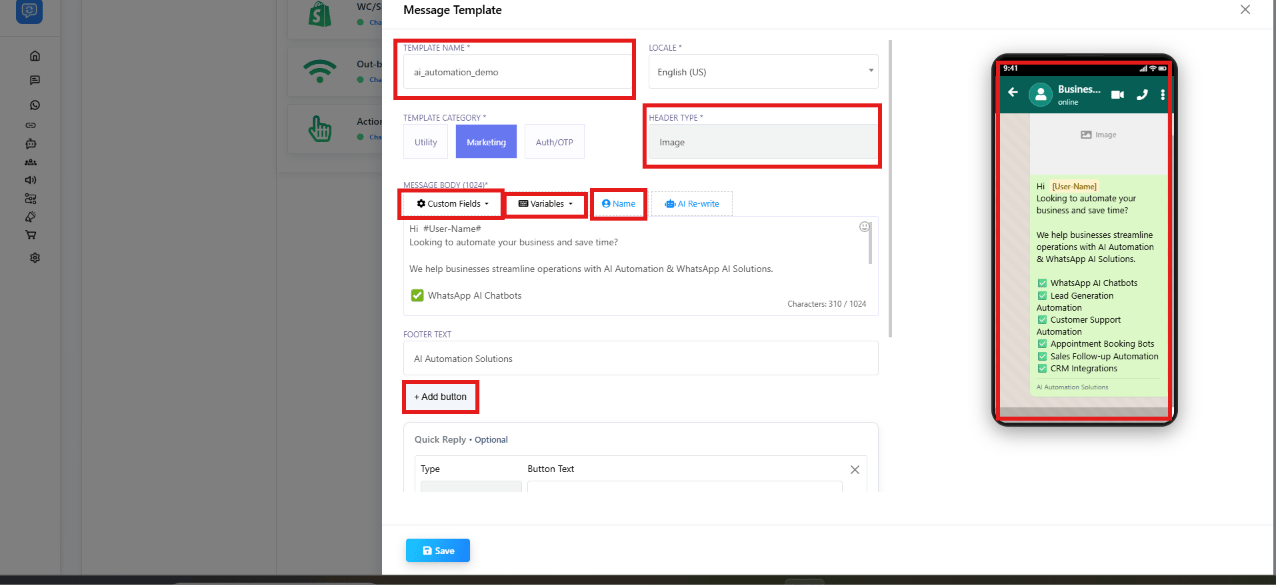 ## The one-line test
Ask: **"Does this message benefit the customer, or my business?"**
* Benefits the **customer** (confirms something, updates them, reminds them) → **Utility**
* Benefits **your business** (drives a sale, promotes something, re-engages a cold lead) →
**Marketing**
* Contains a one-time password or verification code → **Authentication**
If a template mixes both — a shipping update with a discount code tacked on — Meta classifies it
as **Marketing**. A Utility template must be purely non-promotional.
## Marketing
**Purpose:** promote products, services, or offers — drive engagement and sales.
**Examples:**
* *"Exclusive deal! Get 20% off your next purchase. Use code SAVE20 at checkout."*
* *"We miss you! Enjoy free shipping on your next order. Tap below to shop now."*
* *"Join us for our upcoming webinar on WhatsApp automation. Register now!"*
**Key rules:**
* Used for promotional content: discounts, offers, product launches, upselling.
* WhatsApp limits how many marketing templates a single user receives — if they don't engage,
Meta may stop delivering more (a per-user marketing limit).
* **Error 131049** means a marketing template was blocked because the recipient hit that limit.
Wait at least 24 hours before retrying.
* Marketing templates are **not delivered to US phone numbers**.
* If a customer replies to a marketing template, that opens the
[24-hour customer service window](/meta-api/messaging/24-hour-customer-service-window).
## Utility
**Purpose:** transactional notifications sent in response to something the customer already did
or is expecting — a confirmation, a change, or a status update.
**Examples:**
* *"Your order #12345 has been confirmed. You will receive a tracking update soon."*
* *"Your payment of ₹2,500 has been successfully processed. Thank you for your purchase!"*
* *"Reminder: Your appointment with Dr. Sharma is scheduled for March 15 at 10 AM. Reply to
confirm."*
**Key rules:**
* Must be **non-promotional** — no discounts, offers, upselling, or marketing language.
* Must be specific to the customer's own action, or essential/critical information.
* If Meta detects promotional intent in a Utility template, it **automatically reclassifies it
as Marketing**, and the higher Marketing pricing applies going forward.
* Supports up to 10 buttons: Call request, Copy code, Phone number, Quick Reply, URL.
**Accepted use cases:** order confirmation, shipping update, payment reminder, account alert,
feedback survey, an emergency notice (outage, fraud alert, health/safety), a privacy policy
update.
These are illustrative examples — Meta may classify a similar-looking message differently
depending on its exact wording, so treat borderline cases with caution and lean Marketing if in
doubt.
## Authentication
**Purpose:** one-time passwords (OTPs) and verification codes only.
**Examples:**
* *"123456 is your verification code."*
* *"Use 789012 to verify your login."*
**Key rules:**
* Only for OTP-based flows: login verification, account recovery, identity verification,
security checks, sign-up verification.
* **Only Authentication templates can send OTPs** — never put a verification code in a Marketing
or Utility template.
* Delivered only to the customer's **primary device**, not a linked/secondary device.
* No header, footer, or URL buttons allowed — body only, containing the code.
## Category comparison
| | Marketing | Utility | Authentication |
| --------------------- | -------------- | -------------------------- | --------------- |
| Purpose | Promote / sell | Transact / notify | Verify identity |
| Promotional content | Yes | No | No |
| OTP / verification | No | No | Yes |
| US number delivery | No | Yes | Yes |
| Per-user limit | Yes | No | No |
| Auto-reclassification | — | → Marketing if promotional | — |
## Why picking wrong matters
Choosing the wrong category is one of the fastest ways to get a template
[rejected](/learn/chatsyncs-message-templates/why-templates-get-rejected-and-how-to-fix-them-in-chatsyncs), and it also changes what the message costs you
every time it's sent — see
[Understanding Conversations and Their Types](/learn/chatsyncs-message-templates/understanding-conversations-and-their-types-in-chatsyncs) for how
category ties directly to conversation pricing.
## Frequently asked
Utility — it confirms and reminds the customer about something they already scheduled, with
no promotional content.
Marketing. Adding any promotional content — a discount, an offer, an upsell — to an
otherwise transactional message pushes the whole template into Marketing. Send the discount
as a separate template if you want the shipping update to stay Utility.
No. One-time passwords and verification codes always need the **Authentication** category —
never Utility or Marketing.
Meta either rejects it or automatically reclassifies it as Marketing, and the higher
Marketing conversation cost applies going forward.
Two likely reasons: the recipient is a US phone number (Marketing templates aren't delivered
there), or they've hit their per-user marketing limit (Error 131049) — wait at least 24
hours before retrying.
No — Authentication templates are body-only, containing just the code. No header, footer, or
URL buttons are allowed.
* **Putting a discount in a Utility template** — Meta reclassifies it as Marketing
automatically, and the higher price applies.
* **Sending OTPs in a Utility template** — only Authentication templates can carry OTPs.
* **Marketing to US numbers** — WhatsApp does not deliver marketing templates to US phone
numbers. Use Utility or a different channel for US customers.
* **Ignoring Error 131049** — retrying immediately makes it worse. Wait at least 24 hours.
* **Authentication on secondary devices** — OTP messages only reach the customer's primary
device.
## The one-line test
Ask: **"Does this message benefit the customer, or my business?"**
* Benefits the **customer** (confirms something, updates them, reminds them) → **Utility**
* Benefits **your business** (drives a sale, promotes something, re-engages a cold lead) →
**Marketing**
* Contains a one-time password or verification code → **Authentication**
If a template mixes both — a shipping update with a discount code tacked on — Meta classifies it
as **Marketing**. A Utility template must be purely non-promotional.
## Marketing
**Purpose:** promote products, services, or offers — drive engagement and sales.
**Examples:**
* *"Exclusive deal! Get 20% off your next purchase. Use code SAVE20 at checkout."*
* *"We miss you! Enjoy free shipping on your next order. Tap below to shop now."*
* *"Join us for our upcoming webinar on WhatsApp automation. Register now!"*
**Key rules:**
* Used for promotional content: discounts, offers, product launches, upselling.
* WhatsApp limits how many marketing templates a single user receives — if they don't engage,
Meta may stop delivering more (a per-user marketing limit).
* **Error 131049** means a marketing template was blocked because the recipient hit that limit.
Wait at least 24 hours before retrying.
* Marketing templates are **not delivered to US phone numbers**.
* If a customer replies to a marketing template, that opens the
[24-hour customer service window](/meta-api/messaging/24-hour-customer-service-window).
## Utility
**Purpose:** transactional notifications sent in response to something the customer already did
or is expecting — a confirmation, a change, or a status update.
**Examples:**
* *"Your order #12345 has been confirmed. You will receive a tracking update soon."*
* *"Your payment of ₹2,500 has been successfully processed. Thank you for your purchase!"*
* *"Reminder: Your appointment with Dr. Sharma is scheduled for March 15 at 10 AM. Reply to
confirm."*
**Key rules:**
* Must be **non-promotional** — no discounts, offers, upselling, or marketing language.
* Must be specific to the customer's own action, or essential/critical information.
* If Meta detects promotional intent in a Utility template, it **automatically reclassifies it
as Marketing**, and the higher Marketing pricing applies going forward.
* Supports up to 10 buttons: Call request, Copy code, Phone number, Quick Reply, URL.
**Accepted use cases:** order confirmation, shipping update, payment reminder, account alert,
feedback survey, an emergency notice (outage, fraud alert, health/safety), a privacy policy
update.
These are illustrative examples — Meta may classify a similar-looking message differently
depending on its exact wording, so treat borderline cases with caution and lean Marketing if in
doubt.
## Authentication
**Purpose:** one-time passwords (OTPs) and verification codes only.
**Examples:**
* *"123456 is your verification code."*
* *"Use 789012 to verify your login."*
**Key rules:**
* Only for OTP-based flows: login verification, account recovery, identity verification,
security checks, sign-up verification.
* **Only Authentication templates can send OTPs** — never put a verification code in a Marketing
or Utility template.
* Delivered only to the customer's **primary device**, not a linked/secondary device.
* No header, footer, or URL buttons allowed — body only, containing the code.
## Category comparison
| | Marketing | Utility | Authentication |
| --------------------- | -------------- | -------------------------- | --------------- |
| Purpose | Promote / sell | Transact / notify | Verify identity |
| Promotional content | Yes | No | No |
| OTP / verification | No | No | Yes |
| US number delivery | No | Yes | Yes |
| Per-user limit | Yes | No | No |
| Auto-reclassification | — | → Marketing if promotional | — |
## Why picking wrong matters
Choosing the wrong category is one of the fastest ways to get a template
[rejected](/learn/chatsyncs-message-templates/why-templates-get-rejected-and-how-to-fix-them-in-chatsyncs), and it also changes what the message costs you
every time it's sent — see
[Understanding Conversations and Their Types](/learn/chatsyncs-message-templates/understanding-conversations-and-their-types-in-chatsyncs) for how
category ties directly to conversation pricing.
## Frequently asked
Utility — it confirms and reminds the customer about something they already scheduled, with
no promotional content.
Marketing. Adding any promotional content — a discount, an offer, an upsell — to an
otherwise transactional message pushes the whole template into Marketing. Send the discount
as a separate template if you want the shipping update to stay Utility.
No. One-time passwords and verification codes always need the **Authentication** category —
never Utility or Marketing.
Meta either rejects it or automatically reclassifies it as Marketing, and the higher
Marketing conversation cost applies going forward.
Two likely reasons: the recipient is a US phone number (Marketing templates aren't delivered
there), or they've hit their per-user marketing limit (Error 131049) — wait at least 24
hours before retrying.
No — Authentication templates are body-only, containing just the code. No header, footer, or
URL buttons are allowed.
* **Putting a discount in a Utility template** — Meta reclassifies it as Marketing
automatically, and the higher price applies.
* **Sending OTPs in a Utility template** — only Authentication templates can carry OTPs.
* **Marketing to US numbers** — WhatsApp does not deliver marketing templates to US phone
numbers. Use Utility or a different channel for US customers.
* **Ignoring Error 131049** — retrying immediately makes it worse. Wait at least 24 hours.
* **Authentication on secondary devices** — OTP messages only reach the customer's primary
device.