> ## Documentation Index
> Fetch the complete documentation index at: https://docs.chatsyncs.com/llms.txt
> Use this file to discover all available pages before exploring further.
# How Do I Connect Africa's Talking for SMS with ChatSyncs?
> Worked example of connecting Africa's Talking as an SMS gateway in SMS Integration — generating an API key in Sandbox mode and adding it as an AfricasTalking profile. Use when a customer is targeting an African audience and wants local SMS rates and coverage.
[SMS Integration](/learn/chatsyncs-integrations/sms/introduction) lists **AfricasTalking** as one of the SMS gateways
you can connect — a good fit when a customer's audience is in Africa, where Africa's Talking
offers wide local coverage, competitive rates, and a free sandbox for testing.
## Step 1: Sign up or log in to Africa's Talking
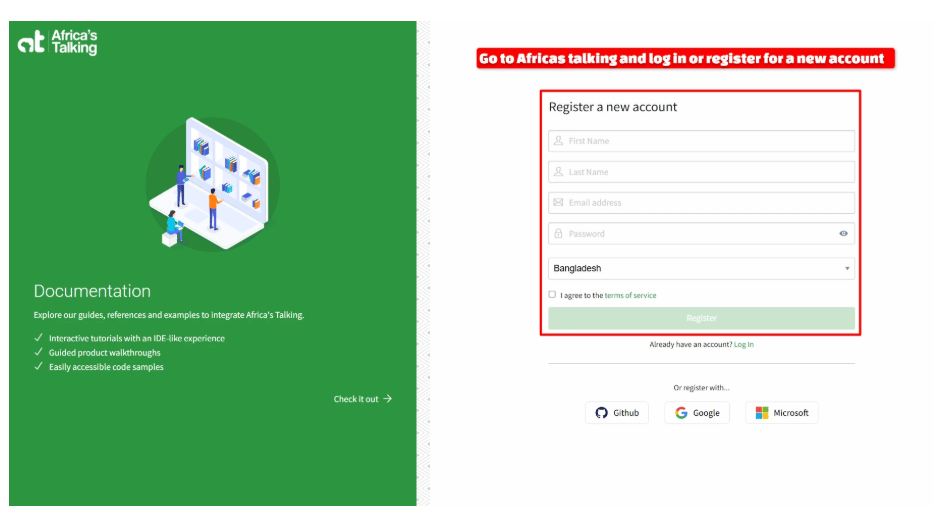
Go to Africa's Talking and register a new account with your first name, last name, email
address, password, and country. Agree to their terms of service and click **Register**.
 ## Step 2: Open the Sandbox app's API Key page
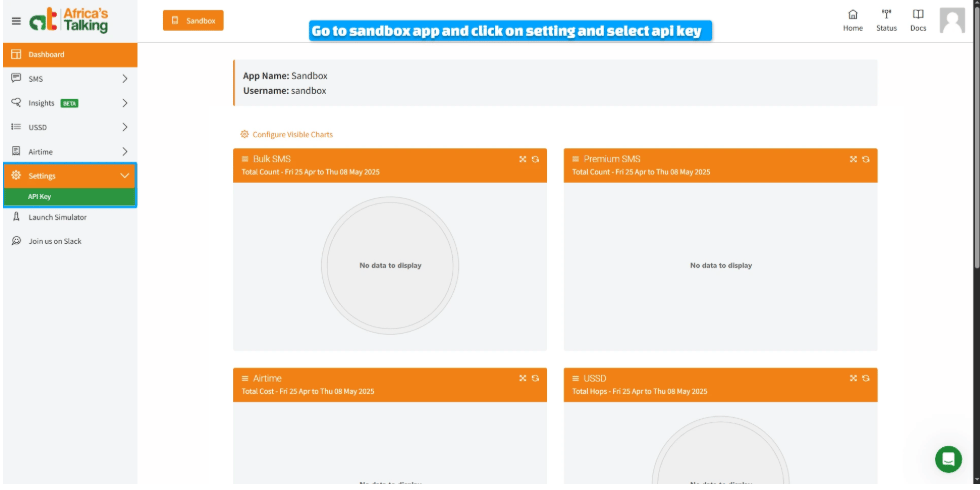
Once you're logged in, Africa's Talking puts you in **Sandbox App** mode by default — this is a
free testing environment, so you can try everything out before spending any real money. In the
left sidebar, open **Settings**, then click **API Key**.
## Step 2: Open the Sandbox app's API Key page
Once you're logged in, Africa's Talking puts you in **Sandbox App** mode by default — this is a
free testing environment, so you can try everything out before spending any real money. In the
left sidebar, open **Settings**, then click **API Key**.
 ## Step 3: Request the key
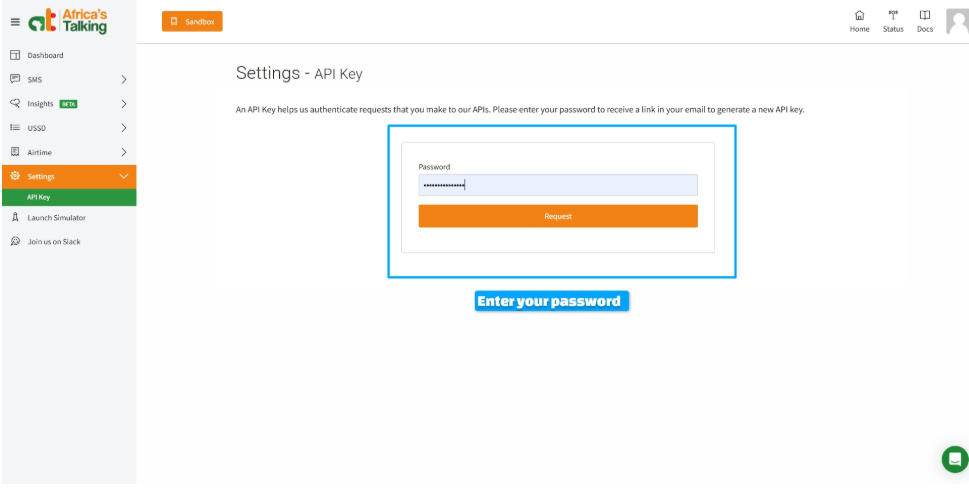
On the API Key page, type in your account **password** and click **Request**. Africa's Talking
does this as a security check — it won't just show you the key on screen.
## Step 3: Request the key
On the API Key page, type in your account **password** and click **Request**. Africa's Talking
does this as a security check — it won't just show you the key on screen.
 ## Step 4: Generate the key from your email
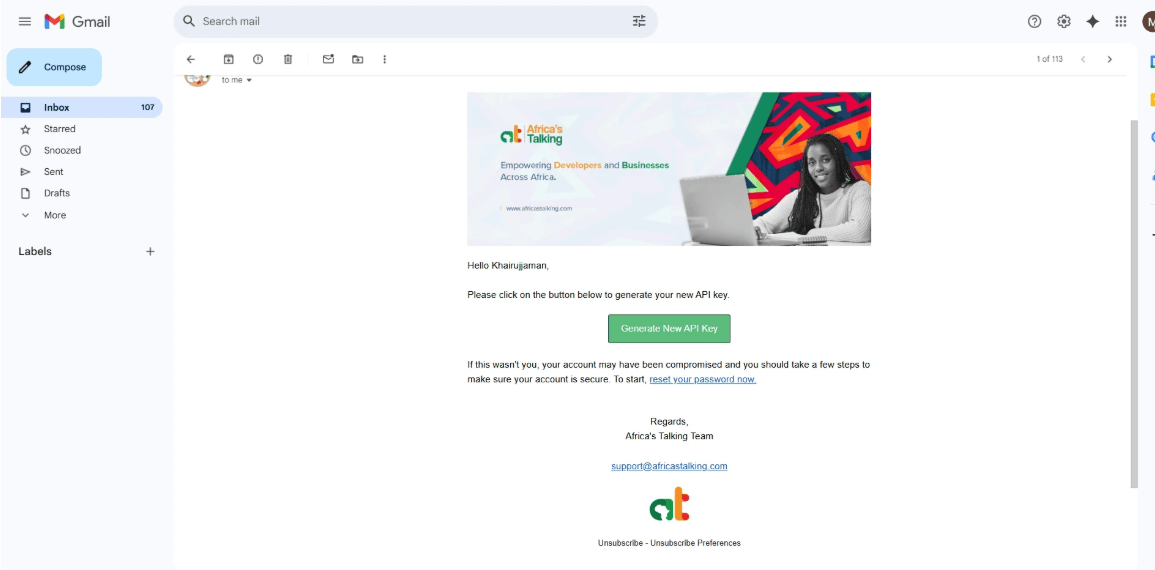
Check the inbox for the email address on your Africa's Talking account — you'll get a message
from Africa's Talking with a **Generate New API Key** button. Click it to actually create the
key.
## Step 4: Generate the key from your email
Check the inbox for the email address on your Africa's Talking account — you'll get a message
from Africa's Talking with a **Generate New API Key** button. Click it to actually create the
key.
 Copy the key somewhere safe as soon as it's generated — you'll paste it straight into ChatSyncs
in the next step.
## Step 5: Add the SMS profile in ChatSyncs
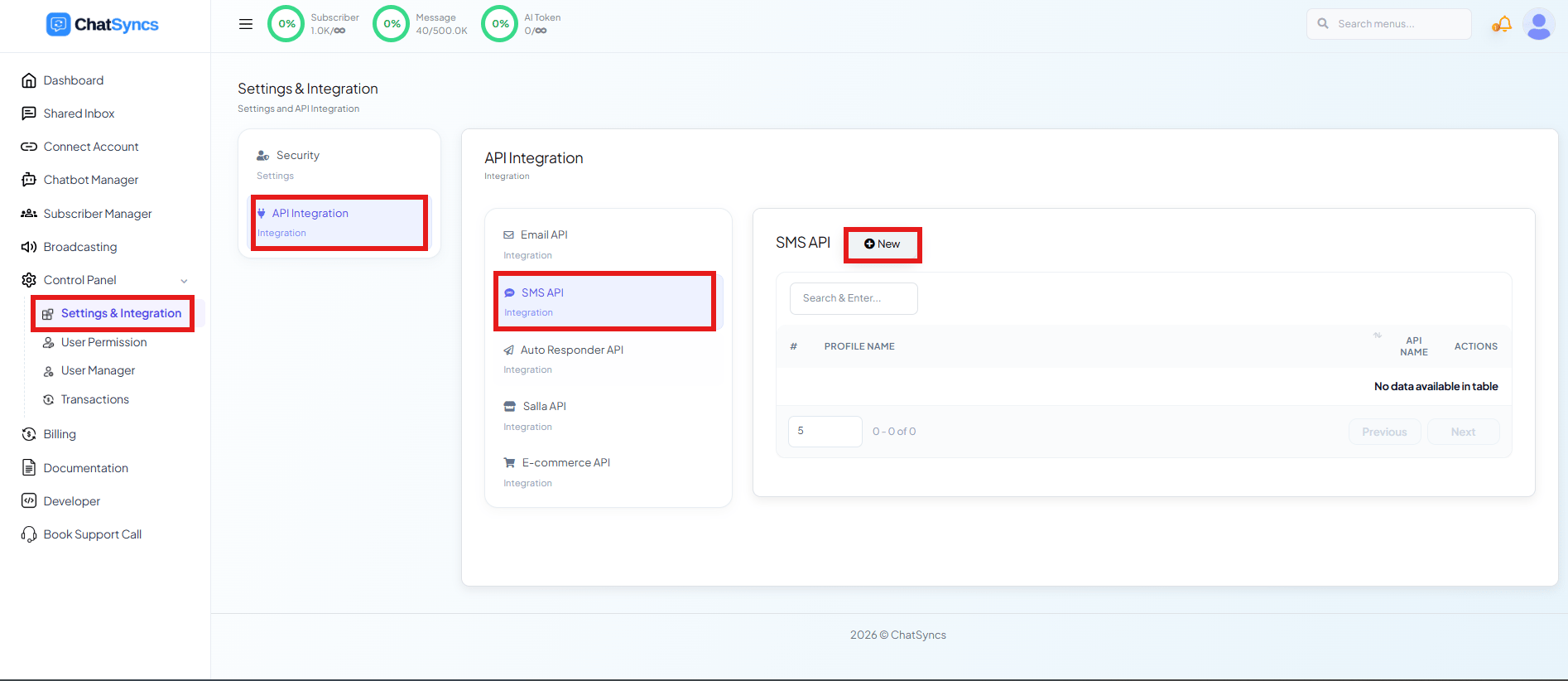
Switch to ChatSyncs. From [SMS Integration](/learn/chatsyncs-integrations/sms/introduction), click **New** to open the
**SMS API** form.
Copy the key somewhere safe as soon as it's generated — you'll paste it straight into ChatSyncs
in the next step.
## Step 5: Add the SMS profile in ChatSyncs
Switch to ChatSyncs. From [SMS Integration](/learn/chatsyncs-integrations/sms/introduction), click **New** to open the
**SMS API** form.
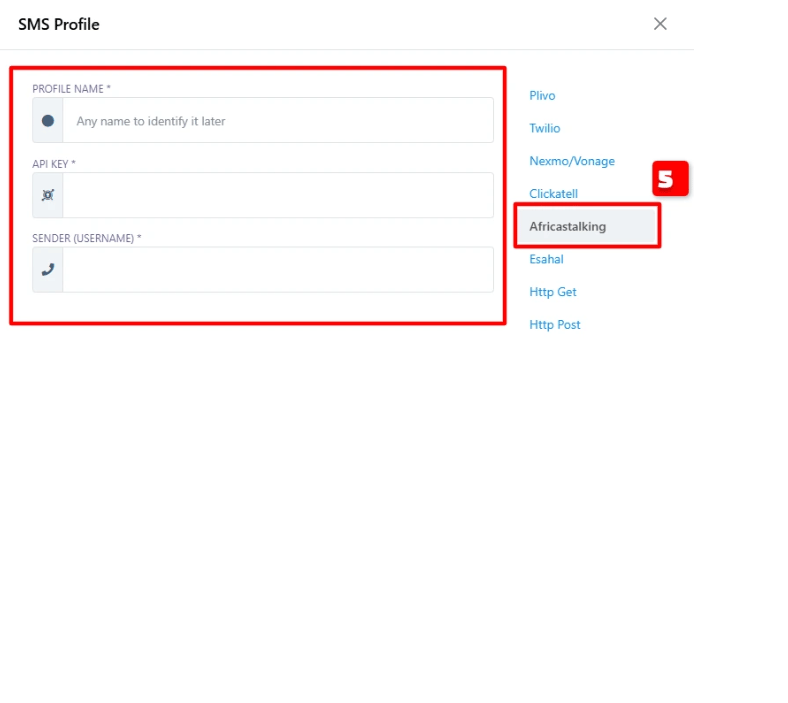
 Pick **Africastalking** from the provider list, then fill in:
| Field | Value |
| --------------------- | --------------------------------------------------------- |
| **Profile Name** | Any recognizable label, e.g. "Africa SMS". |
| **API Key** | The key you generated and received by email in Step 4. |
| **Sender (Username)** | Your Africa's Talking username — `sandbox` while testing. |
Pick **Africastalking** from the provider list, then fill in:
| Field | Value |
| --------------------- | --------------------------------------------------------- |
| **Profile Name** | Any recognizable label, e.g. "Africa SMS". |
| **API Key** | The key you generated and received by email in Step 4. |
| **Sender (Username)** | Your Africa's Talking username — `sandbox` while testing. |
 Click **Save** — the profile is now ready to send SMS from your bot or automations.
## Frequently asked
Generate an API key in your Africa's Talking Sandbox account under **Settings → API Key**,
then add it as a new **AfricasTalking** profile under [SMS
Integration](/learn/chatsyncs-integrations/sms/introduction).
Yes — the Sandbox App mode in Africa's Talking lets you fully test the SMS API and its
ChatSyncs integration at no cost before moving to production.
Your Africa's Talking username — during sandbox testing this is typically `sandbox`; in
production it's the username tied to your live Africa's Talking account.
## Related Documentation
* [SMS Integration](/learn/chatsyncs-integrations/sms/introduction) — connecting any SMS gateway and what it's used for.
Click **Save** — the profile is now ready to send SMS from your bot or automations.
## Frequently asked
Generate an API key in your Africa's Talking Sandbox account under **Settings → API Key**,
then add it as a new **AfricasTalking** profile under [SMS
Integration](/learn/chatsyncs-integrations/sms/introduction).
Yes — the Sandbox App mode in Africa's Talking lets you fully test the SMS API and its
ChatSyncs integration at no cost before moving to production.
Your Africa's Talking username — during sandbox testing this is typically `sandbox`; in
production it's the username tied to your live Africa's Talking account.
## Related Documentation
* [SMS Integration](/learn/chatsyncs-integrations/sms/introduction) — connecting any SMS gateway and what it's used for.