> ## Documentation Index
> Fetch the complete documentation index at: https://docs.chatsyncs.com/llms.txt
> Use this file to discover all available pages before exploring further.
# How Do I Connect Postmark for Transactional Email with ChatSyncs?
> Connect Postmark as an email provider in Email Integration using an API token, for reliable transactional email — order confirmations, account verification, password resets, event signups. Use when a customer wants high-deliverability transactional email instead of a generic SMTP inbox.
[Email Integration](/learn/chatsyncs-integrations/email/introduction) lists **Postmark** as one of the providers you can
connect. Unlike SMTP providers, Postmark connects with a single **API token** instead of a
host/username/password combination — a common choice when a customer specifically wants
Postmark's transactional-email deliverability (order confirmations, account verification,
password resets, event signups) rather than a generic SMTP inbox.
## Step 1: Get your Postmark API token
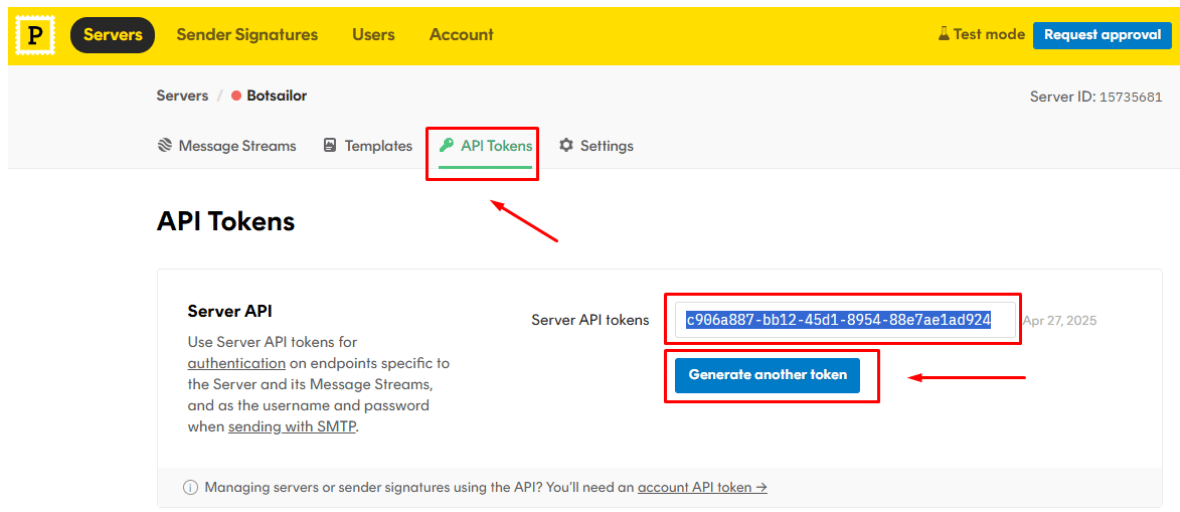
Sign up or log in at Postmark, then under **Account Settings → API Tokens**, generate a
**Server API token**.
 ## Step 2: Add Postmark as an email provider
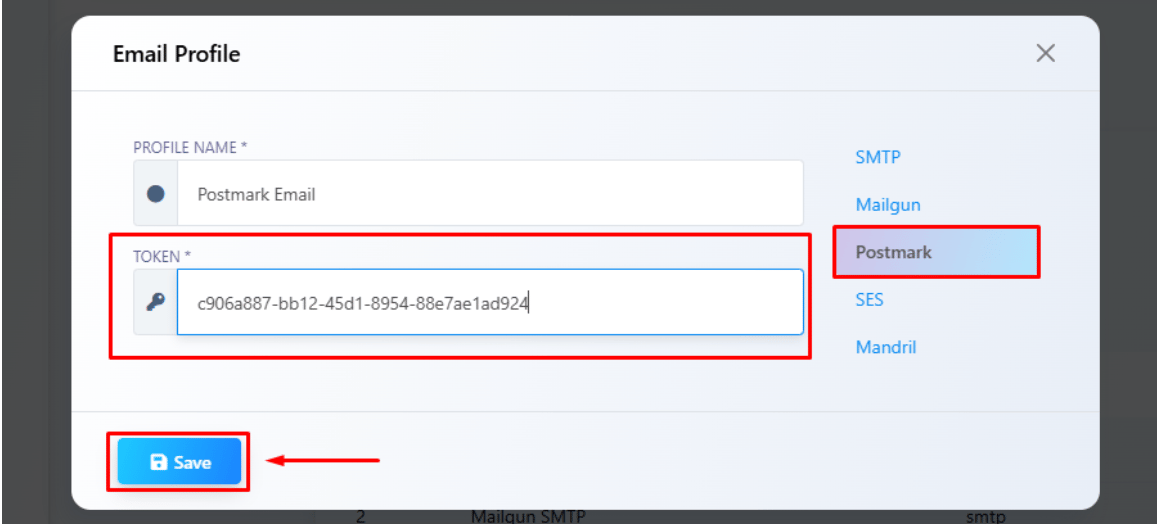
From [Email Integration](/learn/chatsyncs-integrations/email/introduction), click **New**, set **Provider Type** to
**Postmark**, give the profile a name, and paste in the token.
Click **Save** — the profile is now available anywhere Email Integration is used, e.g. the
[Email tab in Bot Settings](/learn/chatsyncs-bot-settings/send-an-automatic-email-from-my-bot-with-chatsyncs), the same way as any other connected
provider.
Postmark's own dashboard also offers a **Templates** feature with dynamic variables (e.g.
`{{customer_name}}`, `{{order_number}}`) for building the email itself on Postmark's side. That's
a Postmark-account feature, independent of the profile you connect here — verify with your
Postmark account whether you're using their templates or ChatSyncs' own Subject/Content fields
(as in [Bot Settings → Email](/learn/chatsyncs-bot-settings/send-an-automatic-email-from-my-bot-with-chatsyncs)) before assuming either is wired up.
## Frequently asked
Generate a Server API token in Postmark under **Account Settings → API Tokens**, then add a
new **Postmark** profile in [Email Integration](/learn/chatsyncs-integrations/email/introduction) and paste in the
token — see the steps above.
Postmark specializes in transactional email deliverability — order confirmations, account
verification, password resets — and connects with just an API token rather than SMTP
host/username/password.
Yes — Postmark requires a verified sender signature or domain before it will deliver mail,
same as any other provider. Set that up in your Postmark account first.
## Related Documentation
* [Email Integration](/learn/chatsyncs-integrations/email/introduction) — connecting any email provider and what it's
used for.
* [How Do I Send an Automatic Email from My Bot?](/learn/chatsyncs-bot-settings/send-an-automatic-email-from-my-bot-with-chatsyncs) — using a connected
profile inside a bot.
* [Webhook Workflow](/learn/chatsyncs-webhook-workflow/introduction) — for routing events to external
systems beyond a single email send.
## Step 2: Add Postmark as an email provider
From [Email Integration](/learn/chatsyncs-integrations/email/introduction), click **New**, set **Provider Type** to
**Postmark**, give the profile a name, and paste in the token.
Click **Save** — the profile is now available anywhere Email Integration is used, e.g. the
[Email tab in Bot Settings](/learn/chatsyncs-bot-settings/send-an-automatic-email-from-my-bot-with-chatsyncs), the same way as any other connected
provider.
Postmark's own dashboard also offers a **Templates** feature with dynamic variables (e.g.
`{{customer_name}}`, `{{order_number}}`) for building the email itself on Postmark's side. That's
a Postmark-account feature, independent of the profile you connect here — verify with your
Postmark account whether you're using their templates or ChatSyncs' own Subject/Content fields
(as in [Bot Settings → Email](/learn/chatsyncs-bot-settings/send-an-automatic-email-from-my-bot-with-chatsyncs)) before assuming either is wired up.
## Frequently asked
Generate a Server API token in Postmark under **Account Settings → API Tokens**, then add a
new **Postmark** profile in [Email Integration](/learn/chatsyncs-integrations/email/introduction) and paste in the
token — see the steps above.
Postmark specializes in transactional email deliverability — order confirmations, account
verification, password resets — and connects with just an API token rather than SMTP
host/username/password.
Yes — Postmark requires a verified sender signature or domain before it will deliver mail,
same as any other provider. Set that up in your Postmark account first.
## Related Documentation
* [Email Integration](/learn/chatsyncs-integrations/email/introduction) — connecting any email provider and what it's
used for.
* [How Do I Send an Automatic Email from My Bot?](/learn/chatsyncs-bot-settings/send-an-automatic-email-from-my-bot-with-chatsyncs) — using a connected
profile inside a bot.
* [Webhook Workflow](/learn/chatsyncs-webhook-workflow/introduction) — for routing events to external
systems beyond a single email send.