> ## Documentation Index
> Fetch the complete documentation index at: https://docs.chatsyncs.com/llms.txt
> Use this file to discover all available pages before exploring further.
# How Do I Connect ActiveCampaign for Auto Responder with ChatSyncs?
> Worked example of connecting ActiveCampaign as an Auto Responder Integration provider — copying the API URL and API Key and adding them as an ActiveCampaign profile. Use when a customer wants WhatsApp subscribers automatically synced into ActiveCampaign for drip campaigns and automations.
[Auto Responder Integration](/learn/chatsyncs-integrations/auto-responder/introduction) lists **ActiveCampaign** as one
of the email marketing platforms you can connect. This page is a worked example: copying your
ActiveCampaign API credentials and adding them as a profile.
## Step 1: Get your ActiveCampaign API credentials
Log into your ActiveCampaign account — you'll land on its dashboard.
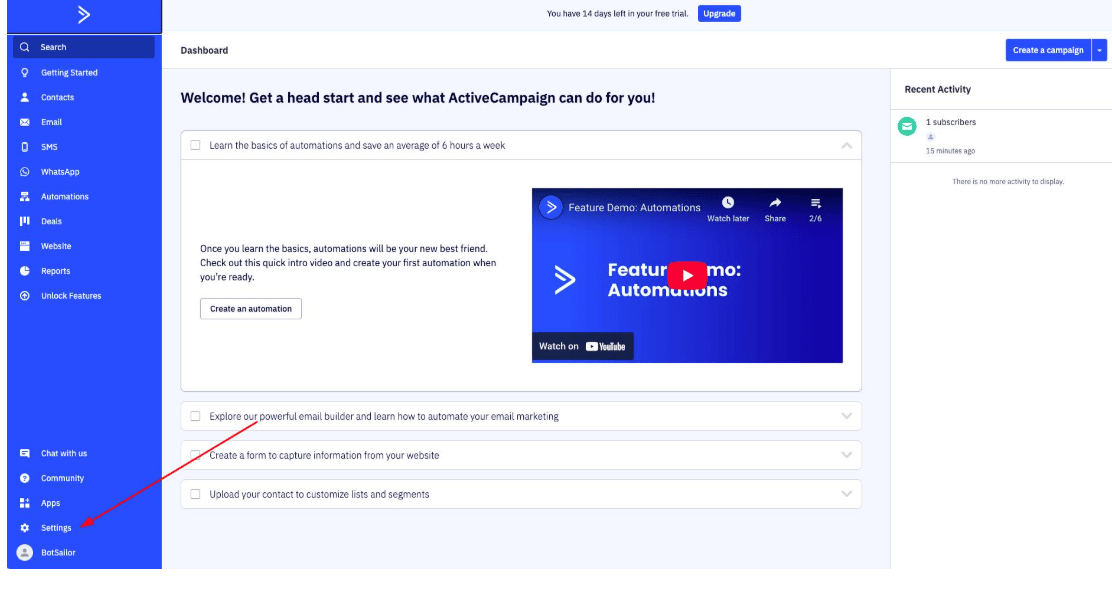 Click the gear icon for **Settings** in the bottom-left, then open
**Developer** from the settings menu. Under **API Access** you'll find both your **API URL** and
your **API Key**.
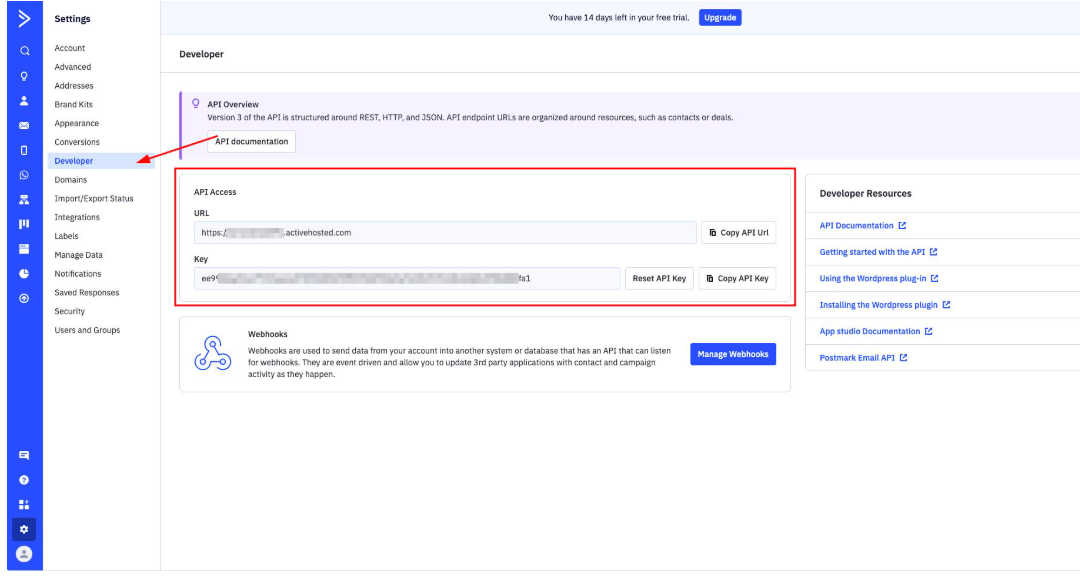
Click the gear icon for **Settings** in the bottom-left, then open
**Developer** from the settings menu. Under **API Access** you'll find both your **API URL** and
your **API Key**.
 The API Key is only available on paid ActiveCampaign plans, though a trial plan works for
testing.
## Step 2: Add the ActiveCampaign profile in ChatSyncs
Switch to ChatSyncs. From [Auto Responder Integration](/learn/chatsyncs-integrations/auto-responder/introduction), click
**New**, select **ActiveCampaign** from the provider list, and enter:
| Field | Value |
| ---------------- | --------------------------------------------------- |
| **Profile Name** | Any recognizable label, e.g. "ActiveCampaign Test". |
| **API Key** | Copied from ActiveCampaign's Developer settings. |
| **API URL** | e.g. `https://youraccount.api-us1.com`. |
The API Key is only available on paid ActiveCampaign plans, though a trial plan works for
testing.
## Step 2: Add the ActiveCampaign profile in ChatSyncs
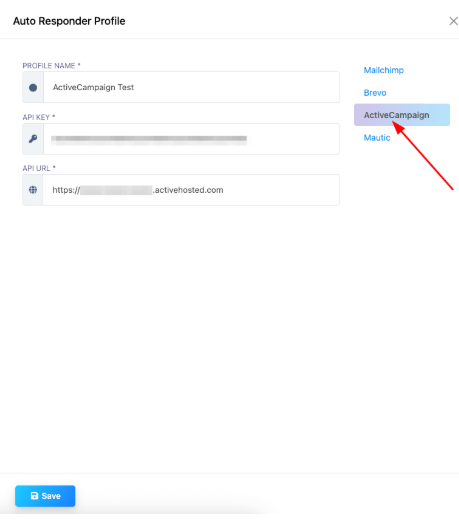
Switch to ChatSyncs. From [Auto Responder Integration](/learn/chatsyncs-integrations/auto-responder/introduction), click
**New**, select **ActiveCampaign** from the provider list, and enter:
| Field | Value |
| ---------------- | --------------------------------------------------- |
| **Profile Name** | Any recognizable label, e.g. "ActiveCampaign Test". |
| **API Key** | Copied from ActiveCampaign's Developer settings. |
| **API URL** | e.g. `https://youraccount.api-us1.com`. |
 Click **Save**. To sync a specific bot's subscribers into an ActiveCampaign list, open **Bot
Manager → \[your bot] → Configuration → Settings → Auto Responder**, and paste the list ID into
the **ActiveCampaign List** field — see [Auto Responder
Integration](/learn/chatsyncs-integrations/auto-responder/introduction) for how the sync is triggered from a bot flow.
## Frequently asked
Copy your API URL and API Key from ActiveCampaign's **Settings → Developer** page, then add
them as a new **ActiveCampaign** profile under [Auto Responder
Integration](/learn/chatsyncs-integrations/auto-responder/introduction).
ChatSyncs shows an error and can't sync data — double-check both values against
ActiveCampaign's Developer settings.
Yes — add multiple profiles, which is useful if you're managing several client accounts.
## Related Documentation
* [Auto Responder Integration](/learn/chatsyncs-integrations/auto-responder/introduction) — connecting any email
marketing platform and what it's used for.
Click **Save**. To sync a specific bot's subscribers into an ActiveCampaign list, open **Bot
Manager → \[your bot] → Configuration → Settings → Auto Responder**, and paste the list ID into
the **ActiveCampaign List** field — see [Auto Responder
Integration](/learn/chatsyncs-integrations/auto-responder/introduction) for how the sync is triggered from a bot flow.
## Frequently asked
Copy your API URL and API Key from ActiveCampaign's **Settings → Developer** page, then add
them as a new **ActiveCampaign** profile under [Auto Responder
Integration](/learn/chatsyncs-integrations/auto-responder/introduction).
ChatSyncs shows an error and can't sync data — double-check both values against
ActiveCampaign's Developer settings.
Yes — add multiple profiles, which is useful if you're managing several client accounts.
## Related Documentation
* [Auto Responder Integration](/learn/chatsyncs-integrations/auto-responder/introduction) — connecting any email
marketing platform and what it's used for.