> ## Documentation Index
> Fetch the complete documentation index at: https://docs.chatsyncs.com/llms.txt
> Use this file to discover all available pages before exploring further.
# Bot Settings in ChatSyncs
> Bot Settings is the panel every WhatsApp bot has for configuring its behavior — general replies, webhooks, business hours, Shared Inbox, and automatic emails and SMS.
**Bot Settings** is a panel every WhatsApp bot in **Chatbot Manager** has of its own — eight tabs
that control how that specific bot replies, when it's allowed to reply, and where the data it
collects gets sent.
## Open Bot Settings
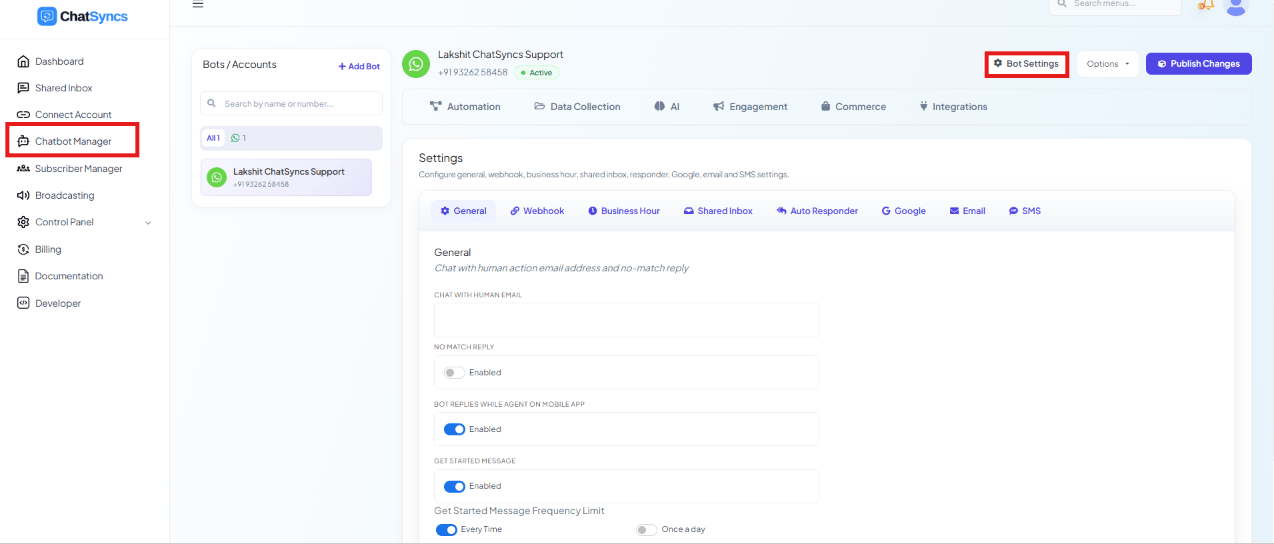 Select **Chatbot Manager**.
Pick the bot from the **Bots / Accounts** list.
Click the **Bot Settings** button in the top-right corner.
Eight topics get their own, deeper pages in this section:
Chat with Human Email, No Match Reply, replying while an agent is active, and the Get
Started Message.
Send incoming messages, outgoing messages, and status changes to your own server.
Timezone, off days, a weekly schedule, and a special off-hours auto-reply.
Agent signature messages, session expiry, and failed-delivery labeling.
Send a subscriber's email straight to Mailchimp, Brevo, ActiveCampaign, or Mautic.
Write subscriber details to a connected Google Sheet or Google Contacts automatically.
Send a custom email the moment a subscriber shares their email address.
Send a custom SMS the moment a subscriber shares their phone number.
## All Bot Settings tabs at a glance
| Tab | Purpose |
| ------------------ | --------------------------------------------------------------------- |
| **General** | Configure bot behavior and notifications. |
| **Webhook** | Integrate ChatSyncs with external applications. |
| **Business Hour** | Configure business hours, timezone, off days, and off-hours behavior. |
| **Shared Inbox** | Configure live chat / human-agent settings. |
| **Auto Responder** | Send subscribers to marketing platforms. |
| **Google** | Save subscriber details to Google services. |
| **Email** | Send automatic emails. |
| **SMS** | Send automatic SMS messages. |
* **Disable bot reply / Disable AI assistant outside business hour only apply outside business
hours** — they don't stop the bot during business hours; that's controlled separately in
General settings. See [How Do I Set Up Business Hours for My Bot?](/learn/chatsyncs-bot-settings/set-up-business-hours-for-my-bot-with-chatsyncs).
* **Webhook URLs must be reachable from the internet** — a local/internal-only URL will never
receive incoming or outgoing webhook calls.
* **Auto Responder, Google, Email, and SMS only fire when the bot actually collects that data**
— e.g. the Email tab only sends if a customer shares an email address during the conversation.
## Frequently asked
Turn on **Get Started Message** in the **General** tab — see [How Do I Configure General Bot
Behavior?](/learn/chatsyncs-bot-settings/configure-general-bot-behavior-with-chatsyncs)
Set your hours, timezone, and off days, then enable **Special Bot during business off
hours** — see [How Do I Set Up Business Hours for My
Bot?](/learn/chatsyncs-bot-settings/set-up-business-hours-for-my-bot-with-chatsyncs)
Use the **Incoming Webhook** — see [How Do I Turn On Webhook Triggers for My
Bot?](/learn/chatsyncs-bot-settings/turn-on-webhook-triggers-for-my-bot-with-chatsyncs)
Yes — see [How Do I Send an Automatic Email from My Bot?](/learn/chatsyncs-bot-settings/send-an-automatic-email-from-my-bot-with-chatsyncs) and
[How Do I Send an Automatic SMS from My Bot?](/learn/chatsyncs-bot-settings/send-an-automatic-sms-from-my-bot-with-chatsyncs)
Select **Chatbot Manager**.
Pick the bot from the **Bots / Accounts** list.
Click the **Bot Settings** button in the top-right corner.
Eight topics get their own, deeper pages in this section:
Chat with Human Email, No Match Reply, replying while an agent is active, and the Get
Started Message.
Send incoming messages, outgoing messages, and status changes to your own server.
Timezone, off days, a weekly schedule, and a special off-hours auto-reply.
Agent signature messages, session expiry, and failed-delivery labeling.
Send a subscriber's email straight to Mailchimp, Brevo, ActiveCampaign, or Mautic.
Write subscriber details to a connected Google Sheet or Google Contacts automatically.
Send a custom email the moment a subscriber shares their email address.
Send a custom SMS the moment a subscriber shares their phone number.
## All Bot Settings tabs at a glance
| Tab | Purpose |
| ------------------ | --------------------------------------------------------------------- |
| **General** | Configure bot behavior and notifications. |
| **Webhook** | Integrate ChatSyncs with external applications. |
| **Business Hour** | Configure business hours, timezone, off days, and off-hours behavior. |
| **Shared Inbox** | Configure live chat / human-agent settings. |
| **Auto Responder** | Send subscribers to marketing platforms. |
| **Google** | Save subscriber details to Google services. |
| **Email** | Send automatic emails. |
| **SMS** | Send automatic SMS messages. |
* **Disable bot reply / Disable AI assistant outside business hour only apply outside business
hours** — they don't stop the bot during business hours; that's controlled separately in
General settings. See [How Do I Set Up Business Hours for My Bot?](/learn/chatsyncs-bot-settings/set-up-business-hours-for-my-bot-with-chatsyncs).
* **Webhook URLs must be reachable from the internet** — a local/internal-only URL will never
receive incoming or outgoing webhook calls.
* **Auto Responder, Google, Email, and SMS only fire when the bot actually collects that data**
— e.g. the Email tab only sends if a customer shares an email address during the conversation.
## Frequently asked
Turn on **Get Started Message** in the **General** tab — see [How Do I Configure General Bot
Behavior?](/learn/chatsyncs-bot-settings/configure-general-bot-behavior-with-chatsyncs)
Set your hours, timezone, and off days, then enable **Special Bot during business off
hours** — see [How Do I Set Up Business Hours for My
Bot?](/learn/chatsyncs-bot-settings/set-up-business-hours-for-my-bot-with-chatsyncs)
Use the **Incoming Webhook** — see [How Do I Turn On Webhook Triggers for My
Bot?](/learn/chatsyncs-bot-settings/turn-on-webhook-triggers-for-my-bot-with-chatsyncs)
Yes — see [How Do I Send an Automatic Email from My Bot?](/learn/chatsyncs-bot-settings/send-an-automatic-email-from-my-bot-with-chatsyncs) and
[How Do I Send an Automatic SMS from My Bot?](/learn/chatsyncs-bot-settings/send-an-automatic-sms-from-my-bot-with-chatsyncs)