> ## Documentation Index
> Fetch the complete documentation index at: https://docs.chatsyncs.com/llms.txt
> Use this file to discover all available pages before exploring further.
# How to Use User Input Flow in the Chat Widget in ChatSyncs
> How to collect structured answers from a website visitor using an Input Flow inside the Chat Widget, not just WhatsApp.
**Webchat** here just means the ChatSyncs [Chat Widget](/learn/chatsyncs-automation/chat-widget-in-chatsyncs) — the chat button on
your website. Its conversation builder is the same canvas as Keyword Replies, so a [User Input
Flow](/learn/chatsyncs-automation/user-input-flow-in-chatsyncs) works inside it exactly the same way it does on WhatsApp.
**Example:** A visitor opens the chat widget wanting a quote. Instead of one generic message,
an Input Flow asks step by step — Name, Service Needed, Budget — validating each answer before
moving to the next, then saves it all to Custom Fields.
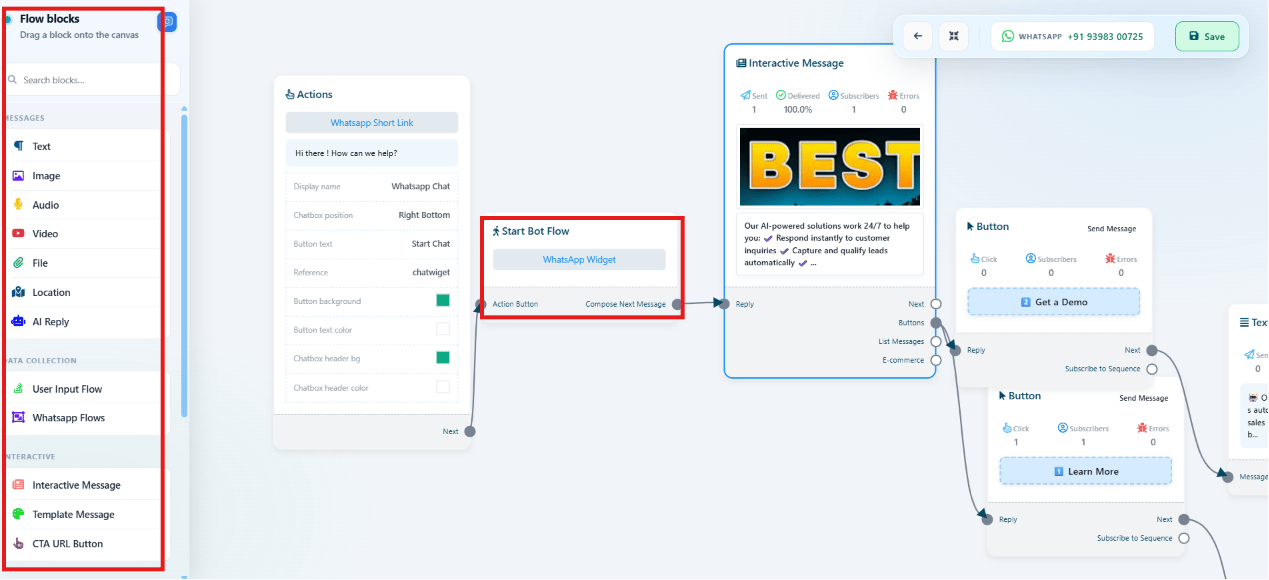 Follow [Chat Widget](/learn/chatsyncs-automation/chat-widget-in-chatsyncs) to create the widget and open its
conversation canvas.
Drag on a **User Input Flow** component the same way as in [User Input
Flow](/learn/chatsyncs-automation/user-input-flow-in-chatsyncs), chaining questions together.
Save the flow, then confirm the embed code is live on your site.
## Frequently asked
Yes — it's the same canvas and the same [User Input Flow](/learn/chatsyncs-automation/user-input-flow-in-chatsyncs)
component, just running inside the [Chat Widget](/learn/chatsyncs-automation/chat-widget-in-chatsyncs) instead of a
WhatsApp conversation.
Saved as Custom Fields on the subscriber's profile, the same as any other Input Flow
submission — see [How Do I Manage Custom Fields and Labels?](/learn/chatsyncs-subscriber-manager/manage-custom-fields-and-labels-with-chatsyncs).
Follow [Chat Widget](/learn/chatsyncs-automation/chat-widget-in-chatsyncs) to create the widget and open its
conversation canvas.
Drag on a **User Input Flow** component the same way as in [User Input
Flow](/learn/chatsyncs-automation/user-input-flow-in-chatsyncs), chaining questions together.
Save the flow, then confirm the embed code is live on your site.
## Frequently asked
Yes — it's the same canvas and the same [User Input Flow](/learn/chatsyncs-automation/user-input-flow-in-chatsyncs)
component, just running inside the [Chat Widget](/learn/chatsyncs-automation/chat-widget-in-chatsyncs) instead of a
WhatsApp conversation.
Saved as Custom Fields on the subscriber's profile, the same as any other Input Flow
submission — see [How Do I Manage Custom Fields and Labels?](/learn/chatsyncs-subscriber-manager/manage-custom-fields-and-labels-with-chatsyncs).