> ## Documentation Index
> Fetch the complete documentation index at: https://docs.chatsyncs.com/llms.txt
> Use this file to discover all available pages before exploring further.
# How to Set Up Sales Sequence Chatbots in ChatSyncs
> How to use a Follow-up Sequence to nurture a sales lead automatically, from first contact to closing.
In ChatSyncs, a "sales sequence chatbot" is a Follow-up Sequence (see [How to Build Automatic Follow-Up
Chatbots on WhatsApp](/learn/chatsyncs-automation/build-automatic-follow-up-chatbots-on-whatsapp-in-chatsyncs)) built around
moving a lead toward a sale, instead of a generic drip campaign.
**Example — a real estate lead:**
* Day 0 — "Thanks for your interest! Here are 3 properties matching your budget."
* Day 2 — "Still deciding? Here's a video walkthrough of our top pick."
* Day 5 — "This unit is getting popular — want to book a site visit?"
* Day 8 — "Limited-time offer: book this week and get free registration."
Each message nudges the lead one step closer, without a salesperson manually following up.
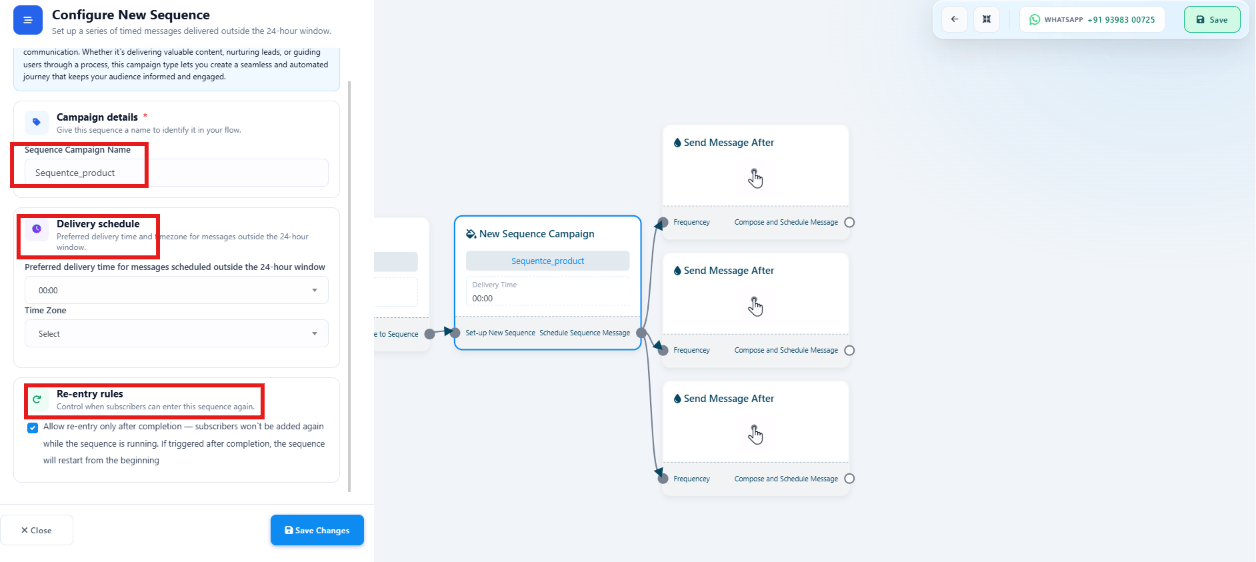 Follow [How to Build Automatic Follow-Up Chatbots on WhatsApp](/learn/chatsyncs-automation/build-automatic-follow-up-chatbots-on-whatsapp-in-chatsyncs) to create the campaign and
set its delivery schedule.
Each message should have a clear next step — a link, a question, or an offer — not just a
check-in.
Use [Labels](/learn/chatsyncs-subscriber-manager/manage-custom-fields-and-labels-with-chatsyncs#create-a-label) to mark
leads who reply or convert, so they can be pulled out of the sequence and handled by a
salesperson directly.
## Frequently asked
Nothing technical — it's the same Follow-up Sequence feature — see [How to Build Automatic
Follow-Up Chatbots on WhatsApp](/learn/chatsyncs-automation/build-automatic-follow-up-chatbots-on-whatsapp-in-chatsyncs) —
just written with a sales goal (get a reply, book a call, close a deal) at every step.
Assign the conversation to an agent from the [Shared Inbox](/learn/chatsyncs-shared-inbox/team-collaboration-agent-assignment-in-chatsyncs)
— a human handling the chat directly is the natural point to take them out of the automated
sequence.
Follow [How to Build Automatic Follow-Up Chatbots on WhatsApp](/learn/chatsyncs-automation/build-automatic-follow-up-chatbots-on-whatsapp-in-chatsyncs) to create the campaign and
set its delivery schedule.
Each message should have a clear next step — a link, a question, or an offer — not just a
check-in.
Use [Labels](/learn/chatsyncs-subscriber-manager/manage-custom-fields-and-labels-with-chatsyncs#create-a-label) to mark
leads who reply or convert, so they can be pulled out of the sequence and handled by a
salesperson directly.
## Frequently asked
Nothing technical — it's the same Follow-up Sequence feature — see [How to Build Automatic
Follow-Up Chatbots on WhatsApp](/learn/chatsyncs-automation/build-automatic-follow-up-chatbots-on-whatsapp-in-chatsyncs) —
just written with a sales goal (get a reply, book a call, close a deal) at every step.
Assign the conversation to an agent from the [Shared Inbox](/learn/chatsyncs-shared-inbox/team-collaboration-agent-assignment-in-chatsyncs)
— a human handling the chat directly is the natural point to take them out of the automated
sequence.