> ## Documentation Index
> Fetch the complete documentation index at: https://docs.chatsyncs.com/llms.txt
> Use this file to discover all available pages before exploring further.
# How to Make a Chatbot Reply to Any Keyword in ChatSyncs
> How to give your bot a catch-all reply for messages that don't match any keyword you've set up.
A [Keyword Replies](/learn/chatsyncs-automation/how-to-create-a-keyword-based-whatsapp-chatbot-in-chatsyncs) flow only replies to the exact
words you've set up as **Trigger Keywords**. If a customer types anything else, the bot stays
silent by default.
**Example:** Say your bot only has a flow set up for the word `menu`. If a customer types
`menu`, the bot replies. But if that same customer types `hi`, `pricing`, or `help`, the bot
does nothing — because none of those words were set up as a Trigger Keyword.
To fix this, set up a catch-all reply that fires for anything that doesn't match a Trigger
Keyword.
That catch-all is the **No Match** action, not a special keyword you type in. It has two halves,
set up in two different places:
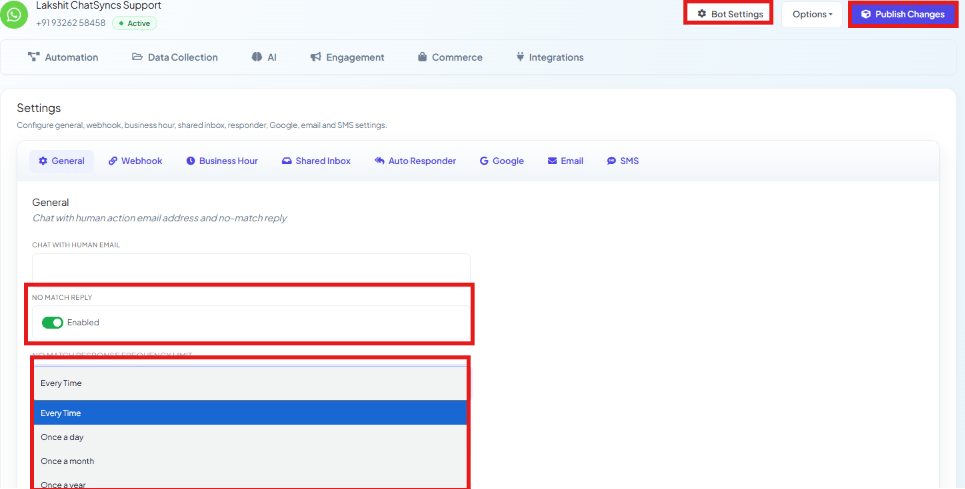
Enable **No Match Reply**, and set **No Match Response Frequency Limit** — **Every Time**,
**Once a Day**, **Once a Month**, or **Once a Year** — so the same customer doesn't get the
fallback reply on every single unmatched message. Click **Publish Changes** to save.
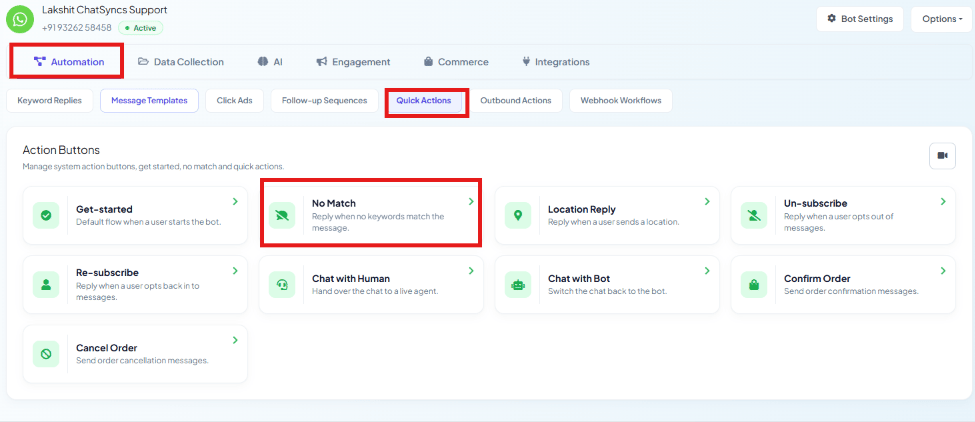
 Open **Automation → Quick Actions**, then click the **No Match** tile in the Action Buttons
grid to build the actual flow that runs.
Open **Automation → Quick Actions**, then click the **No Match** tile in the Action Buttons
grid to build the actual flow that runs.
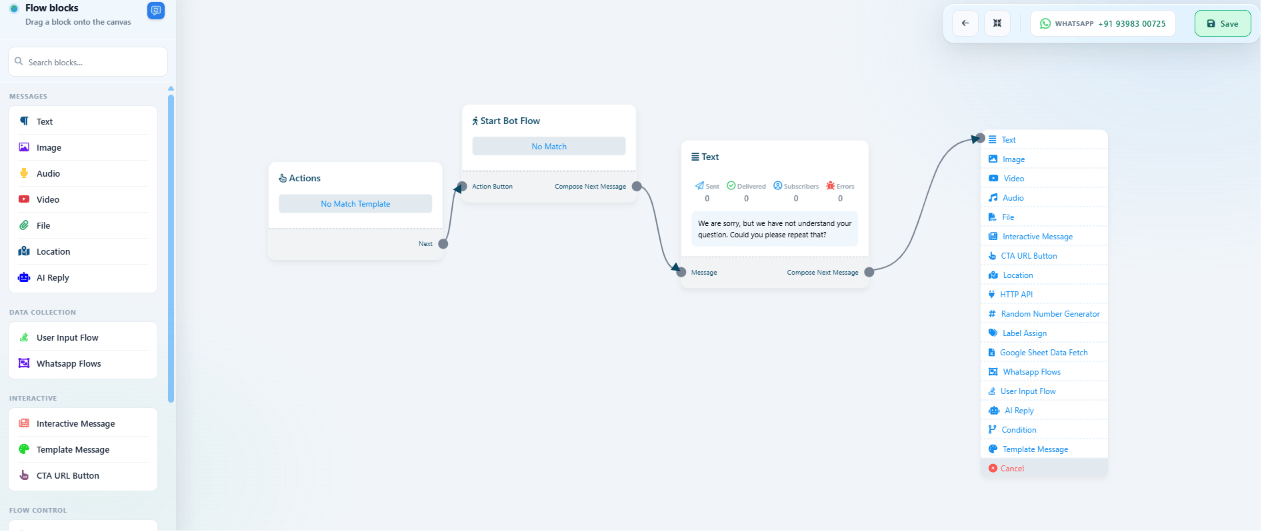
 See [How to Set Up Quick Actions (No Match, Get Started, and
More)](/learn/chatsyncs-automation/how-to-set-up-quick-actions-no-match-get-started-and-more-in-chatsyncs) for the full **No Match** flow-building walkthrough.
**Example:** A customer types `pizza`, `help me`, or anything else with no matching flow.
Instead of getting ignored, **No Match** catches it and replies with something like *"I'm not
sure I understood — type 'menu' to see what I can help with."*
See [How to Set Up Quick Actions (No Match, Get Started, and
More)](/learn/chatsyncs-automation/how-to-set-up-quick-actions-no-match-get-started-and-more-in-chatsyncs) for the full **No Match** flow-building walkthrough.
**Example:** A customer types `pizza`, `help me`, or anything else with no matching flow.
Instead of getting ignored, **No Match** catches it and replies with something like *"I'm not
sure I understood — type 'menu' to see what I can help with."*
 ## Frequently asked
Not as a keyword you type — instead, enable **No Match Reply** in Bot Settings → General,
then build its flow under **Automation → Quick Actions → No Match**. Together they catch
every message that didn't match a set trigger keyword.
Check **No Match Response Frequency Limit** in Bot Settings → General — if it's set to
**Once a Day** (or longer), the same customer only gets the fallback reply once per that
period, even if they send several more unmatched messages.
Yes — the keyword matching type on a flow's trigger can be set to match partially, not just
an exact word. See [How to Create a Keyword-Based WhatsApp Chatbot](/learn/chatsyncs-automation/how-to-create-a-keyword-based-whatsapp-chatbot-in-chatsyncs) for the
trigger setup.
This documentation is built and hosted on [Mintlify](https://mintlify.com), a developer documentation platform.
## Frequently asked
Not as a keyword you type — instead, enable **No Match Reply** in Bot Settings → General,
then build its flow under **Automation → Quick Actions → No Match**. Together they catch
every message that didn't match a set trigger keyword.
Check **No Match Response Frequency Limit** in Bot Settings → General — if it's set to
**Once a Day** (or longer), the same customer only gets the fallback reply once per that
period, even if they send several more unmatched messages.
Yes — the keyword matching type on a flow's trigger can be set to match partially, not just
an exact word. See [How to Create a Keyword-Based WhatsApp Chatbot](/learn/chatsyncs-automation/how-to-create-a-keyword-based-whatsapp-chatbot-in-chatsyncs) for the
trigger setup.
This documentation is built and hosted on [Mintlify](https://mintlify.com), a developer documentation platform.