> ## Documentation Index
> Fetch the complete documentation index at: https://docs.chatsyncs.com/llms.txt
> Use this file to discover all available pages before exploring further.
# How Do I Restrict AI on Specific Keywords with ChatSyncs?
> How to stop an AI agent from answering certain topics using Restricted Topics and a custom Response for Restricted Keywords in ChatSyncs.
In ChatSyncs, **Restricted Topics** stop an AI agent from answering certain subjects at all —
instead of trying and possibly saying something wrong, it responds with a fixed message you
control.
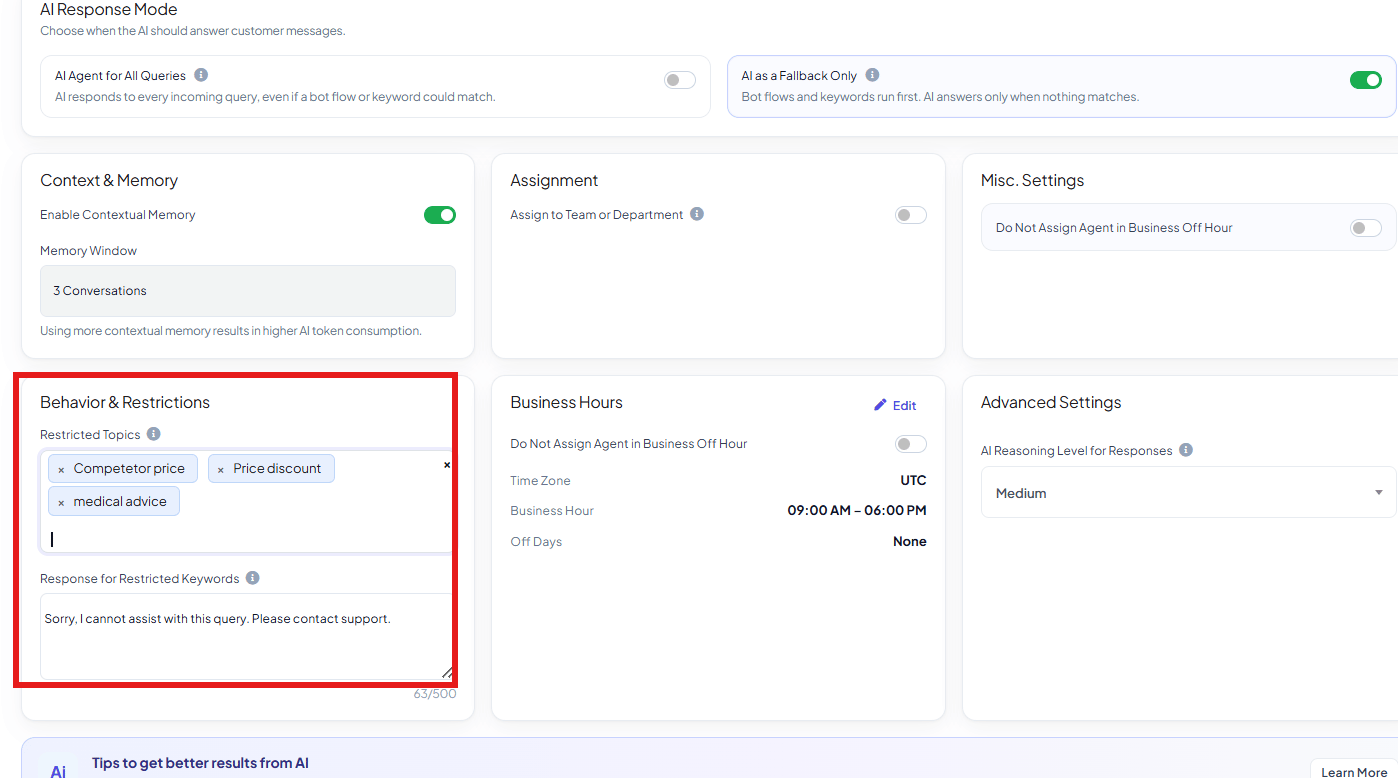 Go to **Chatbot Manager → AI → Agents**, open the agent, and find **Behavior &
Restrictions**.
List the subjects this agent should never answer, e.g. `competitor comparisons`,
`unrelated services`, `pricing negotiations`, `medical advice` — whatever's off-limits for
this specific agent.
Set the fixed reply sent whenever a message touches a restricted topic, e.g. *"Sorry, I
cannot assist with this query. Please contact support."* (limited to 500 characters).
The agent now declines those topics with your fixed response instead of attempting an
answer.
**Example:** A `Sales Advisor Agent` has `competitor comparisons` as a Restricted Topic. A
customer asks *"How do you compare to \[competitor]?"* — instead of the AI improvising an answer
about a competitor, it replies with the fixed message and the conversation can be escalated to a
human if needed.
Restricted Topics are per-agent — a `Sales Advisor Agent` and a `Support Agent` can each have
their own list, matching what's actually off-limits for that agent's role.
## Frequently asked
Add the subject to **Restricted Topics** in the agent's **Behavior & Restrictions** settings,
and set a **Response for Restricted Keywords** to send instead of an AI-generated answer.
Yes — Restricted Topics are set per agent, not account-wide.
Yes — 500 characters.
Set one before relying on Restricted Topics — without a fixed response configured, there's
nothing controlled to fall back on when a restricted topic comes up.
Go to **Chatbot Manager → AI → Agents**, open the agent, and find **Behavior &
Restrictions**.
List the subjects this agent should never answer, e.g. `competitor comparisons`,
`unrelated services`, `pricing negotiations`, `medical advice` — whatever's off-limits for
this specific agent.
Set the fixed reply sent whenever a message touches a restricted topic, e.g. *"Sorry, I
cannot assist with this query. Please contact support."* (limited to 500 characters).
The agent now declines those topics with your fixed response instead of attempting an
answer.
**Example:** A `Sales Advisor Agent` has `competitor comparisons` as a Restricted Topic. A
customer asks *"How do you compare to \[competitor]?"* — instead of the AI improvising an answer
about a competitor, it replies with the fixed message and the conversation can be escalated to a
human if needed.
Restricted Topics are per-agent — a `Sales Advisor Agent` and a `Support Agent` can each have
their own list, matching what's actually off-limits for that agent's role.
## Frequently asked
Add the subject to **Restricted Topics** in the agent's **Behavior & Restrictions** settings,
and set a **Response for Restricted Keywords** to send instead of an AI-generated answer.
Yes — Restricted Topics are set per agent, not account-wide.
Yes — 500 characters.
Set one before relying on Restricted Topics — without a fixed response configured, there's
nothing controlled to fall back on when a restricted topic comes up.