> ## Documentation Index
> Fetch the complete documentation index at: https://docs.chatsyncs.com/llms.txt
> Use this file to discover all available pages before exploring further.
# How Do I Auto-Assign Conversations to a Department with ChatSyncs?
> How to make an AI agent hand a conversation to a human team or department automatically, using the Assignment setting under an agent's configuration in ChatSyncs.
Sometimes a ChatSyncs AI agent shouldn't try to answer at all — it should route the conversation
straight to a human team. **Assign to Team or Department** does that at the agent-settings level,
for every conversation this agent handles.
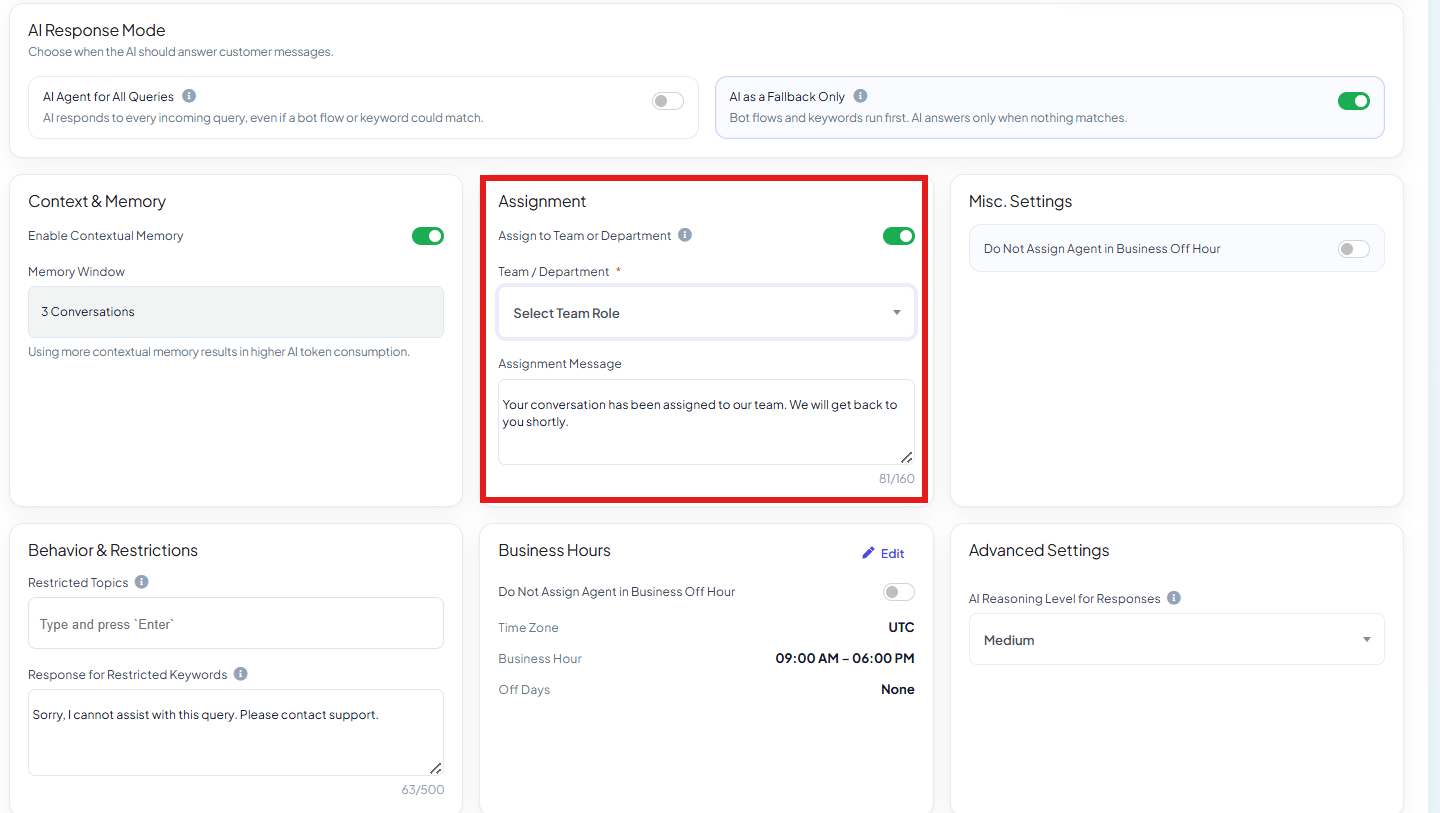 Go to **Chatbot Manager → AI → Agents**, open the agent, and find the **Assignment** card.
Enable the toggle.
Select which team (e.g. Sales, Support, Billing) should receive conversations this agent
handles.
This hands off **every** conversation the agent is involved in to that team — it's a
whole-agent setting, not conditional on the message content. If you only want specific message
types routed to a team, use a `##assign_human_member##` or `##assign_human_role##` action
instead — see [AI Agent Actions](/learn/chatsyncs-ai-agents/ai-agent-actions-in-chatsyncs).
**Example:** A `WhatsApp Marketing Agent` handles broadcast replies but shouldn't field detailed
support questions itself — with **Assign to Team or Department** set to `Support`, every
conversation it touches lands with the Support team, ready for a human to pick up.
## Frequently asked
This **Assignment** setting hands off every conversation the agent handles, unconditionally.
The `##assign_human_member##` / `##assign_human_role##` [System Prompt
actions](/learn/chatsyncs-ai-agents/ai-agent-actions-in-chatsyncs) let you route only specific situations — written into the
prompt logic instead of applying to the whole agent.
Yes — Assignment is set per agent, so a support-focused agent can route to Support while a
sales-focused agent routes to Sales.
That depends on how you've built the agent's System Prompt and any `##assign_human_member##`
/ `##assign_human_role##` actions — the whole-agent Assignment setting itself is about which
team ends up with the conversation, not whether the AI speaks first.
Go to **Chatbot Manager → AI → Agents**, open the agent, and find the **Assignment** card.
Enable the toggle.
Select which team (e.g. Sales, Support, Billing) should receive conversations this agent
handles.
This hands off **every** conversation the agent is involved in to that team — it's a
whole-agent setting, not conditional on the message content. If you only want specific message
types routed to a team, use a `##assign_human_member##` or `##assign_human_role##` action
instead — see [AI Agent Actions](/learn/chatsyncs-ai-agents/ai-agent-actions-in-chatsyncs).
**Example:** A `WhatsApp Marketing Agent` handles broadcast replies but shouldn't field detailed
support questions itself — with **Assign to Team or Department** set to `Support`, every
conversation it touches lands with the Support team, ready for a human to pick up.
## Frequently asked
This **Assignment** setting hands off every conversation the agent handles, unconditionally.
The `##assign_human_member##` / `##assign_human_role##` [System Prompt
actions](/learn/chatsyncs-ai-agents/ai-agent-actions-in-chatsyncs) let you route only specific situations — written into the
prompt logic instead of applying to the whole agent.
Yes — Assignment is set per agent, so a support-focused agent can route to Support while a
sales-focused agent routes to Sales.
That depends on how you've built the agent's System Prompt and any `##assign_human_member##`
/ `##assign_human_role##` actions — the whole-agent Assignment setting itself is about which
team ends up with the conversation, not whether the AI speaks first.