> ## Documentation Index
> Fetch the complete documentation index at: https://docs.chatsyncs.com/llms.txt
> Use this file to discover all available pages before exploring further.
# Agent Routing in ChatSyncs
> How to write Agent Routing rules in ChatSyncs so a customer's message type — pricing questions, order tracking — automatically routes to the right AI agent.
Once more than one agent is [activated for a bot](/learn/chatsyncs-ai-agents/create-your-first-ai-agent-in-chatsyncs#turn-your-new-agent-on),
**Agent Routing** decides which one actually answers a given message — instead of leaving it
ambiguous, or always falling to the same agent.
This replaces what earlier ChatSyncs docs called **Intent Detection** — same idea (route a
message to the right handler based on what it's about), current UI and terminology.
 ## Add a routing rule
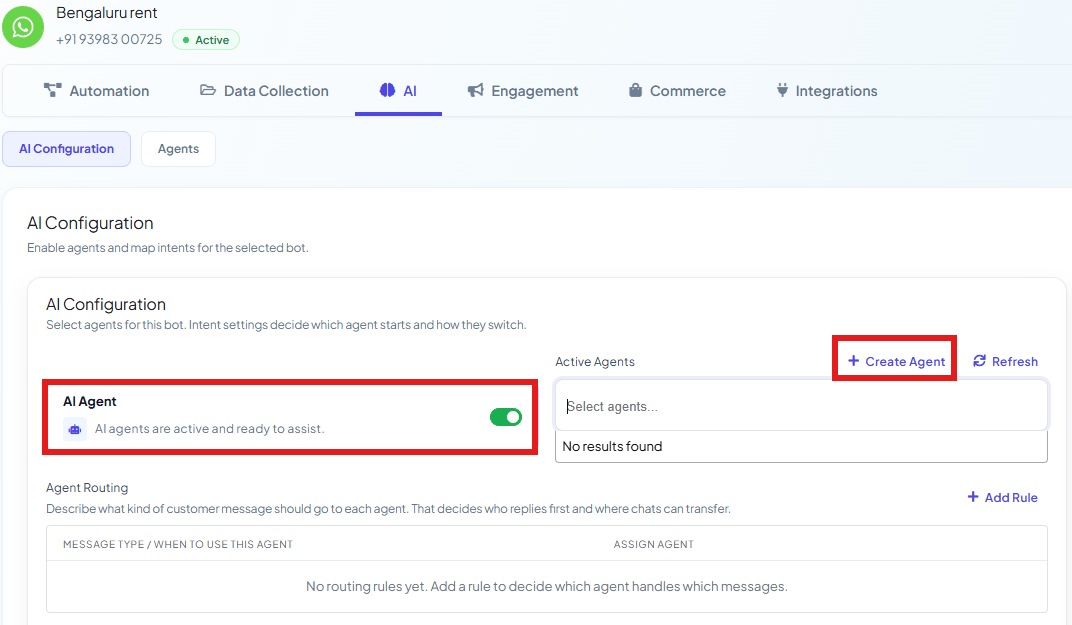
 Go to **Chatbot Manager → AI → AI Configuration**.
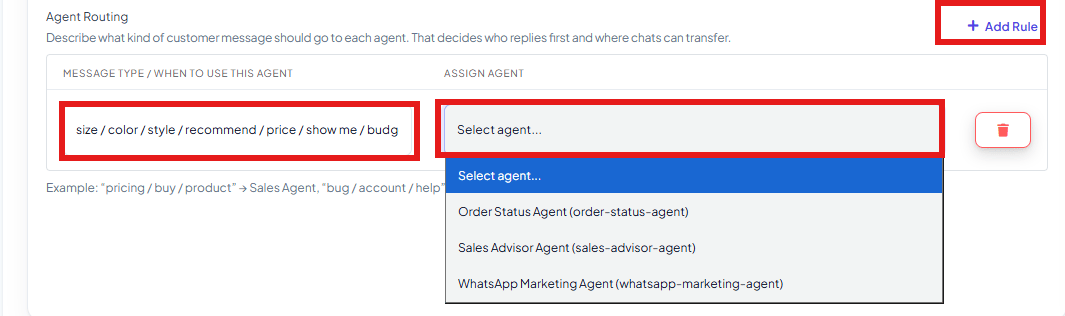
Under **Agent Routing**, click **Add Rule** to add a new row.
In **Message Type / When to Use This Agent**, list the words or phrases that signal this
kind of message — e.g. `size / color / style / recommend / price / show me / budget` for a
sales-shaped question, or `order / tracking / delivery / shipped / arrived / exchange` for an
order-status question.
In **Assign Agent**, pick which active agent should handle messages matching that
description — e.g. the `size / color / style...` rule points to the **Sales Advisor Agent**,
and the `order / tracking / delivery...` rule points to the **Order Status Agent**.
Click **Add Rule** again for each additional message type. Rules also decide **where chats
can transfer** — an agent can hand a conversation to another agent whose rule better matches
what the customer is now asking.
**Example:** *"What's the price on the blue dress in size M?"* matches the
`size / color / style / recommend / price` rule → routed to the **Sales Advisor Agent**. Later
in the same conversation, *"Where's my order, it hasn't shipped yet"* matches the
`order / tracking / delivery / shipped` rule → the conversation transfers to the
**Order Status Agent** instead.
Write rules the way customers actually phrase things, not internal category names. A rule like
`price / cost / how much` catches more real messages than a rule like `pricing_inquiry`.
## Frequently asked
It goes to whichever agent is set to handle general queries for the bot — keep at least one
active agent capable of answering broadly if you want every message covered.
Yes — routing rules also govern where chats can transfer. If a later message matches a
different rule, the conversation can hand off to that rule's agent. See also the
`transfer_agent` action in [AI Agent Actions](/learn/chatsyncs-ai-agents/ai-agent-actions-in-chatsyncs) for an agent-initiated
handoff.
No — with a single active agent, every message just goes to it. Routing only matters once you
have more than one agent to choose between.
It's the current version of the same idea — routing a message to the right handler based on
what it's about. The screens and exact fields have changed to this Agent Routing table.
Go to **Chatbot Manager → AI → AI Configuration**.
Under **Agent Routing**, click **Add Rule** to add a new row.
In **Message Type / When to Use This Agent**, list the words or phrases that signal this
kind of message — e.g. `size / color / style / recommend / price / show me / budget` for a
sales-shaped question, or `order / tracking / delivery / shipped / arrived / exchange` for an
order-status question.
In **Assign Agent**, pick which active agent should handle messages matching that
description — e.g. the `size / color / style...` rule points to the **Sales Advisor Agent**,
and the `order / tracking / delivery...` rule points to the **Order Status Agent**.
Click **Add Rule** again for each additional message type. Rules also decide **where chats
can transfer** — an agent can hand a conversation to another agent whose rule better matches
what the customer is now asking.
**Example:** *"What's the price on the blue dress in size M?"* matches the
`size / color / style / recommend / price` rule → routed to the **Sales Advisor Agent**. Later
in the same conversation, *"Where's my order, it hasn't shipped yet"* matches the
`order / tracking / delivery / shipped` rule → the conversation transfers to the
**Order Status Agent** instead.
Write rules the way customers actually phrase things, not internal category names. A rule like
`price / cost / how much` catches more real messages than a rule like `pricing_inquiry`.
## Frequently asked
It goes to whichever agent is set to handle general queries for the bot — keep at least one
active agent capable of answering broadly if you want every message covered.
Yes — routing rules also govern where chats can transfer. If a later message matches a
different rule, the conversation can hand off to that rule's agent. See also the
`transfer_agent` action in [AI Agent Actions](/learn/chatsyncs-ai-agents/ai-agent-actions-in-chatsyncs) for an agent-initiated
handoff.
No — with a single active agent, every message just goes to it. Routing only matters once you
have more than one agent to choose between.
It's the current version of the same idea — routing a message to the right handler based on
what it's about. The screens and exact fields have changed to this Agent Routing table.